
Introduction
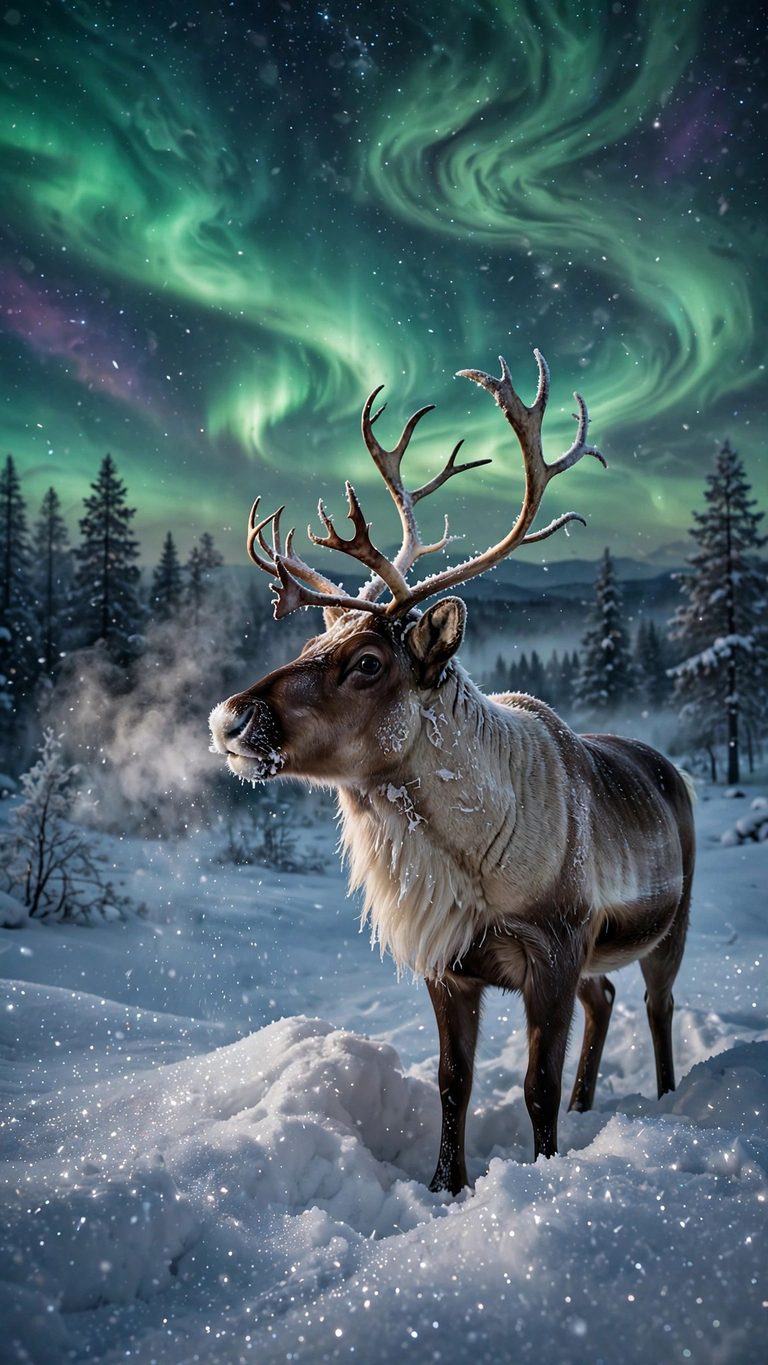
Picture the ultimate Arctic fairytale: a reindeer standing motionless in deep snow, its breath fogging in the freezing air, antlers silhouetted against ribbons of green aurora swirling across a starry sky. The northern lights are one of nature’s rarest spectacles, visible only in dark polar skies, unpredictable, and gone in minutes. Pair them with a reindeer and you have an image that looks like the cover of a storybook. This AI photo prompt creates that exact magic, a night photograph where snow sparkles, distant pines stand watch, and the aurora dances above it all. It is the kind of image people set as their winter wallpaper and share with captions about dreams and wanderlust. Whether you make travel content, holiday designs, or simply love the Arctic night, this prompt delivers a fairytale you can generate on demand.
The Prompt
Here is the exact prompt. Copy it character for character into your AI image tool:
Magical night photograph of a reindeer standing in deep snow under swirling green aurora borealis, breath fogging in freezing air, antlers silhouetted against the lights, snow sparkling, distant pines, starry arctic sky, fairytale winter moment, ultra detailed, 8k, professional night photography, photorealistic
Why This Prompt Works
This prompt fuses two of the most emotionally powerful winter subjects, the aurora and the reindeer, into a single composition, and that fusion is its superpower. The northern lights alone are stunning, but they are abstract; adding “a reindeer standing in deep snow” gives the sky a grounding subject and the viewer an emotional anchor. The reindeer’s silhouette, with “antlers silhouetted against the lights,” creates one of the most iconic shapes in winter imagery, instantly readable even as a thumbnail. This combination of celestial wonder and gentle animal is why Aurora reindeer photos dominate winter travel marketing.
The sensory details make it feel real. “Breath fogging in freezing air” is a brilliant touch because it implies temperature and life; viewers can almost feel the cold. “Snow sparkling” adds micro-glitter that mimics how snow reflects light under a bright sky, and “distant pines” plus “starry arctic sky” layer the depth from foreground to background. The phrase “fairytale winter moment” is the emotional instruction that ties it together, telling the model to aim for enchantment rather than documentary starkness. Night scenes risk looking muddy or flat, but the glowing aurora provides a natural light source that the model can use to illuminate the reindeer and snow realistically.
Technically, the prompt is well armed for night photography: “ultra detailed,” “8k,” “professional night photography,” and “photorealistic” push the render toward clean, noise-free night rendering with believable star fields. Aurora content has evergreen shareability, it trends every winter, spikes during solar storm news, and performs beautifully as wallpapers, greeting cards, and travel inspiration. An image this dreamy does not just get liked; it gets saved, shared, and remembered.
How to Use This Prompt
In Midjourney v7, paste the prompt with –ar 9:16 for a vertical night-sky composition that gives the aurora room to swirl, and add –style raw for a photographic finish. If the aurora looks faint, append “vivid bright aurora” or “strong aurora display” to intensify it. In DALL-E 3, the tall format suits this scene; DALL-E renders convincing star fields, so lean into the “starry arctic sky” detail. In Flux, use 1024 by 1792 with guidance around 4, and consider generating at higher steps for cleaner night skies with less grain. In Stable Diffusion, 768 by 1344 with a photorealistic checkpoint is ideal, plus negative prompts like “daytime, blurry stars, cartoon, watermark.”
Night generations deserve extra scrutiny: zoom in on the reindeer’s antlers and legs to check anatomy, since dark scenes can hide distortions that become obvious on closer look. If the reindeer is too dark to see, add “soft moonlight illuminating the reindeer” to lift the subject without killing the night mood. For wallpaper use, generate at the highest resolution available and test the crop on an actual phone screen; aurora images with the reindeer positioned in the lower third leave perfect space for clock widgets. Batch-generate and pick the version where the aurora’s curves frame the reindeer rather than competing with it, composition is everything in night sky photography.
Pro Tips & Creative Variations
The aurora is your paintbrush, so experiment boldly. Change its colors with “purple and teal aurora” or “rare red aurora” for unusual, scroll-stopping variants. Swap the animal for a series: “arctic fox under the aurora,” “moose in snow under northern lights,” or “a herd of reindeer” each open new creative doors. Add human wonder with “a person watching the aurora beside the reindeer” or “a cozy cabin with warm windows under the lights” to blend wildlife with lifestyle storytelling.
Foreground details add magic: “sparkling snow in the foreground,” “frost-covered branches framing the scene,” or “the reindeer’s breath glowing in the aurora light” create layers that reward a second look. Try “reflection of aurora in a frozen lake” for a symmetrical, mirror-like masterpiece, or “aurora over snowy mountains with the reindeer on a ridge” for epic scale. For holiday content, a subtle “distant village lights” on the horizon makes the scene feel like Christmas Eve. If you build a collection, keep the reindeer consistent using the same seed and vary only the sky, followers will recognize your signature Arctic series. These images also make spectacular AI video openers: a slow zoom from the reindeer up to the swirling sky is pure cinematic magic.
Frequently Asked Questions
How do I get a brighter, more dramatic aurora? Strengthen the sky language: “vivid swirling aurora,” “bright green ribbons,” “aurora filling the sky.” Stronger aurora descriptions give the model permission to make the lights the hero. Regenerating a few times also helps, since aurora intensity varies between renders.
Why does my night sky look noisy or grainy? Low-light detail is hard for AI models. Generate at higher resolution and more steps, then apply gentle noise reduction in a photo editor. Avoid over-sharpening, which amplifies grain; instead, slightly reduce clarity in the sky while keeping the reindeer sharp.
Can I combine the aurora with other winter scenes? Absolutely. The aurora works as a sky replacement for almost any snowy night scene, ice caves, cabins, frozen lakes, or forests. Keep the foreground subject well described and let the “swirling aurora borealis” transform the sky.
What makes aurora photos so popular every winter? The northern lights are rare, beautiful, and bucket-list worthy, so they carry built-in aspiration. They trend with winter travel season and spike whenever solar activity makes news, giving your content recurring waves of relevance year after year.
Conclusion: The Arctic night holds no greater magic than a reindeer beneath the dancing aurora, and now that magic is yours to create. Generate your fairytale, share the wonder, and light up your feed. Try this AI photo prompt today and chase the lights.
Related Viral Prompts
- Snowfall Village Evening AI Video Prompt: Craft a Cozy Cinematic Winter Wonderland That Melts Hearts
- Frozen Lake Ice Skating AI Video Prompt: Create an Elegant Winter Sunrise Glide That Feels Like Pure Magic
- Snowy Cabin Chimney Smoke AI Video Prompt: Create a Cozy Hygge Winter Escape Deep in the Snowy Pines
# A I V i d e o # P r o m p t B a z a r # A I P h o t o # R e i n d e e r # A u r o r a

Leave a Reply