
Introduction
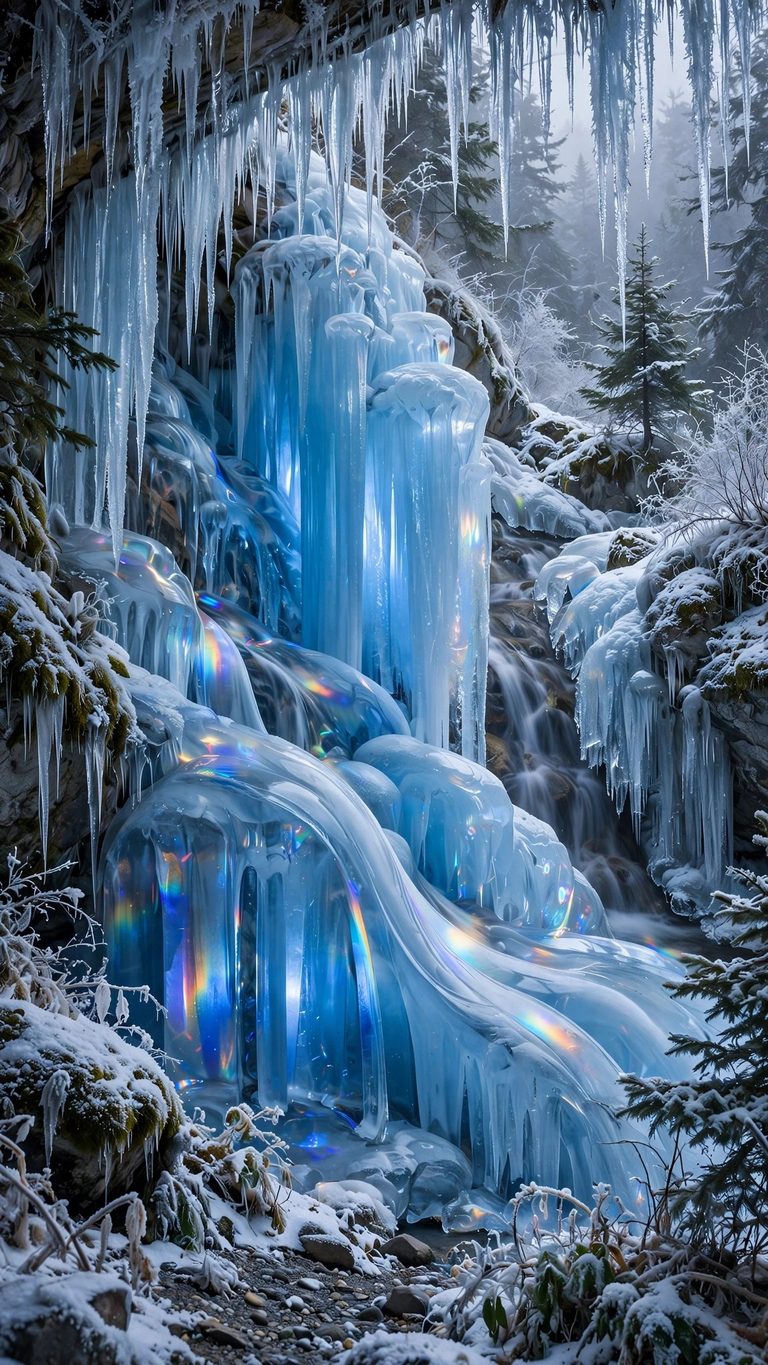
Some winter scenes look carved by giants, and a frozen waterfall is the most spectacular of them all. Imagine a cascade stopped mid-thunder, transformed into towering columns of translucent sapphire ice that glow from within. Delicate icicles frame the scene like crystal chandeliers, faint water still moves behind glass-like sheets, and where the light strikes, tiny rainbows scatter across the ice. This is the frozen waterfall our blue ice AI photo prompt creates, and it looks less like a photograph and more like a dream you can step into.
Frozen waterfalls are rare in real life, which is exactly why they explode online. Most people will never stand before one, so the image delivers a genuine sense of wonder, that wide-eyed feeling of seeing something nature should not be able to make. Wonder is one of the most shared emotions on the internet, and blue ice is its perfect winter vehicle.
The Prompt
Copy the exact prompt below and paste it into your favorite AI image generator. It is ready to use with no edits needed, just pick your tool and generate.
Stunning photograph of a frozen waterfall transformed into cascading blue ice sculptures, translucent sapphire ice columns glowing from within, delicate icicles framing the scene, faint water flowing behind glass-like ice, rainbow refractions, winter wonderland mood, ultra detailed ice textures, 8k, professional landscape photography, photorealistic
Why This Prompt Works
This prompt works first through sheer visual uniqueness. Blue ice is uncommon in everyday feeds dominated by white snow and grey skies, so a sapphire waterfall arrests scrolling instantly. The color itself does psychological work: deep blues signal depth, calm, and mystery, while the glow-from-within effect adds an almost magical quality. Viewers do not just look at this image, they explore it, zooming into the ice columns and icicles, and that active exploration drives saves and shares far beyond a passive glance.
The prompt is also a masterclass in specifying light behavior. Translucent sapphire ice columns glowing from within and rainbow refractions tell the generator exactly how light should move through the scene, which produces the luminous depth that makes the image feel real and three-dimensional. Generic prompts say blue ice and get flat blue shapes; this prompt describes translucency, internal glow, and refraction, so the result has the layered complexity of a real photograph. Content tagged #FrozenWaterfall thrives on this detail density, and the #Ice community rewards images that hold up under close inspection.
There is a storytelling layer too. Faint water flowing behind glass-like ice captures a moment of transformation, liquid becoming solid, motion becoming stillness. That tension between movement and frozen time gives the image a narrative hook that pure landscape shots often lack. Winter wonderland mood seals the deal, wrapping the technical description in an emotional atmosphere that makes people want to send the image to someone they love.
How to Use This Prompt
Paste the prompt into any major generator to begin. In Midjourney v7, add –ar 9:16 –style raw so the ice textures render with photographic crispness rather than painterly softness. If the waterfall looks too small in frame, add a low-angle view phrase or –zoom 1 for a more monumental composition. DALL-E 3 follows this prompt faithfully through chat, just paste it and request a vertical image, and the icicle framing plus rainbow refractions will appear as described.
For Flux, use the 9:16 portrait setting with moderate guidance so the translucency details are preserved. In Stable Diffusion, pick an SDXL landscape photorealism checkpoint, run 30 to 40 steps at CFG 7, and consider adding ice texture detail emphasis in the prompt if your model renders the columns too smooth. Across all tools, keep ultra detailed ice textures and professional landscape photography in the prompt, because those phrases are what push the generator past generic ice toward the intricate, light-filled result this scene needs. If colors skew too teal, add deep sapphire blue to re-anchor the palette.
Pro Tips & Creative Variations
This scene is a playground for variations. Change the scale by asking for a tiny frozen cascade in a forest stream with moss and ferns at its base, an intimate macro world instead of a monumental one. Or go bigger: a colossal frozen falls at blue hour with a lone hiker silhouetted at its base for jaw-dropping scale. Swap the palette with a dawn version where warm pink light strikes the top of the ice while the base stays deep blue, a warm-cold gradient that performs beautifully in feeds.
Add life and story for extra engagement. A red-coated photographer with a tripod before the falls gives viewers a human entry point and a color accent that makes the blue ice pop even harder. Icicle caves, where the viewpoint sits behind a curtain of icicles looking out at the frozen falls, create a natural frame that feels immersive and three-dimensional. The original pro tips still guide every version: always describe translucency so the ice glows rather than looking painted, always consider rainbow refraction for that magical sparkle, and always use icicles as a framing device to add depth.
For advanced creators, try a split scene: the top half showing the waterfall still flowing in summer greens, the bottom half frozen in blue ice, a seasonal transition image that sparks comments and debates. Night versions with the ice lit by aurora overhead turn this into fantasy-tier content while staying photographic.
Frequently Asked Questions
Q: How do I make the ice look translucent instead of solid blue?
Translucency comes from describing light behavior, not just color. Keep phrases like translucent, glowing from within, and glass-like ice in the prompt. In Midjourney, –style raw helps; in Stable Diffusion, avoid over-smoothing models and keep detail-oriented language like intricate ice textures and internal glow.
Q: Why does my waterfall look small or distant?
AI generators default to wide establishing shots for waterfalls. Fix it by adding close framing language such as towering ice columns filling the frame or dramatic low-angle view. In Midjourney, –zoom 1 or –ar 9:16 naturally tightens the composition toward vertical monumentality.
Q: Can I get realistic rainbow refractions in the ice?
Yes, and this prompt already includes them. If they do not appear, strengthen the phrase to vivid rainbow light refractions dancing through the ice crystals. Generating at higher resolution also helps, since refractions are fine details that need pixel room to render convincingly.
Q: What is the best platform for frozen waterfall images?
Pinterest and Instagram reward this content most, because users save beautiful landscapes to inspiration boards at very high rates. Post at 9:16 for Reels and Stories, and consider a 4:5 version for the main feed. Add location-style captions even for AI images, since wanderlust drives engagement.
Your frozen waterfall is one copy-paste away. Generate the blue ice scene, then push it further with a dawn palette or an icicle cave frame, and share the version that takes your breath away. Try the prompt today and watch a waterfall of glowing sapphire ice appear on your screen. Nature’s ice sculptures deserve an audience, so give yours the spotlight it deserves.
Related Viral Prompts
- Winter Village Lights AI Photo Prompt: Storybook Evening Photography Magic for Viral Winter Holiday Posts
- Ice Skater Motion AI Photo Prompt: Dynamic Winter Sports Photography That Instantly Stops the Scroll
- Snowy Owl Stare: The Ultimate AI Photo Prompt for Majestic Winter Wildlife Portraits and Arctic Wallpapers
# A I V i d e o # P r o m p t B a z a r # A I P h o t o # F r o z e n W a t e r f a l l # I c e

Leave a Reply