
Introduction
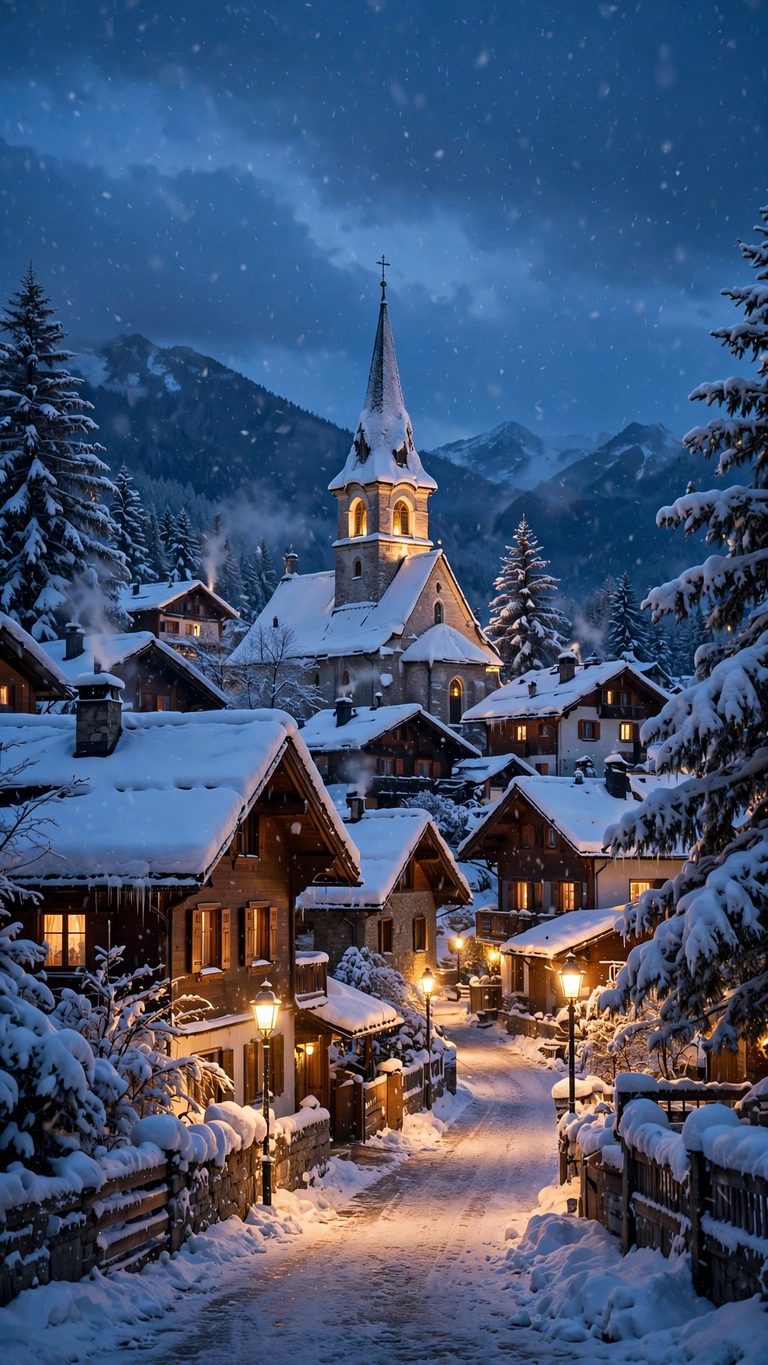
Evening settles over the mountains, and one by one, the windows of a snow-covered village flicker to life. Every rooftop wears a thick white cap, every pine bough sags gently under fresh snow, and the street lamps bloom into pools of gold on the untouched drifts. Above it all, a church steeple rises into a deep blue twilight sky while soft snowflakes drift down like slow confetti. This is the winter village our glowing lights AI photo prompt paints, and it feels like stepping inside a storybook you never want to close.
Holiday-season content has a special power: it arrives exactly when people are most emotional, most nostalgic, and most eager to share warmth with others. A glowing village in the snow is the visual shorthand for all of that. It does not need a caption to make someone feel something, and feeling something is the entire engine of virality.
The Prompt
Copy the exact prompt below and paste it into your favorite AI image generator. It is ready to use with no edits needed, just pick your tool and generate.
Charming evening photograph of a snow-covered mountain village glowing with warm lights, every rooftop and pine laden with fresh snow, street lamps casting golden pools, a church steeple rising above, gentle snowfall, deep blue twilight sky, storybook winter charm, ultra detailed, 8k, professional travel photography, photorealistic
Why This Prompt Works
The core mechanism here is warm-versus-cool contrast, executed at village scale. Hundreds of golden windows and lamps blaze against the deep blue twilight sky and the cool white snow, creating the single most attention-grabbing color opposition in photography. The eye cannot help but bounce between the warm lights and the cool shadows, and that visual journey keeps viewers engaged several seconds longer than a flatly lit scene. Those extra seconds are pure gold for algorithmic ranking on every platform.
Nostalgia is the second engine. Storybook winter charm is not just a pretty phrase, it is a direct appeal to childhood memories of holidays, snow days, and cozy evenings. Content that triggers nostalgia earns comments, because people share their own memories in response, and comments are the strongest engagement signal of all. The church steeple acts as a visual anchor and a storytelling focal point, giving the composition a clear hero that the eye returns to, while the gentle snowfall adds living motion to an otherwise still scene.
The prompt also benefits from universal appeal. You do not need to love photography, travel, or winter to feel the charm of a glowing village, which means it travels across audiences and demographics effortlessly. Posts in the #WinterVillage style consistently spike every holiday season, and evening shots tagged #Evening pull in the golden-hour photography crowd as a bonus audience. Dense detail, every rooftop, every pine, every lamp, rewards zooming, and zoom-worthy images get saved, which is the metric that keeps content circulating for weeks.
How to Use This Prompt
Getting started is as simple as pasting the prompt. In Midjourney v7, add –ar 9:16 –style raw for a photographic village scene, and consider –stylize 150 to let the model enrich the lighting atmosphere. The 9:16 portrait ratio suits the vertical layering of this scene, sky, steeple, rooftops, street, and it is perfect for Stories, Reels, and Shorts. DALL-E 3 renders this prompt beautifully from chat: paste it, ask for a vertical image, and the warm windows against twilight blue will compose themselves reliably.
Flux users should set the 9:16 portrait format with balanced guidance to preserve the delicate snowfall and lamp glow. In Stable Diffusion, an SDXL photorealistic landscape or travel photography checkpoint at 30 to 40 steps and CFG around 7 will deliver the goods; add glowing warm windows, volumetric lamplight if the lights feel dim. Keep professional travel photography and photorealistic in every run, since those anchors keep the result photographic rather than illustrative. If the sky renders too dark, specify deep blue twilight rather than night to hold that magical in-between hour.
Pro Tips & Creative Variations
Variations on this theme are endless. Shift the era for charm: a Victorian gas-lamp version with horse-drawn sleigh tracks in the snow, or a Scandinavian red-cottage version with candles in every window. Change the weather by adding a light blizzard swirling around the lamps, which makes the golden pools of light look even more precious, or clear the sky to reveal stars and a rising moon above the steeple.
Play with viewpoint for fresh compositions. A drone-style aerial looking down on the glowing village nestled in a snowy valley is breathtaking, while a street-level view down a lantern-lit lane with the steeple at the end feels intimate and immersive. The original pro tips remain your compass: always specify the twilight blue sky, because full night loses the magic hour glow; keep the snowfall gentle so the lights stay the heroes; and keep the church steeple as the focal point that organizes the whole composition.
For series content, generate the same village at four moments: blue-hour evening, snowy night with lit windows, dawn with smoke rising from chimneys, and a Christmas version with wreaths and a tree in the square. Post as a carousel or a day-in-the-life sequence, and add a warm caption about coming home for the holidays. Seasonal series like this earn follows, not just likes, because viewers want to see the next chapter.
Frequently Asked Questions
Q: When is the best time to post winter village content?
The six weeks from mid-November through early January are peak season, when holiday nostalgia is at its highest and engagement on cozy content surges. Post in the evening hours of your audience timezone to match the mood of the image itself. Evergreen versions without Christmas elements can perform all winter long.
Q: How do I get the windows to actually glow instead of looking flat?
Use active light language: glowing with warm lights, windows flickering to life, lamps casting golden pools. In Midjourney, –style raw plus a touch of –stylize helps the model render believable glow and bloom. Avoid the word illustration, which pushes results toward flat cartoon lighting.
Q: My village looks empty and lifeless. How do I fix it?
Add small signs of life: smoke curling from chimneys, a figure with a lantern on the street, sleigh tracks in the snow, or a dog waiting by a doorway. These micro-stories transform a pretty scene into a place viewers want to visit, which dramatically lifts comments and shares.
Q: Which ratio works best for this scene?
9:16 portrait captures the full vertical stack from twilight sky to snowy street and dominates phone screens on TikTok, Reels, and Shorts. For Pinterest, 2:3 also performs well. Use 16:9 only for YouTube thumbnails or blog headers where horizontal space matters.
The lamps are lit and the snow is falling, all it needs is you. Copy the prompt, generate your glowing winter village, and try one variation that feels like home, maybe the aerial view or the Christmas square. Share it with someone who loves the holidays. Storybook scenes like this are meant to be shared.
Related Viral Prompts
- Ice Skater Motion AI Photo Prompt: Dynamic Winter Sports Photography That Instantly Stops the Scroll
- Snowy Owl Stare: The Ultimate AI Photo Prompt for Majestic Winter Wildlife Portraits and Arctic Wallpapers
- Frost on Glass Magic: A Viral AI Photo Prompt for Stunning Winter Macro Photography of Frozen Crystal Art
# A I V i d e o # P r o m p t B a z a r # A I P h o t o # W i n t e r V i l l a g e # E v e n i n g

Leave a Reply