
Introduction
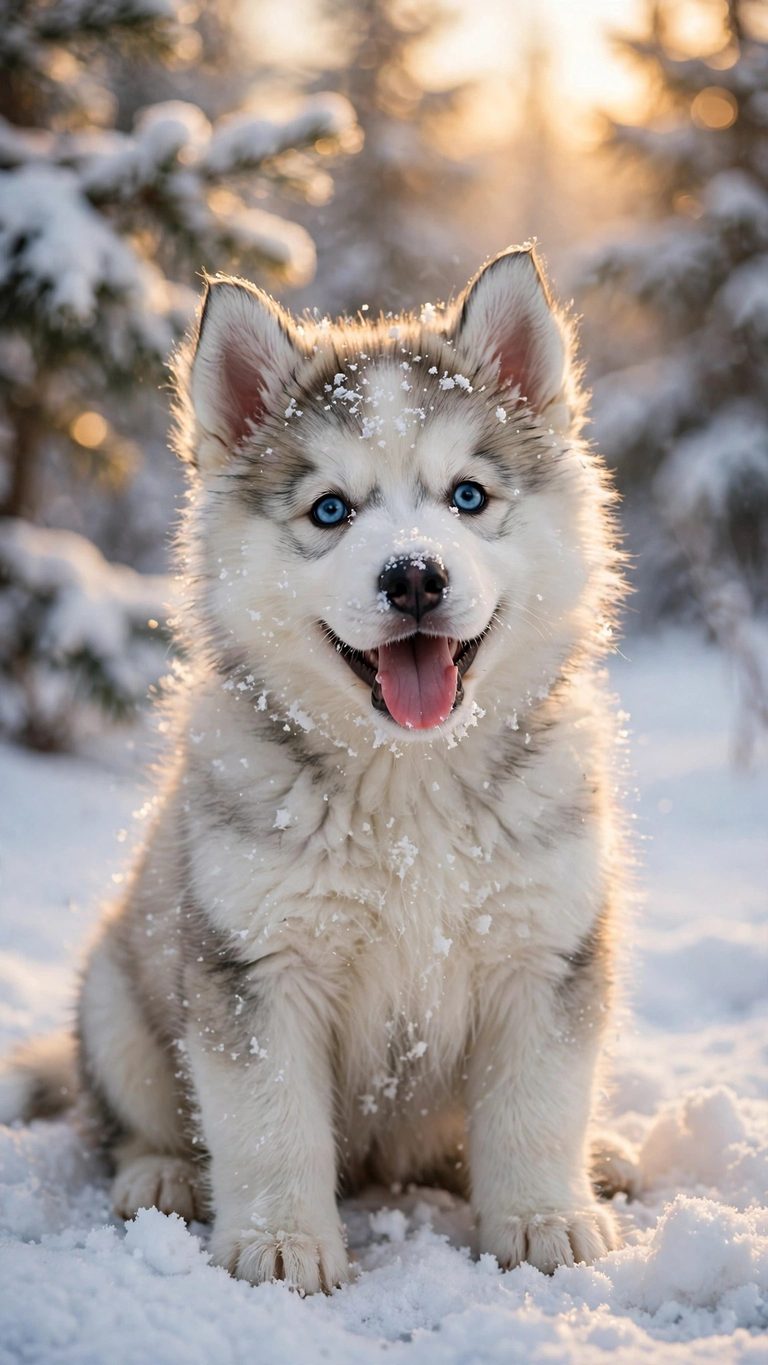
Some images melt hearts on contact: a fluffy husky puppy sitting in fresh snow, bright blue eyes sparkling, pink tongue out, tiny snowflakes dusting its nose. Pet content is the undisputed champion of social media engagement, and winter gives it an extra layer of magic, soft snow, golden light, and that irresistible contrast between a warm, joyful animal and the cold world around it. This AI photo prompt captures the perfect puppy moment without needing a trained dog, a snowy location, or perfect timing. The scene is simple but engineered for maximum cuteness: a joyful expression, ultra-detailed fur, and a dreamy snowy forest background bathed in golden winter light. Whether you run a pet page, need adorable visuals for a winter campaign, or just want to brighten someone’s day, this prompt produces the kind of photo that earns comments like “I can’t even” within minutes of posting.
The Prompt
Here is the exact prompt that creates this bundle of joy. Copy it word for word:
Irresistibly cute photograph of a fluffy husky puppy sitting in fresh snow, bright blue eyes, pink tongue out, snowflakes on its nose and fur, joyful expression, soft snowy forest background, golden winter light, heart-melting cuteness, ultra detailed fur, 8k, professional pet photography, photorealistic
Why This Prompt Works
Cuteness is not an accident; it is a set of visual triggers, and this prompt hits nearly all of them. Big bright eyes, a small nose with snowflakes on it, fluffy fur, and a playful tongue-out expression are classic “baby schema” features that humans are biologically wired to find adorable. The phrase “bright blue eyes” is especially powerful because huskies are famous for their striking gaze, and blue eyes against white snow create a color pop that draws the viewer in instantly. Add “pink tongue out” and “joyful expression” and you get personality, not just a pretty animal but a happy one, which triggers warmth and affection rather than passive admiration.
The setting amplifies the effect. “Fresh snow” and a “soft snowy forest background” keep the scene clean and dreamlike, while “golden winter light” wraps the puppy in a warm glow that contrasts beautifully with the cool snow. This warm-cool interplay is a staple of high-performing winter pet photography because it makes the subject feel cozy and alive. The craft keywords, “ultra detailed fur,” “8k,” “professional pet photography,” “photorealistic,” push the render toward believable texture, and fur detail is critical: soft, clumpy, snow-dusted fur is what makes viewers want to reach through the screen.
Finally, the emotional payload is pure shareability. Cute Husky puppy photos are among the most forwarded content on the internet, people tag friends, send them in group chats, and save them for bad days. The prompt’s explicit “heart-melting cuteness” instruction is the model being told to maximize that emotional register. In a feed full of polished ads and arguments, a joyful puppy in snow is a breath of fresh air, and that contrast is exactly why this image travels.
How to Use This Prompt
In Midjourney v7, paste the prompt with –ar 9:16 for a portrait crop that frames the puppy beautifully on mobile, and add –style raw for photographic realism. If the fur looks too smooth, append “fluffy thick winter coat” to encourage texture. In DALL-E 3, the tall size works well; DALL-E is particularly good at expressive animal faces, so expect strong results on the joyful expression. In Flux, use a guidance scale of 3.5 to 5 and portrait dimensions around 1024 by 1792 to keep the fur crisp. In Stable Diffusion, 768 by 1344 with a photorealistic checkpoint is the sweet spot, and negative prompts like “cartoon, deformed paws, extra legs, blurry” help avoid common animal-generation artifacts.
Always generate in batches and inspect the paws, ears, and tongue closely, since these are the areas where AI pet images most often glitch. Choose the render with the most natural anatomy and the sharpest eyes. A subtle vignette or slight warmth boost in editing can finish the image, but avoid heavy filters that flatten the fur detail. For consistency across a series, save your exact prompt and seed, then make small edits, like changing the background or the puppy’s pose, while keeping the core description identical. This is how pet pages build a recognizable, lovable “character” that followers return for.
Pro Tips & Creative Variations
The variations here are endless and each one is a content goldmine. Change the action: “husky puppy catching a snowflake on its tongue,” “puppy shaking off snow,” or “two husky puppies playing in the snow” for dynamic, story-rich shots. Swap the breed for a series, “golden retriever puppy,” “samoyed puppy,” or “shiba inu puppy” in the same snowy setting, and you have a whole “winter puppies” collection. Seasonal twists work too: add “wearing a tiny red scarf” for holiday content, “puppy next to a snowman” for playful scenes, or “puppy peeking from behind a pine tree” for a hide-and-seek feel.
Lighting changes transform the mood: “blue hour with soft snowfall” creates a calm, magical evening portrait, while “bright sunny snow day” feels energetic and fun. For close-up lovers, try “extreme close-up of puppy’s face with snowflakes on nose” as an ultra-cute detail shot. If you want the image to feel candid rather than posed, add “candid snapshot style, motion blur on falling snow” for a spontaneous, real-moment feel. For merchandise or greeting cards, the 9:16 portrait format crops perfectly into phone wallpapers, and adding “soft bokeh holiday lights in background” makes it instantly giftable. Because cute compounds, post these as carousels with three to five variations and watch the saves roll in.
Frequently Asked Questions
How do I avoid weird-looking paws and faces in AI pet photos? Generate multiple images and pick the best, use negative prompts like “deformed paws, extra limbs,” and render at higher resolution. Close inspection at full zoom before posting catches most issues, and a tiny crop can remove a slightly odd ear or paw.
Can I make a consistent puppy character across many images? Yes. Reuse the exact same core prompt and, where supported, the same seed and reference image. Some tools let you upload a favorite render as a character reference, which locks in the puppy’s markings and eye color across new scenes.
Is it okay to post AI pet photos without disclosing they are AI? Best practice is transparency: label them as AI-generated in the caption or hashtags. Audiences generally love AI pet art when it is honest, and disclosure builds trust with your followers while complying with platform policies.
Which generator makes the cutest animals? DALL-E 3 and Midjourney v7 both excel at expressive pet faces. Flux renders beautiful fur texture. Try all three with this prompt and compare, the “cutest” result is subjective, so let your audience vote with likes.
Conclusion: Happiness is a husky puppy in fresh snow, and now it is one prompt away. Generate your bundle of joy, share the cuteness, and watch your engagement warm up. Try this AI photo prompt today and melt some hearts.
Related Viral Prompts
- Inside a Glowing Blue Ice Cave: An Epic AI Photo Prompt for Breathtaking Winter Adventure Photography
- Reindeer Under the Aurora: A Magical AI Photo Prompt for Dreamy Northern Lights Winter Photography Art
- Snowfall Village Evening AI Video Prompt: Craft a Cozy Cinematic Winter Wonderland That Melts Hearts
# A I V i d e o # P r o m p t B a z a r # A I P h o t o # H u s k y # C u t e

Leave a Reply