
Introduction
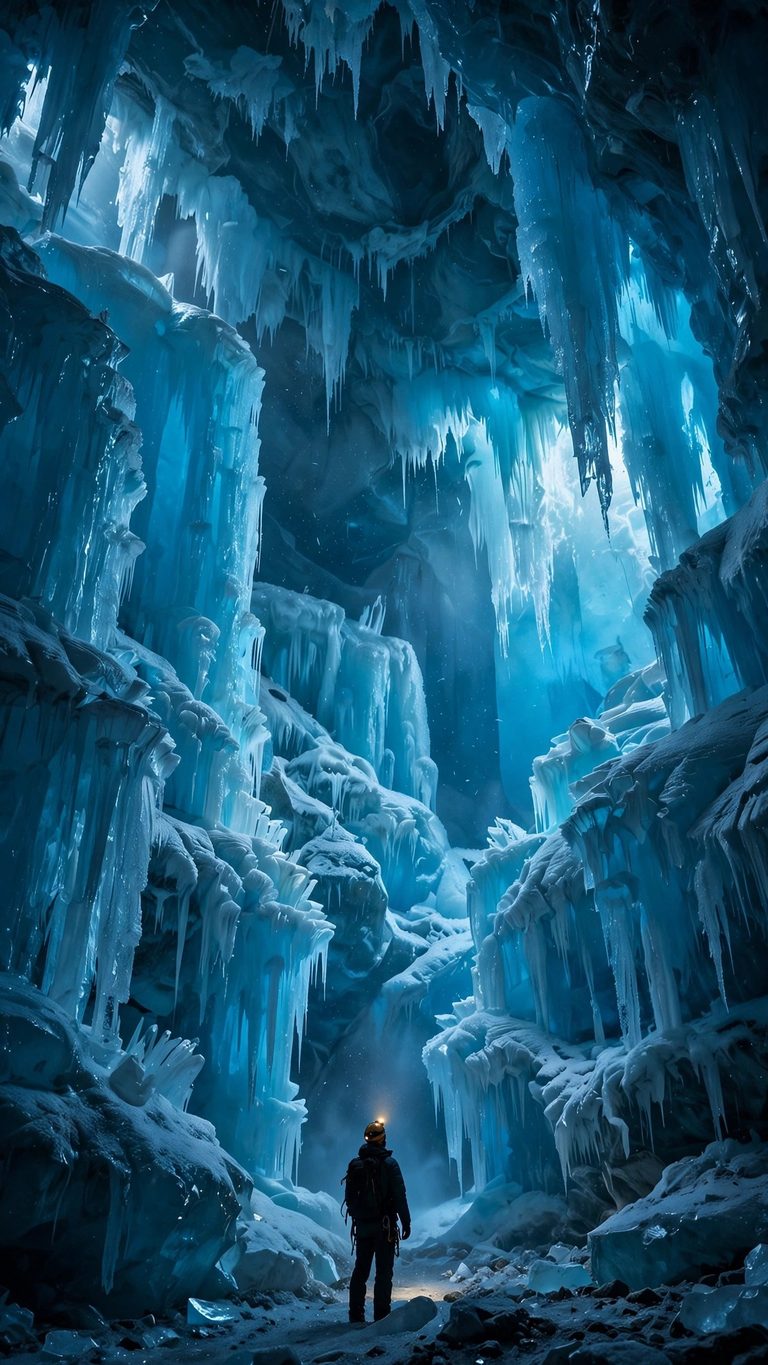
Step inside a cathedral carved from sapphire: towering walls of translucent blue ice glowing from within, crystal formations frozen like waterfalls mid-cascade, and a lone explorer with a headlamp standing small beneath it all. Real ice caves exist in places like Iceland and Alaska, but reaching them demands guides, crampons, and perfect timing before the spring melt collapses the tunnels. This AI photo prompt transports you there instantly, rendering a surreal interior photograph of a blue ice cave where light glows through the ice and an explorer silhouette gives the scene its breathtaking sense of scale. It is adventure photography at its most cinematic, the kind of image that makes viewers whisper “wow” and immediately check the location tag. Whether you create travel content, design epic wallpapers, or just crave otherworldly beauty, this prompt opens the door to a frozen underworld.
The Prompt
Copy this prompt exactly and paste it into your AI image generator to enter the ice cave:
Surreal interior photograph of a blue ice cave, explorer silhouette with headlamp dwarfed by towering translucent ice walls, light glowing through sapphire ice, crystal formations like frozen waterfalls, deep blue and cyan palette, otherworldly cathedral mood, ultra detailed, 8k, professional adventure photography, photorealistic
Why This Prompt Works
This prompt is a masterclass in scale, color, and mood, the three pillars of epic adventure imagery. The “explorer silhouette with headlamp dwarfed by towering translucent ice walls” is the compositional genius here: a tiny human figure against massive ice instantly communicates grandeur. Our brains judge size by comparison, so the silhouetted explorer turns abstract blue shapes into a vast, awe-inspiring space. This is the same trick National Geographic photographers use, and it triggers the emotion psychologists call awe, a proven driver of sharing and saving content.
The color palette does heavy lifting too. “Deep blue and cyan” with “light glowing through sapphire ice” creates a luminous, almost bioluminescent feel that is rare in everyday photography. Blue is associated with depth, mystery, and calm, and glowing ice adds a fantasy quality that makes the image feel like a film still from an expedition movie. The “otherworldly cathedral mood” phrase guides the model toward reverent, majestic composition, high ceilings of ice, symmetrical grandeur, soft volumetric light, rather than a random jumble of frozen rocks.
The craft keywords complete the illusion: “crystal formations like frozen waterfalls,” “ultra detailed,” “8k,” “professional adventure photography,” and “photorealistic” ensure the ice renders with convincing translucency and texture instead of looking like blue plastic. Translucency is the make-or-break detail for ice, and describing light passing through the material tells the model to render glow and depth. The result is the kind of Adventure image that performs exceptionally as a hero banner, a YouTube thumbnail, or a viral travel post, because it promises a place viewers have never been.
How to Use This Prompt
In Midjourney v7, use –ar 9:16 for a towering vertical composition that emphasizes the cave’s height, and consider –style raw to keep the ice photographic. Adding –chaos 8 can produce dramatically different cave layouts if you want to explore options. In DALL-E 3, select the tall format; its strength in coherent scenes helps keep the explorer’s silhouette anatomically sensible. In Flux, render at 1024 by 1792 with guidance around 4 to preserve the delicate translucency of the ice walls without oversharpening. In Stable Diffusion, 768 by 1344 with a photorealistic or cinematic checkpoint works well, plus negative prompts like “cartoon, flat lighting, plastic, blurry.”
Pay special attention to the explorer figure: check that the silhouette reads clearly and the headlamp glow looks natural. If the figure looks distorted, regenerate or crop slightly tighter on the ice with the explorer smaller in frame, small silhouettes hide flaws better than large ones. For extra drama, append “light rays through ice cracks” or “mist in the air catching the light” to add atmosphere. After generating, a slight boost to blues and cyans in editing enhances the sapphire feel, but keep it subtle, over-saturation breaks the photorealistic illusion. Save your best seed so you can revisit the same cave with variations like different times of day or weather outside the entrance.
Pro Tips & Creative Variations
This scene invites bold remixing. Change the explorer’s story: “photographer with tripod capturing the ice,” “two explorers with headlamps,” or “explorer touching the glowing ice wall” each tell a different tale. Alter the cave itself with “narrow ice tunnel with light at the end,” “vast ice cavern with frozen waterfall,” or “ice cave opening onto a snowy landscape” for fresh compositions. Color experiments are striking: try “emerald green ice cave” or “ice cave at sunset with warm light streaming through the entrance” for palettes nobody expects.
For cinematic content, generate a sequence of shots, wide entrance, explorer mid-cave, close-up of crystal formations, and post them as a carousel that feels like an expedition diary. Add “aerial drone view inside the ice cave” for an impossible perspective that real photography could never capture safely. Seasonal storytelling works too: “ice cave with aurora visible through the entrance” merges two winter wonders in one frame. If you design thumbnails or posters, the vertical 9:16 format with the tiny explorer low in the frame leaves dramatic negative space at the top for titles. For video creators, these stills make stunning AI video starting frames, pan slowly across the ice walls for an instant cinematic clip. The cave is your studio; every regeneration is a new expedition.
Frequently Asked Questions
How do I make the ice look translucent instead of solid blue? The key is light language: “light glowing through,” “translucent,” “backlit ice,” and “volumetric light” tell the model to render glow and depth. Avoid words like “solid” or “opaque,” and check that highlights bloom softly inside the ice rather than sitting on its surface.
Why does my explorer figure sometimes look distorted? Small human figures at low relative resolution are challenging for AI models. Keep the explorer small in frame, regenerate in batches, and choose the cleanest silhouette. You can also describe the figure minimally, “explorer silhouette,” so the model is not tempted to render facial detail it cannot resolve.
Can I use this style for commercial travel marketing? In most cases yes with a paid plan, but always verify your generator’s commercial terms. Be careful not to present AI ice cave images as real photographs of a specific location, honest labeling protects your brand’s credibility.
What is the best aspect ratio for ice cave images? Vertical 9:16 emphasizes the towering height of the ice walls and performs best on mobile feeds and stories. For desktop wallpapers or website heroes, regenerate with a 16:9 landscape ratio to capture the cave’s sweeping width.
Conclusion: Some places feel too magical to be real, and a glowing blue ice cave is one of them. Now you can visit anytime with a single prompt. Generate your expedition, share the wonder, and inspire your audience’s wanderlust. Try this AI photo prompt today and step into the ice.
Related Viral Prompts
- Reindeer Under the Aurora: A Magical AI Photo Prompt for Dreamy Northern Lights Winter Photography Art
- Snowfall Village Evening AI Video Prompt: Craft a Cozy Cinematic Winter Wonderland That Melts Hearts
- Frozen Lake Ice Skating AI Video Prompt: Create an Elegant Winter Sunrise Glide That Feels Like Pure Magic
# A I V i d e o # P r o m p t B a z a r # A I P h o t o # I c e C a v e # A d v e n t u r e

Leave a Reply