
Introduction
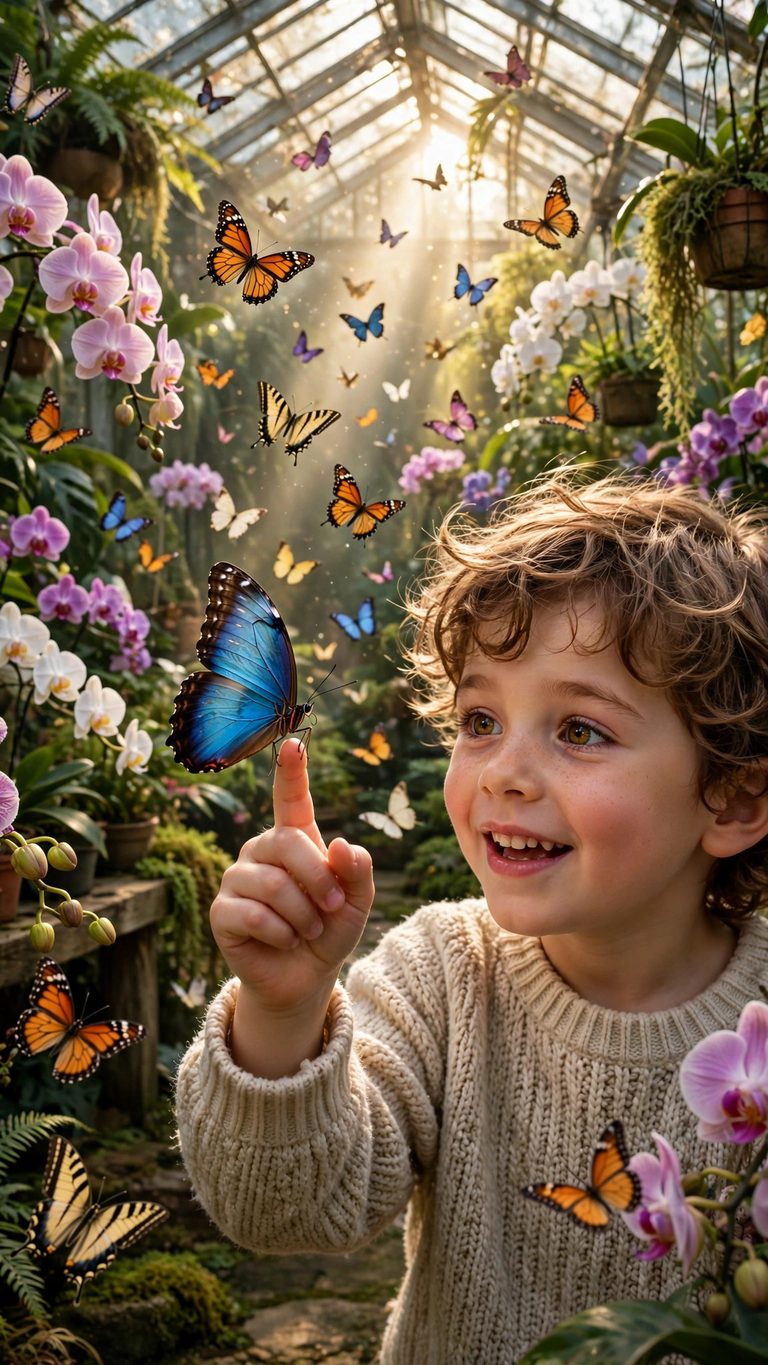
Step through the glass doors and the world changes: warm humid air, the perfume of a hundred orchids, sunbeams slanting through a glass roof — and everywhere, butterflies. Hundreds of them, in impossible colors, fluttering so close you could touch their wings. A blue morpho lands on a child’s outstretched finger, and for a second, time stops. Butterfly conservatories are among the most beloved real-world attractions on the planet, and on video, they are pure magic. These clips perform because they deliver wonder — the rarest emotion in the feed. While most viral content chases shock, humor, or beauty, a butterfly garden offers something deeper: the wide-eyed joy of a child encountering nature’s most delicate miracles. Parents share these videos with other parents, nature lovers save them, and stressed scrollers loop them like a deep breath. The combination of constant gentle motion (fluttering wings everywhere), jewel-like color (iridescent blues, sunset oranges, dappled yellows), and an emotional focal point (the morpho on the finger) creates a video that is simultaneously calming and captivating. In this guide, you get a precision-engineered prompt for Veo 3, Runway, Kling, Pika, and Sora that renders this enchanted conservatory in seconds, a complete breakdown of why each phrase works, platform-specific instructions, and creative variations — from monarch migrations to moonlit moth gardens — that turn one magical prompt into an entire nature-content universe.
The Prompt
Copy the exact prompt below into your AI video generator. It is tuned for a 9:16 vertical, 8-second clip with a dreamy floating camera.
Magical scene inside a butterfly garden conservatory, hundreds of colorful butterflies fluttering around blooming orchids, a blue morpho landing on a child's finger, sunbeams through glass roof, flowers swaying, pure wonder and joy, slow dreamy camera float, ultra realistic, enchanting
Why This Prompt Works
This prompt is engineered around a single emotional target — wonder — and every phrase funnels toward it. “Magical scene” opens with the genre declaration: this is fantasy-adjacent, luminous, extraordinary. “Inside a butterfly garden conservatory” is a brilliant setting choice for AI generation because conservatories solve multiple technical problems at once: the glass roof justifies beautiful directional light (sunbeams), the enclosed space keeps the composition contained and readable, and the setting is inherently believable — viewers accept hundreds of butterflies in a conservatory in a way they would question in an open field. “Hundreds of colorful butterflies fluttering” delivers scale (“hundreds”) plus constant motion (“fluttering”) plus palette (“colorful”) in five words. Fluttering wings are ideal AI motion: small, rapid, and distributed across the frame, they keep every corner of the video alive without requiring the model to animate large complex bodies. “Around blooming orchids” grounds the butterflies in a specific, gorgeous floral context — orchids are exotic, sculptural, and read as premium, which elevates the whole scene beyond a generic garden. Then comes the emotional masterstroke: “a blue morpho landing on a child’s finger.” The blue morpho is nature’s showstopper — its iridescent wings are among the most visually arresting things in the natural world, and naming it specifically tells the model exactly which butterfly to make the hero. The child’s finger provides scale (butterflies are small; a finger proves it), innocence (children + nature = instant emotion), and a narrative micro-moment with a beginning (approach), middle (touchdown), and end (wings opening). This single detail is what viewers will remember and describe when they share the video. “Sunbeams through glass roof” is the lighting directive — god rays, volumetric light, the kind of illumination that makes dust motes and wing scales glow. “Flowers swaying” adds secondary ambient motion so the background breathes. “Pure wonder and joy” names the exact emotions to evoke, “slow dreamy camera float” specifies a gentle, weightless camera move (a float, not a walk or pan — the camera itself seems to drift like a butterfly), and “ultra realistic, enchanting” closes with quality plus magic. The structure — magic, setting, scale-motion-color, floral context, emotional hero moment, light, ambient motion, emotion, camera, quality — is a complete director’s brief compressed into one flowing sentence.
How to Use This Prompt
Follow this platform-by-platform workflow for the butterfly garden prompt. On Google Veo 3, paste the full prompt, select 9:16 vertical, and set 8 seconds. Veo 3 renders iridescent wing detail and volumetric sunbeams beautifully; if the morpho landing feels rushed, append “gentle slow landing” and regenerate. On Runway Gen-4, paste the prompt with a negative prompt like “blurry wings, distorted hands, extra fingers, watermark” — the child’s hand is the artifact risk point here, so the negative prompt earns its keep. Generate two to three takes and choose the one where the landing looks most natural. On Kling, Professional mode at 8 seconds is ideal; Kling’s handling of small-scale fluttering motion is excellent, and the orchids should render with strong detail. If butterflies look sparse, add “dense swarms of butterflies filling the air.” On Pika, use the cinematic preset with medium motion strength — too high and the fluttering becomes frantic; this scene wants gentle. On Sora, paste as-is; Sora’s naturalistic lighting makes the sunbeam-through-glass effect particularly convincing. After generating, inspect the hero moment frame by frame: the morpho-on-finger beat is the soul of the video, so only publish a take where it reads clearly. In your editor, add soft nature ambience or a gentle wonder-filled music track, export at 1080×1920, and write a caption with emotional pull: “The moment a butterfly chose her” or “POV: pure magic exists.”
Pro Tips & Creative Variations
One conservatory, infinite magic — here is how to expand this prompt into a franchise. First, swap the hero species: replace the blue morpho with “a monarch butterfly landing on a sunflower” (North American audiences love monarchs), “a glasswing butterfly with transparent wings” (visually astonishing, highly shareable), or “a giant atlas moth” for a moonlit variation. Each species swap gives you a fresh video with the same proven structure. Second, go nocturnal: “moonlit moth garden conservatory, luna moths glowing softly, silver moonbeams through glass” — the day/night contrast doubles your content and the luna moth aesthetic is hauntingly beautiful. Third, change the human story: “an elderly man’s weathered hand with a butterfly resting on it” (intergenerational emotion, massive share potential), “a bride with butterflies rising around her” (wedding niche), or no people at all for a pure ambience loop. Fourth, play with scale: “extreme macro of a butterfly wing, individual scales shimmering like stained glass, shallow depth of field” — wing-scale macro is some of the most saved nature content on the internet. Fifth, try seasonal migrations: “thousands of monarch butterflies migrating through a mountain valley at sunrise” — epic scale variation for a completely different energy. A common mistake is overcrowding: if hundreds of butterflies plus orchids plus sunbeams plus a child compete for attention, the frame turns to confetti. When that happens, simplify — drop either the crowd density or the hero moment, never both at once, and composite favorites in the edit. Another pro technique is slow motion emphasis: slowing the clip to 70–80 percent in your editor makes wing beats visible and turns fluttering into floating, which dramatically increases the dreamlike quality. Finally, think about educational captions: a one-line butterfly fact (“A blue morpho’s wings aren’t actually blue — it’s light trickery”) in your caption turns a pretty video into a shareable knowledge nugget, and educational hooks drive saves.
Frequently Asked Questions
Q: The butterflies in my video look blurry or like floating blobs. How do I fix it?
A: Add “sharp detailed wings, intricate wing patterns” to reinforce detail, and keep motion strength at medium — excessive motion blurs small fast-moving subjects. Veo 3 and Kling currently render insect detail best. Generate multiple takes; wing clarity varies between rolls, and the sharpest take is usually obvious on first watch.
Q: The child’s hand looks distorted when the butterfly lands. What should I do?
A: Hands are a known AI weak point. Use a negative prompt with “distorted hands, extra fingers, deformed” on Runway and Pika, keep the hand small in frame (the prompt’s “finger” framing already helps), and generate three to four takes. Alternatively, swap the child for “a blooming orchid” as the landing spot — flowers never have finger artifacts.
Q: Can I make a longer, loopable ambience version of this video?
A: Absolutely — this prompt is ideal for ambience content. Generate the scene without the hero landing moment (just butterflies, orchids, and sunbeams), create a seamless loop in your editor, and post it as a 30–60 second “butterfly garden ambience” video. Ambience loops earn long watch times and get saved as relaxation content.
Q: What audio works best for butterfly and nature videos?
A: Soft, wonder-filled audio: gentle piano, ambient nature sounds with light birdsong, or trending “magical” audio tracks. Avoid anything with heavy beats — it fights the dreamy pacing. Layer subtle wing-flutter or garden ambience under music for a rich soundscape that keeps viewers watching longer.
This butterfly garden prompt distills pure wonder into eight seconds of fluttering magic. Generate it in Veo 3, Runway, Kling, Pika, or Sora, find the take where the blue morpho lands perfectly, and share that moment of magic with the world. Copy the prompt above, create your enchanted conservatory, and let your audience feel what it is like when a butterfly chooses you.
Related Viral Prompts
- Sunflower Field Sunset AI Video Prompt: Golden-Hour Cinematic Pan Across Endless Blooms for Viral Reels
- Lotus Pond Bloom AI Video Prompt: Serene Dawn Timelapse of Sacred Flowers for Calm Meditation Reels & Shorts
- Tulip Field Drone AI Video Prompt: Spectacular Aerial Color-Stripes Glide for Stunning Travel Shorts
# A I V i d e o # P r o m p t B a z a r # B u t t e r f l y # G a r d e n # M a g i c a l

Leave a Reply