
Introduction
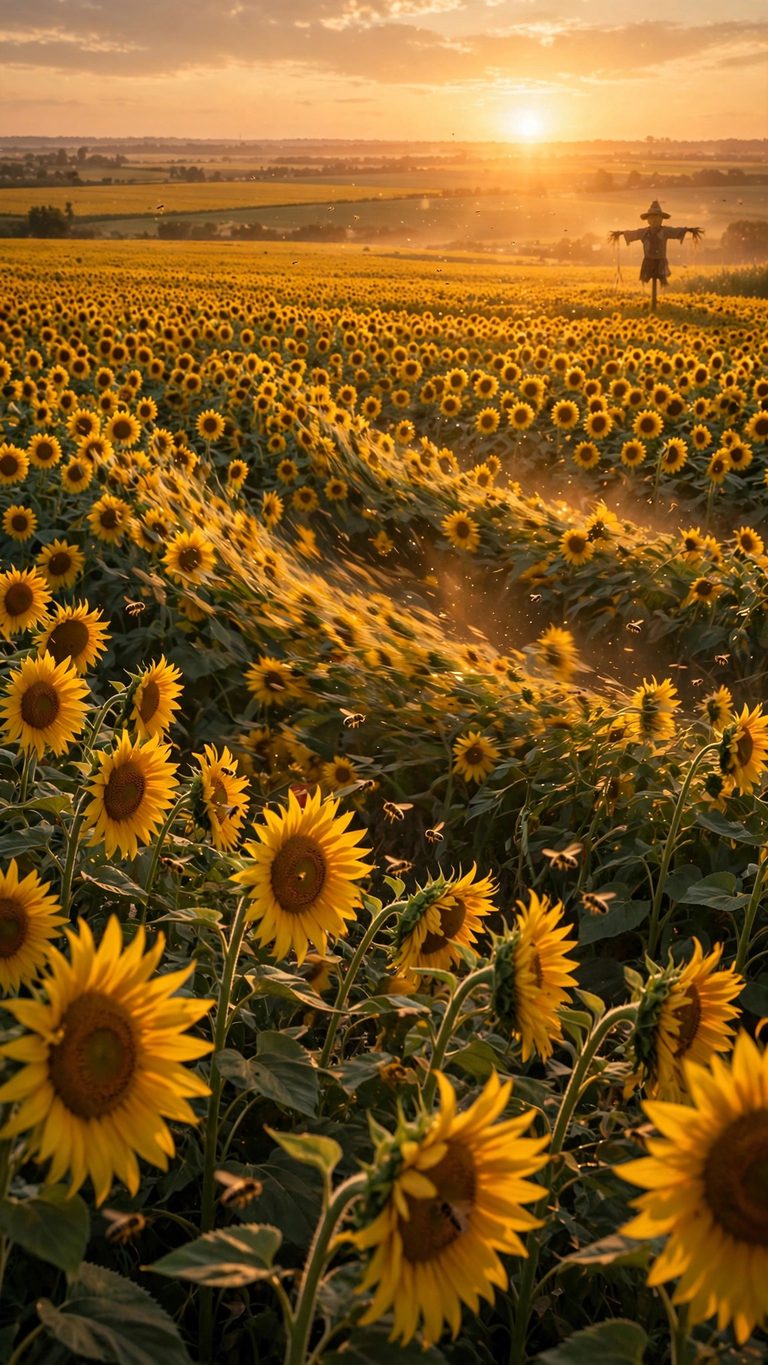
There are sunsets, and then there are sunflower sunsets — those forty golden minutes when an entire field seems to catch fire and every bloom turns its face toward the light. The prompt below recreates that exact feeling in a single ten-second vertical clip: thousands of sunflowers swaying in a warm wind, bees stitching golden threads through the air, and a scarecrow standing watch as the sun melts into the horizon. It is nostalgia you can feel in your chest, the distilled essence of late summer, engineered to stop thumbs mid-scroll. Short-form video lives or dies on the first two seconds, and this prompt front-loads them with the two most reliable emotional triggers on the internet — golden light and natural abundance. Whether you are building a quote reel, a travel memory montage, or a calm loop for a sleep-and-focus channel, this scene does the heavy lifting for you. The AI does the cinematography; you just provide the spark. Paste it, render it, and watch a simple flower field become the most saved clip in your drafts folder.
The Prompt
Copy the exact prompt below and paste it into your AI video generator of choice:
Golden scene of an endless sunflower field at sunset, thousands of blooms turning toward the sinking sun, bees buzzing, warm light igniting yellow petals, a scarecrow silhouette, gentle wind wave moving across the field, nostalgic summer perfection, slow cinematic pan, ultra realistic, heartwarming
Why This Prompt Works
This prompt works because it layers multiple psychological and cinematic signals that AI video models render exceptionally well. First, golden hour lighting is the single most flattering condition a generative model knows — its training data is saturated with it, so phrases like “warm light igniting yellow petals” give the model permission to push contrast, bloom, and rim light hard. Second, massed repetition: “thousands of blooms” tells the model to fill the frame with coherent pattern, which reads as lush abundance and hides the small imperfections these models still make with individual petals. Third, motion layering — the wind wave, the bees, the slow pan — gives the clip three independent rhythms, so the eye never rests long enough to spot artifacts. The scarecrow silhouette is the masterstroke: a dark vertical anchor in a sea of horizontal warmth, it supplies composition, scale, and a whisper of story without demanding narrative. Words like “cinematic,” “ultra realistic,” and “heartwarming” are not decoration; they steer the model toward filmic depth of field, natural color grading, and gentle motion blur instead of harsh digital crispness. Finally, the emotion is universal. Almost everyone has a summer-field memory, which means the clip borrows your viewer’s nostalgia and spends it as engagement — saves, shares, and replays.
How to Use This Prompt
- Pick your platform. This prompt was built vertical (9:16) for Reels, Shorts, and TikTok, so open Veo 3, Runway, Kling, Pika, or Sora and start a new text-to-video project at 10 seconds.
- Paste the prompt exactly as written. Do not trim the descriptive clauses — “bees buzzing” and “scarecrow silhouette” are load-bearing details. On Veo 3, leave the style dropdown on “Cinematic” and let the prompt carry the color.
- Set motion controls. In Runway Gen-3, raise camera motion to slow and steady; in Kling, add a gentle left-to-right pan in the camera direction field; in Pika, use the /animate style with a negative prompt like “blurry faces, morphing petals, extra limbs.”
- Generate 3–4 takes and pick the steadiest pan. Wind motion varies between seeds; choose the take where the wave moves smoothly across the field without petals popping.
- Post-process lightly. A subtle warm LUT, a 1.1x contrast lift, and golden-hour ambient audio (wind + distant bees) complete the illusion. Add captions only if it is a quote reel — the scene speaks for itself.
On Sora, the same prompt works in storyboard mode: lock the first frame as the wide field, then let the model drift the camera. Total workflow time is under ten minutes, most of it waiting on the render.
Pro Tips & Creative Variations
Once the base render is in your library, the variations are where the real virality lives. Time-of-day remixes are the easiest win: swap “sunset” for “dawn mist” or “blue hour” and keep everything else — the model re-grades the entire palette while preserving the composition you already approved. Camera remixes perform well too: change “slow cinematic pan” to “slow drone rise” for an epic opening shot, or to “macro dolly through the blooms” for an ASMR-style clip that pairs beautifully with soft voiceover. A night variant — “fireflies drifting over the sunflower field under a starry sky” — turns the same prompt into cozy-season content that trends every autumn. For pro polish: lock your seed when a take is 90% perfect, then regenerate with tiny wording tweaks instead of starting over; use Runway’s or Kling’s extend feature to stretch a great 10-second take to 20 for loopable background footage; and always add a negative prompt on Pika and Kling (“warped geometry, flickering light, insect swarm close-ups”) to keep the bees at a believable distance. One creator trick: render the clip twice — once sharp, once with “dreamy haze” appended — and crossfade them for a memory-sequence effect that quote pages save by the thousands.
Frequently Asked Questions
Q: Will this prompt work on free AI video tools?
A: Yes. The descriptive language is platform-agnostic. Free tiers of Pika, Kling, and Runway all accept long natural-language prompts like this one; you may just need shorter durations or fewer takes per day.
Q: The bees look weird in my render. How do I fix that?
A: Tiny fast-moving subjects are the hardest thing for these models. Either regenerate until they sit naturally, or simplify the clause to “a few bees drifting lazily” — slower, fewer insects render far more cleanly.
Q: Can I swap sunflowers for another flower?
A: Absolutely, and it still works. Lavender fields at sunset, tulip rows at dawn, wildflower meadows at noon — the lighting and motion language transfers directly. Keep the silhouette element for composition.
Q: What audio should I pair with this clip?
A: Warm acoustic guitar, soft piano, or pure nature ambience (wind + bees). Avoid heavy bass or fast percussion — they fight the slow pan’s calming rhythm and hurt watch time.
A sunflower field at sunset is proof that the simplest subjects make the strongest videos — when the light, motion, and emotion are engineered into the prompt itself. Copy the prompt above, render your take, and post it where your audience scrolls at golden hour for maximum resonance. If it performs, save the seed and build a whole seasonal series from the variations. Try it today and tag your creation — your most heartwarming clip might be one render away.
Related Viral Prompts
- Lotus Pond Bloom AI Video Prompt: Serene Dawn Timelapse of Sacred Flowers for Calm Meditation Reels & Shorts
- Tulip Field Drone AI Video Prompt: Spectacular Aerial Color-Stripes Glide for Stunning Travel Shorts
- Jasmine Rain Drops AI Video Prompt: Slow-Motion Monsoon Macro of Blossoms for Romantic Reels & Viral Shorts
# A I V i d e o # P r o m p t B a z a r # S u n f l o w e r # S u n s e t # F i e l d

Leave a Reply