
Introduction
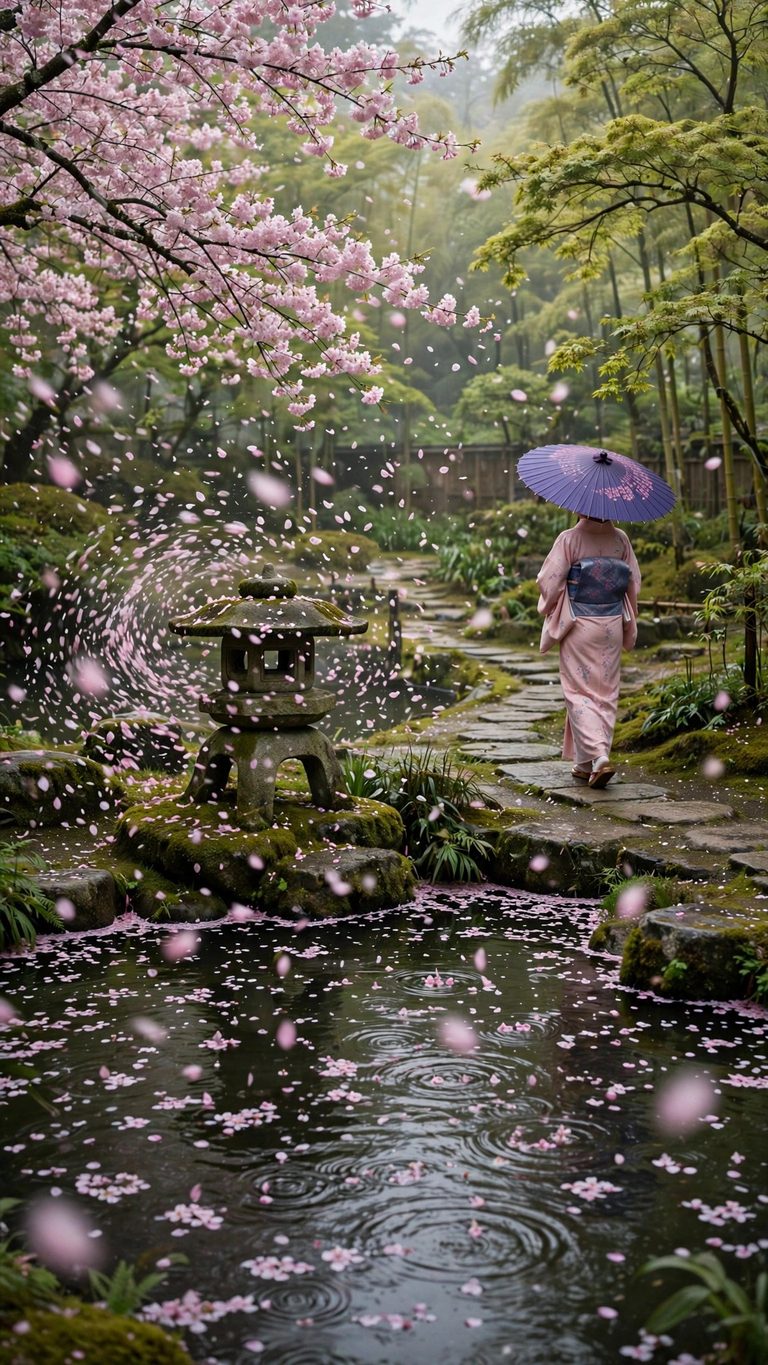
There is a Japanese concept called mono no aware — the bittersweet beauty of fleeting things — and no image captures it better than cherry blossom petals scattering in the spring wind. A pink blizzard swirling through a Japanese garden, petals landing on a still pond and blooming into ripples, a lone figure with an umbrella walking beneath the storm: this is the kind of imagery that has stopped thumbs for centuries in paintings and does the same today on TikTok and Reels. Cherry blossom content is a seasonal juggernaut. Every spring, sakura videos surge across every platform, racking up millions of views from audiences who will never visit Kyoto but desperately want to feel it. The fleeting nature of the blossoms — here for a week, gone with the wind — creates a built-in urgency that makes people watch, save, and share while they can. AI video generation is the perfect medium for this fantasy because it lets you choreograph the impossible: a perpetual petal blizzard, perfectly timed ripples, cinematic slow motion that stretches a single breath of wind into pure poetry. In this guide, you get a precision-engineered prompt for Veo 3, Runway, Kling, Pika, and Sora that renders this dream in seconds, a full breakdown of why each phrase works, platform-specific tuning instructions, and creative variations — from night sakura to rain-kissed blossoms — that will keep your spring content blooming long after the real petals fall.
The Prompt
Copy the exact prompt below into your AI video generator. It is tuned for a 9:16 vertical, 8-second slow-motion clip.
Dreamy scene of cherry blossom petals swirling in spring wind through a Japanese garden, pink blizzard surrounding a stone lantern, petals landing on a still pond creating ripples, a kimono-clad figure with umbrella walking, poetic fleeting beauty, slow cinematic motion, ultra realistic, enchanting
Why This Prompt Works
Every phrase in this prompt is doing deliberate cinematic work — let us dissect it. “Dreamy scene” opens with a mood anchor that tells the model to prioritize atmosphere over documentary accuracy: soft focus edges, gentle light, an almost watercolor quality. “Cherry blossom petals swirling in spring wind” is the core action, and the verb “swirling” is doing heavy lifting — it implies complex, three-dimensional particle motion (spirals, eddies, gusts) rather than petals simply falling straight down, which is what separates a dynamic blizzard from a static snowfall. “Through a Japanese garden” grounds the scene culturally and visually: the model reaches for learned associations — manicured pines, raked gravel, wooden bridges, stone lanterns — which instantly enrich the frame with authentic detail you did not have to describe. “Pink blizzard surrounding a stone lantern” is the compositional masterstroke. The stone lantern is a fixed anchor object in the middle of chaos; the eye locks onto its stillness while petals rage around it, creating a powerful stillness-versus-motion contrast that cinematographers chase deliberately. “Petals landing on a still pond creating ripples” adds a second transformation beat — the video now has two stories: the air story (swirling) and the water story (ripples expanding). Ripples are also one of the most satisfying micro-details AI models render well, and they give viewers a reason to rewatch. “A kimono-clad figure with umbrella walking” introduces the human element with three smart choices: the kimono signals Japanese cultural authenticity, the umbrella adds a recognizable silhouette prop, and “walking” provides slow, deliberate human motion that contrasts with the wild petals. Keeping the figure slightly anonymous (no face described) sidesteps AI face artifacts entirely. “Poetic fleeting beauty” reinforces the mono no aware mood, “slow cinematic motion” explicitly requests slow-motion pacing (critical — fast petals would feel like a storm, not a dream), and “ultra realistic, enchanting” are the quality-plus-mood closers. Notice the architecture: mood, action, setting, anchor object, secondary detail, human element, pacing, quality. That is a complete shot list in one sentence, and it is why this prompt generates reliably gorgeous results across every platform.
How to Use This Prompt
Follow this platform-by-platform workflow to get the most from the cherry blossom prompt. On Google Veo 3, paste the full prompt, choose 9:16 vertical, and set 8 seconds. Veo 3 excels at particle motion and water detail, so the petal blizzard and pond ripples should render beautifully on the first take; if the wind feels weak, append “strong gusts, dense petal storm” and regenerate. On Runway Gen-4, paste the prompt and add a negative prompt such as “blurry, morphing lantern, distorted figure, watermark.” Runway’s slow motion can occasionally stutter on dense particle scenes, so generate two takes and keep the smoothest. On Kling, use Professional mode at 8 seconds — Kling’s physics handling makes the swirling petals and expanding ripples look especially natural. If the kimono figure looks odd, simplify by removing the figure on a second generation and comparing. On Pika, the cinematic preset works well; if the blizzard feels sparse, add “thousands of petals, dense pink storm” as a reinforcement. On Sora, paste as-is — Sora has a strong grasp of Japanese garden aesthetics and tends to nail the stone lantern and pond composition without help. Across all tools, generate at least three variations because petal density and ripple timing vary between rolls, and the best take is usually obvious. In your editor, consider slowing the clip to 80 percent speed for an even dreamier effect, add soft piano or koto audio (trending Japanese-inspired sounds perform well in spring), and export vertical 1080×1920 for Reels, TikTok, and Shorts.
Pro Tips & Creative Variations
One prompt, endless springs — here is how to multiply this cherry blossom concept. First, try yozakura (night sakura): replace “spring wind” lighting cues with “illuminated cherry blossoms at night, paper lanterns glowing, petals drifting through lamplight.” Night sakura is a beloved real-world phenomenon and performs spectacularly as AI content because the contrast is so striking. Second, go rain-kissed: “cherry blossoms in gentle spring rain, petals sticking to wet stone path, mist rising” — rain adds melancholy and incredible surface detail. Third, change the human story: swap the kimono figure for “a couple sharing one umbrella beneath the petal storm” (romance niche), “a child reaching up to catch falling petals” (pure joy, huge shareability), or remove people entirely for a meditative ambience loop. Fourth, play with scale: “extreme close-up of a single petal landing on pond water, ripple expanding in slow motion” turns the epic blizzard into an intimate macro moment — macro sakura clips get saved at very high rates. Fifth, build a seasonal series: generate spring blossoms, then create matching prompts for summer green gardens, autumn maples, and winter snow on bare branches. A “Four Seasons of the Japanese Garden” series is premium binge content. A common mistake is cramming too many elements into one generation — if the lantern, pond, figure, and blizzard fight for attention, simplify by dropping one element per variation and compositing your favorites in the edit. Another pro technique is sound design: layer soft wind ambience under gentle music; viewers keep videos with rich soundscapes playing longer. Finally, time your posts to real-world sakura season (late March through April) and ride the annual wave of blossom fever — and pin your best sakura video so new visitors find it during peak search season.
Frequently Asked Questions
Q: The petals in my generation look sparse, not like a blizzard. How do I fix it?
A: Strengthen the density language: append “dense pink blizzard, thousands of swirling petals filling the air” to the prompt. On Pika and Runway, raising motion strength slightly also thickens particle scenes. Generate three to four takes — petal density varies significantly between rolls — and keep the fullest one.
Q: My pond ripples look fake or the water looks wrong. Any tips?
A: Water is tricky for AI models. Emphasize “still pond” and “glass-like water surface” so the model starts from calm water, making the ripples read clearly. Kling and Veo 3 currently handle water physics best. If ripples still fail, generate the scene without the pond emphasis and add a subtle ripple overlay in your editor.
Q: Can I use this prompt outside of spring, or will it feel out of season?
A: You can absolutely post it year-round — dreamy sakura content performs as escapism in any season — but it peaks during real cherry blossom season (late March to April) when search interest explodes. For off-season posts, frame it as a dream, memory, or travel fantasy in your caption.
Q: How do I avoid the kimono figure looking distorted?
A: The prompt wisely keeps the figure walking at a distance with an umbrella obscuring detail. If artifacts appear, add “distant figure, silhouette” to push them further away, use a negative prompt for “distorted body, extra limbs,” or drop the figure entirely — the lantern, pond, and blizzard carry the scene on their own.
This cherry blossom wind prompt bottles the fleeting magic of sakura season into an eight-second dream. Generate it in Veo 3, Runway, Kling, Pika, or Sora, slow it down, pair it with gentle music, and share your petal blizzard with the world. Copy the prompt above, create your Japanese garden fantasy, and let your audience feel the poetry of petals on the wind.
Related Viral Prompts
- Flower Market Morning AI Video Prompt: Create a Vibrant Cinematic Scene of Marigolds, Roses and Vendors
- Butterfly Garden AI Video Prompt: Create a Magical Conservatory Scene with Fluttering Butterflies and Orchids
- Sunflower Field Sunset AI Video Prompt: Golden-Hour Cinematic Pan Across Endless Blooms for Viral Reels
# A I V i d e o # P r o m p t B a z a r # C h e r r y B l o s s o m # S p r i n g # D r e a m y

Leave a Reply