
Introduction
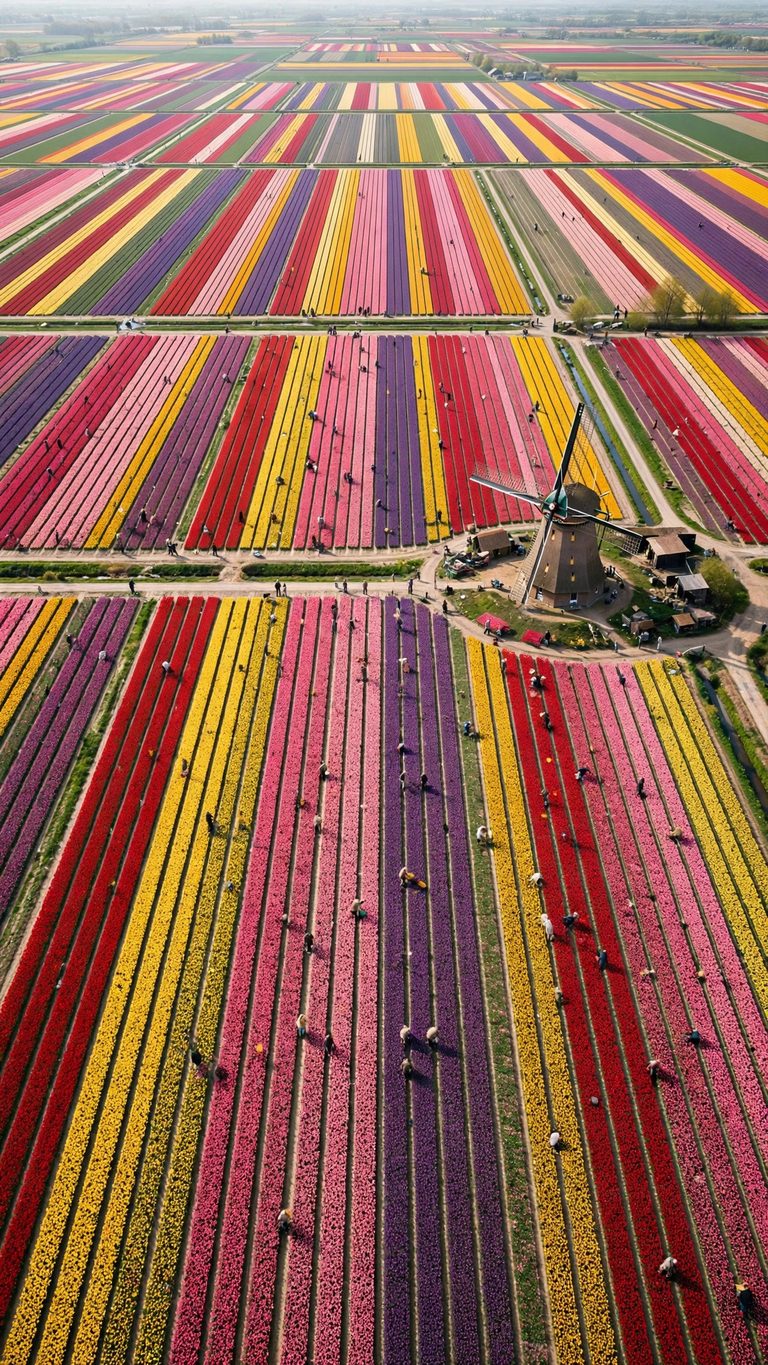
From the ground, a tulip field is pretty. From the air, it is geometry wearing a rainbow — mile-long stripes of red, yellow, pink, and purple stitched into the earth, with a windmill turning slow circles at the center of it all. The prompt below generates that exact postcard-from-heaven shot: a smooth cinematic drone glide over endless color-banded tulip rows, tiny workers dotting the stripes like punctuation marks. Aerial flower footage is evergreen viral material — it reads as expensive, exotic, and impossibly beautiful, the three adjectives that drive travel-content shares. And here is the secret: you do not need a drone, a plane ticket to the Netherlands, or a springtime schedule. The AI fakes the altitude flawlessly because top-down patterned landscapes are among the easiest scenes for video models to keep coherent — stripes are repetitive, the camera moves in one clean vector, and there are no faces to warp. Whether you run a travel page, a spring-aesthetic account, or a brand that just needs a jaw-dropping opener, this ten-second glide is the cheapest helicopter shot you will ever own.
The Prompt
Copy the exact prompt below and paste it into your AI video generator of choice:
Spectacular aerial drone shot over endless tulip fields in perfect color stripes, red yellow pink and purple rows stretching to the horizon, a windmill turning slowly, workers dotting the rows, spring euphoria from above, smooth cinematic drone glide, ultra detailed, vibrant
Why This Prompt Works
This prompt works because aerial views forgive everything AI video still gets wrong. At simulated altitude, individual flowers become texture, not objects — the model never has to render a single believable petal, only believable color bands, which it does effortlessly. The “perfect color stripes” instruction is doing structural work: strong linear patterns give the model’s frame interpolation clear rails to follow, so the glide stays smooth instead of swimming. The windmill is the compositional anchor — a single large, slow-moving vertical element against horizontal stripes creates the contrast that makes drone footage feel cinematic rather than flat. The workers add human scale; tiny and distant, they sell altitude without risking the face-rendering failures that plague close-up AI humans. “Spring euphoria” and “vibrant” push the color grade toward saturated, high-key cheerfulness, which is exactly the palette that pops on phone screens and stops thumbs. Finally, “smooth cinematic drone glide” is a well-understood motion primitive in every major model — unlike complex character action, a linear aerial glide is interpolatable almost perfectly, so your first take is often your keeper. The result looks like a $5,000 shoot and costs a single generation.
How to Use This Prompt
- Open a 10-second vertical project in Veo 3, Runway, Kling, Pika, or Sora. Aerial shots work fine in 9:16 — the stripes stack beautifully in portrait.
- Paste the prompt exactly. Keep the color list (“red yellow pink and purple”) — naming the bands prevents the model from muddying them into generic rainbow noise.
- Dial in the glide. In Runway, set camera motion to slow with a forward push; in Kling, use the camera controls for a “slow forward dolly, slight descent”; in Pika, add a negative prompt like “warped horizon, flickering colors, spinning camera.”
- Generate 2–3 takes and check the stripe edges. The keeper is the one where color bands stay straight and parallel as the camera moves — wavy bands mean the model lost the pattern.
- Grade and score it. A light saturation boost, gentle sharpening, and uplifting acoustic or orchestral audio complete the travel-film illusion. This clip also makes a perfect 3-second hook before cutting to ground-level footage.
On Veo 3, try the same prompt with “golden hour” appended for long shadows striping the field — it doubles the drama and is a favorite for pinned travel posts.
Pro Tips & Creative Variations
Once you own the tulip glide, the pattern-aerial template generalizes to anything striped, terraced, or tiled: lavender rows in Provence, rice terraces at dawn, tea plantations in the mist, even salt flats and tulip-shaped flower mandalas. Swap the windmill for a hot-air balloon, a river bend, or a distant village to localize the postcard. Altitude remixes multiply the asset: a high “map view” glide for pure pattern abstraction, a low skim just above the blooms for a hybrid drone-macro feel, and a slow orbit around the windmill for the classic real-estate-drone move. Pro polish: on Kling and Runway, generate at the widest field of view your tier allows, then punch in slightly in edit — the extra pixels hide stripe wobble. Lock the seed once the horizon is stable; horizon flicker is the tell of AI aerials. A creator power move: render the same glide at dawn, noon, and dusk, then cut them as a “one field, three moods” carousel — triple the posts from one prompt family. And for brands: overlay your logo subtly in a corner during the glide’s calmest two seconds — it reads as a sponsored travel film, not an ad.
Frequently Asked Questions
Q: Will viewers be able to tell it is AI and not a real drone?
A: At ten seconds in vertical format, almost never — patterned aerials are the hardest AI footage to detect. Keep the glide slow and linear; fast orbits and sudden dives are what expose artifacts.
Q: Can I change the country or landmark?
A: Easily. Replace “windmill” with “hot-air balloons,” “distant Alps,” or “a river winding through” and adjust the flower — cherry orchards, sunflower seas, lavender rows all work in the same stripe structure.
Q: My color bands blur together. How do I fix it?
A: Name the colors explicitly (as this prompt does) and add “crisp distinct rows” to the prompt. If bands still bleed, lower motion speed — fast glides smear fine patterns.
Q: What is this clip best used for?
A: Travel hooks, spring campaign openers, “wish you were here” posts, and backgrounds for text-based content like itineraries or quotes. It also sells beautifully as stock-style b-roll.
The most expensive-looking shot in your content library might be the one you never filmed. This tulip-field drone prompt turns a sentence into a helicopter view — and the template works for every patterned landscape on Earth. Render it, grade it warm, and let the stripes do the talking. Generate your aerial glide today and give your audience the postcard they will share.
Related Viral Prompts
- Jasmine Rain Drops AI Video Prompt: Slow-Motion Monsoon Macro of Blossoms for Romantic Reels & Viral Shorts
- Marigold Festival AI Video Prompt: Joyful Explosion of Celebration Colors for Festive Shorts & Reels
- Rose Macro Dew AI Photo Prompt: Create a Dew-Covered Red Rose With Velvet Petals, Sunrise Droplet and Pink Bokeh
# A I V i d e o # P r o m p t B a z a r # T u l i p # D r o n e # S p r i n g

Leave a Reply