
Introduction
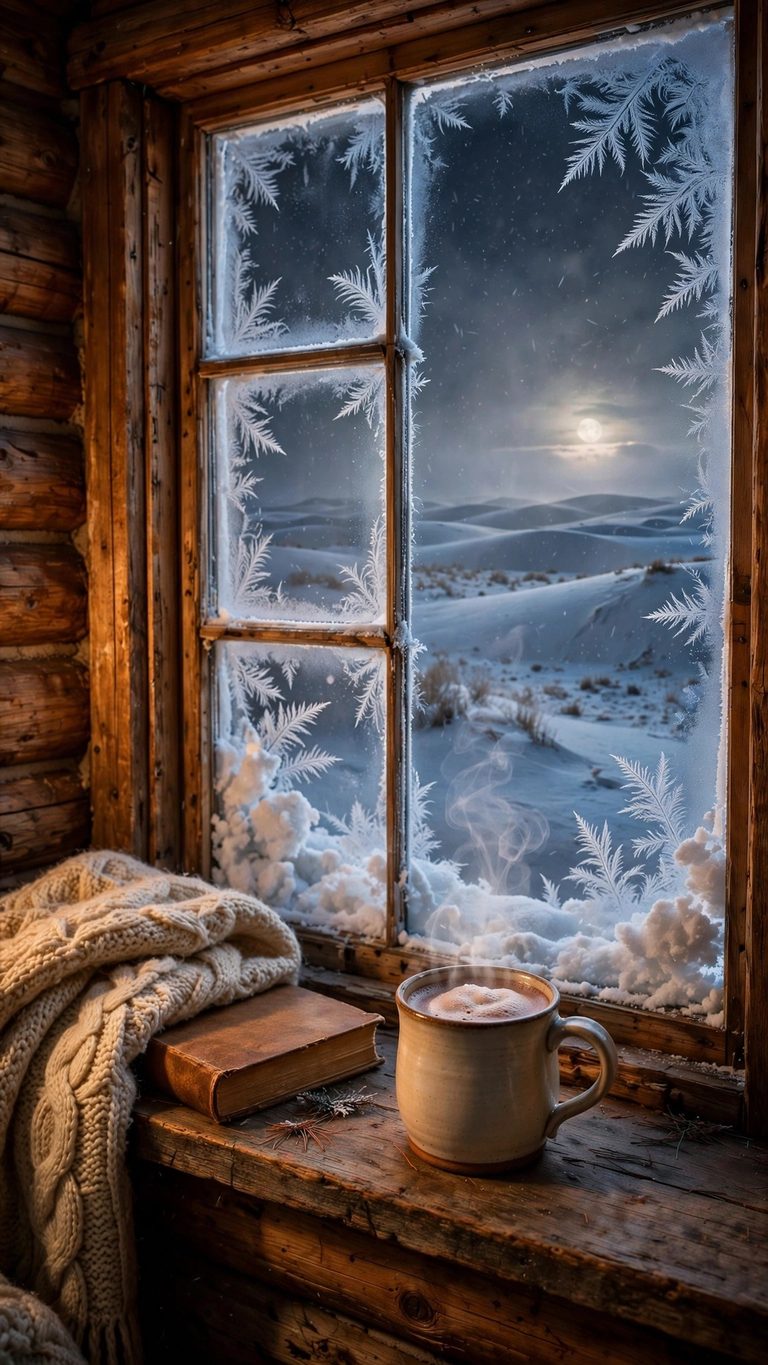
Outside, a snowstorm rages. Wind hurls white sheets against the glass, the world beyond the window dissolves into swirling chaos, and snow piles higher against the pane with every gust. Inside, everything is warm. A mug of hot cocoa steams on the windowsill. A soft blanket waits beside an open book. And then, slowly, the storm breaks. The wind drops, the clouds tear open, and the moon rises over smooth white dunes, turning the whole violent night into something silent and silver. That is the Snowstorm Cabin Window, a ten-second timelapse of the coziest contrast on Earth.
This prompt captures a feeling every winter lover knows: the deep, almost smug comfort of being warm while the weather does its worst outside. It is hygge in video form, and hygge content has a devoted global audience that saves, shares, and replays it all season long. The timelapse structure gives the clip a built-in story arc, chaos resolving into calm, which means viewers stay for the payoff and often watch twice to savor the transition.
The Prompt
Copy this exact prompt to open the cabin window on the storm:
Cozy timelapse from inside a warm cabin looking out a frosty window as a snowstorm rages then clears, hot cocoa steaming on the sill, blanket and book nearby, snow piling against glass, moon emerging over white dunes, ultimate cozy contrast, ultra realistic, heartwarming
Why This Prompt Works
Contrast is one of the most reliable emotional engines in content, and this prompt is built entirely from it. Warm against cold, chaos against calm, dark storm against silver moonlight: the viewer’s brain registers these oppositions instantly and finds them deeply satisfying. Psychologists call it the contrast effect, and marketers have used it forever, because a pleasure feels stronger when it sits beside a hardship. Watching a blizzard from behind warm glass is the visual equivalent of that principle, and it never gets old.
The timelapse format adds a second layer of psychology. Timelapses compress time, which creates a sense of mastery over nature: the viewer watches an entire storm live and die in ten seconds. That compression is inherently satisfying, and the clear before and after structure gives the clip a narrative spine. Viewers who start watching feel a small pull to stay for the resolution, the moon emerging over the dunes, and that pull shows up directly in completion rate, one of the heaviest-weighted metrics on every short-form platform.
Cozy content also benefits from one of the most loyal audiences on social media. The #Cozy community spans book lovers, tea drinkers, cabin dreamers, and slow-living advocates, and they engage with unusual warmth: long comments, saves to comfort collections, and shares with captions like this is us. A clip that earns a save is a clip the algorithm keeps pushing, because saves signal lasting value rather than passing amusement. The hot cocoa steaming, the blanket, and the book are not decoration; they are props the audience projects themselves into.
Finally, the scene is sound-optional in the best way. It works silently as pure visual comfort, and it works even better with layered audio: howling wind fading into silence, a soft fire crackle underneath. That flexibility means one render can be posted as a silent aesthetic loop, a storm-sounds ambience video, or a cozy vlog background, tripling its mileage.
How to Use This Prompt
Timelapse prompts need a little extra care in setup. Here is the workflow.
- Copy the entire prompt from the
block above. The timelapse arc, storm raging then clearing, is described inside the prompt, so do not shorten it.
- Paste it into Veo 3, Runway Gen-4, Kling 2, Pika, or Sora. Veo 3 and Runway handle multi-phase scenes, storm to calm, most reliably.
- Set 9:16 vertical and follow the post settings: 9:16 vertical, 10 sec timelapse. Choose a timelapse or fast-forward motion preset if your tool offers one; otherwise a static camera with high scene-change tolerance works.
- Keep the camera locked. Timelapses fall apart if the viewpoint drifts, so disable any camera motion or set it to static. The motion should come from the storm, not the lens.
- Generate three takes and check the transition: the storm should visibly rage, then visibly clear, with the moon emerging at the end. Discard takes where the weather change is muddy or the window frost looks painted on.
- In your editor, layer audio in two phases: wind and rattling glass for the storm half, fading into soft silence or a gentle fire crackle as the moon appears. This sound arc doubles the emotional payoff.
Post it in the evening when cozy scrolling peaks, and let the storm do the rest.
Pro Tips & Creative Variations
The window is a frame, and you can change everything inside and outside it. Swap the viewpoint: a cabin porch looking at snow burying a lantern, an attic window with the storm swirling around a distant pine, or a train window version where the landscape slides past as the storm clears. Each keeps the cozy contrast formula while feeling like a new video.
Change the props to target different cozy subcultures. A knitting basket and a cat asleep on the sill speaks to the cottagecore audience. A steaming bowl of soup and a rainy-day novel targets the comfort-food crowd. A journal and a fountain pen beside the cocoa turns the clip into a writer's dream, perfect for the journaling community. Small prop swaps let one scene speak to many niches.
Play with the storm itself. A thunder-snow version with occasional lightning flashing through the blizzard adds drama that weather lovers will replay. A gentle version where fat flakes fall softly instead of raging suits the sleep-aid audience. A Christmas variant with distant village lights and a decorated tree reflected in the glass becomes seasonal evergreen content you can repost every December.
For series potential, make the window a recurring character. Post a new view every week: storm, snowfall, sunrise, aurora night, spring thaw. Viewers will start checking your page the way they check the weather, and that habit is the foundation of a loyal following. Pair the series with the #Timelapse tag, where patient, satisfying transformations have a dedicated and generous audience.
Frequently Asked Questions
Q: Will AI generators handle the storm-to-calm transition well?
A: Multi-phase scenes are harder than static ones, which is why you should generate three takes and keep the best. Veo 3 and Runway Gen-4 handle transitions most reliably. If the change looks abrupt, add gradually transitions from raging blizzard to clear moonlit night to the prompt.
Q: How do I keep the camera from drifting during the timelapse?
A: Set camera motion to static or locked in your tool's settings. If your generator has no static option, describe a fixed tripod viewpoint in the prompt. Any drift breaks the timelapse illusion, so this setting matters more than any other.
Q: What audio should I add if my generator makes silent video?
A: Build a two-phase soundscape: howling wind and faint glass rattling for the storm, crossfading to near silence with a soft fire crackle as the moon appears. Free editors like CapCut have winter storm packs, and the contrast between the two phases is what makes the ending feel like relief.
Q: Can I loop this for a longer ambience video?
A: A storm-to-calm arc does not loop seamlessly, but you can reverse the second half in your editor to create a calm-to-storm-to-calm cycle. For a true loop, generate a separate steady-snowfall version of the window and loop that behind the timelapse as an intro.
Pour the cocoa, lock the camera, and let the storm perform. The Snowstorm Cabin Window prompt compresses the coziest ten seconds of winter into a clip your audience will save for the coldest nights. Try it tonight, add the sound of wind giving way to silence, and give your feed its warmest #Cozy moment of the season.
Related Viral Prompts
- Aurora Over Snow Village AI Video Prompt: Design a Dreamlike Northern Lights Night Scene That Stops the Scroll
- Snow Cabin Cozy Interior AI Photo Prompt: Warm Hygge Winter Photography Magic for Viral Winter Cozy Posts
- Snow Leopard Portrait AI Photo Prompt: Majestic Wildlife Photography Secrets for Viral Winter Content
# A I V i d e o # P r o m p t B a z a r # S n o w s t o r m # C o z y # T i m e l a p s e

Leave a Reply