
Introduction
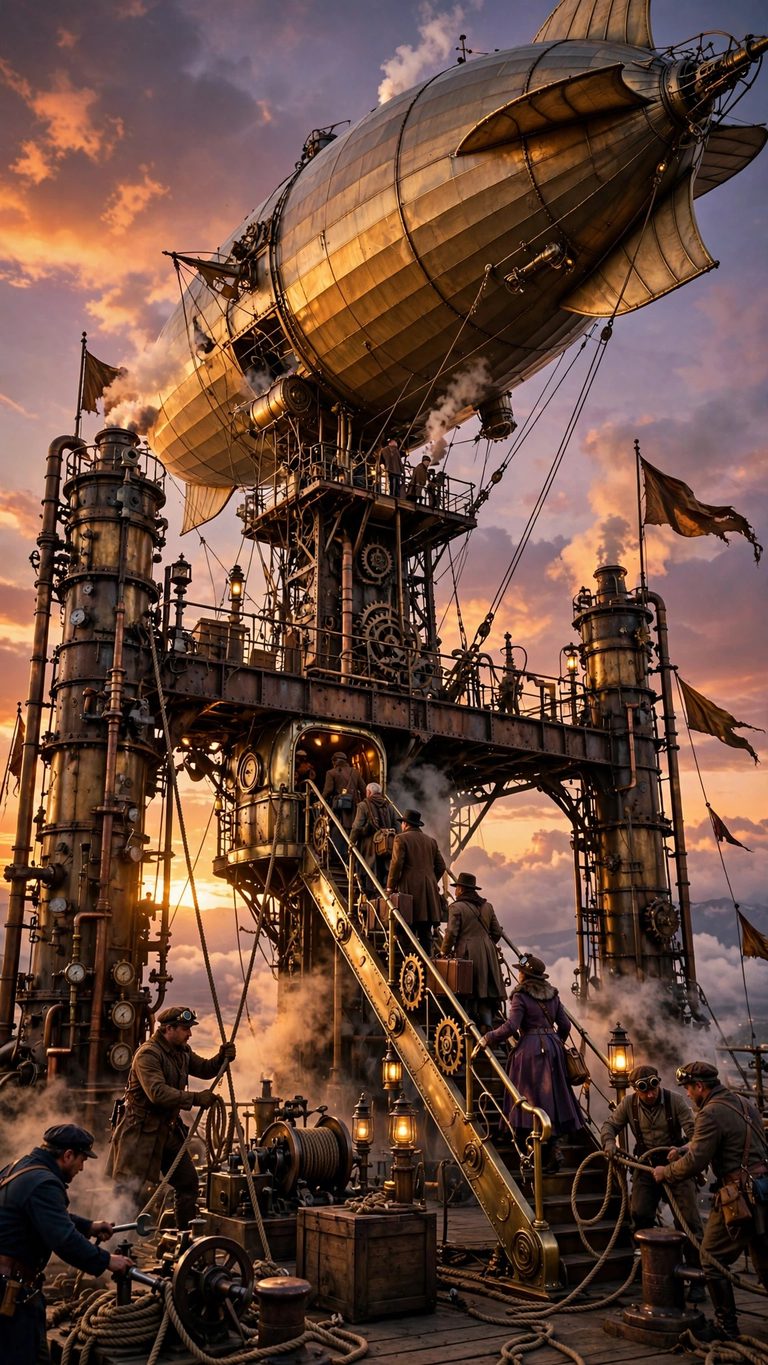
Every great adventure needs a departure point, and in the steampunk imagination, that place is a sky harbor. Picture it: towering mooring masts silhouetted against a sunset painted orange and violet, a massive zeppelin straining gently against thick mooring ropes while workers scramble across the dock. Steam vents hiss white plumes into the golden air. Passengers in Victorian finery climb a brass gangway toward the gondola, flags snapping in the evening wind. The camera pans across the whole glorious chaos, and for ten seconds you are standing on the edge of the sky, about to leave the ordinary world behind.
The Airship Dock at Sunset prompt captures the single most nostalgic emotion in the steampunk genre: the ache of departure. Harbors have always been cinematic, and a harbor in the clouds doubles the romance. This is a scene built for golden-hour light, which flatters every AI video model ever trained, and it is packed with the kind of layered human activity, workers, passengers, fluttering flags, that makes generated footage feel alive rather than staged. If you want a prompt that feels like the opening shot of a film, this is it.
The Prompt
Copy the full prompt below exactly as written. It is balanced for a 10-second panoramic pan across the dock, so run it unmodified first.
Golden steampunk scene at a towering airship dock during sunset, workers securing a massive zeppelin with thick ropes, steam venting from mooring towers, passengers boarding via a brass gangway, the sky painted orange and violet, flags fluttering, camera panning across the busy harbor in the sky, nostalgic adventure mood, ultra realistic
Why This Prompt Works
This prompt works because it is composed like a film establishing shot, with foreground, midground, and background all assigned a job. The foreground has workers securing ropes and steam venting from mooring towers, giving the model immediate motion and texture near the camera. The midground holds the massive zeppelin and the brass gangway with boarding passengers, the narrative heart of the scene. The background is the sunset sky painted orange and violet, a gradient no model can get wrong and every viewer finds beautiful. When a prompt distributes detail across depth planes like this, the result has instant cinematic composition.
The human activity is the prompt’s engine. Workers securing ropes, passengers boarding, flags fluttering: these are all small, readable motions that AI models animate reliably. A common failure of AI video is the empty, lifeless scene, and this prompt inoculates against it by filling every layer with purposeful movement. The nostalgic adventure mood instruction is equally important. Mood words act as a lighting and color-grade directive, telling the model to warm the palette, soften the contrast, and lean into sentiment rather than spectacle.
Finally, the camera direction, panning across the busy harbor in the sky, is perfectly matched to the subject. A pan is the most stable camera move these models can execute, far less prone to warping than orbits or dolly moves, and it lets the viewer drink in the scale of the dock. Combined with ultra realistic as the closing style tag, the prompt consistently delivers footage that looks like a matte painting come to life.
How to Use This Prompt
Optimized for a 10-second vertical panoramic pan. Run it on Veo 3, Runway, Kling, Pika, or Sora with these steps:
- Set 9:16 vertical aspect ratio and a 10-second duration so the pan has time to travel across the full width of the sky harbor.
- Paste the prompt verbatim, keeping the nostalgic adventure mood and ultra realistic tags exactly where they are.
- Select a slow horizontal pan in your tool’s camera controls if available, matching the prompt’s panning direction.
- Use a negative prompt such as modern airport, blurry faces, distorted ropes, watermark to keep the Victorian illusion clean.
- Generate three takes and choose the one with the smoothest flag and steam motion, then add dock ambience, rope creaks, distant airship horns, and a warm orchestral theme.
Golden-hour scenes benefit from a slight contrast boost in post. A gentle S-curve on your color grade will deepen the orange and violet sky without crushing the brass highlights on the gangway and mooring towers.
Pro Tips & Creative Variations
Sunset is only one departure mood. Regenerate the same dock at dawn with cool blue mist and lantern light for a quieter, more mysterious send-off, or at night with the zeppelin’s windows glowing like a constellation and fireworks from a distant city below. Stormy variants, with the zeppelin straining against its ropes as clouds boil behind it, turn the romance into high drama. The dock infrastructure stays the same; only the sky and lighting change, so your series keeps visual continuity.
Zoom into the human stories for spin-off clips. A close-up of a passenger’s gloved hand on the brass gangway rail, a worker coiling a rope as thick as his arm, a child pressing her face to a gondola window as the dock falls away: each of these can be generated with the same descriptive vocabulary and edited into a sequence that feels like a trailer. You can also swap the vessel, replacing the zeppelin with a fleet of small brass airships, a ornithopter with flapping wings, or a sky-whale with a gondola strapped to its back for pure fantasy.
For world-builders, this dock is a hub. Generate matching clips of the zeppelin arriving at other locations, a desert canyon, a clockwork city, an ocean platform, using identical phrasing for the vessel, and you have a travel series with a recurring hero. Consistent vessel description across prompts is the simplest continuity trick in AI video, and audiences reward it with follows.
Frequently Asked Questions
Why do my ropes and rigging look tangled or melted?
Thin intersecting lines like ropes are a known weak point for video models. Slow the pan down, keep the clip at 10 seconds or shorter, and add distorted ropes and tangled lines to your negative prompt. Generating at higher resolution also helps the model resolve fine rigging cleanly.
Can I make this a loop for a background video?
Yes, and it loops beautifully. Choose a take where the pan motion is smooth and even, then crossfade the last half-second into the first frame in your editor. The continuous steam venting and fluttering flags hide the seam, giving you a perfect ambient loop for streams or displays.
Which tool gives the best sunset skies?
Sora and Veo 3 render the most painterly sunset gradients, with natural orange-to-violet transitions. Kling handles the crowd motion well, Runway gives the steadiest pan, and Pika is fastest for iterating on sky variations. All five handle this prompt competently.
How do I add dialogue or narration to this scene?
This scene works best with minimal or no dialogue, letting the ambience carry it. If you want narration, record a warm, documentary-style voiceover about the age of sky travel and duck it under the orchestral score. Keep any on-screen text to a short title card at the start so the panorama stays uncluttered.
The Airship Dock at Sunset prompt is pure departure magic: golden light, straining ropes, and a sky full of promise. It is the establishing shot your steampunk series has been missing. Run this AI video prompt tonight and give your audience a ticket to the clouds. Your viewers will feel the wind on the mooring deck and hear adventure calling in every golden frame.
Related Viral Prompts
- Steam Station Crowd: Bustling Victorian AI Video Prompt of a Brass Locomotive in a Steampunk Railway Station
- Airship Over Desert Canyon: Epic Steampunk AI Video Prompt of a Lone Brass Airship Drifting Over Misty Canyons at Dawn
- Brass Robot Butler AI Photo Prompt: Create a Regal Steampunk Android Portrait for 9:16 Instagram Posts
# A I V i d e o # P r o m p t B a z a r # S t e a m p u n k # A i r s h i p D o c k # S u n s e t

Leave a Reply