
Introduction
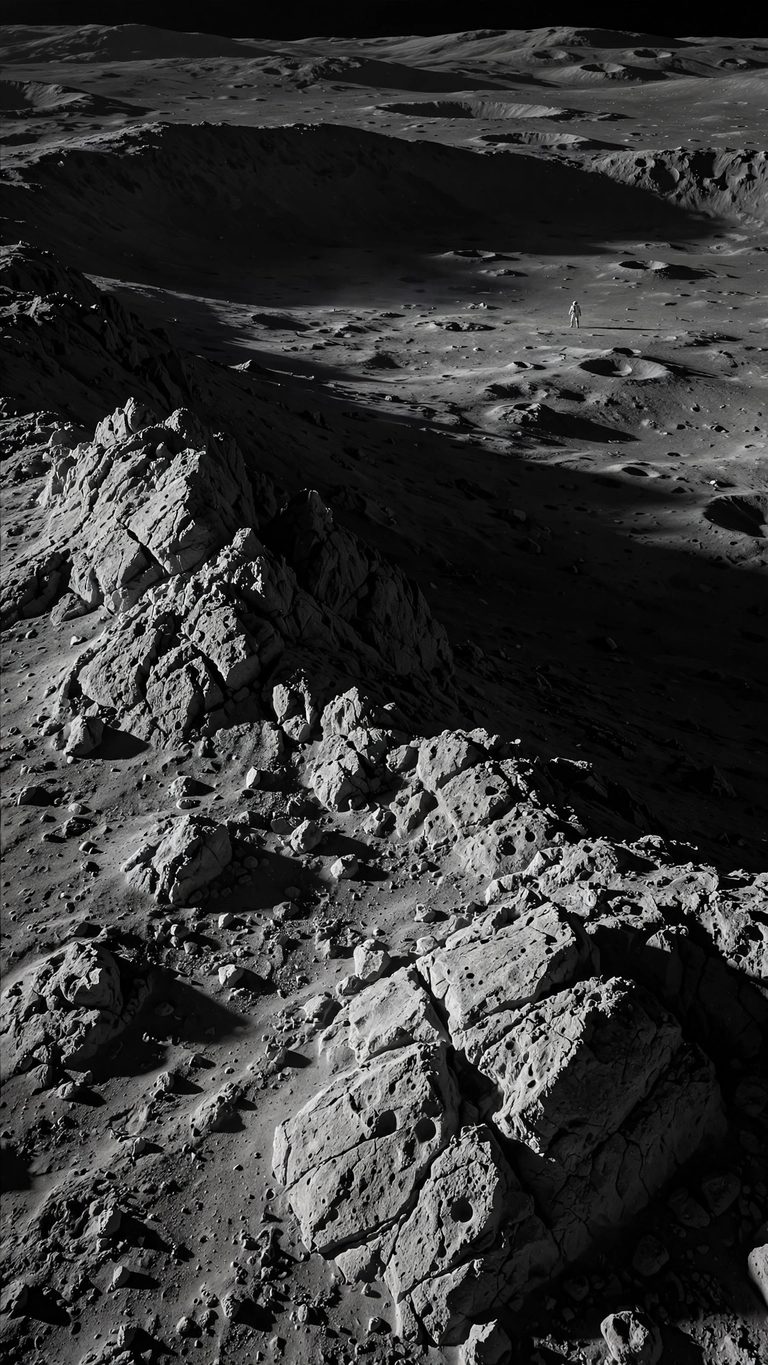
Stand on the Moon and look around. There is no wind, no water, no life — just an endless field of grey dust pockmarked by craters, each one a frozen record of an ancient impact. The shadows are absolute black because there is no atmosphere to soften them. Above it all hangs the Earth, impossibly blue, impossibly alive. No human being has stood on the lunar surface since 1972, which makes the Moon the most visited-yet-unreachable place in our collective imagination. This AI photo prompt takes you there: a hyper-detailed closeup of the cratered lunar surface, with sharp rugged rims casting long black shadows, soft Earthshine glowing across the dust — and a tiny astronaut figure in the distance that makes the entire scene snap into breathtaking scale.
Lunar imagery occupies a special place in visual culture. It carries the weight of the Apollo program, the romance of the Space Race, and the quiet melancholy of a world we touched and then left behind. Images like this one perform exceptionally well because they trigger both awe and nostalgia in a single glance. The monochrome palette feels artistic and timeless, the tiny astronaut delivers the emotional gut-punch of human smallness, and the extreme detail invites viewers to zoom in and explore. Whether you are creating content about space history, designing an album cover, or building a cinematic mood board, this prompt delivers one of the most evocative space images AI can produce.
The Prompt
Copy the exact prompt below and paste it into your favorite AI image generator. Pay special attention to the scale element — the tiny astronaut is what makes this image unforgettable.
Hyper-detailed closeup photograph of the Moon's cratered surface, sharp rugged crater rims casting long black shadows, Earthshine softly lighting the landscape, a tiny astronaut figure for scale in the distance, monochrome greys with subtle blue tones, ultra detailed, 8k, photorealistic
Why This Prompt Works
The defining brilliance of this prompt is its use of scale. “A tiny astronaut figure for scale in the distance” is perhaps the most powerful twelve words in any space prompt ever written. Human brains are terrible at judging the size of alien landscapes — a crater could be a teacup or a city. But the moment you place a human figure in the frame, the brain instantly computes: that astronaut is about six feet tall, so those crater rims must be hundreds of feet high, so this landscape is enormous. That sudden recalibration is a physical sensation — viewers literally feel the vastness — and it is what transforms a nice Moon picture into an image people stare at. The word “tiny” is doing critical work here; it instructs the model to keep the figure small, because a large astronaut would shrink the landscape instead.
The lighting design is equally masterful. “Sharp rugged crater rims casting long black shadows” describes exactly how the Moon actually looks: with no atmosphere to scatter light, shadows on the lunar surface are pitch black and razor-edged, and near the terminator they stretch enormously long. This is authentic lunar lighting, and authenticity is what makes viewers whisper “this looks real.” Then comes the counterpoint: “Earthshine softly lighting the landscape.” Earthshine is real physics — sunlight reflected off Earth gently illuminating the Moon’s night side — and as a prompt element it does two things: it lifts the shadows just enough to reveal detail, and it adds a poetic, almost tender quality to an otherwise harsh scene. Harsh plus soft is a combination the eye finds irresistible.
The color direction seals the deal. “Monochrome greys with subtle blue tones” rejects the flat grey that boring Moon renders default to, and instead asks for a nuanced palette — greys with a whisper of blue, like moonlight actually photographs. This restraint is sophisticated; it signals artistry rather than spectacle, which is why this style of image gets used in editorial design and fine-art contexts. Combined with the extreme detail words — “hyper-detailed,” “ultra detailed,” “8k, photorealistic” — the prompt demands that every grain of regolith and every fracture in the crater rims be rendered crisply. Detail at this level is what earns the zoom-in, and zoom-ins are what earn the share.
How to Use This Prompt
Here is the step-by-step workflow for your own lunar closeup:
- Open your AI image generator. Midjourney v7 renders lunar texture superbly; DALL-E 3 is strong on the compositional scale trick; Flux handles monochrome palettes well. Start fresh.
- Set the 9:16 portrait aspect ratio. The vertical frame emphasizes depth — foreground craters large at the bottom, the tiny astronaut lost in the middle distance, black sky above. In Midjourney, add
--ar 9:16; in DALL-E 3, request portrait; in Flux, select the 9:16 preset. - Paste the exact prompt. Copy it character for character from the box above. The lighting and scale phrases are precisely balanced.
- Generate and check two things. First, the astronaut must be genuinely tiny — a small figure in the distance, not a foreground character. Second, the shadows should be deep black and long. If either is off, regenerate before editing words.
- Download at the highest resolution available. This image is all about fine texture; low resolution will turn the regolith into mush. Export the largest file you can.
- Share with restraint. This image needs no hype. A quiet caption — a date, a quote, a single line about standing on another world — will outperform anything loud.
Tip: generate at least three variations and compare the astronaut placement. The best version is usually the one where the figure sits near a strong shadow line, maximizing the contrast that makes it pop.
Pro Tips & Creative Variations
The tiny-figure-for-scale trick is endlessly remixable. Keep the lunar landscape and change the figure: “a tiny lunar rover in the distance” gives you a robotic-explorer variant; “two tiny astronaut figures” suggests companionship and story; “a tiny American flag planted in the distance” leans into the Apollo nostalgia that performs so well with history audiences. You can also move the camera: “view from inside a crater looking up at the rim” creates a dramatic low-angle variant, while “astronaut’s-eye view, gloved hand reaching toward the dust” makes it intimate and first-person.
Lighting variations dramatically change the mood. Try “harsh noon sunlight, short shadows, blinding white” for the brutal reality of the lunar day, or “Earthrise glowing on the horizon, blue light washing the craters” for the most romantic variant imaginable — our home planet doing the lighting. For a documentary feel, add “grainy 1969 Hasselblad film aesthetic, slight vignette” and watch the image time-travel. For pure art, try “long exposure star trails wheeling above the crater field” — scientifically fanciful on the airless Moon, but visually stunning.
On aspect ratios: while 9:16 is ideal for mobile, a 16:9 landscape version makes a phenomenal desktop wallpaper or a cinematic establishing shot for video projects. For print, upscale with a detail-preserving tool and inspect the crater rims at full zoom — they should stay razor-sharp. If the monochrome ever feels flat, strengthen it with “rich tonal range, deep blacks, luminous highlights, Ansel Adams zone system” to push the model toward gallery-grade black and white. And consider a series: the same crater field at “lunar dawn,” “lunar noon,” and “Earthshine night” — three images, one location, a complete story of light on another world.
Frequently Asked Questions
Why does my astronaut keep coming out too big? The model sometimes promotes the human figure to protagonist. Strengthen the scale language: “a truly tiny astronaut figure, very small in the far distance.” You can also add “vast empty foreground” to push the figure deeper into the scene. Regenerating helps — scale varies between runs.
Can this pass as a real Apollo photograph? It can look remarkably convincing, which is exactly why you should always label AI-generated imagery as AI-generated. Presenting synthetic images as genuine historical photographs — especially of the Moon landings — misleads viewers and can fuel conspiracy narratives. Enjoy the realism, but disclose the source.
What is Earthshine, exactly? Earthshine is sunlight reflected off Earth’s surface and clouds, traveling to the Moon and faintly illuminating its night side. It is a real, observable phenomenon — you can see it with the naked eye as the “ashen glow” on a crescent Moon. Including it in the prompt adds both realism and beauty.
Which tool is best for monochrome space images? Midjourney v7 has excellent tonal control for black-and-white work, DALL-E 3 follows monochrome instructions literally, and Flux produces clean greyscale on its higher settings. All three handle this prompt well; pick based on the plan you already have.
Grey dust, black shadows, a whisper of blue — and one tiny human proving how big the universe is. Run this prompt and stand, for a moment, on the surface of another world.
Related Viral Prompts
- Aurora From Space AI Photo Prompt: Generate a Rare Orbital View of Earth’s Glowing Green Curtains Free
- Observatory Starry Night AI Photo Prompt: Capture the Milky Way Arching Over a Glowing Mountain Dome Free
- Jupiter Storm AI Photo Prompt: Render the Great Red Spot Swirling in Stunning Photorealistic Detail Free
# A I P h o t o # P r o m p t B a z a r # M o o n # C r a t e r # L u n a r

Leave a Reply