
Introduction
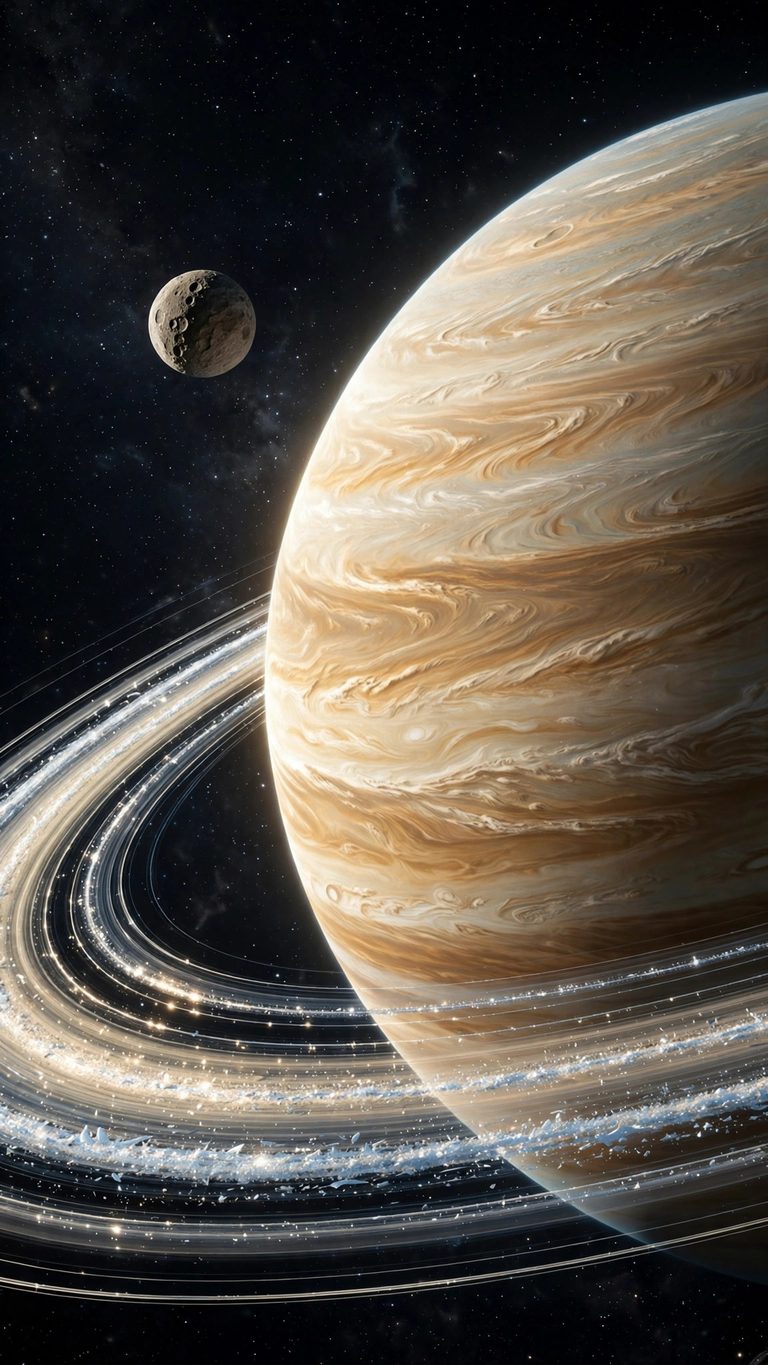
Of all the sights in the solar system, none is more universally beloved than a ringed giant. Saturn’s rings have captivated humanity since Galileo first squinted at them through a primitive telescope four centuries ago, and they remain the single most requested subject in space art. There is something about those impossible, delicate bands — wider than worlds yet thinner than paper in cosmic terms — that short-circuits our sense of scale. They should not exist, and yet there they are, circling in silent perfection. This AI photo prompt captures that wonder in a single majestic frame: a ringed gas giant rendered in photograph-style realism, its icy rings catching sunlight, its banded clouds glowing in cream and amber, a small cratered moon keeping quiet company nearby.
What makes this image endlessly shareable is its serenity. The internet is loud, fast, and anxious — and then this picture drifts across the feed like a deep breath. Grand and serene, as the prompt itself says. Space art in this style gets saved as wallpapers, printed as posters, and used as calming backgrounds by people who may never read a word about astronomy. It performs across every demographic because beauty needs no translation. Whether you are decorating a blog, building a meditation app background, or simply collecting gorgeous images, this prompt gives you a museum-worthy piece of the cosmos in about thirty seconds.
The Prompt
Copy the exact prompt below and paste it into your favorite AI image generator. The color words are doing heavy lifting — keep them intact on your first run.
Majestic photograph-style render of a ringed gas giant planet, delicate icy rings catching sunlight, banded cream and amber clouds, a small cratered moon nearby, deep black space with distant stars, grand and serene, ultra detailed, 8k, photorealistic, space art
Why This Prompt Works
This prompt succeeds because it understands that a ringed planet image lives or dies on three things: the rings, the clouds, and the company it keeps. Start with the rings: “delicate icy rings catching sunlight” is a masterclass in efficient description. “Delicate” tells the model to render fine, thin bands rather than chunky cartoon hoops. “Icy” sets the material — crystalline, glittering, translucent at the edges. “Catching sunlight” adds the critical lighting behavior: one side bright, with light scattering through the ice particles. Real ring systems are backlit marvels, and this phrase pushes the model toward that luminous, almost glowing quality that makes viewers gasp. Get the rings right and the image is already eighty percent of the way to stunning.
The cloud bands are the second pillar. “Banded cream and amber clouds” gives the model a specific, sophisticated palette instead of the generic orange-and-white that lazy prompts produce. Cream and amber are warm, rich, and — crucially — they harmonize with the golden sunlight on the rings. Color harmony is what separates professional-looking space art from amateur renders, and this prompt bakes it in. The word “banded” also matters: it instructs the model to paint horizontal atmospheric stripes with turbulence and variation, the signature look of a real gas giant, rather than a smooth featureless ball.
The third pillar is the small cratered moon, and it is the quiet genius of the composition. A lone planet, however beautiful, can feel abstract — but add a moon and suddenly the viewer has a sense of scale, depth, and place. The moon is a familiar object; we know roughly how big moons are, so its presence lets the brain compute just how enormous the ringed giant must be. It also creates a two-subject composition, which is inherently more interesting than one, and gives the eye somewhere to travel. Set against “deep black space with distant stars” — a clean, uncluttered backdrop — every element gets room to breathe. The closing mood words “grand and serene” act as an emotional director for the whole scene, and the quality tags ensure the fine ring structure renders crisply instead of dissolving into blur.
How to Use This Prompt
Follow this simple workflow to generate your own ringed giant:
- Choose your generator. Midjourney v7 excels at space art like this; DALL-E 3 follows the compositional instructions faithfully; Flux is a capable free option. Open a new generation in whichever you prefer.
- Set the 9:16 portrait aspect ratio. A vertical frame lets the planet sit large with the rings sweeping across the full width — dramatic and phone-friendly. In Midjourney add
--ar 9:16; in DALL-E 3 request portrait orientation; in Flux pick the 9:16 preset. - Paste the complete prompt. Copy every word from the prompt box above, including the color descriptions and the “space art” style tag at the end.
- Generate and check the rings. Your quality checkpoint: the rings should look thin, layered, and luminous — not thick or solid. The planet’s bands should show variation and turbulence. If the rings look like a flat donut, regenerate.
- Download the highest resolution. Fine ring structure needs pixels. Always export the largest available size so the delicate bands stay crisp.
- Share or print. This image shines as a wallpaper, a framed print, or a calming social post. Pair it with a single line about the beauty of the cosmos and let it breathe.
Do not be discouraged if the first generation is imperfect — ring geometry is challenging for AI models, and the third or fourth attempt is often the one where everything clicks into place.
Pro Tips & Creative Variations
The easiest high-impact variation is changing the ring lighting. Try “rings backlit by the sun, glowing from behind” for a luminous halo effect, or “rings casting long shadows across the planet’s cloud tops” for dramatic realism — real ring shadows are one of the most awe-inspiring sights in planetary photography. You can also experiment with ring color: “pale blue icy rings” gives a colder, more alien feel, while “golden dust rings” suggests a younger, more chaotic system.
Planet variations open a whole gallery. Replace the gas giant description with “a ringed ice giant in deep teal and navy” for a Neptune-like world, or “a ringed super-Earth with swirling white storms” for something original. Add “multiple small moons” instead of one to create a richer system, or place “a tiny spacecraft silhouette crossing the rings” to add a human story and an incredible sense of scale. For mood shifts, append “eclipse darkness, rings glowing faintly” for mystery, or “nebula colors faint in the background” for a more fantastical space-art feel.
Aspect ratio experiments are worthwhile: 16:9 landscape gives the rings room to stretch gloriously edge to edge — ideal for desktop wallpapers and video backgrounds — while 1:1 square makes a perfect album-cover-style art piece. When upscaling for print, use a detail-preserving upscaler and check the ring edges at 100 percent zoom; cheap upscaling turns delicate bands into mush. If the planet ever looks too smooth, add “turbulent cloud detail, visible storm swirls” to roughen the atmosphere. And for a striking diptych, generate the same planet twice — once in daylight serenity, once half in shadow — and display them side by side as a study in light.
Frequently Asked Questions
My rings look like a solid flat disc. How do I fix it? Emphasize thinness and layering: change “delicate icy rings” to “ultra-thin layered icy rings with visible gaps.” Adding “translucent” also helps the model render light passing through. Regenerating a few times usually resolves it, since ring geometry varies between runs.
Can I make it look like Saturn specifically? The prompt is deliberately generic, but you can steer it: add “pale gold planet with subtle bands, iconic wide ring system” and most viewers will read it as Saturn. Be aware that photorealistic claims about real celestial bodies are fine — Saturn is not a trademarked likeness issue — but always present AI art honestly as AI-generated.
What is the best use for this image? Wallpapers and prints are the top performers — this style of serene space art has evergreen demand. It also works beautifully as a blog hero image, a presentation background, or calming content for wellness and meditation channels.
Why 9:16 instead of landscape for a planet? Portrait is the native format of phones, Stories, Reels, and Pinterest — where most image discovery happens now. A vertical composition also lets you make the planet enormous in frame, which amplifies the sense of grandeur. You can always generate a 16:9 version separately for desktop use.
A ringed giant in cream and amber, attended by a small moon, adrift in the perfect black — this is the cosmos at its most elegant. Generate it, frame it, share it, and give your audience a moment of genuine serenity.
Related Viral Prompts
- Lunar Crater AI Photo Prompt: Create a Hyper-Detailed Moon Surface Closeup With a Tiny Astronaut for Scale
- Aurora From Space AI Photo Prompt: Generate a Rare Orbital View of Earth’s Glowing Green Curtains Free
- Observatory Starry Night AI Photo Prompt: Capture the Milky Way Arching Over a Glowing Mountain Dome Free
# A I P h o t o # P r o m p t B a z a r # P l a n e t # R i n g s # S p a c e A r t

Leave a Reply