
Introduction
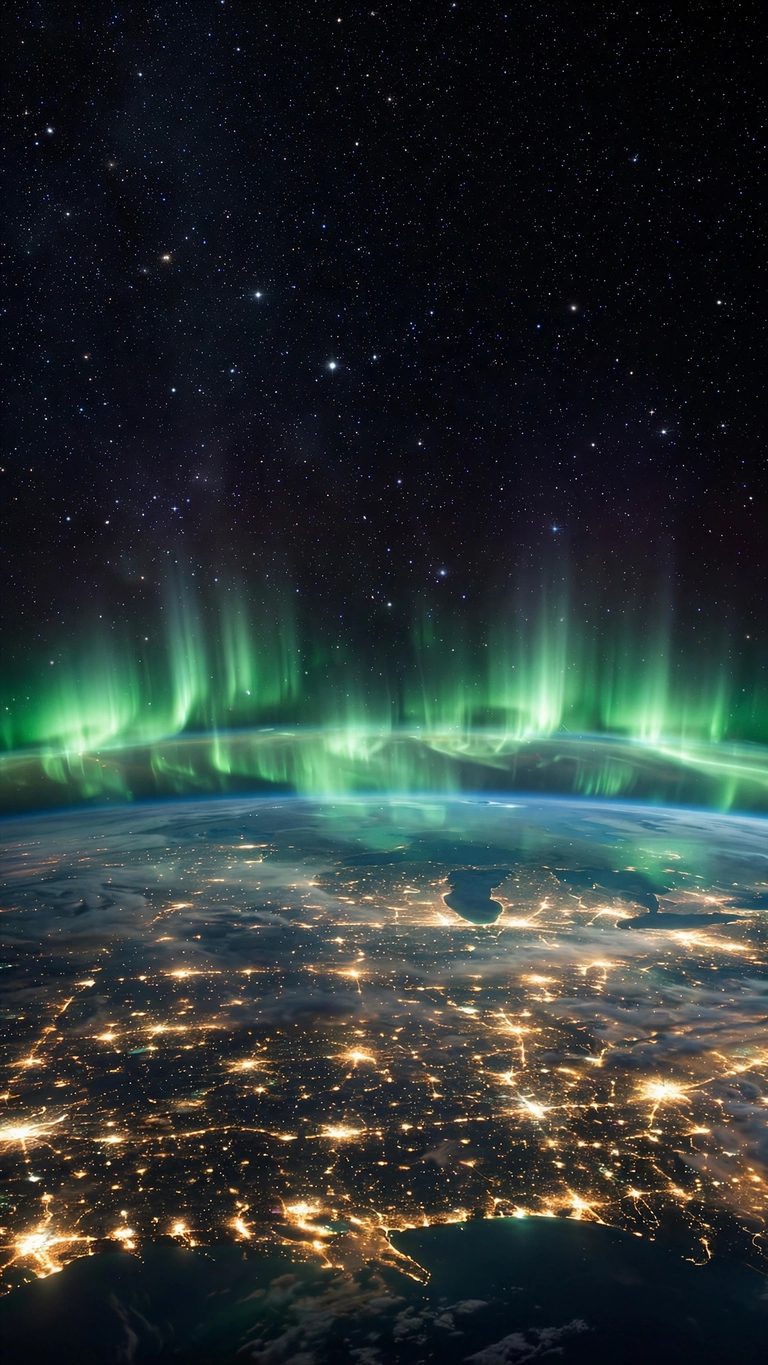
Every year, thousands of travelers journey to the far north, standing in freezing darkness for hours, hoping the sky will catch fire. The aurora borealis is nature’s most elusive light show — and even the luckiest skywatchers only ever see it from below, craning their necks at green ribbons overhead. But there is a rarer view, one that almost no human being has ever witnessed with their own eyes: the aurora as seen from orbit, hundreds of miles above, where the glowing curtains wrap around the entire curved horizon of the Earth like a neon atmosphere. Only a handful of astronauts have photographed it. This AI photo prompt gives you that impossible perspective on demand — glowing green curtains circling the planet’s limb, city lights twinkling below through thin clouds, and the sharp stars of deep space crowding the black above.
Images shot from orbit carry a unique psychological charge. They do not just show us something beautiful; they relocate us. For a moment, the viewer is not a person looking at a picture — they are a traveler looking down at home. That shift in perspective is profoundly moving, and it is why “Earth from space” imagery consistently ranks among the most shared content on the internet. The aurora adds the final ingredient: color, motion implied in stillness, and the electric green that no other natural phenomenon produces. This is not just a pretty picture. It is a reminder of how thin, how glowing, how alive our planet’s edge really is.
The Prompt
Copy the exact prompt below and paste it into your favorite AI image generator. The horizon curvature is the make-or-break detail — keep it exactly as written on your first run.
Rare photograph of aurora borealis seen from orbit, glowing green curtains wrapping around Earth's curved horizon, city lights twinkling below through thin clouds, the blackness of space above with sharp stars, breathtaking planetary perspective, ultra detailed, 8k, photorealistic
Why This Prompt Works
The core power of this prompt is perspective. “Aurora borealis seen from orbit” takes one of the most photographed natural wonders on Earth and shows it from an angle that 99.999 percent of humanity will never experience. Novelty is the engine of virality, and genuine novelty — not a filter, not a gimmick, but a truly rare vantage point — is almost impossible to scroll past. When viewers realize what they are looking at, there is a small moment of reorientation, and that cognitive surprise is deeply shareable. People send this image to friends with messages like “look at this,” which is the purest form of organic distribution.
The composition is a masterclass in layering. Consider the vertical stack the prompt builds: at the bottom, “city lights twinkling below through thin clouds” — warmth, humanity, home. In the middle, “glowing green curtains wrapping around Earth’s curved horizon” — the electric phenomenon itself, emphasizing the curvature that proves we are in orbit. Above, “the blackness of space above with sharp stars” — the infinite void, cold and perfect. Three bands, three emotional registers: home, wonder, infinity. The eye travels up through the frame the way a rocket climbs, and each layer makes the next one more dramatic. The “curved horizon” is the linchpin — without it, this could be any aurora photo; with it, the image becomes unmistakably orbital, and the viewer’s stomach does a little flip.
Color psychology does the rest. Aurora green is one of the most arresting hues in nature — it does not occur in sunsets, flowers, or oceans, so the brain flags it as extraordinary on sight. Against the deep black of space and the warm gold pinpricks of city lights, the green becomes almost supernatural. The prompt’s restraint is also notable: it does not ask for purple or red auroral fringes, keeping the image to the iconic green that reads instantly as “aurora” even in a thumbnail. Finally, “breathtaking planetary perspective” acts as a mood directive, and the standard quality stack — “ultra detailed, 8k, photorealistic” — ensures the thin auroral curtains render with the delicate, translucent quality that makes them believable. Blurry auroras look fake; sharp, structured curtains look like the real photographs astronauts bring home.
How to Use This Prompt
Generating your own orbital aurora is simple. Follow these steps:
- Pick your AI image tool. Midjourney v7, DALL-E 3, and Flux all handle this prompt well. Open a new generation in your tool of choice.
- Set the 9:16 portrait aspect ratio. The vertical frame is perfect for this composition: Earth and cities at the bottom, aurora curtains sweeping across the middle, star-filled blackness filling the top. In Midjourney add
--ar 9:16; in DALL-E 3 request portrait orientation; in Flux choose the 9:16 preset. - Paste the exact prompt. Copy the full text from the box above without changes. The layering of city lights, horizon, and stars is carefully ordered.
- Generate and check the horizon. Your quality checkpoint: the Earth’s limb must be visibly curved, the aurora should form distinct vertical curtains rather than a green smear, and the stars above should be sharp points. If the horizon looks flat, regenerate — curvature varies between runs.
- Download at maximum resolution. The delicate structure of auroral curtains dissolves at low resolution. Always export the largest file available.
- Share with a sense of wonder. This image pairs beautifully with facts about the aurora or quotes about seeing Earth from above. Let the perspective do the talking.
If the aurora looks too faint, resist the urge to add “brighter” — instead regenerate, since models vary the intensity naturally. Two or three rolls usually produce one spectacular version.
Pro Tips & Creative Variations
The aurora’s color is your first remix lever. While green is iconic, real auroras also glow red, purple, and blue at high altitudes. Try “rare red aurora fringes topping the green curtains” for a scientifically accurate variant that aurora chasers will love, or “violet and teal aurora curtains” for a more fantastical, otherworldly palette. You can also change the location: “aurora australis over Antarctica, ice sheet glowing below” gives you the southern lights with a completely different terrestrial backdrop.
Perspective variations are where this concept truly expands. Try “view from the International Space Station cupola, window frame visible at the edges” — the window frame adds a thrilling you-are-here realism that performs incredibly well. Or go wider: “aurora wrapping the entire night side of Earth, full disc view” for the ultimate planetary portrait. For a human element, add “a tiny astronaut silhouette floating in the foreground, watching the aurora” — the scale contrast is devastatingly effective. Time-of-day experiments work too: “aurora over the terminator line, half Earth in daylight” creates a mind-bending split image of day and night.
For different formats, 16:9 landscape lets the aurora curtains stretch majestically across the full width — stunning as a desktop wallpaper or video background — while 1:1 square crops make striking art prints. When upscaling, use a detail-preserving upscaler and zoom to 100 percent on the curtain edges; they should show fine ray structure, not smooth gradients. If the city lights ever overpower the aurora, tame them with “faint distant city lights” to restore the balance. And for a series with serious educational appeal, generate the same orbital view showing “aurora,” “city lights at night,” and “sunrise over the limb” — three faces of our planet from the ultimate vantage point.
Frequently Asked Questions
Can the aurora actually be seen from space like this? Yes — astronauts aboard the International Space Station regularly photograph the aurora from orbit, and it looks very much like this prompt describes: glowing curtains wrapping the limb of the Earth. The images are real, rare, and spectacular, which is why the AI version resonates so strongly.
Why does my horizon look flat instead of curved? The model sometimes renders the view as if from high altitude rather than true orbit. Strengthen the orbital cue: “strongly curved horizon of Earth, clearly seen from deep orbit.” Adding “planetary limb” also helps. If it persists across regenerations, try a different tool — some models render curvature more reliably.
What causes the green color in real auroras? The green comes from oxygen atoms in the upper atmosphere, excited by charged particles from the sun and releasing light at a wavelength of 557.7 nanometers as they settle down. It is the most common auroral color because oxygen is abundant at the altitudes where auroras typically form.
Can I use this image commercially? That depends on your AI generator’s terms of service. Paid plans on major platforms generally include commercial usage rights, but free tiers often do not. Check the current terms for your specific tool and plan before using the image in products, ads, or client work.
Green fire ringing a blue marble, cities glittering below, eternity above — the aurora from orbit is Earth showing off. Generate this view, share it widely, and give your audience the rarest seat in the house.
Related Viral Prompts
- Observatory Starry Night AI Photo Prompt: Capture the Milky Way Arching Over a Glowing Mountain Dome Free
- Jupiter Storm AI Photo Prompt: Render the Great Red Spot Swirling in Stunning Photorealistic Detail Free
- Diamond Ring Eclipse AI Photo Prompt: Capture the Total Solar Eclipse’s Most Dramatic Second in Detail
# A I P h o t o # P r o m p t B a z a r # A u r o r a # F r o m S p a c e # E a r t h

Leave a Reply