
Introduction
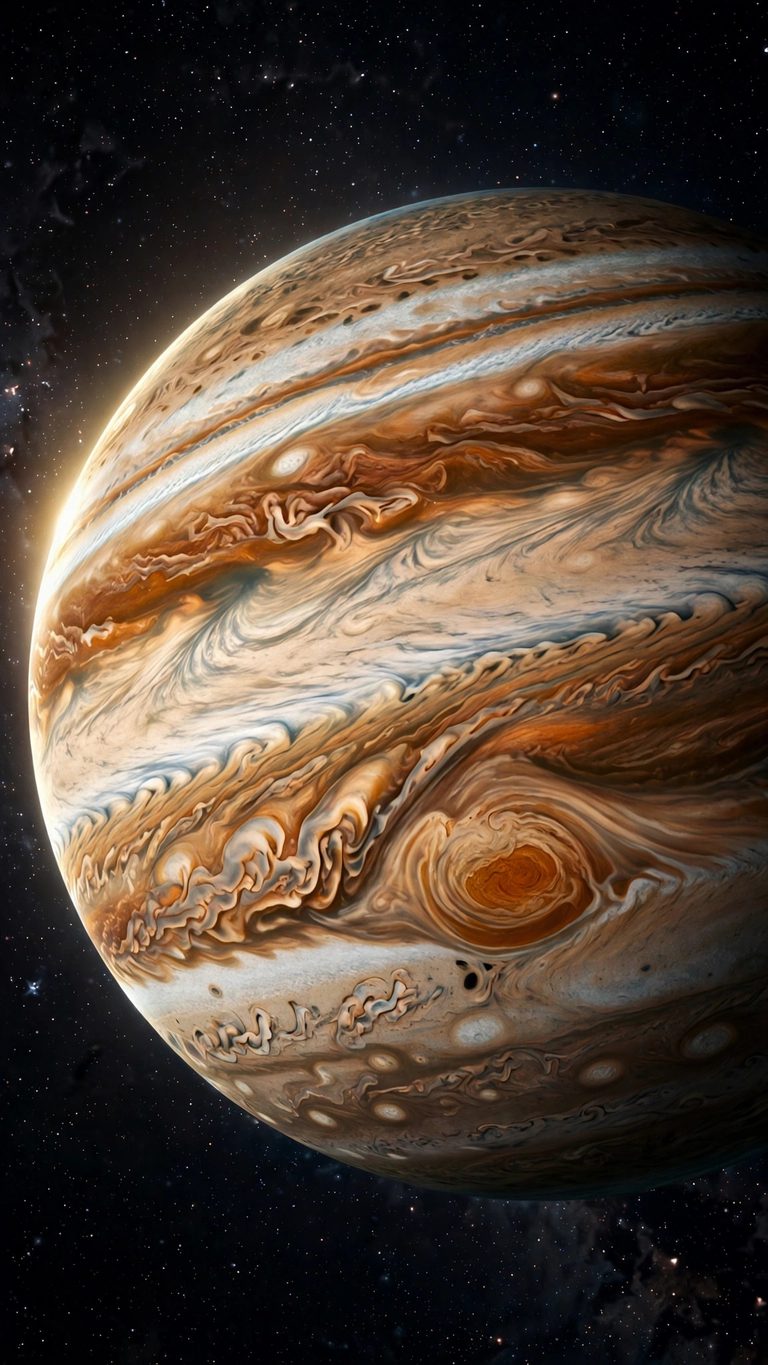
Some storms last an afternoon. The Great Red Spot has been raging for at least three hundred years. It is a hurricane wider than the entire Earth, spinning in the banded clouds of Jupiter with a fury no terrestrial weather could ever match — and it is, without question, the most dramatic single feature in our solar system. Spacecraft like Juno and Voyager have photographed it in exquisite detail, but those raw images are the property of space agencies and the patience of orbital mechanics. This AI photo prompt hands you the keys instead: a dramatic, photograph-style render of Jupiter with the Great Red Spot swirling at center stage, wrapped in cream, rust, and caramel cloud bands. The result looks like a frame pulled from a flagship space documentary, the kind of image that makes viewers stop and whisper. Use it as a desktop wallpaper, a science-fair poster, or the cover of your next space-themed project — it carries the weight of the largest planet and its most famous storm in a single glance. Below is the exact prompt, an analysis of every visual choice inside it, and a step-by-step guide for Midjourney, DALL-E 3, and Flux.
The Prompt
Copy the block below exactly as written and paste it into your favorite AI image generator. Every phrase was tuned for photorealistic planetary detail:
Dramatic photograph-style render of Jupiter, the Great Red Spot storm swirling among banded cream, rust and caramel clouds, turbulent details at the storm's edge, thin ring of light on the limb, dark starfield behind, powerful and immense, ultra detailed, 8k, photorealistic, space art
Why This Prompt Works
This prompt works because it understands that Jupiter’s beauty is all about texture, color, and scale — and it directs the AI on all three fronts. Start with the palette: “banded cream, rust and caramel clouds” is a stroke of descriptive genius. Those three words paint an earthy, almost painterly range of tones that matches Jupiter’s real appearance far better than generic “orange and brown” would. Cream keeps the highlights luminous, rust adds drama and age, and caramel gives the mid-tones a rich, swirling warmth. Because the colors are specific, the model renders distinct, believable cloud bands instead of a muddy orange blur. Then comes the star of the show: the Great Red Spot, described as “swirling among” the bands with “turbulent details at the storm’s edge.” That edge detail is crucial. Real Juno images show the Spot as a churning vortex with filamentary wisps peeling off its rim, and asking for turbulence at the boundary pushes the AI toward that complex, fluid look rather than a flat red oval stamped onto the planet. The “thin ring of light on the limb” is a professional touch — planetary photographers call this limb brightening, and it is what makes a rendered sphere read as a three-dimensional world catching sunlight rather than a flat disc. Behind it all, the “dark starfield” does two jobs: it isolates Jupiter in inky blackness for maximum contrast, and it adds tiny pinpricks of scale that remind the viewer how alone and immense the planet is. The mood words “powerful and immense” steer the composition toward a frame-filling, monumental Jupiter rather than a small distant marble. Finally, the closing tags — “ultra detailed, 8k, photorealistic, space art” — blend documentary realism with artistic polish, giving you an image that feels both scientifically grounded and gallery-worthy. That blend is exactly why Jupiter renders go viral: they satisfy space nerds and art lovers at the same time, doubling the audience that will save and share them.
How to Use This Prompt
Follow these numbered steps to render your own Jupiter on any major AI image platform:
- Copy the prompt. Highlight the full text in the box above, from “Dramatic photograph-style render” through “space art,” and copy it.
- Open your image tool. In Midjourney, type /imagine, paste the prompt, and add –ar 9:16 for portrait (or –ar 1:1 for a classic square planet portrait). In DALL-E 3, paste the prompt into ChatGPT or Bing Image Creator and request your preferred orientation. In Flux, paste the prompt and set the aspect ratio to match.
- Generate several variations. Compare at least three or four renders. Look for crisp banding, a well-defined Great Red Spot with visible swirl structure, and a clean limb light — reject any version where the Spot looks like a pasted sticker.
- Upscale and download. Planetary renders reward resolution: upscale to the maximum your tool allows so the cloud turbulence stays sharp, then download as PNG.
- Share or print. This image makes a phenomenal phone wallpaper, a classroom poster, or a framed print. The dark background means it looks stunning on OLED screens.
Pro Tips & Creative Variations
Jupiter is a deep well of variations — one prompt can spawn a whole gallery. For a closer, more intimate portrait, add “extreme close-up of the Great Red Spot filling the frame, swirling cloud filaments” and watch the storm become an abstract painting of fluid dynamics. Want context and scale? Append “with the volcanic moon Io small in the foreground” — a tiny moon against the giant planet is one of the most humbling compositions in space art. History buffs can try a vintage treatment: add “1970s Voyager mission poster style, retro typography space” for a nostalgic mission-patch aesthetic. If you prefer pure wallpaper minimalism, generate at 1:1 or 16:9 and crop so Jupiter sits slightly off-center, leaving dark negative space for phone icons or desktop widgets. Color experiments are rewarding too: try “in muted sepia tones, antique observatory plate aesthetic” for a 19th-century astronomy engraving feel, or push saturation slightly with “vivid enhanced color, JunoCam style” for the hyper-real look of processed NASA imagery. A common pitfall is Earth-like clouds — if your render shows fluffy white cumulus instead of banded gas, strengthen the prompt with “horizontal banded gas giant clouds, no Earth-like clouds” or use a negative prompt. For print projects, upscale aggressively: cloud turbulence contains fine detail that only reveals itself at large sizes, and a 24-inch poster of the Great Red Spot is a genuine conversation piece. Finally, consider a diptych: generate one classic full-disc Jupiter and one storm close-up, then display them side by side for a “zoom into the storm” storytelling effect on social media carousels.
Frequently Asked Questions
Q: Is this an accurate depiction of Jupiter?
A: It is artistically convincing rather than scientifically exact. The prompt captures Jupiter’s real visual signatures — the banded clouds, the Great Red Spot, the limb light — but an AI render should not be presented as an actual NASA photograph. For educational use, pair it with a caption noting it is AI-generated space art inspired by real Juno imagery.
Q: Which AI tool renders planets best?
A: All three recommended tools handle this prompt well. Midjourney tends to produce the most painterly, dramatic cloud turbulence; DALL-E 3 is strong on clean, balanced compositions; Flux excels at sharp detail. Generate the same prompt on two platforms and keep the winner.
Q: Can I print this as a poster?
A> Absolutely — dark-background space art prints beautifully. Upscale to at least 300 DPI at your target print size, use a matte or satin finish to preserve the deep blacks, and check your image tool’s terms for commercial printing rights if you plan to sell copies.
Q: Why does my render sometimes show a blurry red blob instead of a detailed storm?
A> The model may be under-weighting the turbulence description. Regenerate with extra emphasis, such as repeating “highly detailed swirling storm filaments” or raising the stylization/detail settings in your tool. Generating more variations also helps — detail quality varies run to run.
Jupiter does not hurry — its great storm has outlasted empires. With this prompt, you can hold that slow, immense power in your hand. Copy it, render your own giant, and share a storm bigger than worlds.
Related Viral Prompts
- Diamond Ring Eclipse AI Photo Prompt: Capture the Total Solar Eclipse’s Most Dramatic Second in Detail
- ISS Moon Transit AI Photo Prompt: Generate the Rare Space Station Lunar Crossing Shot Everyone Shares
- Deep Space Nebula AI Photo Prompt: Create Hubble-Style Carina Nebula Art in Rich Cosmic Color Free Today
# A I P h o t o # P r o m p t B a z a r # J u p i t e r # S t o r m # P l a n e t

Leave a Reply