
Introduction
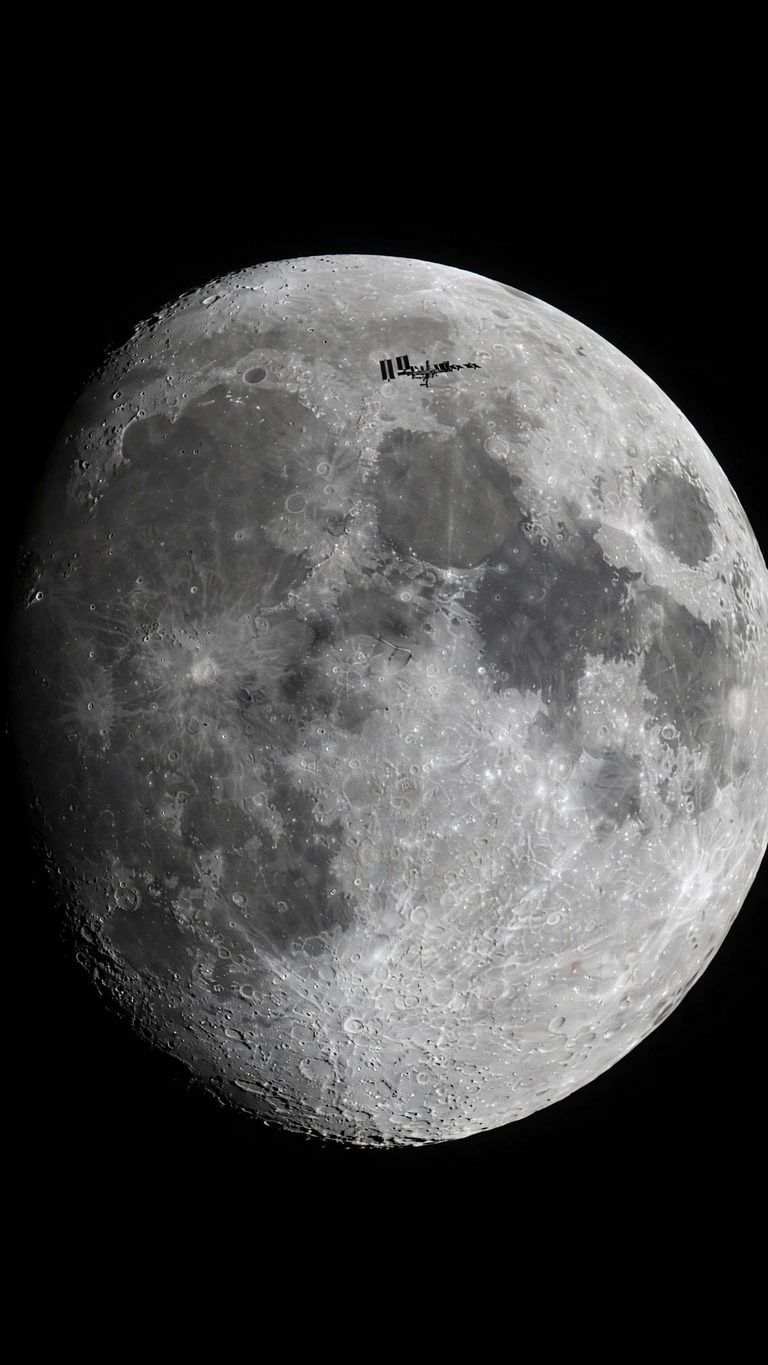
Real astrophotographers plan this shot for months. They calculate orbital passes, drive to precise locations, and set up telescopes for an event that lasts less than a second: the International Space Station crossing the face of the full Moon. When it works, the result is legendary — a tiny, razor-sharp spacecraft silhouette gliding across a hyper-detailed lunar disc, proof of human precision meeting cosmic scale. When it doesn’t, it’s another cloudy night and a wasted trip. This AI photo prompt skips the spreadsheets and the weather anxiety and hands you the trophy shot directly: the ISS as a crisp dark shape transiting the full Moon, every crater rendered in sharp relief, solar panels clearly visible, against a pure black sky. It is the kind of image that makes space fans gasp and casual scrollers stop cold, because it compresses two wonders — our Moon and our greatest orbiting outpost — into one impossible frame. Perfect for wallpapers, science posters, and anyone who loves the romance of precision. Below is the exact prompt, a breakdown of why it works, and step-by-step instructions for Midjourney, DALL-E 3, and Flux.
The Prompt
Copy the block below exactly as written and paste it into your favorite AI image generator. Every phrase was tuned for crisp lunar detail and a believable transit:
Rare photograph of the International Space Station silhouetted as a tiny sharp shape crossing the full Moon's face, every crater on the lunar surface in crisp detail, the station's solar panels clearly visible, black sky, incredible timing and precision feel, ultra detailed, 8k, photorealistic
Why This Prompt Works
This prompt is a masterclass in contrast — of scale, of light, and of meaning — and each contrast is engineered by a specific phrase. The central drama is scale: the ISS rendered as “a tiny sharp shape” against the enormous lunar disc. That size relationship is the entire emotional payload of a transit photo. The Moon is vast, ancient, and indifferent; the station is small, fragile, and ours. Keeping the station tiny and sharp (not blurry, not oversized) preserves the humbling truth that makes real transit photos so moving. The demand for “every crater on the lunar surface in crisp detail” does heavy lifting too. A featureless white disc would read as a cartoon moon; a Moon textured with sharp craters, maria, and ray systems reads as the product of a serious telescope. Crater detail also gives the image its re-examination value — viewers zoom in, explore, and share it precisely because there is so much to discover. “The station’s solar panels clearly visible” is the recognition hook: even viewers who know nothing about orbital mechanics recognize those blue-gold panel wings, and that instant identification turns an abstract silhouette into the International Space Station. The “black sky” specification keeps the composition ruthlessly clean — no gradient, no haze, no distractions — which is exactly how the real shot looks through a telescope and exactly what makes the image so striking as a phone wallpaper. The phrase “incredible timing and precision feel” is subtle prompt psychology: it nudges the model toward a composition that feels deliberate and momentous rather than accidental, with the station placed decisively on the lunar disc. Finally, “ultra detailed, 8k, photorealistic” pushes the render toward the tack-sharp, high-contrast aesthetic of stacked astrophotography. The shareability here is almost unfair: it combines humanity’s most beloved natural object with humanity’s most ambitious machine in a single frame, and that combination reliably triggers the “you have to see this” sharing impulse.
How to Use This Prompt
Follow these numbered steps to capture the transit on any major AI image platform:
- Copy the prompt. Highlight the full text in the box above, from “Rare photograph” through “photorealistic,” and copy it.
- Open your image tool. In Midjourney, type /imagine, paste the prompt, and add –ar 9:16 (a tall frame lets the full Moon dominate gloriously). In DALL-E 3, paste into ChatGPT or Bing Image Creator and request portrait orientation. In Flux, paste and set 9:16.
- Generate several variations. Check each render carefully: the ISS should be small, dark, and sharp with visible panel structure; the Moon should show crisp craters, not a smooth ball. Reject any where the station looks like a bird or a smudge.
- Upscale and download. Lunar detail rewards pixels — upscale to maximum resolution and save as PNG to preserve the crater sharpness.
- Share it. This is premium wallpaper material and a fantastic educational poster. Caption it with a real ISS fact (it orbits every 90 minutes) to boost engagement.
Pro Tips & Creative Variations
One transit photo is a trophy; a collection of variations is a gallery. Start with placement: add “ISS crossing the upper third of the Moon” or “station near the lunar limb” to explore compositions — centered transits feel monumental, off-center ones feel candid and dynamic. For a telescope-authenticity boost, append “view through an 8-inch Schmidt-Cassegrain telescope, slight atmospheric shimmer” — the subtle optical framing makes it feel like a real amateur-astronomy triumph. Monochrome is a powerful option: add “black and white, high contrast silver-gelatin aesthetic” for a timeless, fine-art print that looks stunning framed. Want narrative? Generate a sequence of three frames with the station at different positions across the disc and present them as a time-lapse strip — it tells the story of the crossing in a way a single image cannot. Colorists can experiment with “subtle mineral moon colors, faint blue and gold maria tones” for the enhanced-color lunar look popular in modern astrophotography. If the AI keeps rendering the station too large, reinforce scale with “ISS very small relative to the Moon, realistic proportions” or add a negative prompt like “giant spacecraft, oversized station.” For desktop use, regenerate at 16:9 with “wide composition, Moon large on the right, negative black space on the left” — perfect for icons and widgets. Print tip: this image’s pure black background and brilliant lunar disc look spectacular on metallic photo paper, which adds a subtle glow to the Moon. And for educators, pair the image with the real numbers — the station is about 400 km up, moving at 28,000 km/h, crossing the Moon’s face in under a second — to turn a pretty picture into a jaw-dropping lesson.
Frequently Asked Questions
Q: Is this a real photograph of the ISS?
A> No — it is an AI-generated image inspired by real transit photography. Real ISS lunar transits are captured by skilled astrophotographers and are genuinely rare. If you share the image, a small “AI-generated” note keeps things honest and is required by some platforms.
Q: Why does the prompt call this a “rare” photograph?
A> Because the real event is extraordinarily hard to capture: the transit lasts under a second, the station’s ground track is narrow, and weather must cooperate. The word “rare” tells the AI to render the scene with the reverence and precision of a once-in-a-season achievement.
Q: My ISS keeps looking like a blob. How do I fix it?
A> Emphasize structure: add “detailed truss structure, distinct solar panel wings, sharp silhouette edges.” Generating more variations helps too — small-object detail is one of the hardest things for image models, so expect to sift through several attempts for a crisp station.
Q: Can I use this image commercially?
A> That depends on your image generator’s terms. Paid Midjourney plans generally grant commercial rights to generations; free tiers of other tools may restrict commercial use. Verify the current terms of whichever platform you used before selling prints or using it in paid products.
In under a second, a football-field-sized laboratory threads the face of an ancient world — and now you can hold that second forever. Copy the prompt, render your transit, and share the shot that real photographers chase for years.
Related Viral Prompts
- Deep Space Nebula AI Photo Prompt: Create Hubble-Style Carina Nebula Art in Rich Cosmic Color Free Today
- Galaxy Collision Zoom AI Video Prompt: Create a Mind-Bending Deep Space Cinematic That Stops the Scroll
- Astronaut Spacewalk AI Video Prompt: Experience a Breathtaking First-Person Spacewalk Above Earth for Free
# A I P h o t o # P r o m p t B a z a r # I S S # M o o n # T r a n s i t

Leave a Reply