
Introduction
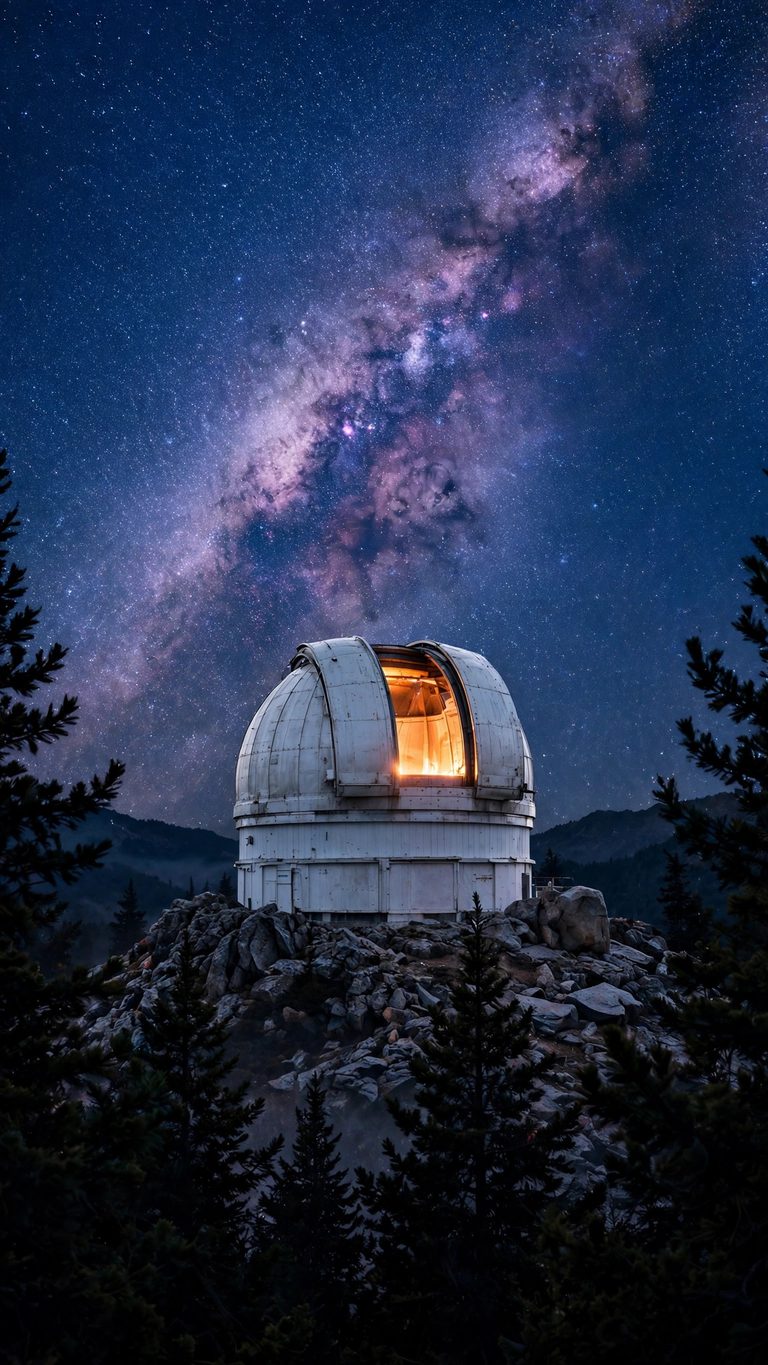
There is a particular kind of silence that only exists on a mountaintop at three in the morning. The wind drops, the pines stop whispering, and above the dark silhouette of an observatory dome, the Milky Way pours across the sky like spilled light. Few of us will ever stand beneath that exact sky — the air is thin, the roads are closed in winter, and the best dark-sky sites sit hours from the nearest town. But your screen can take you there in seconds. This AI photo prompt recreates the most romantic image in all of astronomy: a working observatory dome, its slit glowing warm with lamplight, framed by pine trees and crowned by the galactic core arching overhead. It is equal parts science and poetry — a building whose only purpose is to look up, captured at the moment the universe looks its absolute best. Whether you want a phone wallpaper that stops thumbs mid-scroll, a poster for a science classroom, or simply a daily reminder that the cosmos still inspires awe, this prompt delivers a frame worth keeping. Below you will find the exact copy-paste prompt, a breakdown of why it works, and step-by-step instructions for Midjourney, DALL-E 3, and Flux.
The Prompt
Copy the block below exactly as written and paste it into your favorite AI image generator. Do not change a word — every phrase was tuned for photorealism and shareability:
Beautiful photograph of a mountaintop observatory dome under a brilliant starry sky, the Milky Way arching directly overhead, dome slit glowing warm from inside, silhouette of pine trees, crisp mountain air feel, deep blues and starlight whites, ultra detailed, 8k, photorealistic, astrophotography
Why This Prompt Works
This prompt succeeds because it layers three depths of storytelling into a single vertical frame, and each layer earns its place. In the foreground, the silhouettes of pine trees do quiet compositional work: they frame the edges of the image, anchor the scene to Earth, and give the viewer’s eye a dark border to rest against before it travels upward. Silhouettes are a classic astrophotography device because they require no detail to be beautiful — the AI renders them cleanly, avoiding the muddy textures that sometimes plague complex foregrounds. In the middle ground sits the observatory dome, and this is where the emotional magic happens. The dome slit glows warm from inside, a small amber rectangle against an ocean of blue. That single warm accent tells a human story: someone is awake in there, working, watching, curious. It transforms a landscape into a narrative about science itself. The cool-warm color contrast between the amber slit and the deep blue night sky is one of the most reliable attention-grabbers in photography, and it makes the thumbnail pop in a crowded feed. Then there is the sky. The Milky Way does not merely appear — it arches directly overhead, forming a grand luminous arc that leads the eye in a sweeping curve from one side of the frame to the other. Arches are compositional gold; they create a sense of vastness and completion that a flat band of stars cannot match. The phrase “crisp mountain air feel” is doing subtle but important work too: it instructs the model toward razor-sharp stars, high clarity, and zero atmospheric haze, which is exactly what separates a convincing night sky from a blurry, noisy one. The declared palette of “deep blues and starlight whites” keeps the color science honest — real dark-sky photography is dominated by cool tones, and the prompt respects that instead of oversaturating into fantasy purples. Finally, the genre tags “ultra detailed, 8k, photorealistic, astrophotography” steer the model away from illustration and toward the crisp, high-dynamic-range look of professional night photography. The result is an image people save as wallpapers, which is the highest compliment a vertical image can earn: it means they want to live with it.
How to Use This Prompt
Follow these numbered steps to turn the prompt into a finished image on any major AI image platform:
- Copy the prompt. Highlight the entire text inside the box above, from “Beautiful photograph” through “astrophotography,” and copy it to your clipboard.
- Open your image tool. In Midjourney, type /imagine and paste the prompt, then add –ar 9:16 for the tall portrait ratio (Midjourney v7 supports this natively). In DALL-E 3 (via ChatGPT or Bing Image Creator), paste the prompt into the chat and request a 9:16 portrait orientation. In Flux (via fal.ai, Replicate, or a local install), paste the prompt and set the aspect ratio to 9:16 portrait.
- Generate three to four variations. Do not settle for the first render. Compare them side by side and keep the one with the sharpest stars, the cleanest dome silhouette, and the most natural-looking Milky Way arch.
- Upscale and download. Use Midjourney’s upscale buttons, the upscaler in your Flux interface, or a dedicated tool to bring the file to full resolution. Save it as a high-quality PNG or JPG.
- Share it. Set it as your phone wallpaper, post it to Instagram Stories or Reels covers, or print it for a bedroom or classroom wall. The 9:16 ratio is tailor-made for mobile screens.
Pro Tips & Creative Variations
Once you have the base image, the real fun begins. This prompt is a sturdy skeleton you can redress endlessly. Try swapping the sky first: replace the Milky Way description with “aurora borealis rippling green overhead” for a northern-lights variant, or add “a bright meteor streaking across the frame” for drama. Seasonal swaps work beautifully too — append “fresh snow on the pines, frost in the air” for a winter edition, or “autumn mist in the valley below” for mood. For a different time of night, try a blue-hour version by adding “just after sunset, deep indigo sky, first stars appearing” while keeping the warm dome glow; the contrast becomes even more painterly. Aspect ratio changes unlock new uses: 16:9 turns it into a desktop wallpaper or YouTube thumbnail background, while 1:1 makes a striking profile picture or album cover. Advanced users can experiment with a “long exposure star trails” variant — add the phrase “circular star trails wheeling around Polaris” to get that hypnotic time-lapse-in-one-frame look that astrophotographers love. If your first renders feel too smooth or digital, append “shot on a full-frame camera, 14mm f/1.8 lens, ISO 3200, 20-second exposure” — camera-specific language grounds the AI in real optics and often sharpens the result noticeably. Use a negative prompt like “blurry, cartoon, daytime, people, watermark, text” to filter out common artifacts. For maximum quality, generate at the tool’s highest setting and then run the winner through a dedicated upscaler; observatory domes have hard geometric edges that upscale beautifully. Finally, remember that text overlays belong in a design app, not in the prompt — generate the clean image, then add quotes or titles in Canva or Photoshop for posters and motivational graphics.
Frequently Asked Questions
Q: Is this AI photo prompt free to use?
A: Yes. The prompt text itself is completely free to copy, modify, and reuse as many times as you like. You only need access to an image generator — and several good options, including Bing Image Creator and various Flux interfaces, offer free tiers that handle this prompt well.
Q: Do I need a paid Midjourney subscription?
A: Not necessarily. Midjourney’s paid plans produce excellent results with this prompt, but DALL-E 3 through Bing Image Creator is free with a Microsoft account, and open-weight Flux models can be run at low cost or even locally. Start free, upgrade only if you fall in love with the workflow.
Q: Can I sell prints of the images I generate?
A: It depends on the tool’s terms of service. Midjourney’s paid plans generally grant commercial rights to your generations, while free tiers of other services may restrict commercial use. Always check the current terms of the specific platform you used before selling prints or merchandise.
Q: Why is the 9:16 portrait ratio recommended?
A: The Milky Way arch composition shines in a tall frame — the arc has room to sweep from bottom to top — and 9:16 is the native shape of phone screens, Instagram Stories, Reels covers, and TikTok. A vertical render becomes an instant wallpaper, which dramatically increases how often people save and share it.
In the end, this is more than a pretty picture prompt — it is a shortcut to one of astronomy’s most beloved scenes. Copy the prompt, generate your own mountaintop night, and let a glowing dome under a river of stars remind you, every time you unlock your phone, that the universe is still out there waiting to be explored.
Related Viral Prompts
- Jupiter Storm AI Photo Prompt: Render the Great Red Spot Swirling in Stunning Photorealistic Detail Free
- Diamond Ring Eclipse AI Photo Prompt: Capture the Total Solar Eclipse’s Most Dramatic Second in Detail
- ISS Moon Transit AI Photo Prompt: Generate the Rare Space Station Lunar Crossing Shot Everyone Shares
# A I P h o t o # P r o m p t B a z a r # O b s e r v a t o r y # S t a r s # A s t r o

Leave a Reply