
Introduction
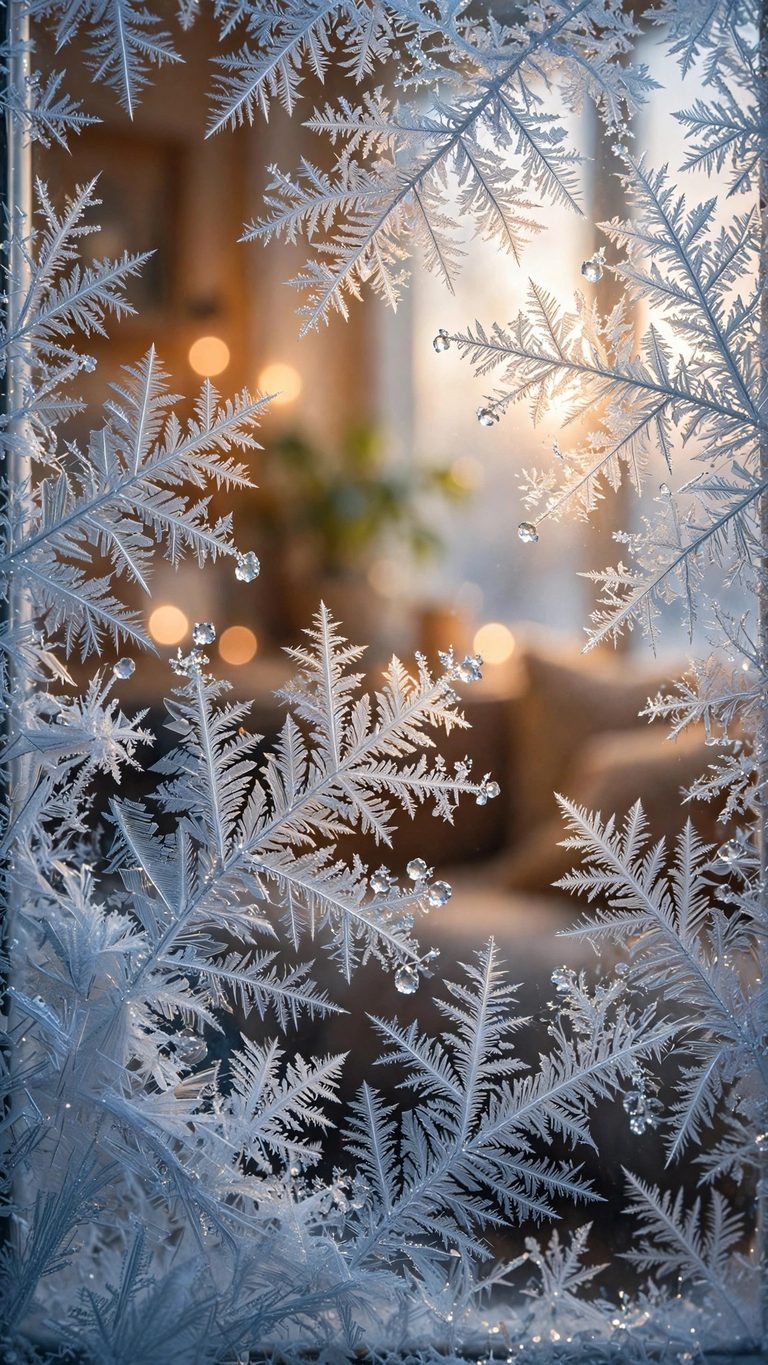
Every winter morning, nature paints temporary masterpieces on cold glass: fern-like frost crystals that bloom overnight and vanish with the first warm breath of day. Macro photographers treasure these fleeting patterns, but capturing them requires freezing temperatures, the right window, perfect light, and lenses worth thousands of dollars. This AI photo prompt hands you that frosty magic instantly, generating an exquisite macro photograph of intricate frost crystals spreading across a windowpane, glowing in soft morning light with a cozy blurred warm interior behind the glass. It is the rare image that feels both scientific and poetic, a close look at winter’s geometry that stops thumbs mid-scroll. Whether you need content for a cozy lifestyle page, a winter marketing campaign, or simply want to marvel at frozen art, this prompt delivers a gallery-grade macro shot that looks like it was taken at dawn with a professional rig.
The Prompt
Copy the prompt below exactly as written, paste it into your AI image tool, and enjoy the frost:
Exquisite macro photograph of intricate frost crystals blooming across a windowpane, delicate fern-like ice patterns in silver and pale blue, soft morning light glowing through, tiny frozen droplets sparkling, cozy blurred warm interior behind the glass, delicate winter art, ultra detailed, 8k, professional macro photography, photorealistic
Why This Prompt Works
Macro frost photography works on a psychological level that few subjects can match: it reveals a hidden world. Most people have seen frost on a window, but almost nobody has studied its crystal architecture up close. The prompt’s “intricate frost crystals blooming” and “delicate fern-like ice patterns in silver and pale blue” promise exactly that revelation, a miniature landscape of branching geometry that rewards close looking. Fractal patterns like these are deeply satisfying to the human eye because the brain loves self-similar structure, which is why Frost macro content earns long viewing times and high save rates.
The prompt also nails the light and contrast formula. “Soft morning light glowing through” backlights the crystals so they shine like glass sculpture, while the “cozy blurred warm interior behind the glass” adds a warm-cool color contrast that photographers call the holy grail of winter imagery. Blue frost against amber warmth is a complementary color pairing that makes the image feel instantly cinematic. The phrase “tiny frozen droplets sparkling” adds micro-highlights that simulate the glitter real frost shows under sunlight, a detail that separates a flat render from a sparkling one.
Finally, the craft keywords do their job: “ultra detailed,” “8k,” “professional macro photography,” and “photorealistic” steer the model toward crisp edges and believable depth of field. Shallow focus is the signature of real macro work, and this prompt’s layered composition, sharp crystals in front, blurred warmth behind, imitates a true macro lens at a wide aperture. The result is an image that feels discovered rather than generated, which is precisely why it is so shareable during the winter months.
How to Use This Prompt
Paste the prompt into Midjourney v7 with –ar 9:16 for a vertical macro frame that suits phone wallpapers and reels covers; add –style raw to keep the crystals looking photographic rather than illustrated. For extreme sharpness, some users add –q 2, though the default quality is usually enough with the “ultra detailed” keyword already present. In DALL-E 3, choose the tall format and let the descriptive language do the work; if the crystals look too uniform, regenerate, since DALL-E varies crystal branching nicely across attempts. In Flux, a guidance value around 4 preserves the delicate fern structures without melting them into noise, and rendering at 1024 by 1792 or higher keeps the fine lines crisp.
In Stable Diffusion, use 768 by 1344 with a photorealistic checkpoint and consider adding “sharp focus on central crystals” while using negative prompts like “blurry, watermark, text, cartoon.” After generation, examine the image at full zoom: real frost has irregular, organic branching, so pick the render where the patterns look most natural and least symmetrical. A light touch of clarity or dehaze in any photo editor will make the crystals pop, and cropping slightly tighter can remove any awkward edges. Because frost patterns are infinitely variable, generate several versions and curate the most beautiful one, macro photography has always been about shooting many frames to find the one.
Pro Tips & Creative Variations
This prompt is a playground for experimentation. Change the crystal style by adding “feather-shaped frost” or “geometric hexagonal ice crystals” for a more scientific look, or “thick feathery frost covering the whole pane” for a denser, more dramatic image. Shift the mood by changing the background: “snowy street blurred outside” turns it into a city-winter story, while “candlelight glowing behind the glass” makes it romantic. Night versions work beautifully too, try “moonlight glowing through frost” with “deep blue night tones” for a dreamy, nocturnal variant.
For artistic flair, request “frost forming the shape of a heart” or other subtle shapes for greeting-card designs, or “extreme close-up of a single crystal branch” for an abstract wallpaper. Pairing the frost with a human element, like “a child’s handprint melted through the frost,” adds storytelling that drives emotional engagement. If you create content series, make a “morning frost collection” across different windows and light conditions, then post them as a carousel. For print products such as mugs, posters, or phone cases, the silver-and-blue palette looks premium on dark backgrounds, so try extending the canvas with outpainting tools. Small wording changes here produce wildly different crystal formations, so iterate freely and save your favorites as reusable prompt templates.
Frequently Asked Questions
Why do my frost crystals look fake or too symmetrical? Overly perfect symmetry is a common AI tell. Regenerate a few times and choose the most organic result, or add “irregular natural patterns” to the prompt. Slight asymmetry and broken crystal edges are what make frost believable.
Can I print these images as wall art? Yes, but generate at the highest resolution your tool allows and upscale with a dedicated AI upscaler before printing. Macro frost art looks stunning as large prints because the fine detail rewards close inspection, just check your generator’s license for commercial print rights.
Which tool is best for macro-style AI images? Midjourney v7 and Flux produce the sharpest fine detail, which matters most for frost. Stable Diffusion with a good photorealistic model is a strong free alternative. DALL-E 3 is easiest to use but sometimes softens micro-detail.
How do I get more sparkle in the crystals? Emphasize light words: “backlit,” “glinting,” “sparkling highlights,” and “sun flare through ice.” Backlighting is what makes real frost glitter, so prompts that describe strong light behind the glass consistently produce more luminous results.
Conclusion: Winter’s most beautiful art lasts only a morning, but this prompt lets you keep it forever. Generate your frost macro, share the sparkle, and give your audience a close-up of nature’s geometry. Try this AI photo prompt today and make your feed shimmer.
Related Viral Prompts
- Husky Puppy in Snow: The Cutest AI Photo Prompt for Heart-Melting Winter Pet Photography That Wows Everyone
- Inside a Glowing Blue Ice Cave: An Epic AI Photo Prompt for Breathtaking Winter Adventure Photography
- Reindeer Under the Aurora: A Magical AI Photo Prompt for Dreamy Northern Lights Winter Photography Art
# A I V i d e o # P r o m p t B a z a r # A I P h o t o # F r o s t # M a c r o

Leave a Reply