
Introduction
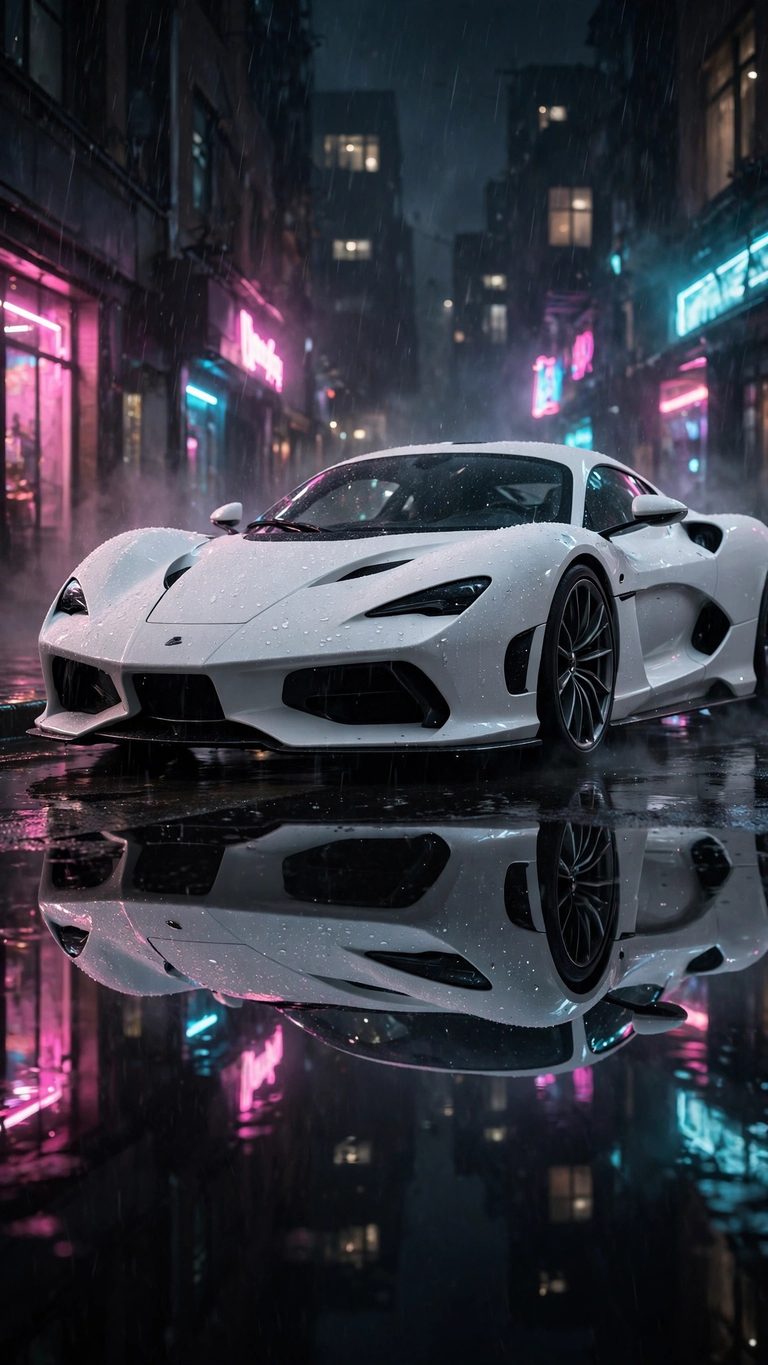
Rain hammers the city street, but the white supercar does not care. It sits parked under the neon glow, and the wet asphalt has turned into a perfect mirror, doubling the car in a shimmering reflection. Pink and cyan signs bleed color across the puddles. Raindrops sparkle on the bodywork like scattered diamonds. The whole scene hums with cinematic noir atmosphere, equal parts luxury and mystery. This is the kind of image that dominates #NightPhotography feeds, because night plus rain plus neon is an unbeatable formula for drama. Shooting it for real means waiting for storms, finding the right street, and protecting your gear. This AI photo prompt does it in seconds. It generates a moody night photograph of a white supercar on a rain-soaked street with mirror reflections and glowing neon, a frame that looks ripped from a neo-noir film. One prompt, and the city is yours.
The Prompt
Paste the exact prompt below into your generator to capture the full rainy neon noir look.
Moody night photograph of a white supercar parked on rain-soaked city street, perfect mirror reflections in puddles, neon signs glowing pink and cyan, rain droplets on the bodywork sparkling, cinematic noir atmosphere, dramatic contrast, ultra detailed, 8k, photorealistic
Why This Prompt Works
Night rain photography works because it stacks multiple high-impact visual effects that the human eye cannot resist. First, reflections. A rain-soaked street is a mirror, and mirrors double the visual information in a frame for free. The prompt demands perfect mirror reflections in puddles, which gives you the car twice: once solid, once shimmering. Symmetry and doubling are deeply satisfying to look at, which is why reflection shots consistently outperform dry street shots in engagement. Second, color. Neon signs glowing pink and cyan is a deliberate complementary pairing, the same teal-and-magenta language as synthwave art and cyberpunk cinema. Against the white supercar, which acts as a neutral canvas, those colors pop with maximum intensity. White is the smartest car color choice here: black would vanish into the night, but white catches every neon hue and every raindrop highlight. Third, texture. Rain droplets on the bodywork sparkling adds micro-detail that rewards close viewing and sells realism, because a perfectly dry car on a wet street would break the illusion instantly. Fourth, mood. Cinematic noir atmosphere and dramatic contrast tell the model to crush the blacks, protect the highlights, and lean into mystery, the visual equivalent of a film still rather than a snapshot. Noir carries built-in storytelling: a lone car in the rain at night implies a narrative, and viewers fill in the story themselves, which makes the image memorable. In #Neon and night photography trends, this aesthetic is evergreen because it fuses luxury with edge. A supercar alone says wealth; a supercar in neon rain says wealth with a secret, and secrets get shared.
How to Use This Prompt
Follow this workflow for the cleanest result. Step one: copy the entire prompt from the box above exactly as written. Step two: open your image generator. In Midjourney v7, paste the prompt and add –ar 9:16 for the 9:16 portrait format from the original post, which stacks the car, its reflection, and the neon skyline into a tall dramatic frame. In DALL-E 3, paste via ChatGPT and ask for a vertical image. Flux and Stable Diffusion users should use a portrait canvas near 768 by 1344 with 30 or more steps. Step three: generate at least four variants, because reflections and rain are detail-heavy and AI sometimes smears them. Check that the puddle reflection roughly matches the car and that the neon signs are legible shapes rather than glowing blobs. Step four: upscale the best one; night scenes gain enormously from upscaling since it cleans up noise in the dark areas. The original post settings recommend 9:16 portrait in Midjourney v7 or DALL-E 3. Save your seed so you can re-render the same street with different car colors for a series.
Pro Tips & Creative Variations
Rainy neon is a playground. Change the car: a matte black supercar for full stealth mode, a racing red one for aggression, or a chrome-wrapped concept car that turns into a liquid mirror of the neon. Change the city: rain-soaked Tokyo alley with vertical kanji signs, a London street with red telephone boxes glowing in the wet, or a Los Angeles boulevard with palm silhouettes. Swap the neon palette for new moods: amber and teal for classic noir, purple and gold for luxury, or green and magenta for cyberpunk chaos. Add motion: a second car blurred past with light trails while the hero car stays sharp, or rain streaking diagonally with a slight long-exposure feel. Play with the human element: a figure with a transparent umbrella reflected in the puddle, or headlights cutting through the rain toward the camera. For extra cinema, add volumetric fog, anamorphic lens flare, or a low Dutch angle to the prompt. Detail crops shine here too: a close-up of rain beading on a headlight with neon bokeh behind it makes a stunning secondary post. Stable Diffusion users should add a negative prompt like blurry reflection, deformed car, watermark to keep the mirror clean. If you run a night photography or supercar page, batch five cities with the same car and neon recipe. A Rainy Nights series with a consistent look builds anticipation, and followers will start asking which city comes next.
Frequently Asked Questions
Why do the reflections sometimes look wrong? AI can struggle with accurate mirror geometry, producing reflections that do not match the car. Generate multiple variants and choose the one where the puddle image plausibly mirrors the vehicle. Tighter crops on the car and its reflection hide minor mismatches.
Can I change the car color? Yes, and you should. White shows off neon best, but black, red, or silver each create a different mood. Keep the rest of the prompt identical so the lighting recipe stays consistent across your series.
How do I keep the image from looking too dark or noisy? Night generations can get muddy. Pick the variant with the cleanest shadows, upscale it, and lift the blacks slightly in any free editor. Avoid over-sharpening, which exaggerates noise in dark skies.
Can I use these images commercially? Check your AI tool’s terms: most paid plans include commercial rights to your generations, but policies differ. For client work or ads, always generate on a plan that grants a commercial license.
Neon, rain, and a white supercar: this AI photo prompt delivers pure cinematic noir in a single generation. Copy the prompt, set your 9:16 portrait canvas, and let the city lights do the rest. Then take it worldwide with new cities, new colors, and new palettes. Your night feed is about to get a lot more electric, so start generating.
Related Viral Prompts
- Vintage Motorcycle Headlight Macro AI Photo Prompt: Glowing Amber Lens Detail in Night Bokeh for Stunning Close-Up Shots
- Retro Pickup Truck Neon Gas Station AI Photo Prompt: Pink and Teal Midnight Vaporwave Aesthetic for Viral Retro Art
- Luxury Car Chrome Grille Close-Up AI Photo Prompt: Dramatic Studio Lighting for Premium Automotive Advertising Style
# A I P h o t o # P r o m p t B a z a r # S u p e r c a r # N i g h t P h o t o g r a p h y # N e o n

Leave a Reply