
Introduction
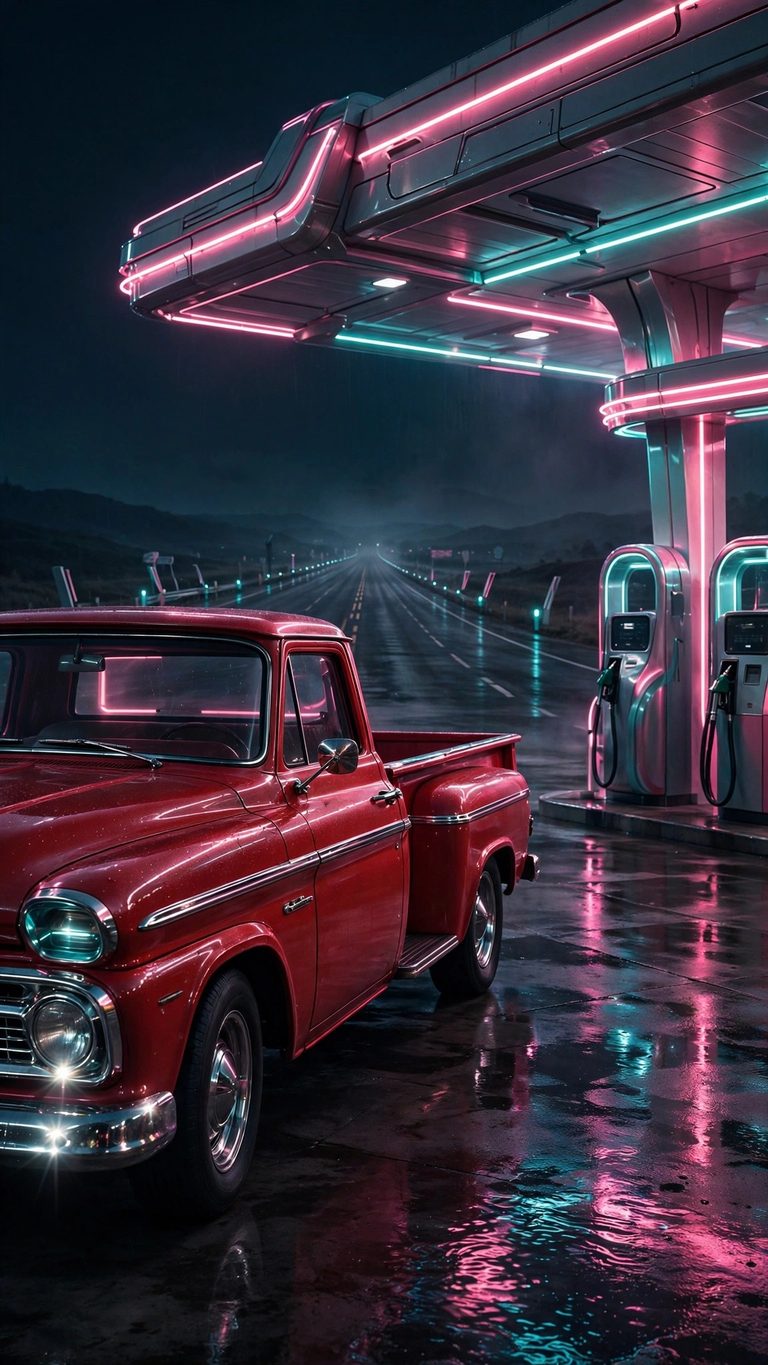
Midnight. A classic red pickup truck idles under the buzzing glow of a neon-lit gas station, pink and teal light washing over its chrome trim while an empty highway stretches into the dark behind it. It is pure vaporwave: retro and futuristic at once, lonely and electric, like a still frame from a film that never existed but everyone remembers. This AI photo prompt builds that exact scene, and the result is the kind of image that gets saved, shared, and set as a wallpaper within minutes of posting.
The retro gas station is one of the most beloved settings in digital art, because it sits at the crossroads of nostalgia and science fiction. Everyone recognizes the pickup, the pumps, and the neon, yet the midnight emptiness makes it feel like a dream. This prompt captures that duality with a cinematic composition that does the heavy lifting for you. Whether you create content for a retro aesthetic page, design synthwave album art, or simply love Americana after dark, this prompt hands you a professional-grade image with zero photography skills required. Run it once and you will understand why neon-soaked automotive scenes dominate feeds.
The Prompt
Here is the exact prompt behind this image. Copy it word for word to reproduce the result, then customize it with the ideas below.
Retro-futuristic photograph of a classic red pickup truck at a neon-lit gas station at midnight, pink and teal neon glow, chrome details reflecting, empty highway stretching behind, vaporwave aesthetic, cinematic composition, ultra detailed, 8k, photorealistic
Why This Prompt Works
This prompt works because it weaponizes color psychology. Pink and teal are complementary neon tones that vibrate against each other, creating an electric tension the eye cannot ignore. The red pickup adds a third warm anchor that keeps the palette grounded in reality, while the chrome details act as tiny mirrors, multiplying the neon glow across the frame. At midnight, with no daylight to dilute the effect, every light source becomes a brushstroke, and the vaporwave aesthetic ties it all together with a coherent retro-futurist language that audiences instantly recognize.
Trend alignment is the second engine here. Vaporwave and synthwave visuals have moved from niche internet subculture to mainstream design language, appearing in music videos, fashion campaigns, and game art. Automotive content with neon lighting consistently ranks among the most saved car imagery on social platforms, and posts using tags like #AIPhoto attract viewers specifically hunting for striking AI-generated art. The empty highway behind the truck adds narrative depth: it suggests a journey, a story, a reason to look twice. Storytelling, even implied, is what separates a pretty picture from a viral one.
The prompt is also built for effortless shareability. Its cinematic composition places the truck as a clear hero with the gas station framing it, so the image reads instantly even as a small thumbnail. The ‘ultra detailed, 8k, photorealistic’ tail pushes generators toward crisp output that survives compression on social feeds. Neon scenes like this double as perfect wallpapers, stream backgrounds, and poster art, which multiplies the ways people reuse and reshare them. Every reuse is free distribution, and that is the quiet mechanics of virality.
How to Use This Prompt
Follow these steps to get the best result in Midjourney, DALL-E 3, Flux, or Stable Diffusion. The recommended settings for this post are: 9:16 portrait, DALL-E 3 / Midjourney v7.
- Choose DALL-E 3 or Midjourney v7, the two tools recommended in this post’s settings. DALL-E 3 excels at coherent scenes with multiple elements like pumps, signage, and the truck.
- Set a 9:16 portrait aspect ratio before generating. In Midjourney use –ar 9:16; in DALL-E 3 select the vertical format. Portrait framing makes the neon signage tower dramatically.
- Paste the exact prompt from the <pre> block below without edits for your first generation, so you establish a quality baseline.
- In Midjourney, add –v 7 –style raw to keep the scene photorealistic rather than painterly. Vaporwave can drift into illustration, and –style raw anchors it in photography.
- If the neon colors feel washed out, strengthen them on the next run with ‘vivid pink and teal neon, glowing signage’ or raise stylization slightly.
- Upscale the winner and do a light contrast pass. Neon images pop hardest with deep blacks, so a slight black-point adjustment makes the glow feel electric.
Flux and Stable Diffusion can also nail this scene. In Flux, the prompt’s detailed lighting description guides its strong photorealism. In Stable Diffusion, use a cinematic photorealism checkpoint and consider a LoRA for neon or synthwave aesthetics if you want an even stronger vaporwave flavor.
Pro Tips & Creative Variations
Once you have a great baseline, these variations keep the concept fresh and let you build a whole series around it.
- Change the vehicle to remix the mood. A vintage muscle car makes it grittier, a 1980s sports car makes it more Miami Vice, and a motorcycle makes it lonelier and cooler.
- Shift the neon palette. Try ‘purple and orange neon’ for a sunset-noir feel, or ‘blue and magenta’ for a cyberpunk edge on the same composition.
- Add weather for drama. ‘Light rain on asphalt with neon reflections’ doubles the visual richness, since every puddle becomes a second neon sign.
- Introduce a human element. ‘A lone figure leaning against the truck’ adds story and scale, turning a beautiful scene into a narrative one.
- Repurpose across formats. This scene works as a vertical wallpaper, a wide YouTube banner (regenerate in 16:9), or a looped background for music videos.
- Add period props. A ‘vintage Route 66 sign’ or ‘classic diner next door’ deepens the Americana storytelling without changing the core composition.
- Go full cinematic. Add ‘anamorphic lens flare, film grain, 35mm still’ for a frame that looks ripped from a lost 1980s cult classic.
- Layer subtle grain. A touch of ‘fine film grain’ keeps the neon from looking plasticky and sells the midnight photograph feel.
Frequently Asked Questions
Why do DALL-E 3 and Midjourney handle this prompt differently?
DALL-E 3 is stronger at keeping all the scene elements coherent: the truck, the pumps, the signage, and the highway all stay logically placed. Midjourney v7 tends to produce richer color and more dramatic lighting, but may stylize details. Try both and keep the version whose strength matches your goal.
How do I avoid a cartoonish vaporwave look?
Keep the words ‘photograph’ and ‘photorealistic’ prominent, and in Midjourney use –style raw. Avoid adding modifiers like ‘illustration’ or ‘digital art’. If the output still looks stylized, lower the stylization value or regenerate with a seed that produced a realistic result.
Can I change the aspect ratio to 16:9?
Absolutely. The 9:16 portrait setting is optimized for phones and stories, but the prompt works in 16:9 for desktop wallpapers and video backgrounds. Just change the aspect parameter and keep everything else identical.
Will the gas station branding cause trademark problems?
AI generators usually invent fictional signage rather than copying real brands, which keeps the output safe. If a recognizable logo appears, regenerate or edit it out before commercial use, and review your generator’s terms for commercial rights under your plan.
Few scenes capture the romance of the open road like a neon gas station at midnight, and this prompt delivers it in stunning detail. Paste the prompt into DALL-E 3 or Midjourney, generate your retro masterpiece, and let the pink and teal glow do the talking. Your feed will thank you.
Related Viral Prompts
- Luxury Car Chrome Grille Close-Up AI Photo Prompt: Dramatic Studio Lighting for Premium Automotive Advertising Style
- Adventure Bike Desert Sunset Silhouette AI Photo Prompt: Epic Wanderlust Dune Scene with Rider for Viral Travel Posts
- Dusty Barn Find Classic Sports Car AI Photo Prompt: Sunbeam Treasure Hunt Scene with Rust Texture in 8K Detail
# A I P h o t o # P r o m p t B a z a r # R e t r o # N e o n # V a p o r w a v e

Leave a Reply