
Introduction
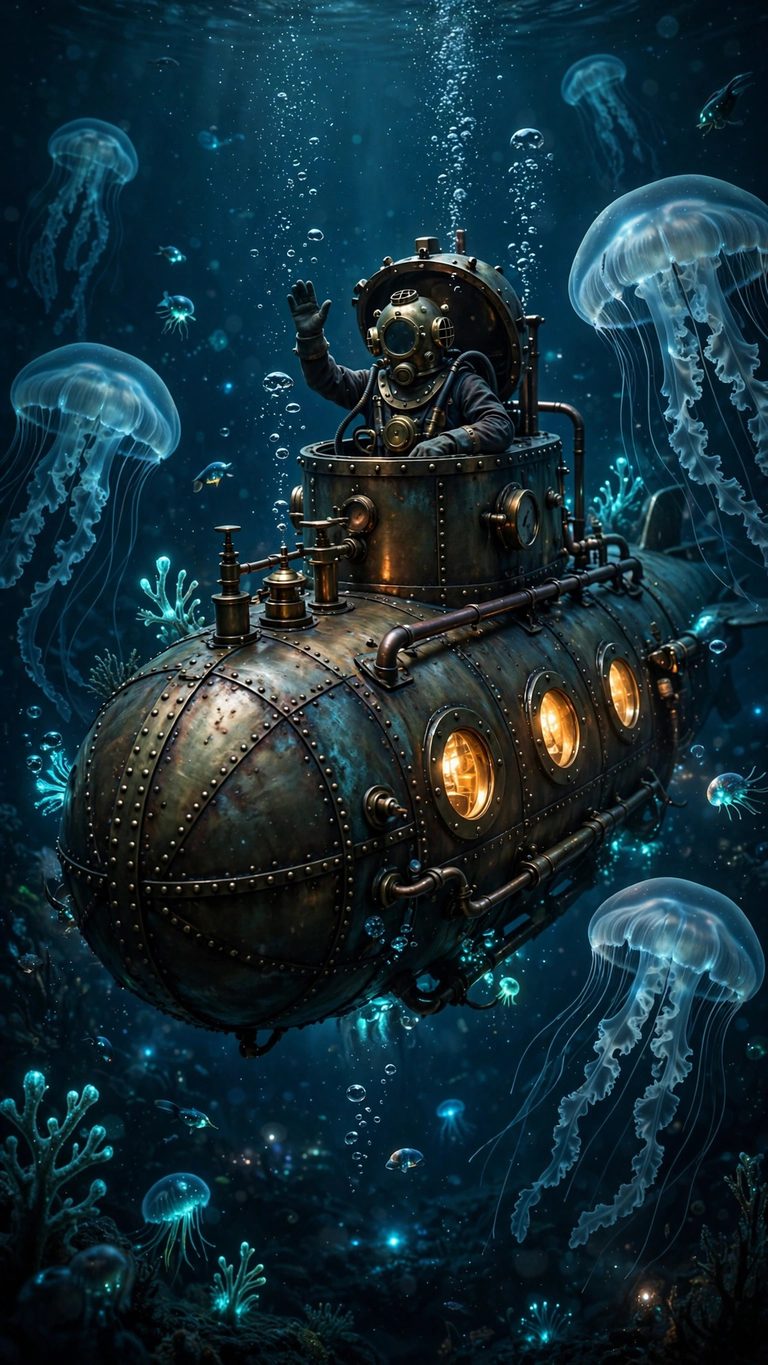
Take the romance of Victorian engineering and sink it two thousand feet beneath the waves. The Steampunk Submarine Dive prompt opens on a riveted brass submarine, its portholes glowing like furnace doors, as it descends through dark blue water into a world no human was ever meant to see. Giant jellyfish drift past the windows, pulsing with their own ghostly light. Bubbles stream upward toward a surface the viewer will never reach. And in the hatch, a diver in a vintage brass-helmeted suit waves, impossibly calm, impossibly alive.
Underwater scenes are some of the most hypnotic content on short-form video, and this one adds a layer no nature documentary can touch: the mystery of a machine that should not exist, doing something beautiful in a place that should be terrifying. Bioluminescent creatures light the submarine’s path like a procession of lanterns. The camera sinks alongside the hull, weightless and silent, and for ten seconds the viewer forgets to breathe. It is cinematic, strange, and deeply shareable, the exact cocktail that makes AI video prompts go viral in the steampunk niche.
The Prompt
Here is the complete prompt, ready to copy. Paste it unchanged for your first generation to lock in the intended composition and mood.
Deep steampunk underwater scene of a riveted brass submarine with glowing portholes descending into dark blue depths, giant jellyfish drifting past the windows, bubbles streaming upward, a diver in vintage suit waving from the hatch, bioluminescent creatures lighting the way, camera sinking alongside, mysterious ocean wonder, ultra realistic, cinematic
Why This Prompt Works
This prompt is a lesson in controlled atmosphere. It begins by anchoring the setting twice, deep and dark blue depths, so the model commits to a low-light underwater palette instead of drifting toward a bright aquarium look. Low light is a gift to AI video generators: it lets them hide imperfect geometry in shadow while making glowing elements, the portholes, the jellyfish, the bioluminescent creatures, pop with contrast. The prompt then stacks light sources deliberately, glowing portholes, bioluminescent creatures, so the scene has depth instead of flat darkness.
The subject description does heavy lifting with very few words. Riveted brass submarine tells the model the material, the texture, and the construction style in three words, instantly separating this from a modern military sub. The diver in a vintage suit waving from the hatch is the prompt’s secret weapon: a human gesture inside an alien environment. That wave gives the viewer a character to identify with and gives the model a clear, simple human motion to animate, far easier to render convincingly than swimming or walking. Giant jellyfish drifting past the windows add scale and slow, graceful secondary motion that fills the frame without competing with the hero subject.
Finally, the camera direction, sinking alongside, is one of the strongest motion cues you can give. It locks the camera to the submarine’s descent, creating parallax between the hull, the jellyfish, and the background, and parallax is what makes AI video feel three-dimensional. Ending with mysterious ocean wonder and the cinematic and ultra realistic style tags pushes the model toward a film-still quality that performs beautifully as a thumbnail as well as a video.
How to Use This Prompt
This prompt is tuned for a 10-second vertical clip with a sinking descent camera move. Here is how to run it across Veo 3, Runway, Kling, Pika, and Sora:
- Set the aspect ratio to 9:16 vertical and the duration to 10 seconds, matching the prompt’s intended sinking descent pacing.
- Paste the full prompt into the text field without edits on your first attempt, keeping the cinematic and ultra realistic style tags at the end.
- In tools with camera controls, choose a slow downward tracking or descend motion to reinforce the camera sinking alongside the submarine.
- Add a negative prompt like bright daylight, cartoon, blurry, watermark, surface waves to keep the deep-ocean mood intact.
- Render two or three seeds and select the version where the jellyfish motion is smoothest, then layer in deep ambient drone audio and soft sonar-like pings for the final cut.
Underwater renders can sometimes look murky, so if your output feels too dark, append faint god rays filtering from above to the prompt. That single addition lifts the mid-tones while preserving the mysterious deep-sea atmosphere this scene depends on.
Pro Tips & Creative Variations
The deep ocean is a mood you can reskin endlessly. Keep the brass submarine identical and change the ecosystem around it: a kelp forest of copper-toned fronds swaying in the current, a field of glowing tube worms on the seafloor, or a colossal clockwork whale surfacing beside the hull for a true sense of scale. Each variant reuses the same hero asset while feeling like a brand-new expedition, which is ideal for building a series your followers will binge.
Play with depth as a storytelling dial. A shallow sunlit descent with turquoise water and a coral reef gives you a bright, family-friendly adventure, while pushing deeper, crushing darkness, volcanic vents, anglerfish-like mechanical creatures, turns the same prompt into steampunk horror. You can also change the era of the diver: a 1920s art-deco diving suit, a glass-domed observation pod instead of a hatch, or no human at all, letting a school of mechanical fish stream past the portholes in his place.
For maximum production value, generate the scene twice, once as the exterior descent and once as an interior shot looking out through a riveted porthole at the passing jellyfish, using the same descriptive language. Cutting between the two creates a mini-narrative that feels directed rather than generated, and it doubles your content from a single prompt concept.
Frequently Asked Questions
Which tool handles underwater lighting best?
Kling and Veo 3 currently produce the most convincing volumetric underwater light, with natural-looking god rays and particle drift. Sora is excellent at the bioluminescent glow effects, while Runway gives you the finest control over the sinking camera move. Pika works well for fast drafts of this scene.
My submarine looks like a modern military sub. How do I fix that?
Strengthen the steampunk vocabulary. Add phrases like Victorian-era, riveted hull plates, brass fittings, and copper pipes to the description. The words riveted brass are already doing this work, so if your model still drifts modern, repeat the material cues and add a negative prompt entry for modern military.
Can I extend this to a longer video?
Yes. Generate the 10-second descent as your establishing shot, then create a second clip of the submarine arriving at a glowing underwater ruin using matching descriptive language, and stitch them with a cross-dissolve. Most of these tools now support 10-second generations natively, and some offer extension features for seamless longer cuts.
What audio should I add to an underwater steampunk clip?
Deep ambient drones, slow bubbles, distant whale-like calls, and soft metallic creaks sell the underwater illusion. Avoid upbeat music, which breaks the mysterious mood. A faint sonar ping every few seconds adds cinematic tension without overwhelming the scene.
The Steampunk Submarine Dive prompt turns ten seconds of screen time into a full expedition: brass, bioluminescence, and the quiet courage of a waving diver. It is atmospheric, endlessly remixable, and built for the vertical feed. Paste this AI video prompt into your favorite generator and take your audience somewhere no camera has ever been.
Related Viral Prompts
- Airship Dock at Sunset: Golden Steampunk AI Video Prompt of a Zeppelin Sky Harbor at Twilight for Cinematic Clips
- Steam Station Crowd: Bustling Victorian AI Video Prompt of a Brass Locomotive in a Steampunk Railway Station
- Airship Over Desert Canyon: Epic Steampunk AI Video Prompt of a Lone Brass Airship Drifting Over Misty Canyons at Dawn
# A I V i d e o # P r o m p t B a z a r # S t e a m p u n k # S u b m a r i n e # U n d e r w a t e r

Leave a Reply