
Introduction
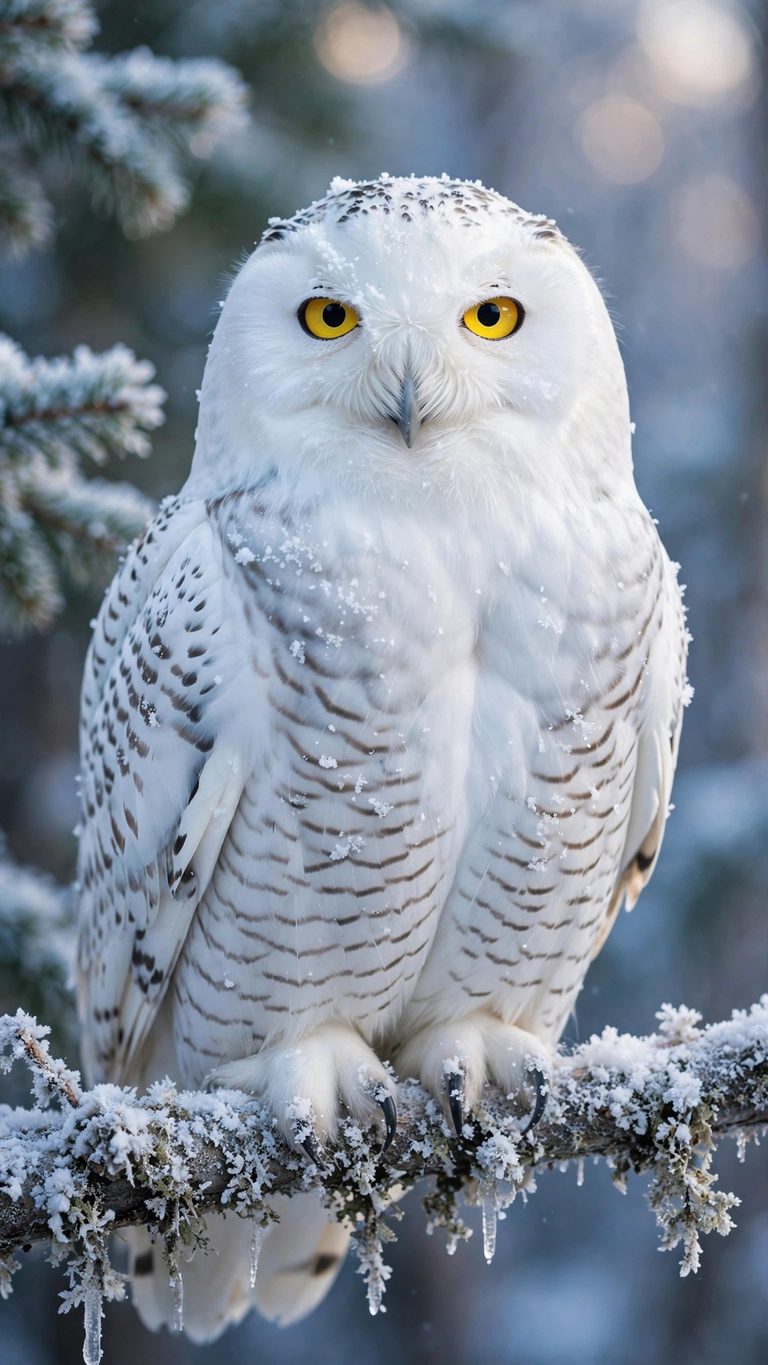
There is a moment every wildlife photographer dreams of: a snowy owl turning its head slowly toward the lens, brilliant yellow eyes locking on in a stare so intense it seems to look straight through you. In the wild, that moment might take hours of freezing patience in the Arctic tundra, a long lens, and a huge dose of luck. With the right AI photo prompt, you can create that heart-stopping encounter in seconds. This particular scene, a breathtaking close-up of a snowy owl perched on a frosted branch with pristine white feathers dusted in snowflakes, captures everything that makes winter wildlife imagery so powerful. The soft forest bokeh behind the bird isolates it like a museum piece, while the exquisite feather detail and silent hunter aura turn a simple portrait into a story. Whether you run a nature page, design winter calendars, or simply love the drama of the far north, this prompt gives you a gallery-worthy owl that looks like it was captured on a real expedition.
The Prompt
Here is the exact prompt. Copy it into your favorite AI image generator and watch the Arctic come to life:
Breathtaking close-up photograph of a snowy owl perched on a frosted branch, brilliant yellow eyes locked on the viewer, pristine white feathers dusted with snowflakes, soft winter forest bokeh, exquisite feather detail, silent majestic hunter aura, ultra detailed, 8k, professional wildlife photography, photorealistic
Why This Prompt Works
This prompt succeeds because it stacks three layers of visual persuasion: subject, atmosphere, and technical craft. First, the subject is unbeatable. A snowy owl is nature’s royalty, and the prompt’s phrase “brilliant yellow eyes locked on the viewer” creates direct eye contact, which is one of the strongest drivers of engagement in photography. Humans are hardwired to notice faces and eyes; a predator’s gaze aimed at the camera triggers attention and emotional response instantly. That is why Wildlife portraits with eye contact consistently outperform landscapes in shares, saves, and comments.
Second, the atmosphere is perfectly winter-coded. A “frosted branch” and feathers “dusted with snowflakes” place the bird in a cold world without cluttering the frame, while the “soft winter forest bokeh” keeps the background dreamy and clean. White-on-white photography is notoriously hard in real life because the subject blends into the snow, but here the prompt cleverly uses the owl’s piercing eyes and the blurred cool-toned forest to create contrast. The words “silent majestic hunter aura” add an emotional register, mood, that the image model translates into posture and lighting.
Third, the craft keywords seal the deal. Terms like “exquisite feather detail,” “ultra detailed,” “8k,” “professional wildlife photography,” and “photorealistic” push the generator toward high-fidelity rendering instead of a painterly or cartoonish look. Together they form the quality stack that defines trending wildlife content on Instagram and Pinterest. This is the kind of image people save as phone wallpaper or share with captions about winter magic, which is exactly the shareability that makes a SnowyOwl post travel far beyond your followers.
How to Use This Prompt
Using this prompt is simple, but a few platform-specific tweaks will get you the best result. In Midjourney v7, paste the prompt and append –ar 9:16 to get a tall portrait format that fills a phone screen, plus –style raw for a more photographic, less stylized render. You can also add –chaos 5 to generate subtly different compositions when you want options. In DALL-E 3, the 9:16 portrait setting maps to the “tall” size; keep the prompt as-is because DALL-E responds well to natural descriptive language. In Flux, use the portrait aspect ratio and a guidance scale around 3.5 to 5 so the fine feather texture renders cleanly without artifacts. In Stable Diffusion, run at 768 by 1344 or 832 by 1440, use a photorealism-focused checkpoint, and add negative prompts like “cartoon, painting, blurry, deformed beak, extra talons” to protect the delicate details. After your first generation, do not stop at one render. Generate a batch of four to eight images, zoom in on the eyes and feather edges, and pick the version where the yellow eyes are sharp and symmetric. Small variations in the owl’s head angle can change the whole mood, so iterate on pose by adding phrases like “head turned slightly left” until the stare feels perfect.
Pro Tips & Creative Variations
Once the base image works, the real fun begins: remixing it. Try swapping the time of day by adding “golden Arctic sunset glow” or “soft blue hour light” to change the color story from crisp white to warm amber. For a more dramatic hunter feel, add “fresh snowfall” and “snowflakes blurred in foreground” to give the scene motion and depth. You can shift the setting from forest to “Arctic tundra with distant mountains” or “frosted pine in a snowstorm” for a wilder, more remote mood. Close-up lovers can push the crop tighter with “extreme macro of facial disc feathers” to create an abstract, mesmerizing texture study.
Another strong variation is changing the owl’s behavior: “wings half spread before takeoff” adds action, while “eyes half closed, serene” creates a calm, meditative portrait. If you want a series, generate the same owl in different poses and arrange them as a triptych for a carousel post, carousels keep viewers swiping and boost reach. For commercial uses like holiday cards or book covers, append “empty space at top for text” so the composition leaves room for titles. Color grading matters too: request “cool cinematic color grade” for a modern, moody look or “warm film grain” for a nostalgic wildlife-magazine feel. Because the prompt is built around one powerful subject, small edits produce reliably beautiful results, making it an excellent template for an entire winter wildlife collection.
Frequently Asked Questions
Can I use this prompt commercially? Generally yes, but check your generator’s terms of service first. Most paid AI platforms grant commercial rights to images you generate, while free tiers sometimes do not. If you plan to sell prints or use the image in ads, review the license of the specific tool and keep records of your prompts.
Why do my owl’s eyes sometimes look blurry or mismatched? Eyes are one of the hardest details for AI models, especially at small render sizes. Generate at higher resolution, use the –style raw equivalent in your tool, and try upscaling tools afterward. Selecting from a batch of renders usually finds a version with crisp, symmetric eyes.
Which generator gives the most realistic feathers? Midjourney v7 and Flux currently lead for fine feather texture, while DALL-E 3 excels at natural composition. For maximum realism, combine Flux’s detail rendering with a dedicated image upscaler and light sharpening in a photo editor.
How can I make the owl look less like a studio shot? Add environmental storytelling: falling snow, wind-ruffled feathers, a breath of mist in cold air, or a blurred second owl in the distance. These natural imperfections and layers of depth trick the eye into reading the image as a captured moment rather than a staged render.
Conclusion: Few images command attention like a snowy owl’s stare, and now you can create one on demand. Copy the prompt, generate a batch, pick your favorite, and share it. Try this AI photo prompt today and watch your winter feed come alive with Arctic magic.
Related Viral Prompts
- Frost on Glass Magic: A Viral AI Photo Prompt for Stunning Winter Macro Photography of Frozen Crystal Art
- Husky Puppy in Snow: The Cutest AI Photo Prompt for Heart-Melting Winter Pet Photography That Wows Everyone
- Inside a Glowing Blue Ice Cave: An Epic AI Photo Prompt for Breathtaking Winter Adventure Photography
# A I V i d e o # P r o m p t B a z a r # A I P h o t o # S n o w y O w l # W i l d l i f e

Leave a Reply