
Introduction
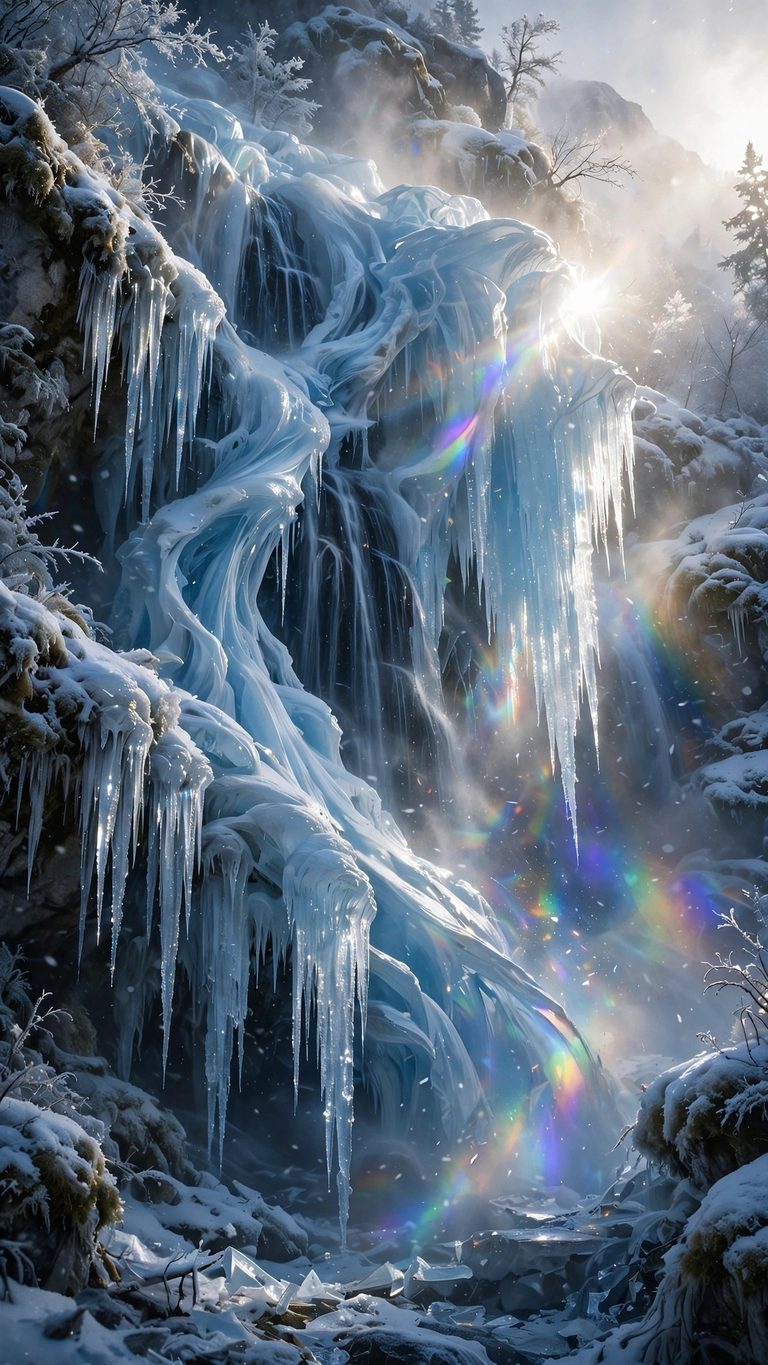
Some winter scenes are beautiful. This one is otherworldly. A massive waterfall stands frozen mid-flow, transformed into towering sculptures of blue ice. Icicles glitter like crystal, and behind the ice, water still trickles in defiance of the cold. Mist freezes as it drifts, while sunlight refracts through the ice and scatters rainbows across the scene. It looks like a fantasy realm, and viewers cannot look away.
This frozen waterfall AI video prompt captures that impossible beauty in a slow cinematic orbit. The circling camera reveals new angles of the ice with every second, rewarding full viewing instead of a glance. In a feed of ordinary winter clips, a blue ice wonderland is genuinely startling.
Fantasy-tinged winter scenes are among the most saved visuals online because they feel like stepping into another world. Below you will find the exact prompt, the psychology behind its mesmerizing effect, and how to generate it on Veo 3, Runway, Kling, Pika, and Sora.
The Prompt
Here is the exact prompt. Copy it character for character into your AI video generator to recreate this scene:
Stunning shot of a massive waterfall frozen mid-flow into blue ice sculptures, icicles glittering like crystal, water still trickling behind the ice, mist freezing in the air, sun refracting rainbows through ice, otherworldly winter wonderland, slow cinematic orbit, ultra realistic, magical
Why This Prompt Works
The human brain is captivated by impossible physics. A waterfall is supposed to flow; seeing one frozen mid-flow creates a cognitive surprise that demands attention. Psychologists call this expectancy violation, and it is one of the most reliable triggers of the stop-and-stare response. The prompt doubles down on this with multiple layers of surprise: blue ice instead of white snow, rainbows refracting through solid water, mist freezing in midair. Each layer gives the viewer another reason to keep watching.
Winter content trends show that fantasy-adjacent scenes outperform plain realistic ones for saves, because viewers treat them as collectible beauty. A frozen waterfall feels like a place from a story, which activates the imagination. The slow cinematic orbit is the perfect camera move for this psychology: as the viewpoint circles, new ice formations and light refractions continuously reveal themselves, creating a sense of discovery that mirrors exploration. Discovery is inherently pleasurable, and pleasurable content gets shared.
There is also a color psychology advantage. Blue is the color of calm, depth, and wonder, and this scene is drenched in it, from pale glacial tones to deep sapphire shadows. Against the white snow and the prismatic rainbows, the blue ice creates a palette that feels both serene and magical. Combined with ultra-realistic rendering, the scene achieves the rare combination of fantasy wonder and photographic believability, which is exactly what makes viewers share it as a real place they dream of visiting.
How to Use This Prompt
Copy the prompt exactly as written into your AI video tool. Select 9:16 vertical format and set the duration to 10 seconds to match the slow cinematic orbit. Ten seconds gives the orbit enough travel to reveal the ice sculptures from multiple angles, which is the whole point of the camera move.
- Veo 3: Paste the full prompt at 9:16 and 10 seconds. Veo 3 renders translucent materials like ice beautifully, so the light refracting through the frozen falls will look spectacular.
- Runway: Use text-to-video mode. The rainbow refraction and glittering icicles are detail-heavy, so generate at the highest quality setting available.
- Kling: Kling handles the mist and the trickling water behind the ice with realistic physics. Set 9:16 vertical and 10 seconds.
- Pika: A quick option for drafts. The orbit motion sometimes needs a second attempt in Pika, so regenerate if the camera path feels jerky.
- Sora: Sora maintains spatial coherence during orbits better than most, keeping the waterfall’s structure consistent as the viewpoint circles.
In the edit, a very subtle sparkle enhancement can make the icicles pop, but keep it restrained to preserve realism. Pair the clip with ethereal ambient music or soft chimes that match the magical mood. Export at maximum resolution, because the ice texture and rainbow refractions are detail-driven and deserve every pixel.
Pro Tips & Creative Variations
The frozen waterfall is a gateway to a whole wonderland series. Change the scale: a tiny frozen stream with delicate ice formations feels intimate and jewel-like, while an enormous glacial falls feels epic. Change the light: a moonlit version with the ice glowing blue-white is hauntingly beautiful, and a sunrise version with warm light striking the ice creates unforgettable color contrast.
- Rainbow play: Emphasize the sun refracting rainbows through the ice for a version that leans fully into the magical. Prismatic light is a proven save-driver.
- Living details: Add the water still trickling behind the ice, as the original does, or a bird landing on an icicle for a touch of life that invites comments.
- Foreground framing: Ask for snow-laden branches in the foreground to add depth and a natural frame that makes the composition feel photographic.
- Seasonal edge: A partially frozen version, with half the falls still thundering, creates dramatic tension between motion and stillness.
- Camera alternatives: Swap the slow orbit for a slow rise that reveals the full height of the falls, or a gentle push through the mist toward the ice.
- Sound design: Distant cracking ice, soft wind, and faint water trickling behind the frozen wall create an immersive soundscape that deepens the magic.
Whatever you change, keep the blue ice as the hero. That otherworldly color is what separates this scene from every ordinary winter clip, and it is the heart of the #FrozenWaterfall wonder. Protect the ice, and every variation will keep its spell.
Frequently Asked Questions
Q: Why does the slow orbit work so well here?
A: An orbit continuously reveals new angles of the ice sculptures, creating a sense of discovery that holds attention for the full 10 seconds. Static shots of the same scene lose viewers faster because there is nothing new to see.
Q: How do I get the rainbow refraction to appear?
A: Keep the phrase about sun refracting rainbows through ice in your prompt, and generate at high quality. Veo 3 and Runway render light refraction through translucent ice most reliably.
Q: My ice looks white instead of blue. How do I fix it?
A: Emphasize blue ice explicitly and mention glacial tones or deep blue shadows. Regenerate with those color words strengthened, and avoid overexposing in your edit, which washes blue into white.
Q: Can this work as a longer ambient video?
A: Yes. Generate two or three 10-second orbits with matched framing and crossfade them into a seamless loop. Frozen waterfall loops make stunning ambient backgrounds and phone wallpapers.
A frozen waterfall is winter’s most magical trick, and this prompt puts it in your hands. Copy the prompt, generate your 10-second vertical clip, and share a blue ice wonderland your audience will never forget. Try it today and stop the scroll. One magical clip is all it takes to turn casual viewers into loyal followers this season.
Related Viral Prompts
- Husky Sled Run AI Video Prompt: Create a Thrilling POV Dog Sled Adventure Racing Through a Snowy Forest Trail
- Snowy Forest Walk AI Video Prompt: Generate a Calm First-Person ASMR Winter Stroll With Crunching Snow and Sunbeams
- Blue Ice Cave AI Video Prompt: Craft a Magical Cinematic Exploration Inside Glowing Frozen Waves and Icicle Halls
# A I V i d e o # P r o m p t B a z a r # F r o z e n W a t e r f a l l # I c e # M a g i c a l

Leave a Reply