
Introduction
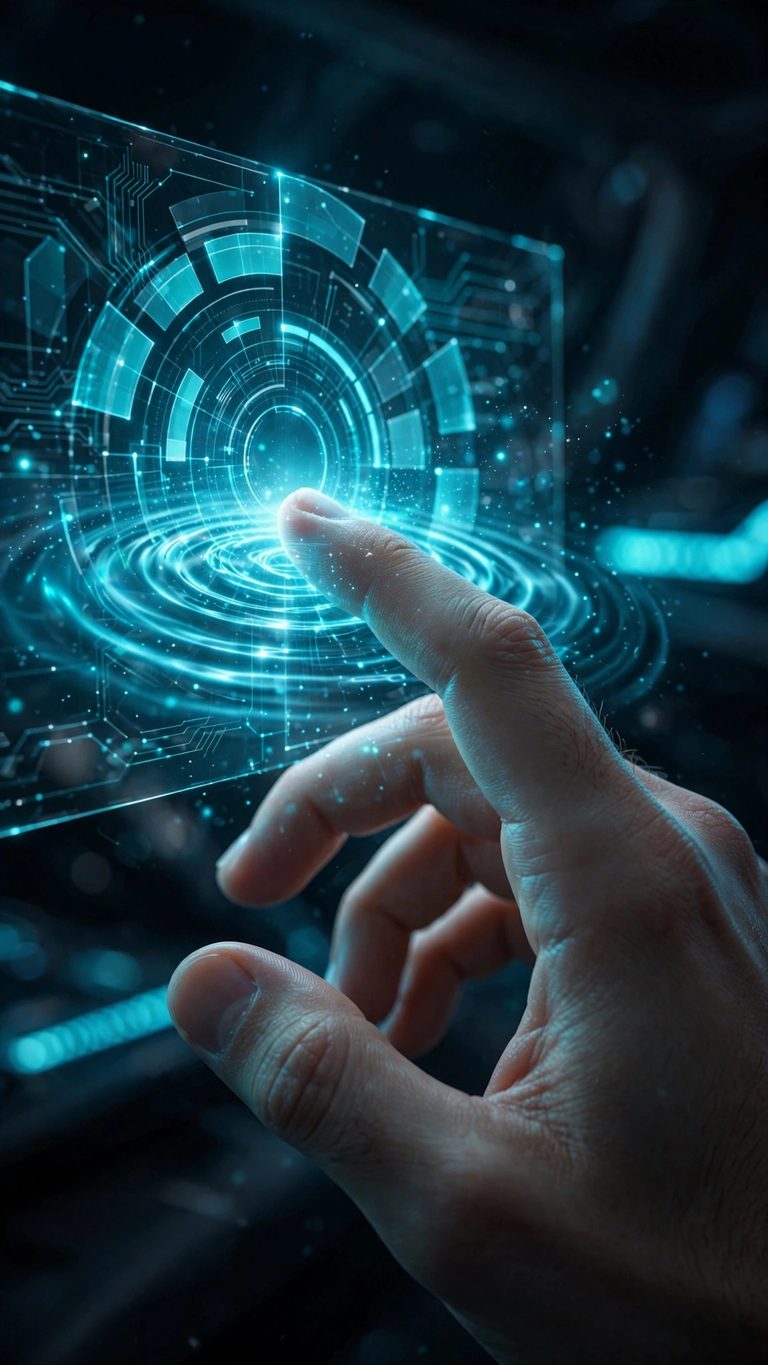
A hand reaches into darkness. Where a screen should be there is only air, until fingertips brush the void and light answers. Menus bloom in midair, rippling outward from every touch like rain on a luminous pond. This prompt puts the holographic interface in extreme close-up: a hand swiping through a floating touch display, every gesture bending cyan light around it.
Interface fantasy has a devoted audience. Tech channels, UI designers, and sci-fi fans share holographic concepts obsessively because they visualize a future everyone wants to touch. The close-up erases the distance between viewer and fantasy: for eight seconds, your own hand could be the one in the frame.
Whether you post sci-fi visuals or market futuristic products, this scene is pure immersion. Below are the exact prompt, the psychology of why interactive light mesmerizes, a workflow for every major AI video platform, and creative variations far beyond a single display.
The Prompt
Copy the prompt below exactly as written and paste it into your AI video generator of choice. It is tuned for tactile, close-up interaction with floating light.
Mind-blowing close-up of a hand interacting with a floating holographic display, fingers swiping through glowing transparent menus, light rippling with each touch, futuristic UI animations, dark room with cyan glow, shallow depth of field, sci-fi realism, ultra realistic, 8k, glowing interactive wonder
Why This Prompt Works
This prompt exploits a deep human fascination: the desire to touch light. Interactive media researchers call the appeal of responsive interfaces “the agency effect”; when an action produces an immediate, beautiful reaction, the brain registers a small hit of delight. The prompt scripts that loop explicitly: fingers swipe, light ripples, menus respond. Even though the viewer is only watching, mirror neurons fire as if they were performing the gestures, which is why close-up interaction videos feel strangely participatory.
The shallow depth of field is a quiet masterstroke. By blurring the dark room into soft cyan bokeh, the prompt forces all attention onto the hand and the hologram, removing any visual competition. Cinematographers use this trick to manufacture intimacy, and here it manufactures immersion: the world outside the interaction ceases to exist. The dark room with cyan glow also taps into a well-worn sci-fi color language that audiences decode instantly, so no exposition is needed. Blue light in darkness means the future, and every viewer already knows it.
On the trend side, holographic UI content sits at the junction of tech enthusiasm and design culture. UI and UX designers share these clips as inspiration, sci-fi pages share them as eye candy, and tech channels share them as “coming soon” speculation, giving the format three distinct distribution networks. The “sci-fi realism” phrasing in the prompt is crucial: it steers the model away from cartoonish glow toward something that looks photographed, and photographed impossibility is what makes viewers comment “this has to be real.” That disbelief, and the debate it sparks, is the shareability engine. Close-up tech clips also loop beautifully, because the gesture cycle has no obvious beginning or end, and seamless loops are among the highest-retention formats on short-form platforms.
How to Use This Prompt
Follow these steps to generate the holographic touch scene on any major AI video platform.
- Pick your generator. Paste the prompt into Veo 3, Runway, Kling, Pika, or Sora. Veo 3 and Runway currently handle translucent materials and light interaction with the most realism, which is essential when fingers must appear to disturb glowing surfaces.
- Set the 9:16 vertical frame. This post is built for TikTok, Reels, and Shorts. Choose portrait output in Veo 3, the 9:16 canvas in Runway, vertical mode in Kling, or 1080×1920 in Pika and Sora. Vertical framing suits the close-up by stacking the hand and hologram in a natural composition.
- Match the 8-second close-up interaction. The tuning calls for 8 seconds of close-up interaction. Keep the camera static or nearly static; the motion should come from the hand, not the lens. If your tool has camera controls, lock them off or use the subtlest drift available.
- Generate several takes for the cleanest touch. The contact moment between fingertip and hologram is where generations vary most. Run four or five takes and choose the one where the light ripples emanate convincingly from each touch point without the fingers smearing.
- Add tactile sound and post. Layer soft glassy chimes and subtle whooshes synced to each swipe, sounds that suggest touching light. Caption it with a hook like “The touchscreen is dead. This is next,” export at 1080×1920, and post. The loop-friendly gesture cycle means you can often play it twice back-to-back for a 16-second version.
Pro Tips & Creative Variations
The floating display is a stage, and you get to decide what performs on it. Swap the generic menus for specific fantasies: a holographic globe that spins and zooms as the hand pinches, a 3D architectural model rotating under a fingertip for design audiences, a beating holographic heart for medical tech content, or a star map that expands with each tap for space channels. Each variation keeps the mesmerizing interaction while targeting a completely different community.
Color and environment are powerful dials. The base prompt uses cyan in darkness, the classic sci-fi recipe, but try amber holograms in a warm study for a “vintage future” feel, or magenta and violet for a synthwave aesthetic that music and gaming pages love. You can also move the interaction out of the dark room: a holographic display floating above a bright desk suggests a plausible near-future workstation, while one operated inside a car dashboard turns the prompt into automotive concept content.
For UI designers and product creators, this format is a portfolio piece. Storyboard a short sequence, a swipe that opens a menu, a pinch that expands a photo, a flick that dismisses a notification, and generate each beat separately for a concept demo of your dream interface. Brands can use the same approach for teaser campaigns: reveal a product feature through holographic gestures without showing the product itself, building mystery. Finally, experiment with two hands for a more dynamic composition, or pull back slightly at the end to reveal the user’s silhouette, a tiny narrative beat that gives the loop a beginning and makes the fantasy feel inhabited.
Frequently Asked Questions
How do I make the touch interaction look believable?
Believability lives in the ripple. The prompt already includes “light rippling with each touch,” which cues the model to sync the effect to the gesture. Choose the generation where ripples clearly originate at the fingertip. If the hand passes through the hologram without reaction in every take, try adding “light bends and ripples precisely where fingers make contact” to strengthen the cause-and-effect.
Can I show text or specific app screens in the hologram?
Readable text is still unreliable in AI video, so design around it. Abstract menus, icons, graphs, and glowing panels read beautifully, while specific words often garble. If you need labels, add clean typography in your video editor afterward; the AI handles the light, and you handle the words.
What is the best way to loop this video?
Pick a take where the hand returns near its starting position, then crossfade the last few frames into the first. Because the gesture cycle is repetitive by nature, even a simple loop point is hard to notice. A seamless loop doubles effective watch time as viewers stay for “one more cycle,” which the algorithm reads as deep engagement.
How should I caption holographic UI videos for reach?
Frame it as the inevitable future to invite debate. Hooks like “We will all be doing this in 5 years” or “Would you replace your phone with this?” outperform plain descriptions. Use hashtags around holograms, touch displays, and sci-fi tech, and reply to skeptics in the comments; friendly debate about whether the tech is real keeps the post alive for days.
Some futures you watch, and some you want to reach out and touch. This prompt delivers the second kind: a floating holographic display that ripples under your fingertips. Paste it into Veo 3, Runway, Kling, Pika, or Sora, render in 9:16, and let eight seconds of cyan light do the mesmerizing. Try the prompt today, design your own holographic interface, and show your audience the touchscreen’s successor.
Related Viral Prompts
- Earbuds Splash Macro AI Video Prompt: Craft a Premium Slow-Motion Product Commercial in Just 8 Seconds
- Smartphone Teardown Timelapse AI Video Prompt: Reveal Hidden Engineering in a Satisfying 10-Second Clip
- Smart Home Wake-Up AI Video Prompt: Create a Magical Morning Automation Sequence That Feels Like the Future
# A I V i d e o # P r o m p t B a z a r # H o l o g r a m # T o u c h D i s p l a y # S c i F i

Leave a Reply