
Introduction
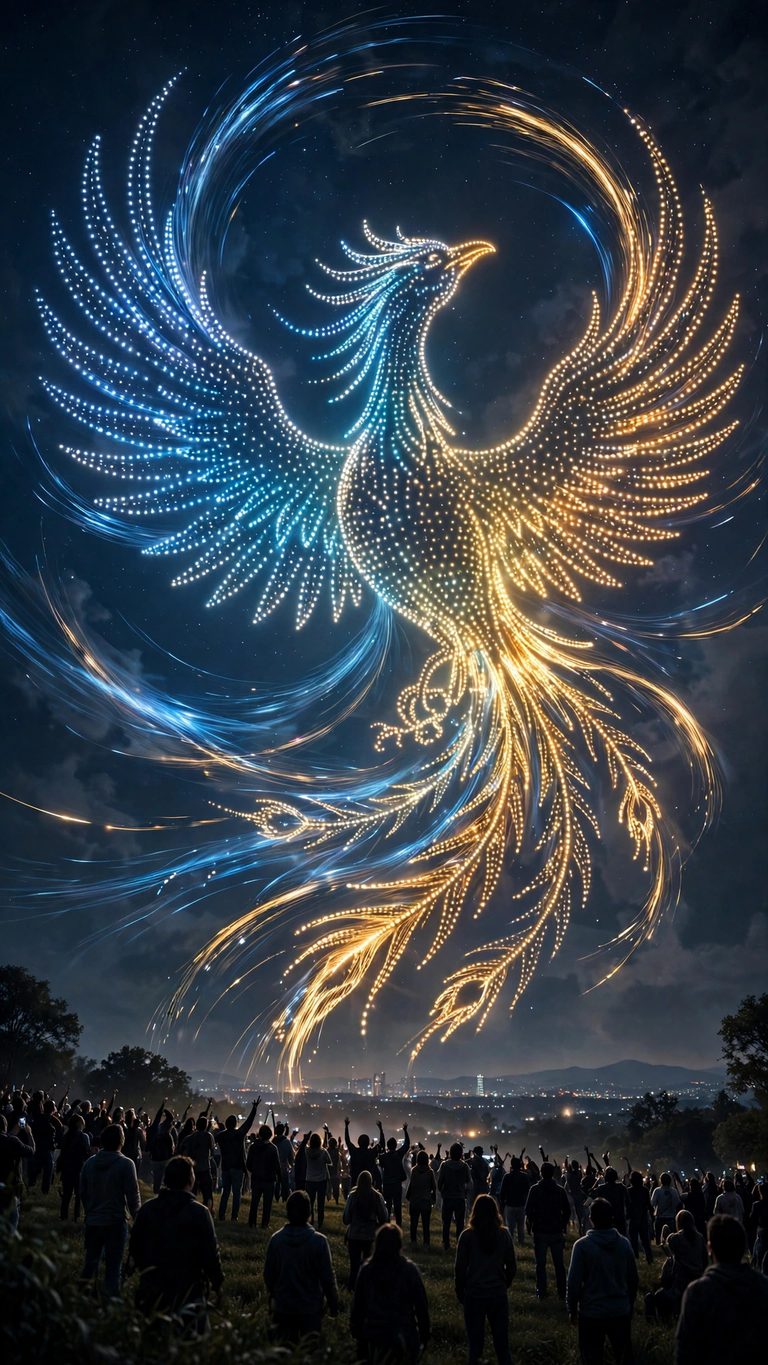
There is a moment at every great night festival when the crowd falls silent at once. Faces tilt upward, phones rise like tiny moons, and the sky itself starts to move. Drone light shows have become the defining spectacle of modern celebrations, and this prompt recreates that collective gasp: hundreds of glowing drones weaving into a giant phoenix, colors melting from blue to gold, as the camera tilts up from a cheering crowd.
Aerial spectacles are catnip for short-form feeds. Real drone shows are rare and expensive, which makes a flawless AI version feel like a gift. The slow tilt-up mirrors the exact move your own hand makes when something amazing happens overhead, so the scene feels authentic even when every pixel is synthetic.
Whether you run a travel page or simply love epic visuals, this scene delivers wonder on demand. Below are the exact prompt, the psychology behind why drone spectacles spread so fast, a step-by-step workflow for every major AI video tool, and variations to keep the format fresh.
The Prompt
Copy the prompt below exactly as written and paste it into your preferred AI video generator. It is tuned for a slow, majestic tilt-up that sells the scale of the show.
Mesmerizing night sky filled with hundreds of glowing drones forming a giant phoenix shape, colors shifting from blue to gold, camera slowly tilting up from a cheering crowd, synchronized movements, light trails lingering, epic scale, cinematic wonder, ultra realistic, 8k
Why This Prompt Works
This prompt is engineered around a single psychological trigger: awe. Researchers who study the emotion of awe describe it as the response to vastness that the mind struggles to process, and few images deliver vastness like a sky full of synchronized light. The giant phoenix shape matters because it is symbolic and instantly legible. A shapeless swarm of dots would read as noise, but a phoenix gives the brain a pattern to lock onto, and the transformation from blue to gold adds a narrative arc, rebirth, rising, triumph, compressed into ten seconds.
The camera direction does quiet but essential work. Starting low on a cheering crowd and tilting upward accomplishes two things. First, it establishes human scale, so when the full drone formation is revealed, the viewer feels the size difference in their body. Second, it mirrors first-person experience. Almost everyone has filmed something in the sky with a phone, so the tilt-up feels like a memory rather than a movie shot. That familiarity lowers the viewer’s guard and makes the spectacle hit harder.
From a trend standpoint, drone show content sits in a sweet spot. Genuine footage of shows in cities like Shenzhen, Dubai, and London regularly racks up tens of millions of views, but supply is limited to wherever a real show happens to fly. AI generation removes that bottleneck, letting any creator publish a front-row view of an impossible show. The light trails and synchronized movement read as premium and futuristic, which plays perfectly to the “future is here” share impulse. Epic spectacle clips also earn unusually high save rates, because viewers bookmark them to show friends later, and saves are one of the strongest ranking signals on every major platform right now.
How to Use This Prompt
Follow these steps to generate the drone show scene on any leading AI video platform.
- Pick your generator. Paste the prompt into Veo 3, Runway, Kling, Pika, or Sora. Kling and Veo 3 currently render large particle crowds and light trails with the most coherence, which matters when hundreds of drones must hold a recognizable shape.
- Set a 9:16 vertical frame. The post is designed for TikTok, Reels, and Shorts. Choose portrait output in Veo 3, the 9:16 canvas in Runway, vertical mode in Kling, or a 1080×1920 resolution in Pika and Sora.
- Dial in the 10-second duration and tilt-up. This scene is tuned for 10 seconds with an epic slow tilt-up. If your tool has camera controls, select tilt-up at the slowest speed. In Runway, use the camera motion panel; in Pika, specify the tilt in the camera settings so the move starts on the crowd and ends on the sky.
- Generate multiple takes. Swarm coherence varies between generations. Run the prompt three or four times and choose the take where the phoenix silhouette is clearest and the color shift from blue to gold reads cleanly across the formation.
- Sound design and posting. Add a swelling orchestral riser and a soft crowd ambience under the clip, then caption it with a location-flavored hook such as “POV: the sky over your city tonight.” Export at 1080×1920 and post during evening hours when spectacle content performs best.
Pro Tips & Creative Variations
The phoenix is a showstopper, but the prompt is really a template for any sky-scale drone narrative. Swap the formation to match your theme: a soaring eagle for patriotic holidays, a giant heart for Valentine’s Day content, a dragon for Lunar New Year, or a brand logo for sponsored posts. Seasonal tie-ins are especially powerful because they let you ride existing search and hashtag waves while the visuals do the heavy lifting.
Color scripting is your second creative lever. The blue-to-gold shift in the base prompt tells a story of ignition and triumph. Try a violet-to-cyan shift for a cyberpunk rave feel, red-to-white for a dramatic national celebration, or a rainbow cycle for festival and pride content. You can also change the environment: a drone show reflected over a calm ocean doubles the visual payoff, while one rising above a mountain town adds a travel-poster quality that travel pages love.
Camera variations keep the format from going stale. Instead of the tilt-up, try a “slow push through the crowd toward the sky” for a more immersive feel, or start tight on a single drone and pull back to reveal the full formation, a classic reveal structure that performs well as a loop. For series potential, create a “drone show of the week” format where the formation changes but the crowd, color grade, and pacing stay consistent. Pair each post with a question in the caption, like “Which city should get this show next?” to convert awe into comments, the engagement metric that keeps epic content circulating.
Frequently Asked Questions
Will viewers be able to tell the drones are AI-generated?
At 9:16 on a phone screen, a well-generated take is nearly indistinguishable from real drone show footage. The giveaway is usually in the formation edges, so pick the take with the cleanest phoenix silhouette. Adding subtle film grain and a slight handheld wobble in editing also sells realism, since real crowd footage is never perfectly stable.
How do I keep the phoenix shape coherent across the clip?
Coherence is the hardest part of swarm generation. Keep the camera move slow, because fast motion gives the model fewer stable frames to maintain the shape. If your tool supports it, raise the quality or consistency setting, and always generate several takes. The phrase “synchronized movements” in the prompt already pushes the model toward formation discipline.
Can I use this commercially for an events brand?
Yes, this is a popular use case. Event planners, tourism boards, and venues use AI drone show previews to visualize concepts for clients before booking a real fleet. Just be transparent that the video is a concept visualization, not footage of a real show, to stay on the right side of advertising standards.
What is the best posting strategy for this kind of video?
Post in the evening when audiences are in leisure-scrolling mode, and tie the caption to a place or occasion to invite tagging. Hooks like “Tag someone you would watch this with” convert awe into shares and tags. Use hashtags around drone shows, light shows, and epic visuals, and pin a comment asking viewers which formation to generate next to seed a series.
Few visuals command a feed like a sky full of light, and this prompt puts a world-class drone show in your pocket. Paste it into Veo 3, Runway, Kling, Pika, or Sora, render in 9:16 with that slow epic tilt-up, and let a phoenix of pure light rise over your content. Try the prompt tonight, experiment with your own formations, and give your audience a spectacle they will save, share, and remember.
Related Viral Prompts
- Self-Assembling Smartwatch Macro Timelapse: A Deeply Satisfying Viral AI Video Prompt for Tech Close-Ups
- Home Robot Making Breakfast: A Cozy Heartwarming AI Video Prompt for Futuristic Smart Kitchen Living
- Floating Holographic Touch Display: A Mind-Blowing Viral AI Video Prompt for Sci-Fi UI Interaction Videos
# A I V i d e o # P r o m p t B a z a r # D r o n e S h o w # L i g h t S h o w # E p i c



Leave a Reply