
Introduction
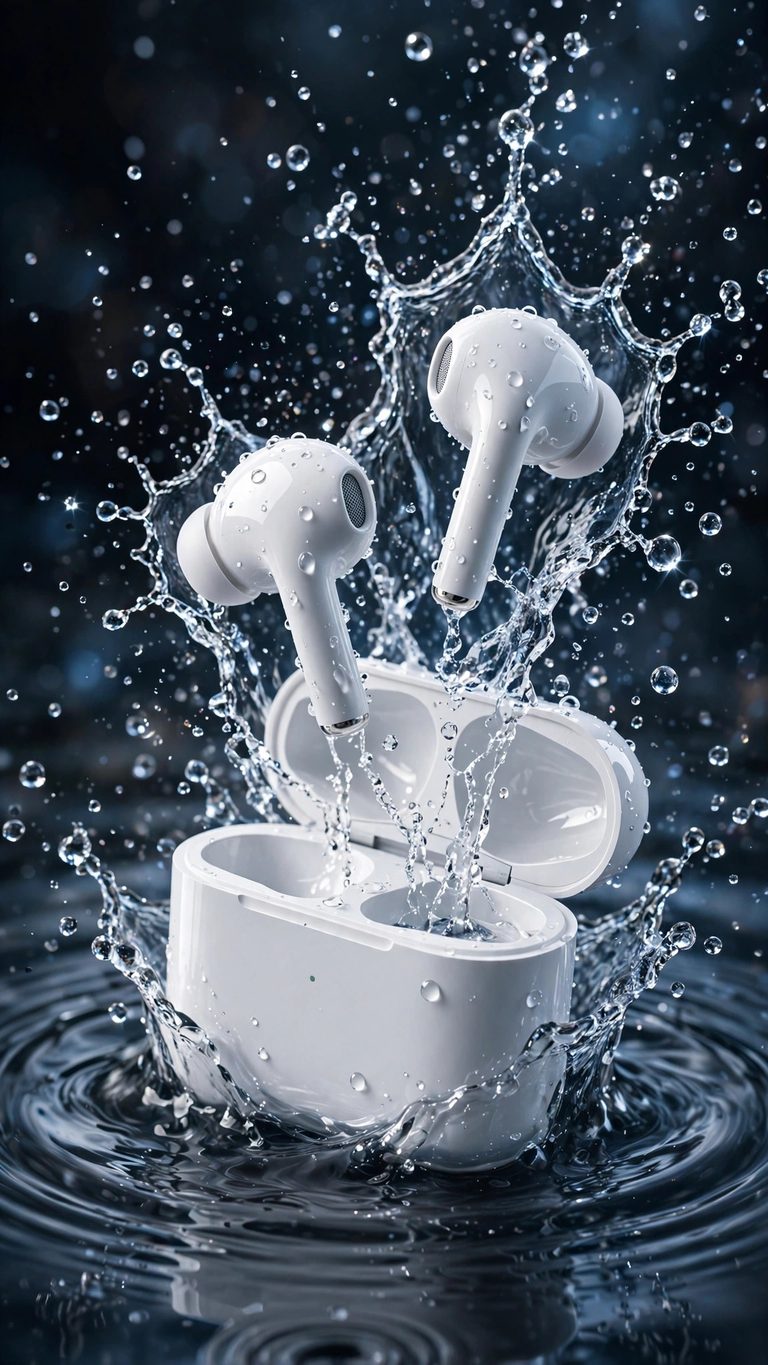
There is a reason the most expensive commercials on television all look the same at their best moments: a product rises out of water in extreme slow motion, droplets hang in the air like tiny chandeliers, and the studio lighting makes every surface gleam. Apple did it. Samsung did it. Luxury perfume houses built entire brands on it. That single visual language tells the viewer, before a word is spoken, that what they are looking at is premium, desirable, and worth paying for. The problem is that shooting real macro slow motion used to require a high-speed cinema camera, a water rig, a lighting technician, and a budget that could buy a car. AI video generation has erased that barrier completely. Today a single well-written prompt can produce the same jaw-dropping splash macro of wireless earbuds that once demanded a full production crew. In this guide we will break down a prompt engineered for exactly that: earbuds emerging from a crystal splash, droplets frozen like diamonds, ripples expanding in perfect circles. Whether you are a dropshipper, a tech reviewer, or a content creator hunting for that viral #ProductVideo aesthetic, this prompt is your shortcut to commercial-grade footage in seconds.
The Prompt
Here is the exact AI video prompt that creates this stunning macro splash scene. Copy it word for word into your AI video generator of choice and watch ordinary earbuds turn into a premium commercial:
Stunning macro slow motion of wireless earbuds emerging from a crystal water splash, droplets frozen mid-air sparkling like diamonds, glossy white case opening, ripples expanding in perfect circles, studio lighting, refreshing premium commercial feel, ultra detailed, photorealistic, 8k, crystal clear refreshment
Why This Prompt Works
This prompt is a masterclass in commercial visual psychology, and every phrase earns its place. Water is one of the most powerful symbols in advertising: it signals freshness, cleanliness, purity, and renewal. When a pair of earbuds emerges from a splash, the viewer unconsciously reads the product as clean, modern, and high-tech. Slow motion multiplies the effect because the human brain is wired to pay attention to things that defy normal speed. Frozen droplets sparkling like diamonds trigger an association with luxury and precision, while perfectly circular ripples satisfy our deep appetite for symmetry and order. Macro framing does the heaviest lifting of all. By filling the frame with extreme detail, it tells the viewer that there is nothing to hide, that the craftsmanship holds up under the harshest scrutiny, and that this is a product engineered with care. Tech content trends confirm the power of this formula. Macro product videos dominate TikTok and Instagram Reels because they deliver instant sensory satisfaction with no context required. Viewers do not need to know the brand, the specs, or the price to enjoy the clip, which makes it infinitely shareable. The glossy white case opening mid-splash adds a micro-narrative, a tiny moment of revelation that keeps eyes locked for the full eight seconds. The #AIVideo community has learned that photorealistic detail plus ultra-clean studio lighting is the combination that separates amateur AI clips from footage that people genuinely mistake for a real shoot. That is shareability in its purest form: a video so beautiful that reposting it feels like sharing art rather than an ad.
How to Use This Prompt
Getting cinematic results from this prompt is straightforward if you follow the right workflow for your tool. The post settings specify 9:16 vertical, 8 seconds, macro slow motion, so set those first before you generate.
Step 1: Choose your generator. Google Veo 3 and Kling produce the most convincing liquid physics for macro shots, while Runway Gen-4 and Pika 2 also handle slow-motion water well. Sora works if you have access.
Step 2: Paste the prompt exactly as written into the text-to-video field. Do not paraphrase it yet; the precise word choices around lighting and detail matter.
Step 3: Set the aspect ratio to 9:16 vertical and the duration to 8 seconds, matching the post settings. Vertical framing keeps the splash and ripples compositionally tight for phones.
Step 4: If your tool supports it, add a negative prompt such as blurry, deformed product, extra buds, watermark to protect the macro geometry.
Step 5: Generate two or three variations and pick the one with the sharpest droplets and the most natural case opening. Water physics is where AI models differ most, so comparing runs pays off.
Step 6: Download the best take, trim the first and last half-second if needed, and you have a finished product shot ready for ads, reviews, or social posts.
Pro Tips & Creative Variations
Once you have the base video working, the real fun begins. This prompt is a template, not a cage, and small edits unlock entirely new campaigns. Swap the glossy white earbuds for matte black ones and a darker studio background to create a completely different mood: stealthy, masculine, gaming-oriented. Replace the water with other liquids for seasonal campaigns. Milk gives a creamy, indulgent feel perfect for a lifestyle ad. Orange juice or iced coffee turns the same prompt into a summer refreshment spot. Colored water, like deep blue or electric teal, makes the clip unmistakable in a feed and works beautifully for brand-color matching. You can add supporting elements to the scene without rewriting the prompt from scratch. A lemon slice or mint leaves beside the splash pushes the freshness angle. Floating ice cubes add a cooling vibe for summer launches. For audio, pair the clip with a crisp splash sound effect followed by a soft bass drop, the classic product-reveal rhythm that performs well on Reels and TikTok. Camera-wise, if your tool allows camera controls, try a slow push-in during the splash to add drama, or generate a matching close-up of the open case alone and edit the two shots together for a mini sequence. Creators making review content can generate the same scene twice, once with the case closed and once open, and use the pair as before-and-after thumbnails. Finally, keep the #Macro hashtag energy alive by chaining variations: water, then colored liquid, then milk, released as a three-part series. Series content trains viewers to follow you for the next drop, which is exactly how product channels grow.
Frequently Asked Questions
Q1: Which AI video generator gives the best macro slow-motion results for this prompt?
A: Google Veo 3 and Kling currently lead for realistic liquid physics and macro detail, making them the best starting points for this splash scene. Runway Gen-4 is a strong alternative with excellent lighting control, and Pika 2 handles short 8-second product clips reliably. If you have Sora access, it also renders water convincingly. Try the same prompt in two tools and keep whichever run has the sharpest droplets and the least product warping.
Q2: My splash looks blurry or the earbuds come out deformed. How do I fix that?
A: Blurry macro shots usually mean the model struggled with motion complexity. First, regenerate the clip two or three times, since quality varies between runs. Second, add a negative prompt such as blurry, deformed, extra objects, watermark to protect the geometry. Third, shorten competing details if a tool lets you edit: simpler backgrounds give the model more capacity for the water and product. Finally, generate at the highest quality setting your plan allows.
Q3: Can I adapt this prompt for other products like perfume bottles or smartwatches?
A: Absolutely. The splash-macro formula works for almost any small premium product. Replace wireless earbuds and case with your product and its packaging, keep the water, droplets, ripples, and studio lighting language intact, and the commercial feel transfers automatically. Perfume bottles, watches, lipstick, and even small gadgets like USB drives all shine in this treatment. It is one of the most reusable prompt structures in product videography.
Q4: What audio should I pair with the video for maximum engagement?
A: Start with a realistic water splash sound effect synced to the moment the earbuds break the surface, then layer a soft cinematic bass note or chime as the case opens. This splash-then-reveal rhythm mirrors professional product ads and keeps viewers watching to the end. For social feeds, trending lo-fi or ambient tracks also work, but keep the splash audible. Videos with synced sound effects consistently outperform silent clips in watch time.
In eight seconds, this AI video prompt turns a simple product into a premium commercial moment that viewers cannot scroll past. The splash, the slow motion, and the diamond-bright droplets do the selling for you. Copy the prompt, generate your first version today, and experiment with liquid and color variations until you find the look that defines your brand. Your next viral product video is one prompt away.
Related Viral Prompts
- Smartphone Teardown Timelapse AI Video Prompt: Reveal Hidden Engineering in a Satisfying 10-Second Clip
- Smart Home Wake-Up AI Video Prompt: Create a Magical Morning Automation Sequence That Feels Like the Future
- VR World Transition AI Video Prompt: Bend Reality With a Mind-Blowing Headset-to-Alien-World Scene in 8 Seconds
# A I V i d e o # P r o m p t B a z a r # E a r b u d s # M a c r o # P r o d u c t V i d e o


Leave a Reply