
Introduction
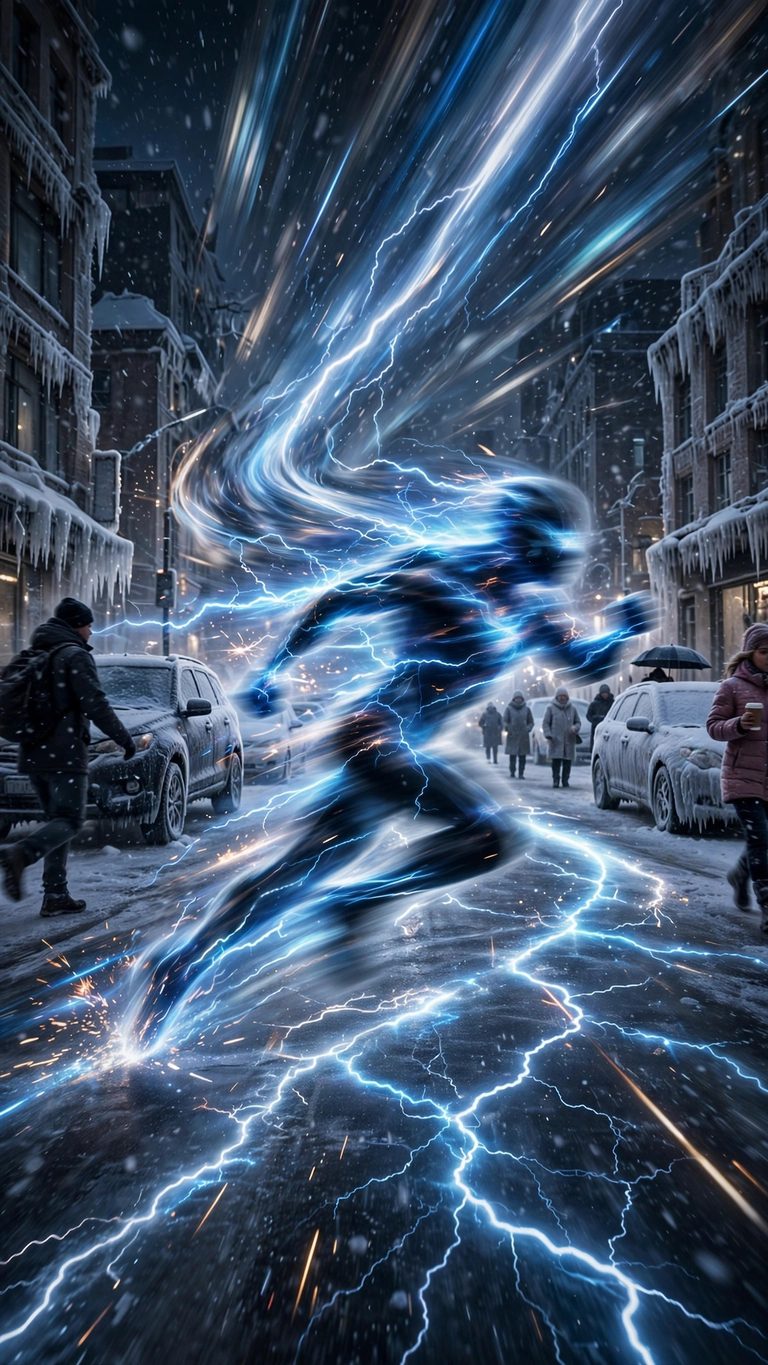
There is a reason the speedster sprint is one of the most rewatched moments in superhero cinema. When time itself seems to stop and a single hero moves between frozen raindrops, every viewer feels the same rush: the thrill of power so absolute it bends physics. From the iconic slow-motion corridor runs to the lightning-charged dashes that set social media on fire, the time-freeze speedster sequence is pure #Superhero spectacle engineered for the scroll era. It packs an entire story arc – tension, wonder, and release – into a few breathless seconds, which is exactly why #Speedster clips dominate the #AIVideo hashtag on TikTok, Instagram Reels, and YouTube Shorts.
This article hands you a battle-tested viral AI video prompt that recreates that exact sensation: a mind-bending race through a frozen city where your hero is nothing but a streak of lightning threading between motionless cars and pedestrians. The #PromptBazar team built this prompt to be plug-and-play across Veo 3, Runway, Kling, Pika, and Sora, so whether you are a first-time creator or a seasoned AI filmmaker, you can generate a cinematic, ultra-realistic #Flash-style sequence tonight. Below you will find the exact prompt, a breakdown of why every phrase earns its place, a step-by-step generation workflow, pro-level variations, and answers to the questions creators ask most. Copy the prompt, hit generate, and watch your comments section light up.
The Prompt
Copy the text below exactly as written – punctuation and all – and paste it into your AI video generator of choice:
Mind-bending speedster sequence racing through a frozen city, the hero a blur of lightning weaving between motionless cars and pedestrians, time appearing stopped, camera struggling to track the streak, lightning trails painting the streets, then everything snapping back to normal speed, exhilarating time-bending rush, ultra realistic, cinematic
Why This Prompt Works
This prompt is a masterclass in contrast-based visual storytelling, and contrast is the engine of virality. The opening phrase, “mind-bending speedster sequence,” immediately establishes genre and scale, while “racing through a frozen city” creates the core tension: motion against stillness. AI video models like Veo 3 and Kling respond powerfully to this kind of binary opposition because it gives them a clear compositional rule – most of the frame is static, one element moves. The result is footage that reads as intentional cinematography rather than random AI noise, which is the difference between a clip people skip and one they loop.
The middle of the prompt layers sensory detail that forces the model to render a dynamic scene instead of a static image with slight wobble. “The hero a blur of lightning weaving between motionless cars and pedestrians” gives the generator a subject, a motion signature (lightning), and obstacles to weave through, which produces depth and parallax – two ingredients that make AI video feel three-dimensional. “Time appearing stopped” reinforces the frozen-world concept so the model does not accidentally animate the background crowd. “Camera struggling to track the streak” is a subtle but brilliant camera-direction cue: it tells the model to simulate handheld, reactive cinematography, which adds realism and kinetic energy that static camera angles cannot match.
Then comes the payoff architecture. “Lightning trails painting the streets” adds a light-painting effect that looks spectacular in thumbnail frames and first-second hooks, while “everything snapping back to normal speed” delivers the release beat – the moment of catharsis that makes viewers exhale and hit replay to catch what they missed. “Exhilarating time-bending rush” locks in the emotional tone, and the closing duo “ultra realistic, cinematic” is the quality anchor that pushes the model toward filmic lighting, lens depth of field, and color grading instead of flat digital renders. Every single phrase earns its place, and together they form a complete three-act micro-narrative inside one prompt.
How to Use This Prompt
Step 1 – Pick your generator. For maximum photorealism, paste this into Google Veo 3 or OpenAI Sora. For more control over motion and camera, use Runway or Kling, where you can pair the prompt with camera-motion settings. Pika works well if you want a slightly stylized, comic-book-charged look.
Step 2 – Set your format. For TikTok, Reels, and Shorts, choose 9:16 vertical at 1080×1920. For YouTube or a trailer-style cut, use 16:9. Most tools generate 5-10 seconds per run; aim for at least two generations so you can stitch a beginning and an end.
Step 3 – Paste the full prompt. Do not paraphrase it on your first run – the phrasing has been tuned for how diffusion video models parse motion language. Paste it verbatim into the text prompt field.
Step 4 – Add technical guardrails. In tools that support negative prompts, add: “blurry faces, extra limbs, morphing cars, watermark, text overlay.” This keeps the frozen pedestrians from melting into surreal shapes.
Step 5 – Generate twice and pick the winner. AI video is stochastic; run the prompt at least twice with different seeds. Choose the take with the cleanest lightning trails and the most dramatic snap-back moment, then trim the weakest frames in any editor.
Step 6 – Sound and captions. Layer a rising whoosh-to-boom sound design and add a one-line hook caption in the first second (“POV: time stops, but you don’t”). Export, post with your hashtags, and you are done.
Pro Tips & Creative Variations
Once you have the base version working, this prompt becomes a playground. Change the environment: swap “frozen city” for “rain-soaked neon downtown at night” and the lightning trails will reflect off wet asphalt for a completely different mood. Try “frozen desert highway at golden hour” for a lone-rider western energy, or “a packed stadium mid-goal” for a sports-miracle variant that plays beautifully with #Speedster fans.
Direct the camera harder. Append phrases like “drone shot pulling back,” “first-person POV sprint,” or “slow-motion close-up of the hero’s eyes mid-run” to steer the model toward specific cinematography. If your tool supports image-to-video, generate a still of the frozen street first, then animate only the lightning streak – this gives you far more control over the composition.
Build a sequence, not a clip. Generate three shots: the freeze (city stops), the run (lightning weaves through), and the snap-back (pedestrians gasp as wind hits). Stitch them with hard cuts and a bass drop, and you have a 15-second short film instead of a one-note clip. Series perform better than singles: post “Speedster Run #1, #2, #3” across a week and watch the #AIVideo and #PromptBazar audience follow along.
Mind the common failure modes. If pedestrians start sliding or cars warp, shorten the background description and strengthen the stillness cue (“every person and car perfectly motionless, only the hero moves”). If the hero looks like a smear, add “recognizable humanoid silhouette inside the lightning blur.” Two or three iterations usually land a keeper.
Frequently Asked Questions
Which AI video tool gives the best results for this prompt? Veo 3 currently leads on photorealistic motion and coherent physics, which matters for the frozen-crowd effect. Kling is a close second and often better at camera language like “struggling to track.” Runway gives you the most post-generation control with motion brushes. Try Veo 3 first, then Kling if you want a different flavor.
Can I make this vertical for TikTok and Reels? Absolutely – in fact, you should. Set 9:16 before generating rather than cropping a 16:9 output, because cropping a speedster streak usually cuts the lightning trails that make the shot. Vertical framing also keeps the hero centered while the city rushes past the edges.
How do I stop the frozen people from looking distorted? Use a negative prompt with “deformed faces, morphing bodies, extra limbs,” keep generations short (5 seconds), and pick the cleanest take. Image-to-video workflows help too: lock the frozen street as a still image, then animate only the speedster layer.
Can I add music or dialogue? Yes. This prompt produces silent footage, so add trending audio or a cinematic score in editing. A single whispered line (“Nobody saw me coming”) over the snap-back moment can turn a cool clip into a story people share.
Time is the ultimate superpower, and now it is yours to direct. Paste this speedster prompt into your favorite AI video generator, generate your frozen-city sprint, and post it with #AIVideo, #PromptBazar, #Superhero, #Speedster, and #Flash. Then tell the community what you built – the fastest creators are already racing. Your turn: hit generate and outrun time itself.
Related Viral Prompts
- One Hero vs Robot Army: Free Viral AI Video Prompt for Epic Cinematic Superhero Battle Scenes Everyone Will Share
- Shield vs Explosion Showdown: Free Viral AI Video Prompt for Cinematic Superhero Defense Moments That Break the Internet
- Skyscraper Leap of Faith: Free Viral AI Video Prompt for Cinematic Superhero Freefall Scenes That Stop Hearts Cold
# A I V i d e o # P r o m p t B a z a r # S u p e r h e r o # S p e e d s t e r # F l a s h

Leave a Reply