
Introduction
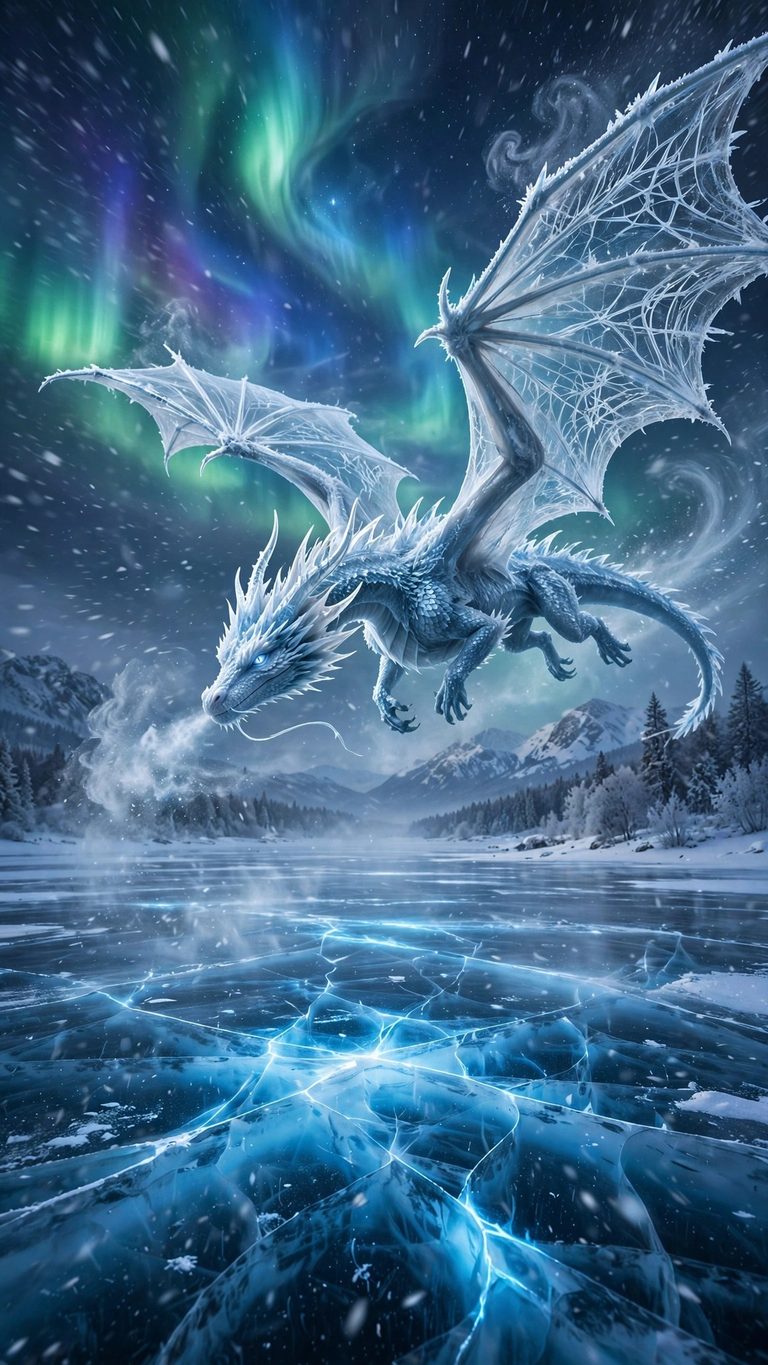
Winter has never looked this magical. Picture an elegant ice dragon with translucent frozen wings gliding low over a vast frozen lake, its breath crystallizing the air into sparkling mist, the aurora borealis dancing overhead in curtains of green and violet, ice cracking beneath it in glowing patterns, and snowflakes swirling through a camera that skims the ice surface. It is a frozen fairytale rendered in ten seconds, and it is one of the most beautiful prompts in this entire collection. Ice dragon content thrives because it merges two proven viral aesthetics: the eternal popularity of dragons and the dreamlike allure of the aurora, a combination that stops scrollers cold. Cool-toned, luminous visuals stand out dramatically on feeds saturated with warm sunset content, and the serene, gliding motion offers a calming contrast to the frantic energy of most short-form video, which makes viewers linger. That linger time, plus the save-worthy beauty, signals quality to every platform algorithm. This guide gives you the exact prompt, unpacks why frozen fantasy enchants audiences, and walks you through generating your ice dragon in Veo 3, Kling, Runway, Pika, or Sora.
The Prompt
Here is the full prompt, ready to copy and paste into your favorite AI video generator:
Breathtaking fantasy scene of an elegant ice dragon with translucent frozen wings gliding low over a vast frozen lake, its breath crystallizing the air, aurora borealis dancing above, ice cracking in glowing patterns beneath it, snowflakes swirling, camera skimming the ice surface, frozen fairytale magic, ultra realistic, cinematic
Why This Prompt Works
This prompt works through the psychology of luminous cool beauty. While most viral video leans on warm, high-energy palettes, icy blues, teals, and aurora greens occupy a rarer visual lane, and rarity captures attention precisely because the feed is not full of it. The aurora borealis is one of the most saved natural phenomena on social media; people collect aurora videos like postcards, and placing a dragon beneath one merges a bucket-list natural wonder with fantasy, doubling the save incentive. The ice dragon’s translucent frozen wings are a masterstroke of material contrast: transparency and refraction catch light in ways opaque creatures cannot, creating prismatic highlights that feel genuinely magical. Motion here is gliding rather than frantic, and that serenity is strategic: calm, beautiful motion increases watch time because viewers relax into the scene instead of bracing for the next cut, and relaxed viewers watch to the end and loop. The ice cracking in glowing patterns beneath the dragon adds a satisfying detail layer; glowing cracks spread organically, giving the eye a secondary show to follow while the dragon holds the primary focus. The breath crystallizing the air is the kind of micro-detail that separates premium AI video from generic output, tiny sparkling particles that reward rewatching. Platform trends confirm the formula: #Aurora content peaks every winter and during solar storm news, dragon content has a massive evergreen fandom, and #Frozen aesthetics trend hard from November through February. Ultra realistic and cinematic ensure the ice textures, aurora gradients, and snow particles render with photographic richness. The 9:16 vertical format stacks the composition beautifully: aurora above, dragon mid-frame, glowing ice below, a perfect three-layer phone-screen composition.
How to Use This Prompt
This prompt runs beautifully on every major AI video model. In Veo 3, paste the prompt into text-to-video with a 9:16 vertical canvas and ten-second duration; Veo 3 excels at translucent materials and atmospheric light, so the frozen wings and aurora will glow convincingly. In Kling, professional mode renders the low gliding flight and skimming camera move with lovely motion coherence; Kling is a strong choice for graceful creature movement. In Runway, use the latest model in vertical orientation and its camera controls to lock in the ice-surface skim if the default framing rises too high. In Pika, the cinematic preset with a ten-second clip enhances the dreamy, fairytale mood naturally. In Sora, paste the full prompt in portrait format and let its composition instincts arrange the aurora, dragon, and ice layers. Generate four to six seeds, because aurora shapes and ice-crack patterns vary enormously, and select the take where the dragon’s silhouette is crisp against the sky and the glowing cracks are clearly visible. If your tool supports image-to-video, consider generating a still of the scene in Flux or Midjourney first for precise art direction, then animating the glide. Export at 1080×1920, and pair the clip with ethereal, music-box, or soft cinematic trending audio; gentle sound design with wind and crystalline chimes will complete the frozen fairytale, and the #AIVideo tag will carry it to fantasy audiences.
Pro Tips & Creative Variations
The aurora is your palette, so experiment boldly. Classic green-and-violet auroras read instantly as the northern lights, but a rare red aurora creates an otherworldly blood-sky fantasy, and a teal-and-gold aurora feels like pure magic. Change the landscape: a dragon gliding over a frozen waterfall, through an ice canyon with blue glacial walls, or above a snow-covered pine forest, each gives the same prompt a completely fresh video. You can redesign the dragon with frost-breath that freezes a trail behind it, crystalline spines that catch the aurora light, or feathered ice wings instead of bat-like membranes for a more elegant, phoenix-like silhouette. The pro tip about the breath crystallizing is essential: that sparkling exhale is the detail viewers mention in comments, so never cut it, and consider emphasizing it by describing glittering ice crystals swirling from its nostrils. Add life by describing a pack of arctic wolves running across the ice below, looking up as the dragon passes, which adds scale, story, and a second shareable animal. Seasonal timing is a superpower here: schedule this content for the first cold snap or the winter holidays, when #Frozen and aurora searches surge, and caption it as a winter dream. Camera variations include a side-profile tracking shot that shows the full wingspan against the aurora, or a dramatic rise from ice level to reveal the dragon backlit by the lights. For a series, generate three clips, the dragon waking in an ice cave, the lake glide, and an ascent into the aurora, and post them as a sequence to build a following. The source notes confirm aurora plus dragon is a double viral element, so caption accordingly and let both fandoms find you.
Frequently Asked Questions
Which AI video tool renders the ice dragon best?
Veo 3 leads for translucent materials like the frozen wings and for realistic aurora gradients. Kling is excellent for the smooth gliding motion and the ice-skimming camera move. Runway gives you the most camera control, Pika’s cinematic preset suits the fairytale mood, and Sora composes stunning layered fantasy scenes. Compare seeds across your preferred tool before switching.
How do I keep the aurora from looking fake?
The key is variation and softness: choose seeds where the aurora has wispy, curtain-like structure rather than flat bands of color, and keep the classic green-violet palette the source recommends, since audiences recognize it as authentic. Rendering at maximum resolution preserves the gradient smoothness, and the ultra realistic tag in the prompt already steers generators away from cartoonish skies.
Can I turn this into a winter content series?
Absolutely, and you should. The prompt adapts beautifully: keep the ice dragon description identical and change only the setting, a glacier, a frozen forest, a snowstorm village, to build a recognizable series character. Consistent character plus varied scenes is one of the most effective formats for growing a fantasy AI video account through winter.
What music fits an ice dragon video?
Ethereal vocals, music-box melodies, soft piano, or cinematic ambient tracks all complement the serene gliding motion. Avoid heavy beats that fight the calm pacing; instead, let a gentle crescendo land as the dragon banks beneath the brightest part of the aurora. Trending winter and fantasy audios on TikTok and Reels will boost discovery.
An ice dragon gliding beneath the aurora is winter fantasy at its most enchanting, the kind of beauty people save for cold nights and share with people they love. Copy the prompt, craft your frozen fairytale, and let the northern lights do the rest. Winter is coming, and your content is ready.
Related Viral Prompts
- Fairy Queen AI Photo Prompt: Generate an Enchanting Moonlit Garden Fantasy Image with Ethereal Magic & Wonder
- Minotaur Labyrinth AI Photo Prompt: Generate a Dark Cinematic Fantasy Image of the Legendary Bull-Headed Beast
- Basilisk Cave AI Photo Prompt: Create a Terrifying Dark Fantasy Image of the Giant Serpent with Hypnotic Eyes
# A I V i d e o # P r o m p t B a z a r # I c e D r a g o n # F r o z e n # A u r o r a


Leave a Reply