
Introduction
In the beautiful chaos of a wedding day, some moments pass in less than thirty seconds and yet carry the entire weight of the ceremony. The ring exchange is one of them. Two hands meet, a band of gold slides onto a finger, and in that tiny gesture a lifetime of promises is sealed. The guests may be watching, the music may be swelling, but for the couple, the world has narrowed to nothing but those trembling hands. It is no surprise that this exact instant is one of the most replayed, most screenshot, most saved shots in every wedding highlight reel ever made. The problem is that real wedding footage of this moment is often rushed, shaky, or blocked by an enthusiastic aunt with a phone. That is where a purpose-built AI video prompt changes everything. With this #RingExchange #Wedding #Macro prompt, you can generate a flawless, hyper-detailed cinematic close-up of the ring exchange on demand, framed perfectly, lit beautifully, and free of photobombers. Whether you are a wedding content creator building highlight reels, a couple recreating a missed moment, or a videographer selling cinematic packages, this #AIVideo prompt delivers the intimate sacred shot your audience will feel in their chest.
The Prompt
Copy the exact prompt below and paste it into your favorite AI video generator to create this breathtaking ring exchange macro scene.
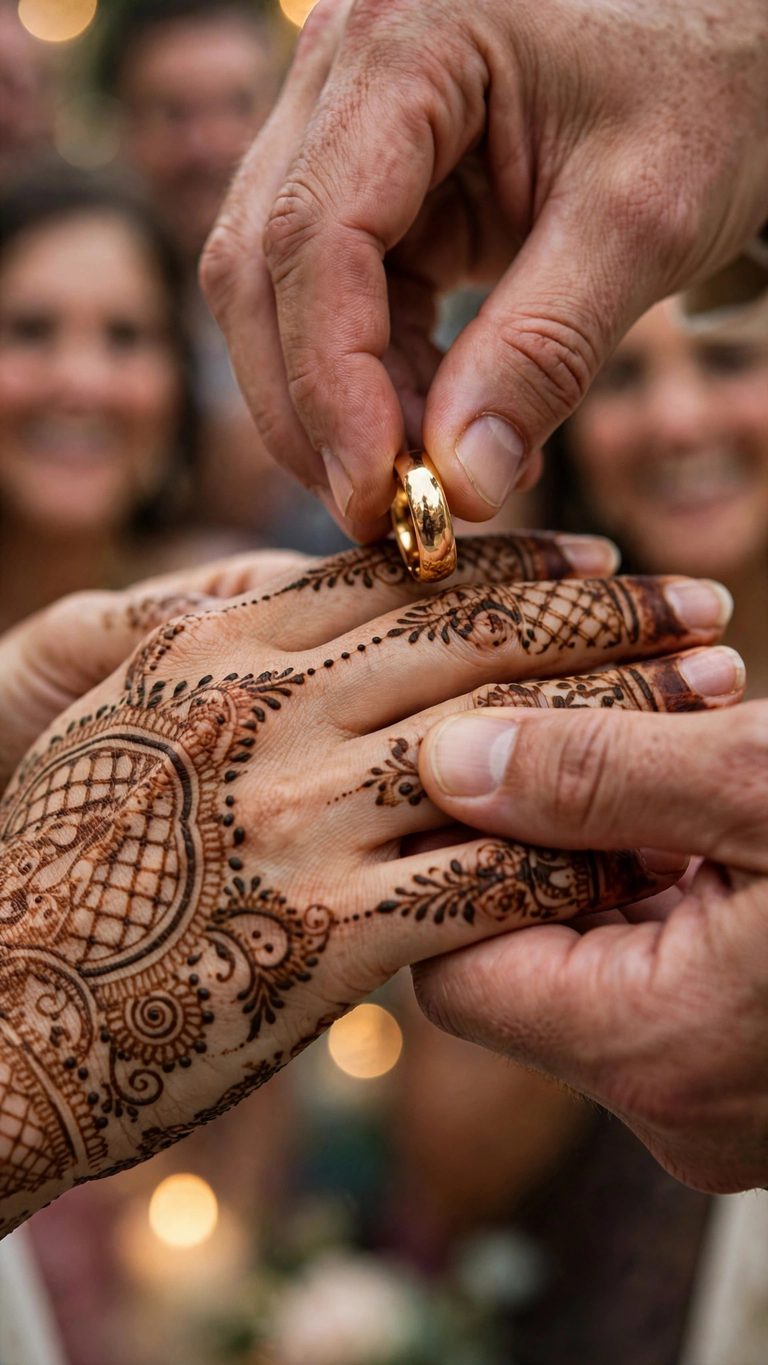
Intimate macro shot of wedding rings being exchanged, trembling hands, intricate mehendi visible, ring glinting as it slides on, soft blurred background of smiling faces, sacred emotional moment, hyper-detailed, ultra realistic, cinematic wedding film, 8k, sacred thread visible on wrist, eternal bond sealed
Why This Prompt Works
This prompt is a masterclass in how specificity steers a generative video model, and every clause earns its place. The opening phrase, “intimate macro shot,” does two jobs at once: it locks the camera distance and it sets the emotional register. Macro tells the model to render extreme detail, which is exactly what sells a #RingExchange scene, because the entire drama lives in millimeters. “Trembling hands” is arguably the most important motion cue in the whole prompt. Without it, the model would render a static, sterile close-up; with it, the hands gain a subtle, human micro-movement that reads as nervous love, and that tiny tremor is what makes viewers hold their breath. “Intricate mehendi visible” anchors the scene in South Asian wedding culture and gives the model rich texture to chew on, while “ring glinting as it slides on” adds both a light interaction and a precise action beat. The glint matters because specular highlights on metal are a strong realism signal for video models, and “as it slides on” turns a pose into an event. The “soft blurred background of smiling faces” uses bokeh to keep attention locked on the hands while still suggesting a joyful crowd, a classic wedding cinematography trick compressed into one phrase. “Sacred emotional moment” and “eternal bond sealed” feed the model an emotional and narrative tone, nudging color, pacing, and framing toward reverence rather than spectacle. Then comes the quality stack: “hyper-detailed, ultra realistic, cinematic wedding film, 8k” is a proven combination that consistently pushes generators toward premium rendering with filmic grain and controlled contrast. Finally, the “sacred thread visible on wrist” is a culturally specific grounding detail that makes the shot feel authentic to Hindu and South Asian ceremonies rather than generically Western. Each phrase narrows the model’s imagination in a productive direction, which is why the output lands as #ViralReels-ready cinema instead of a bland stock clip.
How to Use This Prompt
Using this prompt is simple, but each platform rewards a slightly different workflow. Here is a step-by-step guide for the major AI video tools. Step one: copy the prompt character for character from the
block above, including the commas, because the phrase ordering was tuned deliberately. Step two: set your canvas to 9:16 vertical, roughly 8 seconds, which matches the original post settings and is ideal for Instagram Reels, TikTok, and YouTube Shorts. In Veo 3, paste the prompt into the text-to-video field, enable the highest quality mode, and let the model handle the motion, since its native physics do an excellent job with the sliding ring and trembling hands. In Runway, use Gen-4 with the prompt and set camera motion to a subtle push-in or leave it static; add a slight negative prompt like "blurry hands, extra fingers" to protect the macro detail. In Kling, switch to Professional Mode for the sharpest macro rendering and generate two variants, keeping the one where the ring glint reads clearly. In Pika, paste the prompt and dial effects to low so the model does not over-stylize the realism. In Sora, keep the prompt as-is and request the 8-second duration, since Sora excels at preserving small-object coherence like rings and jewelry. Step three: if the first render has warping on the fingers, regenerate with the seed locked or nudge "trembling hands" to "hands trembling slightly," which often stabilizes the motion. Step four: export, add a soft piano or string bed, and post with your wedding hashtags.Pro Tips & Creative Variations
Once you have the base render, there is a lot of room to make this #RingExchange macro your own. First, experiment with depth of field: append "shallow depth of field, extreme close-up on the band" for an even more luxurious jewelry-commercial feel, or "rack focus from mehendi to ring" to add a cinematographer's focus pull that makes the clip feel directed rather than generated. Second, play with time: the original is real-time, but adding "slow motion" creates a dreamier, more emotional variant that performs beautifully as a #Wedding #Cinematic slow-mo reel. Third, vary the cultural details to match your audience. Swap "sacred thread visible on wrist" for "henna patterns intricate" for a Muslim or fusion ceremony, or for "lace glove on hand" for a Western church wedding, and the whole scene re-contextualizes instantly. Fourth, try a lighting remix: "golden candlelight" gives a warm, intimate evening mood, while "soft window light" gives a fresh, airy morning feel, and each one changes the emotional temperature of the clip. Fifth, build a mini sequence. Generate three variants, one wide of the couple at the altar, this macro as the centerpiece, and one of the smiling faces in the background brought into focus, and you have a thirty-second story arc that feels like a professional highlight edit. Sixth, mind the negative prompts on every platform: "extra fingers, deformed hands, melting jewelry" is the trio that saves macro shots. Seventh, for commercial use, render at the highest resolution available and keep the master file, because a pristine #Macro ring shot is endlessly reusable across wedding planner portfolios, jeweler ads, and #PromptBazar showcase reels.
Frequently Asked Questions
Q: Will AI video generators mess up the hands in a macro shot like this?
A: Hands are historically the hardest part of close-up generation, which is why this prompt pairs "trembling hands" with "hyper-detailed" and "ultra realistic." In practice, Veo 3 and Kling handle this scene well. If you see finger warping, regenerate with a negative prompt of "extra fingers, deformed hands" and try a shorter 5 to 6 second duration, which reduces the chance of drift.Q: Can I adapt this prompt for a Western-style wedding without the mehendi?
A: Absolutely. Replace "intricate mehendi visible" and "sacred thread visible on wrist" with details like "lace cuff" or "simple gold band," and the model will render a clean Western ceremony variant. The emotional core of the prompt, the trembling hands and the glinting ring, works across every culture.Q: What duration and aspect ratio work best for this clip?
A: The sweet spot is 8 seconds in 9:16 vertical, which matches the original post settings. That is long enough for the ring to slide on and the glint to catch, and short enough to hold attention on Reels and TikTok. For YouTube or a wedding website hero section, render a 16:9 version too.Q: How do I make the generated clip feel like part of a real wedding film?
A: Color grade it to match your other footage, add a gentle film grain overlay, and lay in ambient audio like soft murmurs or a string swell. Cutting this macro between a wide altar shot and a reaction shot of smiling faces sells the illusion completely, and viewers will never guess it was generated.In the end, the ring exchange is proof that the smallest frames can hold the biggest feelings. This prompt gives you that frame on demand, cinematic, intimate, and flawless, ready to drop into any wedding film or viral reel. Copy it, generate your macro moment, and share it with the world, because a shot this tender deserves an audience. Try the prompt today and watch your #Wedding content glow with sacred, golden detail.
Related Viral Prompts
- Magical First Dance AI Video Prompt: Glowing Spotlight Wedding Scene for Veo 3, Kling, Runway & Sora Cinema
- Sparkler Send-Off AI Video Prompt: Festive Night Wedding Finale for Veo 3, Runway, Kling & Pika Films
- Groom Waiting Candid AI Video Prompt: Emotional Wedding Morning Moment for Veo 3, Runway & Kling Videos
# A I V i d e o # P r o m p t B a z a r # R i n g E x c h a n g e # W e d d i n g # M a c r o # V i r a l R e e l s

Leave a Reply