
Introduction
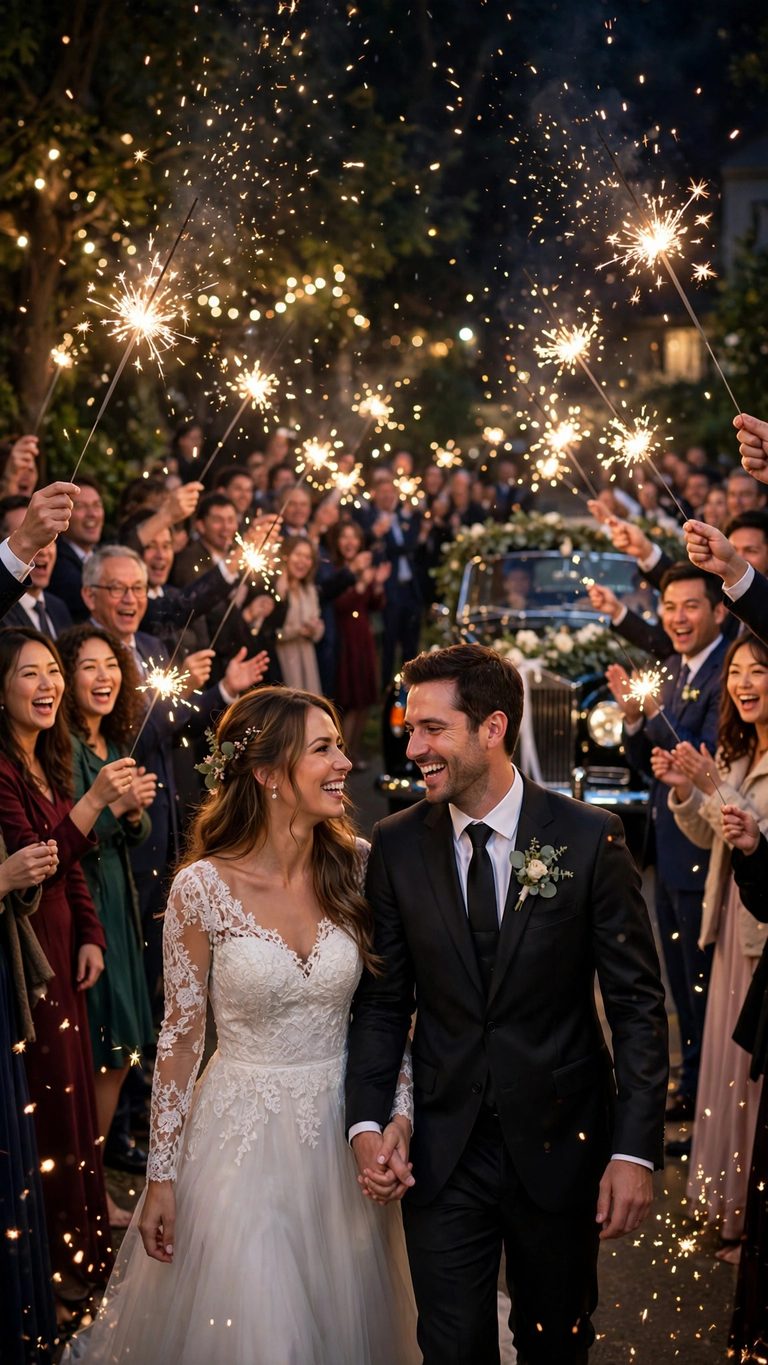
Every great celebration needs a grand finale, and in the world of weddings, nothing says “happily ever after” quite like a sparkler send-off. Picture it: night has fallen, the reception is winding down, and the newlyweds step outside to find two lines of their favorite people holding sparklers aloft, forming a tunnel of living light. Sparks fly, cheers rise, and the couple walks through it all toward a waiting car with a “just married” sign swinging from the bumper. It is pure movie magic, the kind of ending that makes guests tear up and photographers scramble. But real sparkler send-offs are chaotic to film: sparklers burn out in forty-five seconds, guests wave them into the frame, and the lighting is a nightmare of blown highlights and crushed shadows. This #Sparkler #SendOff #Wedding prompt skips all of that. It generates a flawless, festive, cinematic farewell in one pass, with perfect sparkler trails, joyful energy, and a storybook ending, ready to close out any wedding film or light up a #ViralReels feed with celebratory joy.
The Prompt
Copy this prompt into your AI video generator to create a festive, cinematic sparkler send-off scene bursting with celebration.
Festive night shot of a newlywed couple walking through a tunnel of guests holding sparklers, sparks flying, joyful cheering, car waiting with just-married sign, camera following behind, celebratory grand finale energy, ultra realistic, cinematic wedding film, 8k, rice thrown in blessing, joyous farewell energy
Why This Prompt Works
This prompt works because it stages a complete narrative scene, not just a pretty image, and every element reinforces the story of a joyful farewell. The core composition, “a tunnel of guests holding sparklers,” is brilliant scene design for a video model: it creates natural leading lines that draw the eye straight to the couple, and it fills the frame with dozens of small light sources, which gives the model rich, dynamic lighting to render. “Sparks flying” adds particle motion, and particle systems are something generative video handles with genuine beauty, each spark becomes a tiny streak of light that sells the festivity. “Joyful cheering” and “joyous farewell energy” inject emotional motion into the crowd, so the guests read as celebrating rather than standing stiffly, which is a common failure mode in AI crowd scenes. The “car waiting with just-married sign” is a storytelling masterstroke: it gives the scene a destination and a classic visual payoff, the universal symbol of the wedding exit, and it grounds the fantasy in a recognizable tradition. “Camera following behind” is the perfect camera choice for a send-off because it mirrors how a real videographer would shoot it, trailing the couple into their future, and it keeps the sparkler tunnel visible in the foreground where it belongs. The emotional bookends, “festive night shot,” “celebratory grand finale energy,” tune the whole render toward warmth and exhilaration. The quality stack of “ultra realistic, cinematic wedding film, 8k” ensures premium texture, and “rice thrown in blessing” adds a culturally resonant detail that enriches the frame with even more motion and meaning. The result is a clip that feels like the last scene of a romantic film, which is exactly why #SendOff content gets shared: it delivers closure, joy, and spectacle in a single #AIVideo.
How to Use This Prompt
Follow these steps to get a flawless sparkler send-off on each major platform. Step one: copy the prompt exactly from the
block above. Step two: set 9:16 vertical and a 10-second duration, matching the original post settings, which gives the couple time to walk the full tunnel. In Veo 3, paste the prompt in text-to-video at the highest quality; Veo's handling of night scenes and point lights makes the sparklers glow beautifully without blowing out. In Runway, use Gen-4 and consider a subtle "push in" camera move layered on the following shot for extra momentum; if sparks look sparse, add "dense sparkling trails" to the prompt. In Kling, Professional Mode will keep the crowd coherent, which matters here because there are many background figures; generate twice and pick the version where faces look most natural. In Pika, keep stylization low to preserve the "ultra realistic" night photography feel. In Sora, the full 10 seconds lets the walk breathe, and Sora is strong at maintaining consistent sparkler brightness across frames. Step three: check the just-married sign for garbled text, since AI models sometimes struggle with signage; if it is unreadable, regenerate or plan to overlay your own text in editing. Step four: in post, add crowd cheering and a triumphant music sting, and consider a subtle light-leak or film-burn transition into this clip, because as a finale it deserves a dramatic entrance. Step five: post it as the closing shot of a wedding recap reel, where its grand-finale energy will earn saves and shares.Pro Tips & Creative Variations
The sparkler send-off is endlessly remixable. First, change the exit vehicle for a fresh twist: swap "car waiting with just-married sign" for "vintage convertible with flowers," "horse-drawn carriage," or "couple boarding a decorated boat," and each version tells a different fairy-tale ending. Second, vary the send-off material. Replace the sparklers with "guests throwing flower petals," "biodegradable confetti cannons," or "guests waving glow sticks" for daytime or venue-friendly alternatives that keep the tunnel composition intact. Third, play with the time of energy: add "slow motion" to turn the walk into a dreamy, emotional farewell, or keep it real-time for raw, infectious party energy; both perform well, but slow motion tends to earn more saves on #Wedding #Cinematic reels. Fourth, adjust the crowd. "Tunnel of guests" can become "tunnel of bridesmaids in matching dresses" for a more stylized, color-coordinated look, or "small intimate circle of family" for a tender, emotional variant. Fifth, build the finale sequence: open with the couple's last dance, cut to this send-off as the peak, and close on the car's taillights disappearing down a dark road with the just-married sign visible, and you have a three-shot ending worthy of a feature film. Sixth, mind the night-exposure balance: if the render comes out too dark, append "sparklers illuminating faces warmly" to lift the crowd, or if it is too bright, add "deep night sky" to restore the contrast. Seventh, for commercial wedding vendors, this clip is gold for "book your farewell" style ads, so render a 16:9 version as well and keep the master file for campaigns.
Frequently Asked Questions
Q: The text on the just-married sign looks garbled. What should I do?
A: AI video models still struggle with small text. Try regenerating, since text often resolves on a second or third attempt, or simplify by removing the sign from the prompt and adding your own clean text overlay in editing. A custom overlay actually looks sharper and lets you brand the clip.Q: Can I make a daytime version of this send-off?
A: Yes. Replace "festive night shot" with "golden hour" or "bright daylight" and swap sparklers for "flower petals" or "confetti," since sparklers do not read well in daylight. The tunnel composition and following camera work just as beautifully in the sun.Q: How do I avoid the crowd looking like blurry mannequins?
A: Crowd coherence is the main challenge here. Use Kling Professional Mode or Veo 3's highest setting, keep the duration at 10 seconds or under, and add "natural faces, guests smiling and cheering" to encourage lively expressions. If a few background faces still look off, they will be partially hidden by sparkler glow anyway.Q: What is the best way to use this in a full wedding film?
A: Place it as the final shot, always. A send-off is narrative closure, so it should come after the last dance and before the credits or end card. Pair it with an uplifting music swell and let it run a beat longer than you think, because audiences love to linger in a happy ending.Every love story deserves a spectacular final scene, and the sparkler send-off is the most joyful goodbye in the wedding playbook. With this prompt, you can direct that perfect farewell anytime, no permits, no fire hazards, no retakes, just pure cinematic celebration. Generate your grand finale, set it to triumphant music, and send your #Wedding content off in style. Try the prompt tonight and give your audience the happy ending they came for.
Related Viral Prompts
- Groom Waiting Candid AI Video Prompt: Emotional Wedding Morning Moment for Veo 3, Runway & Kling Videos
- Joyful Wedding Cake Cutting AI Video Prompt: Celebration Scene for Veo 3, Runway, Kling & Pika Films
- Golden Hour Bridal Portrait AI Photo Prompt: Regal Red & Gold Wedding Photography in Stunning 8k Detail
# A I V i d e o # P r o m p t B a z a r # S p a r k l e r # S e n d O f f # W e d d i n g # V i r a l R e e l s

Leave a Reply