
Introduction
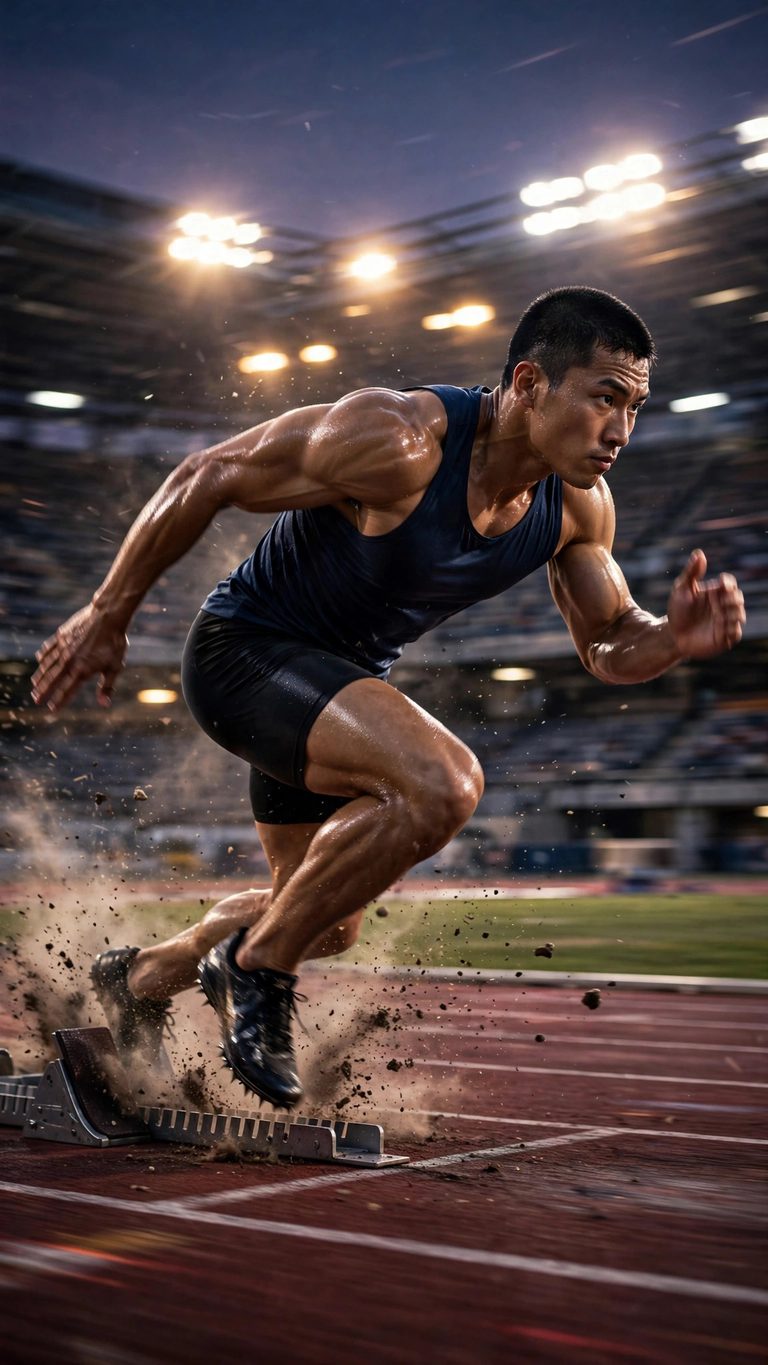
The first three strides out of the blocks decide a sprint before it has barely begun. Coaches spend careers trying to capture that explosion on film: the coiled tension in the set position, the violent release, spikes tearing at the track, dust hanging in the stadium light. It is one of the most electrifying moments in all of sport, and it is over in about a second and a half. This AI video prompt freezes that lightning and stretches it into cinema. A sprinter explodes from the starting blocks on a running track, muscles coiling and releasing in visible waves, dust kicking up from the spikes as a low tracking camera races alongside, the background smearing into motion blur while the athlete stays tack-sharp, stadium lights blazing at dusk. The dramatic slow motion on those first three strides turns biomechanics into ballet. Sprint content has a devoted audience of runners, coaches, and track fans who analyze every frame, and a clip this clean becomes reference material they share in training groups. Whether you cover athletics, coach sprinters, or create sports motivation content, this prompt delivers a shot that would normally require a high-speed cinema camera, a stadium booking, and an elite athlete. You get it from a paragraph of text.
The Prompt
Here is the complete original prompt. Copy it exactly as written and paste it into your AI video generator of choice.
High-speed shot of a sprinter exploding out of starting blocks on a running track, muscles coiled then releasing, dust kicking up from spikes, low tracking camera racing alongside, motion blur on background, intense focus in eyes, stadium lights blazing at dusk, dramatic slow motion on the first three strides, ultra realistic, cinematic sports film, 8k
Why This Prompt Works
Speed is the hardest thing to fake and the easiest thing to ruin in AI video, which makes this prompt’s construction worth studying. It begins by naming both the subject and the technical treatment: a high-speed shot of a sprinter exploding out of starting blocks. That opening tells the model the genre is sports cinematography, not casual footage, and genre framing influences everything from motion rendering to color science in the output.
The biomechanical language is the prompt’s core strength. Muscles coiled then releasing describes the actual physics of a sprint start in the order it happens, giving the model a temporal script: tension first, explosion second. Video models render motion far more convincingly when the prompt describes a causal sequence rather than a static pose, because the sequence implies the in-between frames the model must invent. Dust kicking up from spikes adds the particle layer that sells velocity; without environmental reaction, fast motion reads as sliding rather than driving.
The camera instruction is ambitious but well-chosen. A low tracking camera racing alongside is a demanding move, yet it works because tracking alongside a subject is geometrically simple for the model: the athlete stays roughly centered while the world streams past. That streaming world is explicitly requested as motion blur on background, which is a crucial pairing. Motion blur is the visual signature of speed, and asking for it directly prevents the model from rendering a suspiciously crisp background that would betray the effect. Intense focus in the eyes gives the emotional anchor, stadium lights blazing at dusk supplies the dramatic, high-contrast environment, and dramatic slow motion on the first three strides tells the model exactly which moment to stretch. The closing stack of ultra realistic, cinematic sports film, 8k sets the quality bar. Together these clauses form a complete director’s brief: who, what, how fast, from where, in what light, and to what standard. That completeness is why the prompt performs consistently.
How to Use This Prompt
High-speed tracking shots demand careful settings. Follow these steps, tuned to the post settings of 9:16 vertical, 8 seconds, high-speed tracking.
- Choose your generator. Paste the prompt into Veo 3, Kling, Runway, Pika, or Sora. Kling and Veo 3 currently render the tracking camera with the least wobble; Runway’s motion controls let you fine-tune the tracking speed if the defaults feel off.
- Set 9:16 vertical and 8 seconds. Vertical keeps the sprinter’s full body in frame during the explosive drive phase, and eight seconds gives the slow-motion strides room without letting the model invent extra steps that break biomechanics.
- Enable high-speed or slow-motion mode. Use the generator’s native slow-motion or frame-interpolation setting rather than slowing the clip in post. Native slow motion keeps the dust particles and motion blur smooth and continuous.
- Generate four or five takes. Sprint mechanics are unforgiving: watch each take for foot strike plausibility, block clearance, and arm-leg coordination. Discard any take where the feet slide or the stride count looks wrong.
- Check the background blur. The motion-blurred background is doing half the storytelling. If a take renders the stadium too sharp, regenerate; you want streaking light trails from the stadium lamps.
- Finish with sound design. Layer a starting pistol crack, spike impacts on the track, and a rising sub-bass swell under the slow-motion strides. Speed you can hear is speed you believe.
Pro Tips & Creative Variations
The base prompt is a finished broadcast shot, but these variations multiply its value. Open with a macro beat by prepending extreme close-up of spikes digging into the track, rubber granules scattering. A texture-first opening followed by the explosion is the grammar of every great sports commercial, and it gives you a two-clip edit with built-in pacing. For atmosphere swaps, replace stadium lights blazing at dusk with morning fog rolling across an empty track. Fog simplifies the background, hides any rendering imperfections, and creates a lonely, cinematic training mood that contrasts beautifully with the violence of the start.
Camera variations rewrite the story. A head-on shot of the sprinter driving directly toward the lens, requested as low camera facing the sprinter head-on as they explode toward lens, is terrifyingly intense and makes an unbeatable thumbnail. A high drone-style pullback revealing the full stadium as the sprinter launches turns the moment epic in scale. For coaching content, generate a side-profile pass with the phrase clean biomechanics, textbook sprint form emphasized; coaches will use it as teaching material and credit your page.
Think beyond a single clip. Build a race-day series: the blocks start, a mid-race drive phase, and a lean-at-the-line finish, all with identical dusk stadium lighting and grading, and release them as a three-part sequence. Add a countdown timer text overlay, three, two, one, synced to the set position for unbearable tension. For motivational pages, pair the sprint with captions about starting before you feel ready; the metaphor writes itself and the shares follow. Audio remains the multiplier: the pistol, the spikes, the crowd rising, then near-silence under the slow-motion strides before the bass drops. That dynamic arc turns eight seconds into an experience. Post it with track and field hashtags and tag sprint coaching communities, because this is the clip they have been trying to film for years and you made it from a prompt.
Frequently Asked Questions
Why do the sprinter’s legs sometimes look wrong? Sprinting at full extension is biomechanically extreme, and models occasionally produce extra joints or sliding feet. The defense is volume and selection: generate four to five takes and keep only the one with clean foot strikes. Adding textbook sprint biomechanics, feet strike under hips can help, and avoid requesting extreme close-ups of the legs until you have a clean full-body take.
Can I make it look like a specific stadium or event? You can suggest atmosphere with phrases like packed Olympic stadium at night or empty training track at dawn, but do not attempt to recreate real venues, events, or athletes. Keep it generic and cinematic; the prompt’s power is in its universality, and invented branding keeps you clear of rights issues.
Which generator is best for the motion-blur background? Veo 3 and Kling produce the most natural motion streaking, while Runway gives you manual control over blur intensity in some modes. If your take renders the background too sharp, that take is a reject: the blur is essential to the illusion of speed.
How long should the final posted clip be? Keep the posted cut at eight seconds or under. Sprint content rewards brevity; the explosion is the entire point, and looping the first three strides with a hard cut back to the set position creates a hypnotic loop that viewers watch repeatedly, which the algorithm rewards.
Speed this pure used to need a stadium and a cinema camera. Now it needs a paragraph. Paste this prompt into Veo 3 or Kling, set vertical 9:16 with eight seconds of high-speed tracking, keep the take with the cleanest strides, and design the sound like a film. Then post it and let the track world do the sharing. Try the sprint start prompt today.
Related Viral Prompts
- Kettlebell Swing AI Video Prompt: Moody Dark Gym Cinematic Workout Clip for Veo 3, Kling, Runway & Pika
- Battle Ropes Intensity: The Ultimate AI Video Prompt for Viral Slow-Motion Gym Workout Reels That Hit Hard
- Cliff Rock Climbing at Golden Hour: Epic AI Video Prompt for Breathtaking Adventure Drone Reel Shorts
# A I V i d e o # P r o m p t B a z a r # S p r i n t # R u n n i n g # A t h l e t e # V i r a l R e e l s



Leave a Reply