
Introduction
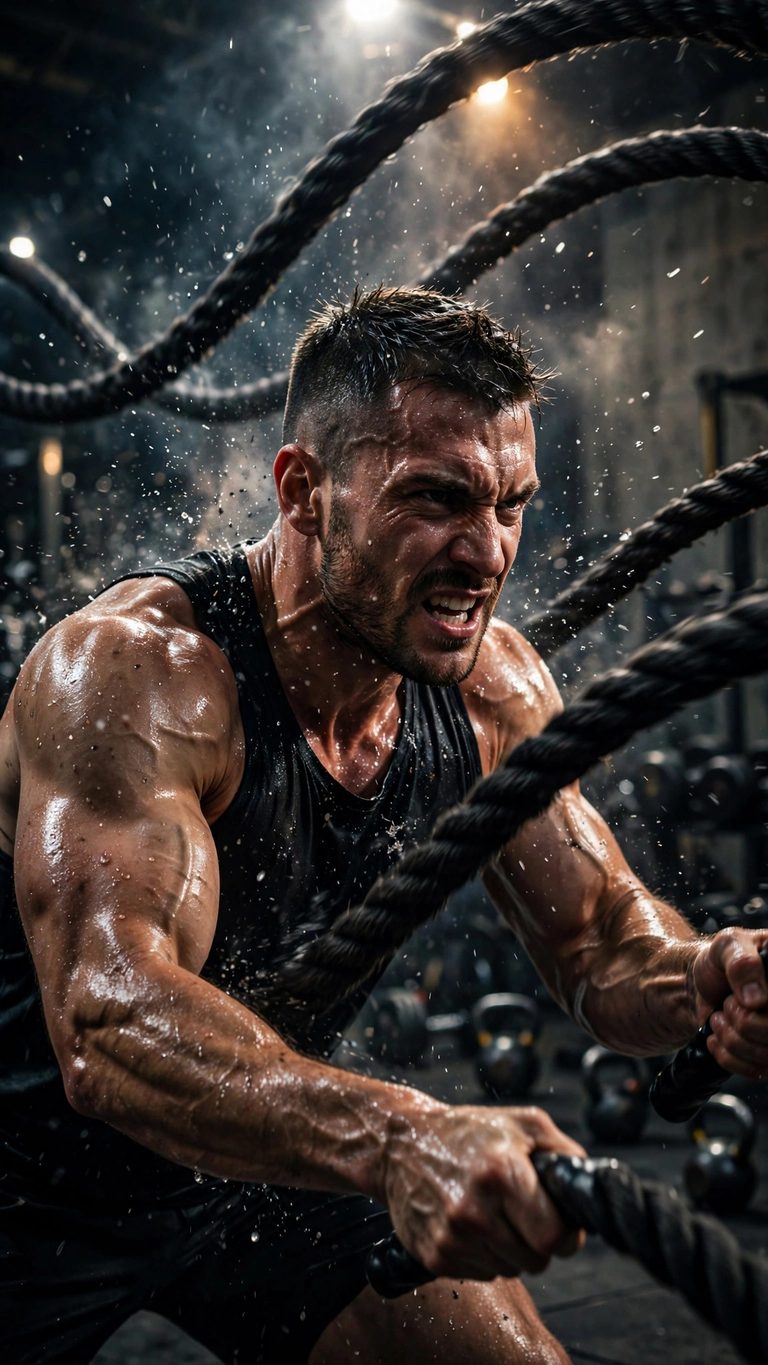
There is a reason battle ropes dominate the most-watched corner of fitness social media: few images in all of sports cinematography communicate raw effort as instantly as two heavy ropes whipping through the air in slow motion. In the first two seconds of a reel, before a single caption is read, the viewer feels the burn in the athlete’s arms, hears the imagined slap of rope on rubber flooring, and decides to keep watching. This prompt was engineered to bottle that exact moment and hand it to you as an eight-second vertical video that looks like it was shot on a cinema camera by a professional sports crew.
Whether you run a fitness page, coach clients online, or simply want scroll-stopping content for your own brand, this article gives you everything you need. Below you will find the complete copy-paste prompt, a breakdown of why each phrase in it earns its place, a step-by-step workflow for generating the clip in Veo 3, Runway, Kling, Pika, or Sora, plus pro variations and answers to the questions creators ask most. No camera, no gym membership, no athlete required: just a great prompt and a generator.
The Prompt
Here is the full prompt, exactly as tested. Copy everything inside the box below and paste it into your AI video generator of choice:
Intense close-up shot of battle ropes whipping violently in slow motion, athlete's strained arms and focused face, rope waves freezing mid-air, sweat spraying, gym lights flickering dramatically, camera alternating between low angle and tight face close-up, veins popping, raw energy and aggression, high contrast cinematic grading, ultra realistic, 8k sports cinematography
Why This Prompt Works
This prompt works because it stacks four cinematic ingredients that AI video models render exceptionally well: a tight frame, extreme motion, dramatic light, and human strain. Close-up shots are the sweet spot for current generators because there is less anatomy to get wrong and more texture to show off. The phrase “intense close-up shot” locks the virtual camera close to the action, so the model spends its detail budget on rope fibers, glistening skin, and flying sweat rather than a blurry background it would only half-resolve.
Slow motion is the second force multiplier. “Rope waves freezing mid-air” tells the model to render a moment of suspended physics, the kind of frame that makes viewers rewind. Generators trained on sports footage have seen thousands of these exact frames, so they reproduce the sinusoidal rope shapes convincingly. “Sweat spraying” adds particle detail that reads as realism: tiny droplets catching the light sell the illusion far more than any resolution number can.
The lighting language does heavy lifting too. “Gym lights flickering dramatically” gives the scene high-contrast, moody illumination with a sense of movement, while “high contrast cinematic grading” pushes the model toward the teal-and-orange blockbuster look fitness audiences associate with premium content. Finally, the emotional anchors, “strained arms,” “focused face,” “veins popping,” “raw energy and aggression,” direct the model toward peak exertion expressions rather than a neutral gym-goer. Ending with “ultra realistic, 8k sports cinematography” sets the quality bar: it is a style instruction the major models recognize, biasing output toward sharp, filmic renders instead of the soft, game-like look of weaker prompts.
How to Use This Prompt
Getting a great result is mostly about matching the prompt to each tool’s strengths. Follow these steps:
Step 1: Pick your generator. Veo 3 and Kling handle human motion and slow-motion physics best for this shot; Runway Gen-3 excels at cinematic grading; Pika is fast for quick iterations; Sora produces beautiful light. Choose based on which account you have.
Step 2: Set the format first. The settings for this post call for 9:16 vertical and 8 seconds. In your tool, select 9:16 (portrait) before generating, since reframing afterward crops the tight close-up the prompt depends on. Set duration to 8 seconds and, if available, choose a slow-motion or high-frame-rate mode to honor the “slow motion intensity” directive.
Step 3: Paste the prompt verbatim. Copy the entire block from the box above, including the style tags at the end. Do not trim phrases you think are redundant: every clause shapes the render.
Step 4: Generate two or three variations. AI video is stochastic. Generate a few takes and pick the one where the rope wave shape and the athlete’s face look most natural.
Step 5: Post-process lightly. Add a punchy caption, trending workout audio, and on-screen text like a rep counter or motivational quote. The clip is already graded cinematically, so avoid heavy filters that fight the high-contrast look.
Pro Tips & Creative Variations
Once you have the base clip working, these variations keep your content fresh without rewriting the prompt from scratch. Swap the environment by changing “gym” to “outdoor beach workout at sunrise” or “dark warehouse gym with neon accents” for a completely different mood that still keeps the rope physics. Change the athlete description to “female athlete with braided hair” or “veteran boxer with tattooed arms” to target different audiences. For a series, generate three clips with alternating camera language, one “low angle,” one “tight face close-up,” one “side profile,” and edit them into a single 24-second montage with beat-synced cuts.
Pro creators also layer storytelling on top. Add text overlays that count down “3… 2… 1… GO” in the first two seconds to hook viewers, or pair the clip with a voiceover about discipline and consistency. If your generator supports image-to-video, upload a still of real battle ropes as a starting frame to lock in realistic rope texture, then let the prompt drive the motion. For longer content, generate the same prompt twice with different seeds and crossfade between them for a seamless 16-second loop, perfect for Instagram Reels and TikTok, where looping boosts watch time and the algorithm rewards it.
Frequently Asked Questions
Which AI video generator gives the best battle rope results?
Veo 3 and Kling currently produce the most convincing rope physics and human exertion faces for this prompt. Runway is a close second with excellent cinematic grading. If you only have access to Pika, generate extra takes, since its motion can occasionally soften the rope waves.
Why does my output look blurry or cartoonish?
This usually happens when the “ultra realistic, 8k sports cinematography” style tags are removed or when the aspect ratio is set after generation instead of before. Keep the full prompt intact, set 9:16 up front, and use the highest quality or “pro” render mode your plan allows.
Can I use this clip commercially for my fitness brand?
That depends on your generator’s terms of service. Most paid tiers of Veo, Runway, Kling, Pika, and Sora grant commercial rights to outputs, but always confirm the current license for your specific plan before running ads with AI-generated footage.
How do I make the slow motion look smoother?
Generate at the highest frame rate your tool offers and, if needed, run the result through a frame-interpolation tool. Keeping the clip at its native 8 seconds rather than stretching it in an editor also preserves the crisp frozen-rope effect the prompt describes.
Battle ropes in slow motion remain one of the most reliable formulas for viral fitness content, and this prompt distills that formula into a single copy-paste block. Try it today in your favorite generator, generate a few takes, pick the most explosive one, and post it with a bold caption. Your next high-performing reel could be eight seconds away.
Related Viral Prompts
- Cliff Rock Climbing at Golden Hour: Epic AI Video Prompt for Breathtaking Adventure Drone Reel Shorts
- Underwater Swimming Laps: Mesmerizing AI Video Prompt for Serene Cinematic Pool Cinematics in Slow Motion
- Boxer Skipping Footwork: Stylish AI Video Prompt for Hypnotic Slow-Motion Boxing Gym Reels That Go Viral
# A I V i d e o # P r o m p t B a z a r # B a t t l e R o p e s # W o r k o u t # I n t e n s i t y # V i r a l R e e l s

Leave a Reply