
Introduction
On July 20, 1969, a boot pressed into grey lunar dust and left a mark that will outlast every footprint on Earth. There is no wind on the Moon, no rain, no erosion — that print is still there, as crisp as the day it was made, and it will be for a million years. It is the most permanent signature humanity has ever written.
But the footprint was only half the story. When the camera tilted up from that dust, it found something no human eye had ever seen before: the Earth, small and blue and impossibly fragile, rising over the grey horizon of another world. The famous Earthrise photograph changed how our species saw itself. It gave birth to the environmental movement, to the phrase “spaceship Earth,” to the quiet understanding that everything we love fits inside a single blue marble.
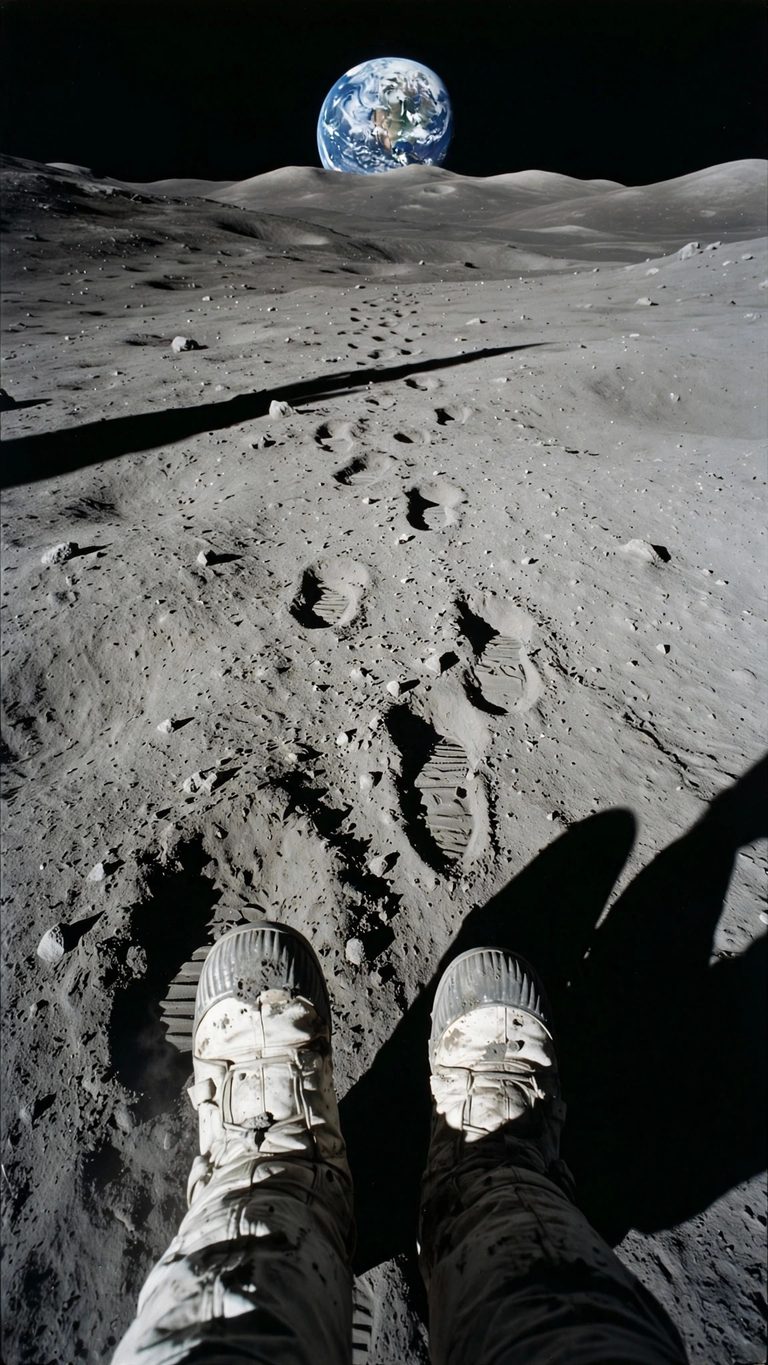
This AI video prompt recreates that moment — the boots, the dust, the tilt up, the rising Earth — in eight vertical seconds of grainy, documentary-feeling footage. It is not just a space clip. It is a time machine to the single most hopeful day of the twentieth century, and it hits viewers in a way no CGI explosion ever could.
The Prompt
Here is the exact prompt. Paste it unchanged into your video generator — the two-part structure, boots first and tilt-up second, is the entire concept, so keep every word.
Historic-feel shot of an astronaut's boots leaving footprints in grey lunar dust, camera tilting up to reveal the blue Earth rising over the Moon's horizon, stark shadows, total silence mood, grainy documentary realism mixed with 8k clarity, awe-inspiring
Why This Prompt Works
The power of this prompt is that it understands cinematic grammar. It opens on a small, human detail — “an astronaut’s boots leaving footprints in grey lunar dust” — and then executes a tilt up to the cosmic payoff: “the blue Earth rising over the Moon’s horizon.” Small-to-vast is the oldest reveal structure in film, and it works because the boot grounds the viewer in something tactile before the Earthrise delivers the emotional uppercut. Anyone can generate “Earth from space.” Almost nobody thinks to arrive there via a footprint.
The texture language is doing equally heavy lifting. “Grainy documentary realism mixed with 8k clarity” is a deliberate contradiction, and it is brilliant: the grain tells the viewer’s brain “this is archival, this really happened,” while the 8k clarity keeps it sharp enough for modern phone screens. That tension is what makes AI recreations of historic moments feel authentic rather than artificial. “Stark shadows” adds the harsh, airless lunar lighting that every real Apollo frame has — long black shadows with no atmospheric softening — which sells realism instantly.
Then there is the silence. “Total silence mood” and “awe-inspiring” are emotional direction, not visual description, but modern video models respond to mood words by adjusting pacing, contrast, and composition. And the subject itself is evergreen: moon-landing content spikes every July and around every Artemis news cycle, giving this clip a built-in calendar of viral moments. Nostalgia plus awe is the most shareable emotional cocktail on the internet, and this prompt serves it in eight seconds flat.
How to Use This Prompt
- Pick your tool. Veo 3 and Kling 2 render lunar regolith and the Earth’s glow most convincingly; Runway, Pika, and Sora all handle this prompt well too.
- Set the format. Start a text-to-video project in 9:16 vertical and set the duration to 8 seconds.
- Paste the prompt exactly. The two-part structure — boots, then tilt up — is the whole concept, so keep both halves intact.
- Direct the camera. If your tool allows camera control, confirm a slow upward tilt beginning around the two-second mark; the reveal should land near the end for maximum impact.
- Cherry-pick your take. Generate a few versions and choose the one where the Earth looks realistically small — oversized Earths are the most common failure mode.
- Finish and post. For sound, either leave it silent (the prompt asks for silence, and silence is arresting on a noisy feed) or layer faint Apollo-era radio crackle. Add a caption like “The most important 8 seconds of the 20th century — recreated by AI” and post to Reels, Shorts, and TikTok.
Pro Tips & Creative Variations
Variations on this theme are nearly endless, and each one taps a different audience. Go full documentary: convert your render to black and white, add film grain and a date stamp reading “JULY 20, 1969,” and you have content for history pages. Go macro: prompt “extreme close-up of a boot print in lunar dust, Earth reflected in the visor above” and you get a two-layer composition that stops thumbs cold. Go wide: “Earthrise from lunar orbit, terminator line crossing the Pacific” for the pure space crowd.
Audio is your secret weapon here. A few seconds of the real Apollo 11 transmission — “Houston, Tranquility Base here, the Eagle has landed” is public domain NASA audio — laid under the tilt-up will give viewers chills. Or go the opposite direction and use total silence with on-screen text; on platforms where most videos scream, quiet is a pattern interrupt that earns rewatches.
Timing matters: schedule posts around July 20th, Artemis launch windows, or full moons for algorithmic tailwinds. Build a series — “History in 8 Seconds” — covering the Wright brothers, the moon landing, and the first ISS docking, all in this grainy documentary style. And one caution: keep the Earth realistically small and the shadows pitch black. The moment it looks like a sci-fi movie instead of archival footage, the documentary spell breaks and the magic evaporates.
Frequently Asked Questions
Q: Which tool handles the tilt-up camera move best?
A: Veo 3 and Kling 2 currently follow explicit camera directions most faithfully — both will execute the “tilting up” instruction as a smooth continuous move. Runway’s camera controls let you manually keyframe the tilt if the text direction underperforms. Always preview the motion; a jerky tilt ruins the reveal.
Q: My Earth looks too big and fake. How do I fix it?
A: From the lunar surface, Earth appears about four times wider than the Moon looks from Earth — still small in the sky. Add “small realistic Earth, correct scale” to the prompt and a negative prompt of “giant planet, oversized Earth.” If it still fails, generate the Earthrise separately and composite it smaller in an editor.
Q: Is it okay to recreate historic NASA footage with AI?
A: Recreating the moment as an artistic tribute is fine, and NASA imagery itself is public domain. Just be transparent — label it “AI recreation” in the caption. Passing AI footage off as genuine archival film, especially of the moon landing, invites conspiracy-theory discourse you do not want.
Q: How do I get that grainy documentary look?
A: The prompt already asks for “grainy documentary realism.” If your tool renders it too clean, add film grain in post — most editors have a one-click grain overlay. A slight vignette and a touch of desaturation complete the archival feel.
Fifty-seven years later, that footprint is still sitting in the dust, untouched. This prompt lets a new generation stand where Armstrong stood and watch the Earth rise. Paste it, tilt the camera up, and give your audience eight seconds of the twentieth century’s greatest morning.
Related Viral Prompts
- Solar Flare Eruption AI Video Prompt: Capture Raw Stellar Power in a Blinding 8K Close-Up for Free Viral
- Saturn Rings Flyby AI Video Prompt: Glide Above Glittering Icy Rings in a Serene Cinematic 8K Space Epic
- Comet Over Desert Night AI Video Prompt: Film a Timeless Streaking Comet in Cinematic 8K Starry Skies Free
# A I V i d e o # P r o m p t B a z a r # M o o n # E a r t h r i s e # A p o l l o

Leave a Reply