
Introduction
Of all the sights in our solar system, one has stopped every human who has ever seen it, from Galileo squinting through his first telescope to the engineers watching Cassini’s final transmission. Saturn’s rings: a disc of glittering ice a quarter of a million kilometers wide, yet in places only ten meters thick — a structure so impossibly delicate it should not exist, and so beautiful it defines what we mean by a planet.
No human will skim those rings in our lifetime. The Cassini probe spent thirteen years orbiting Saturn and gave us our closest views: icy particles drifting like snow, the banded clouds of the giant turning slowly below, a silence and scale that photographs can only suggest.
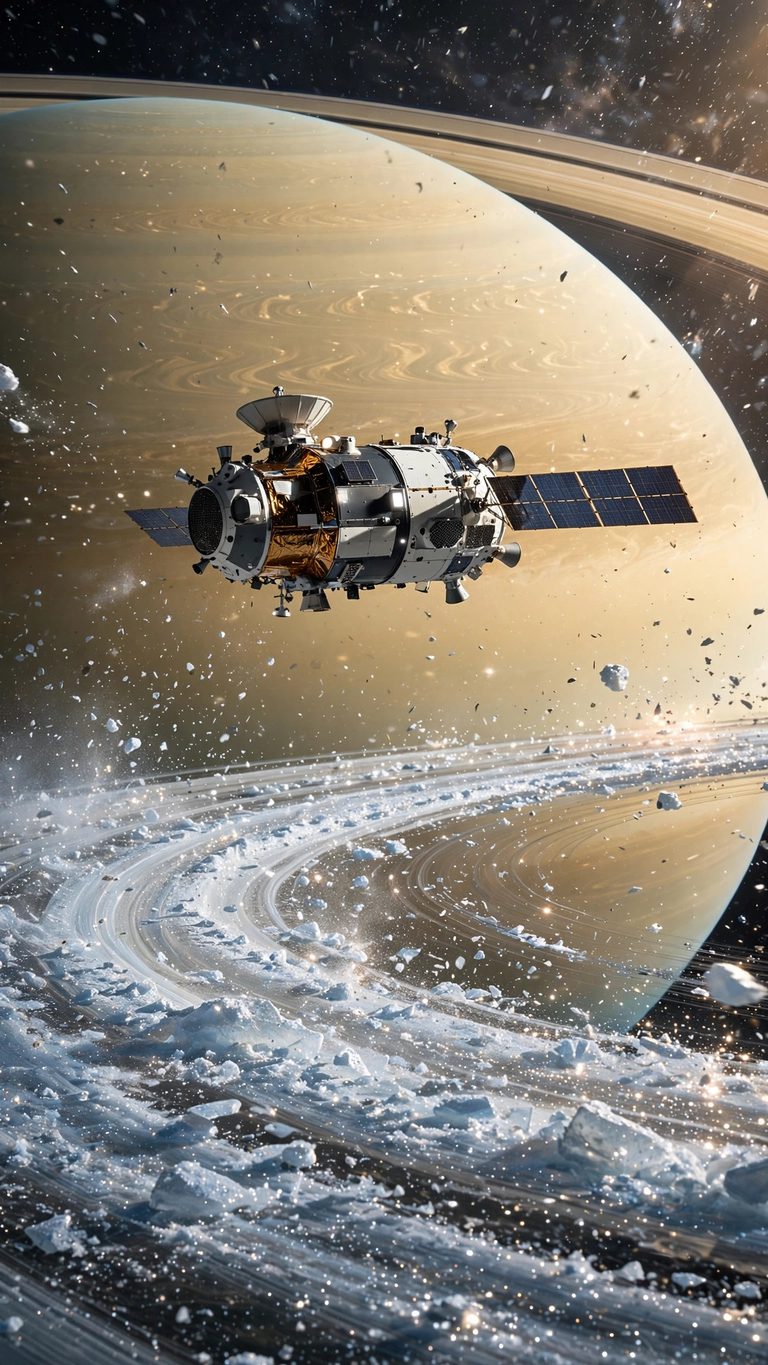
This AI video prompt is the next best thing to being there. It places your camera on a spacecraft gliding just above the rings, particles drifting past the lens while Saturn’s banded face fills the background. Ten seconds of serene, monumental flight — part space documentary, part meditation. It is the calmest viral video you will ever make.
The Prompt
Paste the exact prompt below into your video tool without changing a word. The parallel glide and the drifting ice particles are the two phrases that make this shot — keep them verbatim.
Epic spacecraft flyby skimming just above Saturn's glittering rings, icy particles drifting past the camera, the giant planet's banded clouds filling the background, camera gliding parallel to the rings, serene and monumental, ultra realistic, cinematic, 8k
Why This Prompt Works
The genius of this prompt is restraint. Where most space prompts reach for violence and speed, this one asks for a “camera gliding parallel to the rings” — slow, level, serene. That parallel glide is doing serious cinematic work: it creates a stable horizon line (the rings themselves) against which every drifting particle reads as motion, producing the same hypnotic depth you get from watching snow fall past a train window. Calm content is an underserved niche on short-form platforms, and serene space footage gets saved, looped, and used as ambient background — the holy trinity of algorithmic favor.
“Icy particles drifting past the camera” is the prompt’s depth engine. Foreground particles give the shot parallax and scale — without them, the rings would read as a flat graphic. The word “glittering” pushes the model to add specular highlights, tiny flashes of reflected sunlight that make the ice feel real rather than rendered. And “the giant planet’s banded clouds filling the background” solves composition in one phrase: it guarantees the frame has a background subject, so the shot never feels empty.
“Serene and monumental” is emotional direction that keeps the model from adding drama it was not asked for — no explosions, no speed. Finally, the quality tokens “ultra realistic, cinematic, 8k” ensure the ice and cloud bands render with photographic detail. The result feels like recovered Cassini footage from a dive that never happened — familiar enough to trust, impossible enough to share. That blend of documentary credibility and impossible access is precisely what makes space content go viral.
How to Use This Prompt
- Pick your tool. Veo 3 and Kling 2 render ice particles and cloud bands most convincingly; Runway Gen-4, Pika 2, and Sora are all capable here.
- Set the format. Open a text-to-video project in 9:16 vertical and set the duration to 10 seconds.
- Paste the prompt exactly. “Gliding parallel to the rings” and “icy particles drifting past the camera” are the two phrases that make the shot — keep them verbatim.
- Keep the motion gentle. If your tool offers motion controls, choose the slowest drift setting; serenity is the product here.
- Generate several takes and select the one with the most distinct foreground particles and the clearest banding on Saturn.
- Finish and post. Add a soft ambient piano or space-drone soundtrack and a quiet text hook like “POV: you are Cassini, skimming Saturn’s rings,” then post to Reels, Shorts, and TikTok with #Saturn, #Space, and #AIVideo tags. This style also works beautifully as a looped ambient video.
Pro Tips & Creative Variations
Saturn is a franchise, not a single video. Change the lighting and you change the film: prompt “Saturn’s rings backlit by the Sun, icy particles glowing translucent” for a golden-hour version, or “flying through Saturn’s shadow, rings dark against starlight” for something moody and rare. Both use the same structure with a different sun angle, so they feel like episodes.
Add moons for scale and story. “Enceladus venting geysers in the distance” or “Titan’s orange haze on the horizon” turns a pretty flyby into a place with geography. Or go bold: “diving through the gap between Saturn and its rings, the Cassini Grand Finale trajectory” — recreating the probe’s actual death dive is catnip for space fans and gives you a real-mission hook for the caption.
For craft, emphasize “individual ice boulders tumbling slowly” if you want chunkier foreground interest, and “subtle ring shadows on the cloud tops” for the kind of detail that makes astronomers share your clip. In post, a very slow zoom-in (barely 2% over the clip) adds subliminal motion to the already-gliding shot. Consider the ambient niche: upload an extended loop to YouTube with this footage and “Saturn rings ambience” in the title — calm space content has a devoted, underserved audience. And save this prompt for September 15th, the anniversary of Cassini’s finale, when Saturn content reliably trends.
Frequently Asked Questions
Q: Which tool is best for the drifting ice particles?
A: Veo 3 and Kling 2 handle small-particle physics most convincingly — particles drift with believable parallax rather than sliding artificially. If your render’s particles look like floating dust blobs, regenerate with “sharp individual ice crystals” added to the prompt.
Q: My Saturn looks like a flat cartoon planet. What helps?
A: Push the realism tokens and add “photographic detail, subtle cloud turbulence, realistic limb darkening.” The phrase “banded clouds” is already doing work — if bands look painted, add “NASA Cassini photograph style” to anchor the model to real reference imagery.
Q: How do I make this loop seamlessly?
A: The parallel glide is naturally loop-friendly. Generate the clip, then crossfade the end into the beginning with a short dissolve — because the motion is slow and the subject is uniform, the seam is nearly invisible. A ping-pong (forward-then-reverse) loop also works beautifully here.
Q: Can I show other planets with the same technique?
A: Absolutely — this prompt is a template. Swap Saturn for “Jupiter’s Great Red Spot churning below” or “Uranus’s pale rings edge-on” and keep the parallel-glide structure. A “Grand Tour” series, one ringed world per episode, is a proven format.
Cassini is gone — it burned up in Saturn’s atmosphere in 2017, after thirteen years of service. But its footage taught us what skimming those rings would feel like, and this prompt lets anyone recreate the dream. Paste it, glide slow, and give your audience ten seconds of the most serene place in the solar system.
Related Viral Prompts
- Comet Over Desert Night AI Video Prompt: Film a Timeless Streaking Comet in Cinematic 8K Starry Skies Free
- Milky Way Desert AI Photo Prompt: Generate a Stunning Night Sky Astrophotography Masterpiece for Free
- Astronaut Helmet AI Photo Prompt: Create a Heroic Space Portrait With Planet Earth Reflected in the Visor
# A I V i d e o # P r o m p t B a z a r # S a t u r n # R i n g s # S p a c e

Leave a Reply