
Introduction
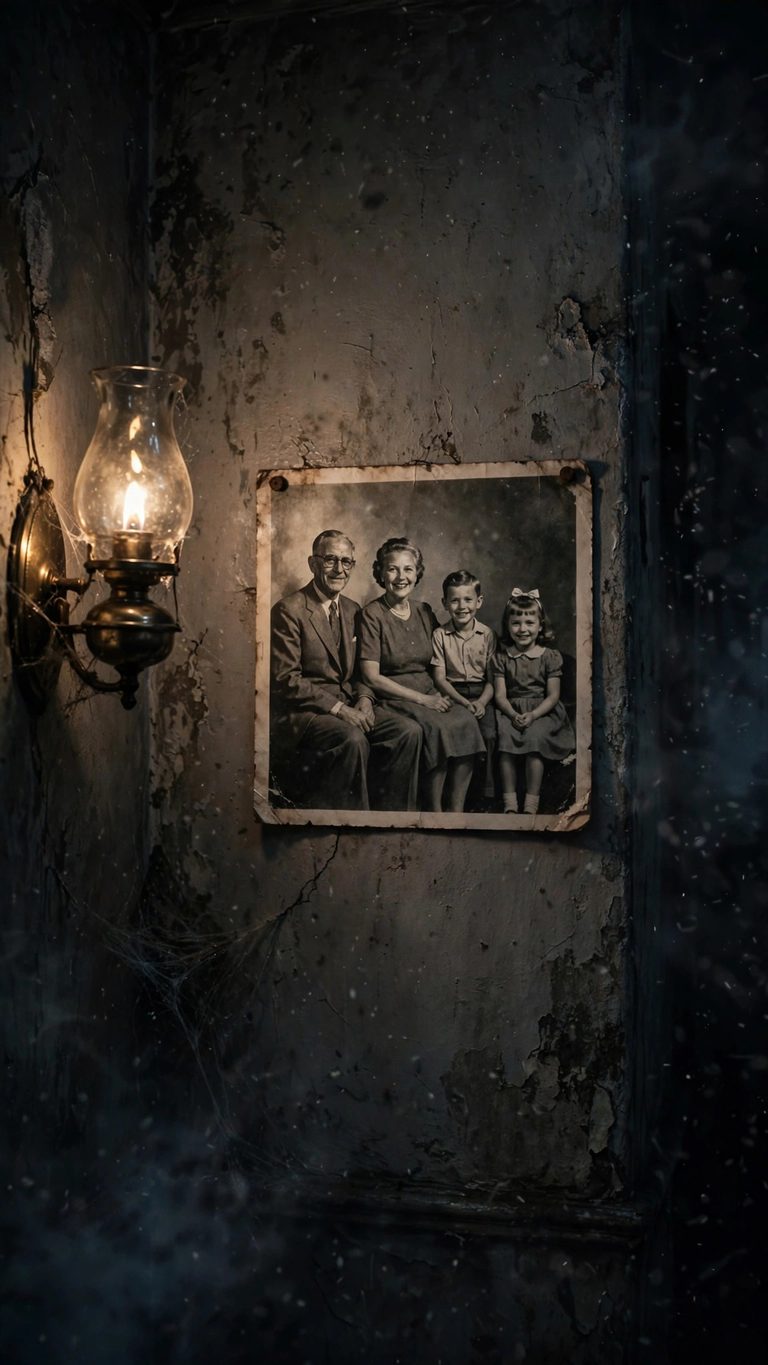
It hangs on the wall of every old house: a black-and-white family photograph, the kind where nobody smiles and everyone stares straight at the camera. You have walked past it a hundred times without really seeing it. But tonight, in the flicker of the hallway lamp, something is different. The faces are changing. Slowly — so slowly you almost convince yourself you imagined it — the expressions shift. A mouth that was closed is now slightly open. And the eyes… the eyes are following you as you move. This AI horror prompt captures the quietest, most insidious kind of supernatural dread: nothing jumps, nothing screams, nothing chases. A photograph simply stops behaving like a photograph. In a genre addicted to loud scares, this eight-second subtle chiller stands out precisely because it whispers — and whispers, on a platform full of shouting, make people lean in.
The Prompt
Copy the prompt below exactly as written and paste it into your AI video generator. It is calibrated for slow, creeping dread across a single eight-second shot:
Chilling scene of an old black and white family photo on a wall, faces in the photo slowly changing expressions, eyes following viewer, dust and flickering lamp, subtle supernatural horror, ultra realistic
Why This Prompt Works
Subtle horror works on a completely different — and arguably deeper — psychological mechanism than jump scares. A jump scare hijacks your startle reflex; it is over in a second and forgotten in a minute. But a face that slowly changes expression in a photograph hijacks your perception of reality itself. The horror here is epistemological: you cannot trust what you just saw, because the change happened at the edge of perception. Viewers will rewatch this clip four, five, six times, leaning closer to the screen, trying to catch the exact moment a mouth moved — and every replay is watch time the algorithm rewards. The prompt’s genius is the word “slowly.” Slow transformation denies the viewer the clean before-and-after comparison that would let their brain file the event away. Instead the dread stays unresolved, which is exactly why it lingers after the video ends.
The “eyes following viewer” element taps into one of the most documented quirks of human visual perception. Portraits with direct gaze genuinely appear to follow viewers across a room — it is an artifact of perspective, and everyone has experienced it in a museum or a grandparent’s house. This prompt takes that familiar, mildly creepy sensation and pushes it one step past comfort: the eyes do not just seem to follow, they actually track. That single step over the line converts a known optical curiosity into a supernatural violation. Combined with the dust motes drifting through the flickering lamplight — texture that sells the scene’s age and stillness — the clip achieves something rare in AI horror: it feels like evidence rather than entertainment, like footage someone captured because they needed proof of what they were seeing.
On platforms, subtle horror is a strategic differentiator. The horror niche on TikTok and Reels is saturated with loud jump scares competing for the same startle; a quiet, slow-burn clip stands out in the feed precisely because it refuses to shout. It also earns a different, arguably more valuable kind of engagement: instead of scream emojis, you get investigation. Viewers comment timestamps (“0:04 the woman’s mouth moved”), debate what they saw, and tag friends to confirm they are not imagining it. That comment-section forensics session keeps the video alive in the algorithm far longer than a jump scare’s brief spike. Eight seconds is perfect for this — long enough for the slow change to register, short enough that the loop feels seamless and viewers lose track of how many times they have watched.
How to Use This Prompt
Open your AI video tool — Veo 3, Runway, Kling, Pika, or Sora — and set a 9:16 vertical canvas at 8 seconds. This prompt lives or dies on fine facial detail, so push quality and detail settings to maximum; the slow expression changes must read clearly on a phone screen or the entire concept collapses. Paste the prompt exactly as written, with a negative prompt like “color, cartoon, blurry faces, fast motion” to protect the black-and-white stillness and the deliberate pacing. Generate five or six takes — more than usual — because you are judging micro-movements: the winning take is the one where the expression shift is perceptible but deniable, the sweet spot where half your audience swears they saw it and the other half needs a replay.
Sound design for subtle horror is an exercise in restraint. Skip the dramatic stingers entirely. Layer a near-silent room tone — the faint hum of an old house — with the soft tick of a clock and the occasional creak of settling wood. Add a barely-there low drone that rises almost imperceptibly across the eight seconds; viewers should feel uneasy without knowing why. The flickering lamp gets a faint electrical buzz that wavers in sync with the light. Export at 1080×1920. Post in the late evening, 9 PM to 11 PM local time, when viewers are in quiet rooms where subtle audio details survive. Caption it minimally — “watch the faces. that’s all I’ll say.” — and let the comments do the marketing. Hashtags: subtle horror, supernatural, creepy, and haunted photograph niches.
Pro Tips & Creative Variations
The cardinal rule of subtle horror: never confirm the scare. Your caption, your comments, your replies — maintain total ambiguity. When viewers ask “did her eyes move??” reply with “did they?” or “watch it again.” The moment you confirm what happened, the mystery dies and the replays stop. Ambiguity is the product; protect it. A second pro technique is the “blink and you’ll miss it” edit: if your best AI take renders the change slightly too obviously, you can actually dial it back in editing by shortening the clip by half a second or adding a faint film-grain overlay that softens the transformation. Counterintuitively, making the scare harder to see makes the video perform better, because the hunt is the engagement.
This prompt has outstanding series potential built on a simple escalation ladder. Part 1: the faces change. Part 2, posted the next night: “I checked the photo this morning” — one face is now missing from the group entirely, an empty dark space where a person used to be. Part 3: the missing face appears in the hallway mirror behind the camera. Each installment recontextualizes the last, and followers will binge your profile to assemble the timeline. For standalone variations, change the photograph’s nature: a wedding portrait where only the groom’s expression changes; a class photo where one child’s head slowly turns toward the camera; a cracked frame where the crack seems to grow between viewings. You can also invert the concept — a photo where the faces are normal but the background window shows a figure that was not there before — to keep the format fresh across uploads.
Presentation details matter enormously for this format. Shoot for a thumbnail that shows the photograph slightly too close, faces just large enough to trigger pareidolia — the brain’s face-detection wiring — in the feed. Add no text, or at most “look closer.” In the video itself, consider opening with a one-second slow push-in toward the photo before the changes begin; that camera movement is a subconscious instruction to the viewer to pay attention, focusing their perception exactly where you need it. Finally, seed the comment section strategically: pin your own comment saying “0:05. You’re welcome.” Viewers will scrub to that timestamp, find the moment, and reply — and every one of those interactions tells the algorithm your quiet little photograph is holding the room.
Frequently Asked Questions
Q: The AI renders the faces changing too fast and it looks comical. How do I slow it down?
A: Emphasize stillness in your generation settings: lower any motion-intensity or dynamism slider the tool offers, and add “barely perceptible movement, extremely slow” to a style or camera field if available. If the render still moves too much, generate at a higher frame count and then slow the clip to 80-90% speed in CapCut — the slight slow-motion smooths the transformation into something uncanny rather than cartoonish. The goal is a change viewers argue about, not one they laugh at.
Q: Should I add a jump scare at the end to boost shares?
A: Resist the temptation. The entire strategic value of this prompt is that it is not a jump scare — in a feed full of screaming, your whisper is the differentiator. Bolting a loud scare onto the end would betray the audience you attracted and train them not to trust your subtle setups. If you want louder content, make it a separate video. Let this format own the quiet lane completely; the investigation-style comments it earns are worth more than cheap startles.
Q: Why do viewers rewatch subtle horror more than jump scares?
A: A jump scare resolves: the monster appeared, you screamed, it is over. A subtle change never resolves — the brain keeps returning to the stimulus trying to complete the pattern, the same mechanism that makes optical illusions fascinating. Each rewatch is also socially motivated: viewers return with a friend watching over their shoulder, or scrub frame by frame to capture proof for the comments. Unresolved perception is a loop machine, and loops are algorithmic gold.
Q: Is this format safe for monetization?
A: Extremely. There is no violence, no gore, no distress, no shocking imagery of any kind — just a photograph behaving strangely. This is among the most advertiser-friendly horror formats that exists. The only caution is the same as any “evidence-style” content: frame it as creative entertainment rather than claiming it is genuine paranormal proof, and you will stay clear of misinformation flags while keeping the delicious ambiguity intact.
Nothing jumps. Nothing screams. A photograph simply stops obeying the rules — and that is enough to keep your viewers up at night. Generate your takes, find the one with the deniable smile, post it late, and never confirm what they saw. The faces are changing. Try this prompt and watch your comments turn into a crime scene investigation.
Related Viral Prompts
- Monster Under the Bed at Night: Viral AI Horror Jump-Scare Video Prompt From a Terrified Child’s POV (Free)
- Haunted House Door Creaks Open Alone: Viral AI Horror Video Prompt for a Bone-Chilling Cinematic Short (Free)
- Shadow Figure in the Mirror Behind You: Viral AI Horror Jump Scare Video Prompt for TikTok & Reels (Free)
# A I V i d e o # P r o m p t B a z a r # G h o s t # P h o t o # C r e e p y

Leave a Reply