
Introduction
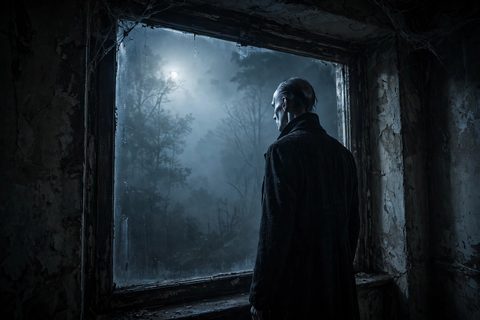
Some horror images stay with you because of what moves, and some stay with you because of what does not move at all. A pale figure standing perfectly still at a dark window belongs firmly in the second category. Everything else in the scene can drift: fog curls across the garden, a curtain sways, moonlight shifts through bare branches, but the figure does not blink, sway, or step back. That stillness feels wrong in a way the brain cannot ignore, and that is why viewers keep staring at the window long after the clip should have ended.
This prompt is designed for the kind of Halloween video that gets shared with a warning: do not watch this alone at night. It does not rely on a loud noise or a sudden shock, so it survives the scroll even when viewers have their sound off. The image itself does the work. A tall window, a faint light behind a motionless figure, and a camera that slowly moves closer create a question the viewer cannot answer from a single watch: is the figure looking at the camera, or is it looking through it?
Because the clip avoids gore, blood, screaming, and jump-scares, it stays within platform rules and reaches a much wider audience than graphic horror. Grandparents, teenagers, and casual Halloween fans can all watch it without feeling ambushed, yet the unsettling feeling remains. That combination of wide reach and strong emotion is exactly what makes a clip saveable, shareable, and worth reposting across Halloween week.
The Prompt
Copy the full prompt below and paste it into your image or video generator exactly as written. You can swap the subject details to match your own photo while keeping the atmosphere, lighting, and composition words unchanged, because those are the parts that create the finished look.
Create a chilling 10-second cinematic horror video clip. Setting: the outside of an old, dark house at night, seen from a foggy garden, with a single tall window glowing faintly. A tall, pale figure stands completely still inside the window, facing outward, barely moving for the entire clip. Camera: slow push-in from the garden toward the window, starting wide and ending in a medium shot of the figure, handheld with a very subtle shake. Motion: almost no movement at all, only fog drifting across the garden, a curtain swaying very slightly, and the figure remaining motionless, which makes the stillness itself feel wrong. Lighting: cold blue moonlight, faint warm light from inside the house behind the figure, deep shadows around the window frame. Atmosphere: silent, eerie, unsettling, with mist curling around bare trees. Style: photorealistic, 16:9, cinematic film grain, muted colours, sharp focus on the figure. No gore, no blood, no screaming, no sudden movement, no jump-scare, no text on screen.
Why This Prompt Works
This prompt works because it weaponises stillness. In most videos, movement tells the viewer where to look, but here the lack of movement is the signal. The fog moves, the curtain moves, the camera moves, and the figure does not, so the eye keeps returning to the one thing that refuses to behave like a living person. That contrast makes the figure feel less human with every passing second, even though nothing about its appearance changes.
The slow push-in camera movement is the second engine of the effect. Starting wide in the garden gives the viewer a sense of safe distance, and ending in a medium shot of the figure removes that safety step by step. The viewer is not choosing to walk closer; the camera is carrying them closer, which creates a feeling of being drawn toward something they would normally avoid. The subtle handheld shake keeps the shot feeling like real footage rather than a smooth animation, which makes the impossible stillness feel documented.
Lighting does the third job. Cold blue moonlight outside and faint warm light inside create a frame within a frame: the dark house, the glowing window, and the pale figure silhouetted against that glow. The figure is backlit, so its features stay slightly unreadable, and unreadable faces are always more unsettling than clearly visible ones. The viewer’s brain tries to resolve the face, fails, and keeps looking, which is why this clip holds attention for the full ten seconds and often earns a second watch.
Finally, the negative instructions are essential. By forbidding sudden movement and jump-scares, the prompt protects the core idea. If the figure suddenly lunged at the window, the clip would become a standard shock video and the slow dread would be wasted. Stillness only works if it is maintained, so the prompt treats the absence of movement as the main action, and that discipline is what separates a genuinely chilling clip from a forgettable one.
How to Use This Prompt
Open your video generator, set the project to 16:9 landscape for YouTube or vertical for Reels and Shorts if that is your main platform, and paste the full prompt exactly as written. Pay special attention to the motion section, because it contains the most unusual instruction in the prompt: almost no movement at all. That line is not a mistake; it is the direction that makes the clip work, so do not delete it to make the video feel more active.
Generate the first version and watch it in full, focusing on the figure rather than the background. The figure should remain essentially motionless while the fog drifts and the curtain sways slightly. If the figure walks, waves, or turns its head sharply, regenerate, because that movement breaks the stillness effect. Video tools sometimes add motion by default, so it may take two or three attempts before the model respects a deliberately still subject.
Check the framing as the camera pushes in. The clip should start wide enough to show the house, the garden, and the fog, and end close enough that the figure fills the window clearly. If the camera stops too far away, the figure will look like a small detail instead of a presence, and if it pushes in too fast, the slow dread will be lost. A steady, unhurried push-in across the full ten seconds is the target.
When the clip feels right, resist the urge to add dramatic music or a scream in editing. A quiet night ambience, faint wind, or near-silence will preserve the eerie mood far better than a soundtrack that tells viewers to be scared. Export at high quality, keep the figure sharp and in focus, and post with a caption that asks viewers whether they would look away or keep watching, because that question mirrors the exact tension the clip creates.
Pro Tips for Best Results
The biggest risk with this prompt is a model that cannot resist making the figure move. If your first few generations show the figure stepping forward or turning, try adding the phrase the figure does not move at all, like a statue to your regeneration, and keep the rest of the prompt unchanged. Some tools respond better to a statue comparison than to an abstract stillness instruction, and that small wording change can lock the figure in place.
Composition matters more here than in most horror clips, because the window is the entire stage. Make sure the window is centred or slightly off-centre in a deliberate way, with bare trees or fog framing it on at least one side. A window floating in a blank wall will feel like a portrait, while a window set into a dark house with a foggy garden around it will feel like a place, and places are what make horror believable.
You can extend this idea into a series by changing the window while keeping the figure, the stillness, and the slow push-in identical. Try an attic window, a basement window at ground level, a hotel window, or a window in an abandoned school, and post one per night in Halloween week. Viewers who recognise the format will watch each episode to see whether this figure finally moves, and that unanswered question is a powerful reason to follow the series.
Before posting, test the clip on a phone screen in a normally lit room. The pale figure needs to be visible against the faint interior light without the whole window blowing out to white. If the figure disappears into glare, regenerate with slightly dimmer interior light wording, and if the figure is too dark to see, ask for a faint rim light on the figure. The goal is a figure that is clearly present but not clearly explained.
Frequently Asked Questions
Why is the figure standing still instead of moving?
Because stillness is more unsettling than movement in this kind of horror. A moving figure can be understood as a person walking, but a figure that never moves while fog drifts and curtains sway feels less human. That wrongness makes viewers keep staring, trying to work out whether the figure is real, and that attention is what makes the clip effective.
Is this clip appropriate for all audiences?
It is designed to be, because it contains no gore, no blood, no screaming, and no jump-scare. The fear comes from atmosphere, moonlight, fog, and a motionless figure, which is classic spooky imagery rather than graphic horror. It should be suitable for general Halloween audiences on major platforms.
What if my video tool keeps making the figure move?
Regenerate and strengthen the stillness instruction, for example by describing the figure as standing like a statue and not moving at all. Video models often add motion by default, so a still subject may need two or three attempts. Keep the rest of the prompt identical so only the stillness changes between attempts.
Can I use my own photo as the figure?
Yes, if your tool supports image-to-video, you can upload a photo of a person in pale clothing and use this prompt to place them at the window. Keep the stillness and lighting instructions unchanged, and make sure the source photo is front-facing and well lit so the figure remains recognisable in the final clip.
A figure that stands still at a window is frightening because it breaks the unspoken agreement of a video: things in videos move. When everything else drifts and the figure does not, the viewer’s brain flags it as wrong before they can explain why. That is the power of this prompt. Generate it, post it, and see how many of your viewers admit they watched the whole clip without blinking.
Related Viral Prompts
- Halloween Door Opens Itself Video AI Prompt: Create a Terrifying
- Halloween Hallway Lights Flicker Video AI Prompt: Create a Suspense
- Halloween Pumpkin Carving Video AI Prompt: Create a Cosy Clip
#HalloweenAI #AIVideoPrompt #FigureInWindow #SpookySeason #PromptBazar


Leave a Reply