
Introduction
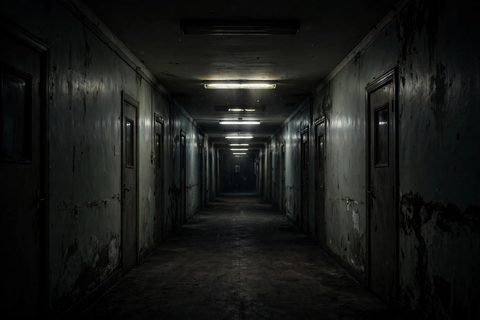
A corridor with lights going out one by one is one of the most effective suspense ideas in horror, and it works without a single monster. The audience understands the pattern immediately: light means safety, darkness means danger, and the darkness is getting closer. Every time another bulb dies, the safe space shrinks, and the viewer feels the walls closing in, even though nothing has actually moved toward them. That simple countdown is why this clip is so watchable.
For Halloween short-form video, this idea has a huge advantage: it is instantly readable even without sound. Many people scroll with their sound off, and a clip that depends on a scream or a whisper will lose them. A corridor where lights die in sequence tells its whole story visually. The viewer can follow the pattern in two seconds, understand that the darkness is advancing, and stay to see whether the last light survives. That visual clarity is what earns full watches and replays.
This prompt also keeps the horror clean and platform-safe. There is no gore, no blood, no figure jumping out, and no person in danger, so the clip can be posted anywhere and watched by anyone. The fear is entirely atmospheric, built from light, shadow, and pacing, which makes it feel like a scene from a quality horror film rather than a shock video. It is the kind of clip people send to friends with a message like watch this with the lights off.
The Prompt
Copy the full prompt below and paste it into your image or video generator exactly as written. You can swap the subject details to match your own photo while keeping the atmosphere, lighting, and composition words unchanged, because those are the parts that create the finished look.
Create a suspenseful 10-second cinematic horror video clip. Setting: a long, empty corridor in an old building at night, with closed doors on both sides, a patterned carpet, and a single row of ceiling lights stretching into the distance. Action: over 10 seconds, the corridor lights flicker and go out one by one, starting from the far end and moving toward the camera, until only darkness remains. Camera: slow, steady forward dolly movement down the centre of the corridor, eye level, no cuts. Motion: each light buzzes, flickers twice, then dies with a faint pop, in a clear one-by-one sequence, never all at once. Lighting: warm ceiling bulbs fading to cold darkness, emergency exit sign glowing faintly green at the far end. Atmosphere: silent, tense, claustrophobic, with dust in the air. Style: photorealistic, 16:9, cinematic film grain, muted colours, realistic shadows. No gore, no blood, no monster, no person, no jump-scare, no text on screen.
Why This Prompt Works
This prompt works because it gives the viewer a pattern to follow and then breaks their comfort with it. The human brain loves patterns, and the one-by-one sequence is easy to track: far light, next light, next light, coming closer. Once the pattern is clear, the viewer starts predicting the next bulb, and prediction creates involvement. They are no longer passively watching; they are counting down with the corridor, and that involvement keeps them watching until the final light goes out.
The camera movement strengthens that feeling. A slow forward dolly down the centre of the corridor moves the viewer deeper into the space at the same time as the darkness advances toward them. It is a double movement: the camera goes forward, the darkness comes forward, and the two meet in the middle. Because there are no cuts, the viewer never gets a break or a safe edit to hide behind, which makes the ten seconds feel longer and tenser than a fast-edited clip of the same length.
The lighting design is the third reason this works. Warm ceiling bulbs, a faint green exit sign, and then cold darkness create a colour story that mirrors the emotional story. Warmth disappears, cold takes over, and the tiny green glow at the far end becomes the last point of hope in the frame. That single surviving detail matters, because total blackness would end the tension, while a distant green sign keeps the viewer looking into the dark and wondering what is standing near it.
Finally, the strict sequencing instruction protects the concept. Without the words one by one and never all at once, a video tool might simply turn all the lights off at the same time, which would be a single moment instead of a countdown. By spelling out the buzz, the double flicker, and the faint pop for each light, the prompt turns a vague idea into a repeatable rhythm, and rhythm is what makes this clip hypnotic, shareable, and easy to recognise as a series.
How to Use This Prompt
Choose your video generator and set the project to 16:9 landscape for YouTube or vertical if your main audience is on Reels and Shorts, then paste the full prompt without trimming the sequencing details. The phrases starting from the far end, moving toward the camera, and never all at once are the most important lines in the whole prompt, because they define the countdown that makes the clip work. Removing them for brevity will weaken the result more than any other edit.
Generate the first version and watch it twice: once for the overall mood, and once while counting the lights. You should be able to see each bulb flicker twice and die before the next one starts, with a clear gap between each death. If two lights go out together, or if the whole corridor goes dark instantly, regenerate with the same prompt, because video models often need a second attempt to respect a strict sequence.
Check the corridor itself as well as the lights. The doors on both sides, the patterned carpet, and the dust in the air give the viewer depth cues that make the forward camera movement feel real. If the corridor looks like an empty white tunnel, the lights will have nothing to reflect on, and the clip will feel flat. A detailed corridor with texture and shadow gives each dying bulb something to take away, which is what makes each loss feel visible.
When the sequence looks right, keep the edit minimal. Do not add fast cuts, zooms, or flashy transitions, because they break the unbroken dolly shot that creates the tension. A quiet hum, a soft electrical buzz for each bulb, or near-silence will support the visuals without distracting from them. Export at high quality, keep the full ten seconds, and post with a caption that invites viewers to count how many lights are left.
Pro Tips for Best Results
The most common mistake is letting the model turn the lights off too quickly. A countdown needs time between each step, so if your version finishes in four seconds, the suspense never builds. The fix is to emphasise the sequence in your regeneration: each light flickers twice, pauses, then dies, before the next light begins. Patience between bulbs is what turns a lighting effect into a story.
Sound can make or break this clip, even though many viewers will watch silently. A faint electrical buzz that stops with each bulb, followed by a soft pop, gives the sequence an audible rhythm for viewers with sound on, while the visual rhythm carries it for viewers with sound off. Avoid loud music or a dramatic score, because this clip works through quiet dread, and a big soundtrack would tell the audience how to feel instead of letting the darkness do it.
This prompt is also an excellent series starter. Once viewers recognise the corridor format, you can repeat it in new locations: a hospital corridor, a school hallway at night, a hotel floor, or an office corridor after hours. Keep the same one-by-one rule, the same forward camera movement, and the same final darkness in every episode, and your audience will start watching each new version to see whether this time the last light survives.
Before posting, preview the clip on a phone at normal brightness. Corridor horror depends on shadow detail, and a clip that looks moody on a computer monitor can become unreadable on a small screen. If the corridor disappears into pure black too early, ask for slightly brighter bulbs at the start or a stronger exit-sign glow at the far end, so the countdown remains visible from the first flicker to the last.
Frequently Asked Questions
Why do the lights need to go out one by one?
Because a sequence creates a countdown, and a countdown creates suspense. If all the lights went out at once, the clip would be a single moment of darkness. One by one, each dying bulb shrinks the safe space and pulls the darkness closer, which keeps viewers watching to see what happens when the last light goes out.
Is this clip scary for younger viewers?
It is suspenseful but not graphic, because there is no gore, no monster, and no person in danger. The fear comes from darkness and anticipation, similar to a spooky hallway scene in a family-friendly Halloween film. Parents can judge for their own children, but the clip is designed to be atmospheric rather than shocking.
What if my video tool turns all the lights off at once?
Regenerate with the same prompt and emphasise the sequencing words: one by one, starting from the far end, never all at once. Video models sometimes need a second attempt to follow a strict order, and keeping those phrases in the prompt gives the model the clearest possible instruction for the countdown.
Can I use this clip as part of a longer Halloween video?
Yes, it works perfectly as an opening scene, a transition, or a looped background for a Halloween countdown. Because it has no cuts and no text, it can be placed between other clips without breaking the mood, and its final darkness makes a natural cut point into the next scene.
A hallway does not need a monster to be frightening. It only needs light that disappears in order, darkness that moves closer with every step, and a camera that refuses to look away. This prompt gives you all three in ten seconds, and the last light going out will stay with your viewers long after they scroll on. Generate it, post it, and let your audience count down the lights with you.
Related Viral Prompts
- Halloween Haunted House AI Photo Prompt: Create a Spooky Portrait
- Halloween Door Opens Itself Video AI Prompt: Create a Terrifying
- Halloween Figure in Window Video AI Prompt: Create a Chilling Clip
#HalloweenAI #AIVideoPrompt #HallwayHorror #SpookySeason #PromptBazar


Leave a Reply