
Introduction
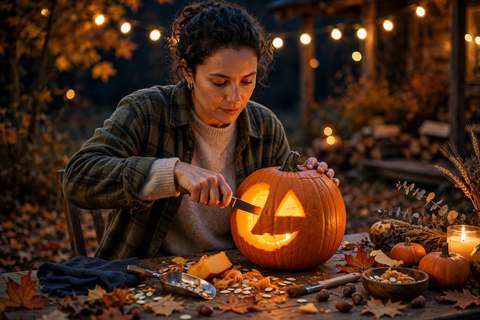
There is something quietly magical about carving a pumpkin on an autumn night. The air turns crisp, the porch light glows warm, and a simple orange pumpkin slowly becomes a smiling face that lights up the whole evening. This Halloween pumpkin carving video AI prompt captures exactly that feeling. Instead of a scary or chaotic Halloween clip, it creates a cosy, heartwarming video that feels like the best part of the season: a kitchen table or a front porch, a family or a creator carving carefully, and a jack o lantern glowing softly as night falls outside.
Video prompts like this are trending because they are easy to watch, easy to share, and perfect for short-form platforms. A cosy pumpkin carving clip works for Halloween countdowns, autumn vlogs, festive reels, and even for brands that want seasonal content without anything frightening. Viewers love the satisfying details: the scoop of seeds, the careful cut of the eyes, the first flicker of candlelight inside the pumpkin, and the final reveal when the carved face glows in the dark. When those moments are filmed with warm light and smooth camera movement, the result feels cinematic even in just a few seconds.
This article gives you a complete, copy-paste video prompt that you can use in a video generation tool such as Flow or Veo. It describes the scene, the person, the pumpkin, the lighting, the camera work, and the mood in detail, so the tool does not have to guess. You will also learn why the prompt works, how to use it step by step, and how to tweak it for your own style, whether you want a solo creator clip, a family moment, or a dreamy autumn night scene. If you have ever wanted a Halloween video that feels warm instead of spooky, this is the prompt to start with.
The Prompt
Copy the full prompt below and paste it into your video generation tool. You can keep it exactly as written, or change the setting, the outfit, or the carved face to match your own idea.
Create a cosy, heartwarming 8-second Halloween video of a person carving a glowing jack o lantern on a quiet autumn night. Setting: a wooden porch or a warm kitchen table decorated with autumn leaves, small pumpkins, a plaid blanket, and a mug of hot cocoa. A friendly young adult in a chunky knit sweater sits at the table, carefully carving a large orange pumpkin with a small safe carving tool. The pumpkin already has a classic smiling face cut out, with triangle eyes and a toothy grin. Inside the pumpkin, a warm candle glows, sending golden light through the carved face and across the table. Camera movement: start with a slow close-up of hands carving, then gently pull back and orbit slightly to reveal the glowing jack o lantern, the autumn decorations, and soft string lights in the background. Motion: natural hand movements, falling leaves drifting past the window, steam rising from the cocoa, and the candle flame flickering gently. Lighting: warm golden hour turning into blue evening light, with the pumpkin glow as the main warm light source. Atmosphere: cosy, peaceful, festive, and family friendly, with no gore, no scary jumps, and no dark horror elements. Style: realistic cinematic video, shallow depth of field, soft warm colours, smooth motion, high detail, 16:9 horizontal format.
Why This Prompt Works
This prompt works because it gives the video tool a complete picture instead of a vague idea. Many video prompts fail because they only say a pumpkin carving video, which leaves the tool to invent the setting, the lighting, and the mood. This prompt removes that guesswork. It names the location, the props, the outfit, the carved face, and the exact warm light that should dominate the scene. When the tool knows the pumpkin glow is the main light source, it can build the whole shot around that golden light, which is what makes the clip feel cosy rather than flat.
The camera instructions are equally important. A slow close-up followed by a gentle pull-back creates a natural story arc in just eight seconds: first we see the satisfying detail of carving, then we see the full cosy scene. The small motion details, such as steam from cocoa, drifting leaves, and a flickering flame, add life without distracting from the main action. These details are what separate a stiff AI clip from one that feels real. The prompt also sets clear boundaries by saying no gore and no horror jumps, which keeps the video safe for all audiences and perfect for family-friendly Halloween content.
Finally, the prompt balances realism with warmth. Words like cinematic, shallow depth of field, and soft warm colours guide the visual style, while the autumn decorations and string lights give the background depth. The result is a clip that feels like a memory of a perfect autumn night, not just a random Halloween video. That emotional quality is why viewers stop scrolling, watch to the end, and share it with friends.
How to Use This Prompt
Using this prompt is simple, even if you have never made an AI video before. Start by opening your video generation tool and creating a new text-to-video project. Paste the full prompt into the prompt box exactly as written, without cutting out the lighting or camera sections, because those details shape the final look. If your tool allows it, set the duration to eight seconds and choose a horizontal 16:9 format for YouTube, or a vertical format if you plan to post it as a short or reel.
Next, generate the first version and watch it carefully. Check three things: does the pumpkin glow warmly, does the carving motion look natural, and does the background feel cosy rather than empty? If something looks off, change only one detail at a time. For example, if the scene feels too dark, add the phrase brighter warm porch light. If you want a different vibe, swap the kitchen table for a front porch, or change the chunky sweater to a flannel shirt. Small, targeted edits work much better than rewriting the whole prompt.
Once you like the clip, you can use it in many ways. Post it as a standalone Halloween short, use it as an opening shot for a longer autumn vlog, or loop it behind a Halloween playlist or countdown. Add gentle background music, such as soft acoustic guitar or lo-fi autumn tones, and a simple caption about carving night. Because the clip is warm and non-scary, it works for audiences of all ages, from kids watching Halloween content to adults who love cosy seasonal videos.
Pro Tips for Best Results
- Keep the carved face simple. A classic smiling face with triangle eyes reads clearly on camera and glows beautifully. Complex designs can blur in short AI clips, so save detailed carvings for photos.
- Emphasise the pumpkin glow. If your first result looks dull, repeat warm golden light from inside the pumpkin in your edit. Light is the whole mood of this clip, so it deserves extra attention.
- Add one personal prop. A mug with your initials, a favourite blanket, or a pet sleeping nearby can make a generic clip feel like your own autumn tradition.
- Try a second version at dusk. Changing golden hour to deep blue evening with string lights creates a completely different, dreamier clip from the same prompt.
- Use slow motion for the reveal. If your tool supports it, slowing the final two seconds when the jack o lantern lights up makes the moment feel magical and shareable.
- Generate two or three takes and pick the best. AI video can vary between runs, so a quick second generation often fixes awkward hand movements or flickering light.
Frequently Asked Questions
Can I use this prompt for a vertical short or reel?
Yes, absolutely. The prompt is written for horizontal video, but you can change the last line to vertical 9:16 format and keep everything else the same. The close-up carving shot and the glowing pumpkin work beautifully in vertical framing, especially for TikTok, Instagram Reels, and YouTube Shorts.
Will this prompt create a scary Halloween video?
No, this prompt is intentionally cosy and family friendly. It specifies warm light, a peaceful atmosphere, no gore, and no scary jumps. If you want a spookier version, you would need to add fog, darker lighting, and a haunted setting yourself, but the default result is warm and comforting.
How long should the video be?
Eight seconds is ideal for this scene because it gives enough time for the close-up carving shot and the wider reveal. If your tool only supports five or six seconds, shorten the camera movement to a single slow pull-back and keep the glowing reveal as the final moment.
Can I change the person or the setting in the prompt?
Yes, and you should. Swap the young adult for a child with an adult helping, a couple carving together, or just hands carving without showing a face. You can also move the scene from a porch to a living room fireplace setting. Keep the pumpkin glow, the warm light, and the autumn props, and the cosy feeling will stay intact.
Carving a pumpkin is one of those small autumn rituals that feels bigger than it looks: a quiet night, warm light, and a glowing face that turns an ordinary pumpkin into a little piece of Halloween magic. With this prompt, you can capture that feeling in a beautiful short video and share it with everyone who loves the cosy side of the season. So light the candle, pick up your carving tool, and let your jack o lantern glow.
Related Viral Prompts
Explore more trending Halloween prompts: Halloween Haunted House AI Photo Prompt: Create a Spooky Portrait, Halloween Hallway Lights Flicker Video AI Prompt: Suspenseful Clip, and Halloween Ghost Photoshoot Video AI Prompt: Playful 6 Second Clip.
#HalloweenAI #PumpkinCarving #AIVideoPrompt #JackOLantern #AutumnVibes #PromptBazar


Leave a Reply