
Introduction
Sports anime has a special place in every fan’s heart, and soccer might be the most beloved of all. Lately, feeds are full of people reimagining themselves as anime athletes, and the soccer portraits hit different: the golden-hour pitch, the perfect strike, the crowd rising in the background. This Ghibli style soccer player field AI photo prompt drops you into that dream, turning your everyday photo into a hand-painted match moment worthy of a feature film’s climax.
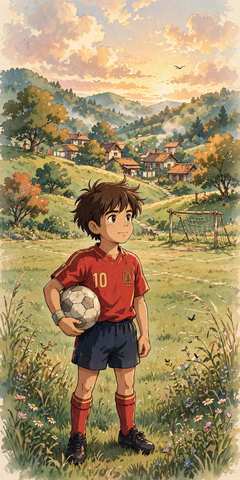
Here is what the finished portrait looks like. You are frozen at the perfect instant of a powerful kick, grass blades and dust bursting from your boot as the ball rockets forward. The pitch stretches around you in impossible, luminous green, every blade rendered with Ghibli’s loving attention to nature. Behind you, the stadium crowd blurs into a warm watercolor wash while enormous anime clouds tower overhead in a burning sunset sky. Your kit ripples with motion, your eyes locked on the ball with total focus.
People love this prompt because it bottles the feeling of the big moment: the split second before the goal, when everything is possible. The Ghibli treatment makes even a casual kickabout feel mythic, like the final match of a tournament arc. Football fans use it for profile pictures during match season, and even non-players enjoy the sheer cinematic energy. It is pure underdog-movie magic in a single frame.
In this guide, you get the exact copy-paste prompt that creates this look, a breakdown of why it works so well, step-by-step instructions for using it with free AI image tools, pro tips for keeping your face recognizable, and answers to the most common questions. By the end, you will be able to turn any ordinary photo of yourself into a hand-painted anime moment that looks like a still frame from a beloved film, ready to share with friends or frame on your wall.
The Prompt
Copy the prompt below and paste it into your favorite AI image generator along with your photo:
Transform my photo into a Studio Ghibli anime portrait of a soccer player on a lush green field at golden hour, keeping my exact face, hairstyle and determined expression. Capture me mid-kick with grass blades flying, wearing a classic soccer kit, with a hand-painted stadium crowd and dramatic anime clouds overhead. Use soft cel shading, warm sunset light, dynamic motion energy, and the inspiring spirit of a Ghibli sports moment. Portrait orientation, highly detailed anime illustration.
Why This Prompt Works
First, Studio Ghibli is famous for animating motion, and this prompt leans into that strength. Instead of a stiff posed portrait, you are captured mid-kick, grass blades and dust bursting from your boot as your kit ripples with speed, with fabric, hair, and the world around you responding to the movement. Think of Think of how Ghibli fills its skies with towering, sculptural clouds, the kind that make every outdoor scene feel epic, like the cloudscapes of Castle in the Sky., where every gesture feels alive. And think of the quiet determination on a Ghibli hero’s face in the moments before they act; this prompt paints that same resolve onto your match moment. That sense of living motion is what separates a flat filter from a true anime illustration, and it is the reason these images stop people mid-scroll.
Second, Ghibli backgrounds are practically characters themselves, and this scene gives the AI a rich one to paint. You stand on a lush green soccer pitch at golden hour, with a hand-painted stadium crowd rising behind you and towering anime clouds overhead. The prompt asks for layered, hand-painted detail: drifting particles in the air, textured surfaces, and a sky full of feeling. Warm golden-hour sunlight rakes across the pitch, stretching long shadows behind you while the sunset sky burns in orange and rose above the stadium. When the setting is this alive, the portrait gains the depth and warmth that make Ghibli frames so comforting to look at.
Third, the prompt protects your identity. Many anime filters redraw your face into someone else entirely, which is fun for a day but forgettable. Here, the instructions explicitly tell the AI to keep your exact face, hairstyle, and expression, then build the Ghibli world around the real you. The result still feels like you, just translated into soft cel shading with expressive anime eyes and painterly color. That personal connection is why people love sharing these: friends instantly recognize you inside the magic.
Finally, the color and light do the emotional heavy lifting. Ghibli films like Whisper of the Heart and Castle in the Sky are masterclasses in golden-hour glow, luminous skies, and shadows that feel soft rather than harsh. Warm golden-hour sunlight rakes across the pitch, stretching long shadows behind you while the sunset sky burns in orange and rose above the stadium. The prompt calls for that same gentle cinematic lighting, and it dresses you in a classic soccer kit with a numbered jersey, shorts, and socks, rendered with fabric folds that show the motion, so every element of the frame works together. The outcome is an image with mood, not just a costume swap.
How to Use This Prompt
Using this prompt takes about two minutes. You do not need any editing skills, and most of the tools below are free to try. Here is the full process:
Step 1: Pick a clear, front-facing photo of yourself with good lighting. A simple background and a natural expression work best, because the AI will preserve your face and redraw everything else.
Step 2: Open an AI image generator that accepts photo uploads, such as ChatGPT with image generation, Gemini, Midjourney, Leonardo AI, or any similar tool you already use.
Step 3: Upload your photo and paste the prompt from the box above exactly as written. Add nothing else for your first try, so you can see the baseline result.
Step 4: Set portrait orientation if the tool offers aspect ratio choices. A 2:3 or 3:4 ratio suits phone wallpapers and profile pictures, while 9:16 is ideal for stories and reels.
Step 5: Generate the image, then refine if needed. If a detail looks off, regenerate with one small tweak, for example asking for a warmer sky or a different camera angle, rather than rewriting the whole prompt.
Step 6: Download your favorite version in the highest resolution available. Share it on social media, set it as your profile picture, or print it. Tag it with the hashtags below so other Ghibli fans can find it.
Pro Tips for Best Results
Small choices make a big difference with AI portraits. These tips will help your soccer player image look its best:
Tip 1: Wear sporty clothes in your source photo if you can. A t-shirt photo converts more naturally into a soccer kit than a formal outfit does.
Tip 2: Ask for your favorite team’s colors in a follow-up. A line like ‘wearing a blue and white striped jersey’ personalizes the kit instantly.
Tip 3: Try a night-match variation. Adding ‘under bright stadium floodlights at night’ to a second run gives you a dramatic alternative with glowing light and deep shadows.
Tip 4: Use the highest-resolution photo you have. The AI keeps your facial features sharper when it starts from a clear, well-lit source image instead of a compressed screenshot.
Tip 5: Keep the original background simple. A plain wall or an uncluttered room gives the AI less to untangle, so more of its effort goes into painting the Ghibli scene around you.
Tip 6: Generate two or three variations before settling. Tiny differences in pose, lighting, and background detail appear between runs, and the second or third attempt is often the keeper.
Frequently Asked Questions
Will the portrait keep my face looking like me?
Yes. The prompt explicitly tells the AI to keep your exact face, hairstyle, and determined expression while rebuilding the scene around you in anime style. Use a clear, front-facing photo with your face well lit for the strongest likeness. If the first result softens your features too much, regenerate with the same photo; likeness usually improves across two or three attempts.
Which free AI tools can I use with this prompt?
Most modern AI image tools that accept photo uploads will work, including ChatGPT with image generation, Google Gemini, Midjourney, Leonardo AI, and Microsoft Designer. Free tiers usually give you a handful of generations per day, which is plenty to produce a great portrait. Paste the prompt exactly as written, upload your photo in the same message, and request portrait orientation.
Can I change the team colors, the stadium, or the time of day?
Yes, this prompt is easy to customize. Add a short line like ‘wearing a red jersey with the number 10’ or ‘night match under floodlights with a packed stadium’ after pasting the main prompt. You can also swap the golden-hour sky for a rainy-day match or a morning training session for completely different moods.
What kind of photo gives the best result?
A front-facing photo taken in soft daylight, with your face clearly visible and a neutral or gently happy expression. Avoid heavy filters, sunglasses, or deep shadows across the face, since the AI needs clean facial features to preserve your identity. A simple background helps, but the prompt will replace the setting anyway, so do not worry if your original photo was taken indoors.
Some moments deserve to be remembered like movie scenes, and your best kick is one of them. Upload your photo, paste the prompt, and step onto the Ghibli pitch. Whether you play every weekend or just love the beautiful game, this portrait is your own personal tournament final, frozen forever at golden hour.
Related Viral Prompts
If you loved this one, try these other prompts from the collection:
- Ghibli Style Beekeeper Meadow AI Photo Prompt
- Ghibli Style Shepherd Hills AI Photo Prompt
- Ghibli Style Deep Sea Diver AI Photo Prompt
#GhibliAI #StudioGhibli #AIPhotoPrompt #GhibliStyle #AnimeSoccer




Leave a Reply