
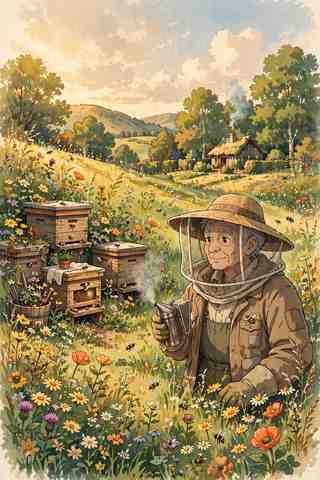
Introduction
There is a special kind of magic in a Studio Ghibli meadow: tall grass swaying in the breeze, wildflowers nodding in the sun, and the low golden hum of bees drifting between blossoms. It is the kind of scene Ghibli films return to again and again, from the countryside of My Neighbor Totoro to the flower fields of Howl’s Moving Castle, a world where ordinary work becomes a quiet adventure. Now, thanks to the viral Ghibli-style AI photo trend sweeping TikTok and Instagram, you can step into that world yourself, as a beekeeper with the veil lifted back, surrounded by wooden hives and honeybees in a sunlit meadow that looks hand-painted just for you.
The beekeeper aesthetic has exploded in popularity because it sits at the perfect crossroads of cottagecore, slow living, and anime nostalgia. People are tired of hyper-polished, over-edited selfies; they want images that feel warm, storybook, and alive. A Ghibli beekeeper portrait delivers exactly that: you, unmistakably you, standing in a meadow that could be a background painting from a beloved film. It is wholesome without being boring and dreamy without being fake, and it makes a stunning profile picture, a beautiful wall art print, or a thoughtful gift for someone who loves nature.
What makes this particular prompt so shareable is how personal it feels. Beekeeping is gentle, patient work, and Ghibli’s whole philosophy celebrates exactly that kind of harmony between people and nature. The prompt keeps your real face and expression, so the final image is not a generic anime character, it is you, reimagined as the hero of your own pastoral story. In this guide you will get the exact copy-paste prompt, a breakdown of why it works so well, step-by-step usage instructions, pro tips for the best possible results, and answers to the questions everyone asks before generating their first portrait.
The Prompt
Copy the exact prompt below and paste it into your AI image generator together with your photo:
Transform this photo into a Studio Ghibli-style anime illustration of a beekeeper standing in a sunlit wildflower meadow, wearing a classic white beekeeper suit with the veil lifted back, wooden beehives behind them and honeybees drifting through golden afternoon light. Keep the person's face, expression, and identity exactly the same as the uploaded photo. Painterly hand-drawn Ghibli aesthetic with soft watercolor textures, lush green grass, glowing pollen particles in the air, and a warm storybook sky; vertical portrait orientation, 3:4 aspect ratio.
Why This Prompt Works
Studio Ghibli’s visual language rests on three pillars, and this prompt captures all of them. First, storybook adventure in the everyday: Ghibli never needed dragons to make a scene thrilling. A girl waiting at a bus stop in the rain in My Neighbor Totoro, or a boy quietly tending a garden, can carry an entire film’s worth of wonder. Beekeeping, with its veils, hives, and humming swarms, is exactly the kind of humble craft that Ghibli elevates into poetry, and the prompt frames your portrait as a moment of quiet heroism inside an ordinary afternoon.
Second, obsessively detailed worlds. Ghibli backgrounds are famous for their density: every blade of grass, every wooden slat on a beehive, every bee rendered with visible love. The prompt specifically calls for wooden beehives, wildflowers, lush grass, and drifting honeybees, which pushes the AI to fill the frame with the rich, lived-in detail that separates a true Ghibli look from a flat anime filter. It is this density of small, believable things that makes viewers stare at the image a little longer.
Third, cinematic light. The prompt’s golden afternoon glow and floating pollen particles recreate the luminous, almost tangible atmosphere of Ghibli’s best outdoor scenes, think of the sun-drenched fields in Only Yesterday or the glowing garden air in The Secret World of Arrietty. Light does half the storytelling here, wrapping you in warmth and turning a simple portrait into a memory. Combined with the explicit instruction to preserve your face identity, the result is unmistakably you inside an unmistakably Ghibli world, and that combination is exactly why this prompt gets saved, shared, and reposted.
How to Use This Prompt
Step 1: choose the right source photo. Pick a clear, front-facing photo where your face is well lit and unobstructed. Sunglasses and heavy shadows make face preservation harder for the AI, so use a clean, natural shot. A gentle smile or calm expression works beautifully with the peaceful meadow mood, and the model can only preserve the identity you give it, so start with your best-lit selfie or portrait.
Step 2: open your favorite AI image generator. This prompt works in ChatGPT with image generation, Google Gemini, Midjourney, Leonardo AI, and most modern image models, anywhere you can upload a reference photo alongside a text prompt. Upload your photo first, then paste the full prompt text exactly as written in the prompt box above.
Step 3: set portrait orientation. The prompt asks for a vertical 3:4 portrait, which is ideal for phone wallpapers, Instagram posts, and profile pictures. If your tool lets you choose an aspect ratio, select 3:4 or 4:5 before generating so the composition frames you the way the prompt intends.
Step 4: generate and refine. Hit generate and wait for the magic. If the bees look odd or the veil sits strangely, simply regenerate, because AI image models vary with every run and the second or third attempt is often the keeper. You can also request small tweaks afterward, such as making the sunset warmer or adding more wildflowers, while keeping the same face.
Pro Tips for Best Results
Match the mood with your expression. A soft, content smile in your source photo translates into the serene beekeeper energy this scene wants. A stern or overly dramatic expression can clash with the sunny meadow vibe, so save that intensity for the knight or samurai prompts elsewhere in this series.
Try seasonal variations once you love the base result. Ask the AI for a spring version with cherry blossom petals drifting through the meadow, or an autumn version with golden leaves and low amber light. Each season completely changes the painting while keeping your face identical, which is perfect for a set of four seasonal profile pictures.
Add personal props with follow-up prompts. Want to hold a jar of fresh honey, or have a curious bee landing on your glove? Describe it in a follow-up message, for example asking to add a glass jar of golden honey in your hand. Small, specific additions like this make the image feel like your story rather than a template.
Use it beyond social media. A high-resolution Ghibli beekeeper portrait makes gorgeous wall art, a unique gift for a nature-loving friend, or even a journal cover. Generate at the highest resolution your tool allows, because the painterly style hides small AI imperfections beautifully when printed.
Keep the prompt text intact when you share it. If friends ask how you made your portrait, send them the exact prompt from this page. The precise wording, especially the face-preservation sentence and the painterly style descriptors, is what produces the consistent Ghibli look, so copying it verbatim gives them the same great starting point.
Frequently Asked Questions
Will the AI really keep my face looking like me?
Yes. The prompt explicitly instructs the model to preserve your face, expression, and identity from the uploaded photo. For best results use a clear, front-facing, well-lit photo. Extreme angles, sunglasses, or heavy filters in the source image make identity preservation harder, so start with a clean and natural photo.
Which AI tools work best with this prompt?
Any modern image generator that accepts a reference photo works well, including ChatGPT image generation, Google Gemini, Midjourney, and Leonardo AI. Paste the full prompt text exactly as written, and make sure you have uploaded your photo as the reference image before generating.
Can I change the scene after generating?
Absolutely. Once you have a result you like, ask for variations in a follow-up message: a different time of day, a different season, more bees or fewer bees, a different meadow. Keep your requests specific and change one thing at a time for the most reliable results.
Is it okay to use this image as my profile picture?
Of course, that is one of the most popular uses. The vertical portrait format is designed for profile pictures and phone wallpapers. Just remember that AI-generated images should be labeled as such if a platform requires it, and avoid using them anywhere a real photograph is expected, such as ID documents.
Some portraits capture how you look; this one captures how a perfect afternoon feels, with sun on your shoulders, bees humming low, and a whole meadow painted in Ghibli gold around the most important detail of all: you.
Related Viral Prompts
Ghibli Style Shepherd Hills AI Photo Prompt | Ghibli Style Knight Dragon AI Photo Prompt | Ghibli Style Pirate Ship AI Photo Prompt
#GhibliAI #StudioGhibli #AIPhotoPrompt #GhibliStyle #BeekeeperMeadow




Leave a Reply