
Introduction
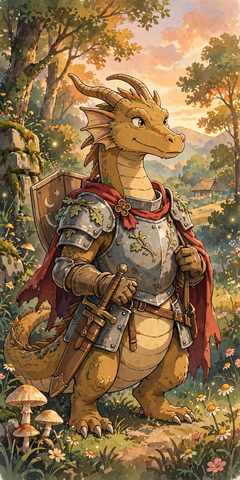
Every Studio Ghibli fan remembers their first dragon: Haku spiraling through the clouds in Spirited Away, a creature of impossible grace who turns out to be gentle, wise, and quietly protective. Ghibli dragons are never just monsters to slay; they are ancient, emotional beings, and standing beside one feels less like a battle and more like a coronation. That is exactly the fantasy this prompt delivers: you, in ornate silver armor, cloak lifting in the wind, face to face with a gentle giant dragon on a cliff above a vast fantasy valley.
The knight-and-dragon portrait has become one of the most shared entries in the Ghibli AI photo trend, and it is easy to see why. It is the ultimate power fantasy rendered in the softest possible art style: epic in scale, tender in feeling. People use it for gaming avatars, fantasy novel author photos, dramatic profile pictures, and even printed posters. Where the beekeeper and shepherd portraits whisper, this one sings, and it still keeps your real face at the center of the adventure.
Crucially, the prompt insists on a gentle dragon rather than a snarling beast, which is what keeps the image authentically Ghibli instead of generic dark fantasy. The glowing breath, the floating clouds, the distant mountains: every element is chosen to echo the studio’s love of vast, breathing worlds. Below you will find the exact copy-paste prompt, why each phrase earns its place, how to use it step by step, pro tips for a flawless result, and answers to the most common questions.
The Prompt
Copy the exact prompt below and paste it into your AI image generator together with your photo:
Reimagine this photo as an epic Studio Ghibli-style anime illustration of a brave knight in ornate silver armor standing before a gentle giant dragon on a cliff overlooking a vast fantasy valley, wind lifting their cloak as the dragon's warm breath glows softly in the cool air. Keep the person's face and identity exactly the same as the uploaded photo. Painterly hand-drawn Ghibli aesthetic with dramatic cinematic lighting, floating clouds, distant mountains, and rich storybook detail; vertical portrait orientation, 3:4 aspect ratio.
Why This Prompt Works
This prompt works because it understands what makes Ghibli fantasy different. Western fantasy often frames dragons as enemies; Ghibli frames them as forces of nature to be respected, even befriended. By specifying a gentle giant dragon with softly glowing breath, the prompt steers the AI away from fire-and-destruction cliches and toward the awe and tenderness of Haku’s flight or the Ohmu’s calm in Nausicaa. That emotional register is the difference between a cool picture and a Ghibli picture.
It also nails the Ghibli sense of scale. The studio’s most breathtaking shots place a small human figure against an enormous living world: a cliff, a valley, layers of mountains fading into the distance, clouds drifting at eye level. The prompt builds exactly this composition, with you as the human anchor in the foreground and the dragon and valley expanding behind you. Vertical 3:4 framing enhances the effect, stacking sky, dragon, knight, and valley into one towering storybook panel.
Finally, the dramatic cinematic lighting does the heavy lifting. Ghibli’s fantasy scenes glow from within, whether it is the sunset over the valley in Tales from Earthsea or the luminous spirits of Princess Mononoke. The prompt’s dramatic light plus rich storybook detail pushes the AI toward luminous armor reflections, rim-lit clouds, and atmospheric depth. And because your face identity is preserved exactly, the epic scene never becomes impersonal: it is your eyes meeting the dragon’s, which is why viewers find these portraits so moving.
How to Use This Prompt
Step 1: choose a bold source photo. Pick a clear, front-facing photo with good lighting on your face. A confident, calm expression suits the knight fantasy best; the AI will carry your expression into the armor, so a determined or serene look sells the scene far better than a goofy grin.
Step 2: upload to your AI image generator. Use any modern generator that accepts reference photos, such as ChatGPT image generation, Google Gemini, Midjourney, or Leonardo AI. Upload your photo first so the model has your face as its anchor, then paste the full prompt text exactly as written above.
Step 3: confirm the portrait format. The prompt calls for vertical 3:4 orientation, which suits the towering composition of knight, dragon, and valley. Set 3:4 or 4:5 in your tool if the option exists, since landscape framing would cramp the epic vertical staging.
Step 4: generate and polish. Create the image and inspect the details: armor symmetry, the dragon’s expression, your face likeness. Regenerate if anything looks off, and use follow-up prompts for fine-tuning, such as requesting warmer sunset light on the valley or a slightly closer view of the dragon.
Pro Tips for Best Results
Keep the dragon gentle in follow-ups. If you ask for variations, preserve the kind, majestic tone with words like calm, wise, and protective. Asking for a roaring or attacking dragon will drag the image out of Ghibli territory and into generic fantasy, losing the tender magic that makes this prompt special.
Try armor variations. A follow-up like ornate silver armor with blue enamel details or a weathered traveler’s cloak over the armor can personalize the knight while keeping the composition. One change at a time keeps your face and the dragon consistent across versions.
Use it as a statement avatar. This is the boldest portrait in the pastoral-to-epic arc of this series, and it makes a phenomenal gaming avatar, stream overlay portrait, or fantasy project author photo. The vertical format also crops cleanly into a square without losing the essential drama.
Mind the small details at full size. Armor, dragon scales, and clouds are where AI models sometimes smudge. Generate at the highest resolution available and zoom in before printing or posting; a quick regeneration usually fixes a garbled pauldron or a melted claw.
Pair it with the samurai duel portrait. Article 146 in this series offers a quieter, more contemplative warrior fantasy. Generating both gives you a matched pair: the epic dragon-knight for bold displays and the bamboo-grove samurai for reflective ones.
Frequently Asked Questions
Will the dragon look scary?
Not with this prompt. It specifically describes a gentle giant dragon with softly glowing breath, which guides the AI toward the kind, majestic dragons of Ghibli films rather than frightening monsters. If a generation comes out too fierce, regenerate or add the word gentle in a follow-up.
Does the prompt keep my face under the armor?
Yes. The prompt instructs the model to keep your face and identity exactly the same as the uploaded photo, and knights in this composition are typically shown with an open helm or no helmet so your face stays visible. Use a clear, front-facing source photo for the best likeness.
Can I change the dragon’s color?
Absolutely. After your first generation, ask for a variation such as an emerald-green dragon or a silver-white dragon. Keep the rest of the description unchanged so the composition, lighting, and your face remain consistent while only the dragon’s coloring shifts.
Which tools handle this detailed scene best?
Any leading image generator with reference-photo support works, including ChatGPT image generation, Google Gemini, Midjourney, and Leonardo AI. Highly detailed scenes benefit from the highest quality or detail settings your tool offers, so enable those before generating.
Stand tall, meet the dragon’s gaze, and remember the Ghibli lesson at the heart of this portrait: true courage is not about conquering the magnificent beast before you, but about earning the quiet moment when it chooses to trust you.
Related Viral Prompts
Ghibli Style Pirate Ship AI Photo Prompt | Ghibli Style Ninja Forest AI Photo Prompt | Ghibli Style Samurai Duel AI Photo Prompt
#GhibliAI #StudioGhibli #AIPhotoPrompt #GhibliStyle #KnightAndDragon




Leave a Reply