
Introduction
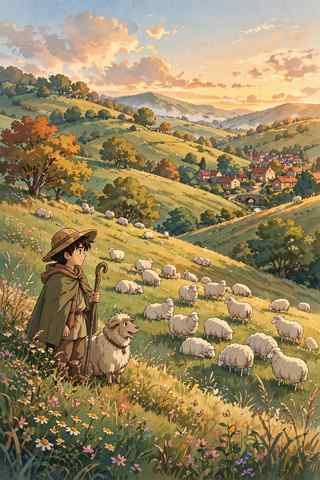
Few images feel as purely Studio Ghibli as a lone shepherd on a green hill at dawn: mist curling through the valleys, sheep dotting the slopes like clouds that fell to earth, and a sky washed in the soft pastels of early morning. It is the visual language of Heidi-style pastoral daydreams and the sweeping countryside panoramas of films like My Neighbor Totoro and Tales from Earthsea. Thanks to the viral Ghibli-style AI photo trend, you no longer have to just admire those scenes, you can stand inside one, cloak around your shoulders, staff in hand, your own sheepdog waiting patiently at your side.
The shepherd portrait has become a quiet favorite on TikTok and Instagram precisely because it is so calming. While other AI trends chase drama and spectacle, this one offers stillness: a person at peace in a vast, gentle landscape. In a feed full of noise, a hand-painted portrait of you watching over a flock at sunrise stands out like a deep breath. It reads as wholesome, timeless, and deeply personal, which is why so many people are choosing it for profile pictures, printed wall art, and even wedding-adjacent keepsakes.
This prompt is built to keep your real face and expression intact, so the shepherd in the painting is unmistakably you, not a generic anime wanderer. The woolen cloak, the wooden staff, the sheep, and the mist are all there to serve one purpose: making you the calm center of a living Ghibli landscape. Below you will find the exact copy-paste prompt, an explanation of why it produces such a convincing Ghibli look, simple steps for using it, pro tips for refining your result, and answers to common questions.
The Prompt
Copy the exact prompt below and paste it into your AI image generator together with your photo:
Turn this photo into a Studio Ghibli-style anime scene of a shepherd standing on rolling green hills at dawn, wrapped in a cozy woolen cloak with a wooden staff in hand, a small flock of fluffy sheep grazing nearby and a loyal sheepdog sitting at their side. Preserve the person's face and identity exactly from the uploaded photo. Hand-painted Ghibli look with soft pastel skies, drifting morning mist, wildflowers dotting the meadows, and warm cinematic light; vertical portrait orientation, 3:4 aspect ratio.
Why This Prompt Works
The prompt works because it speaks fluent Ghibli. First, it understands that Ghibli adventure is often quiet. Some of the studio’s most beloved sequences involve nothing more dramatic than walking through fields, watching clouds, or tending animals, yet they feel epic because of how lovingly the world is rendered. A shepherd at dawn is the perfect subject for this philosophy: no battle, no chase, just a person in harmony with a landscape, which is the emotional core of half the Ghibli catalog.
Second, it builds a detailed, believable world around you. The prompt does not just say hills, it specifies rolling green hills, drifting morning mist, wildflowers, a flock of fluffy sheep, and a sheepdog, giving the AI a full cast of background elements to paint. Ghibli backgrounds reward this kind of density; every extra detail, from the texture of the woolen cloak to the individual sheep in the distance, pushes the image away from generic anime and toward that rich, storybook realism fans recognize instantly.
Third, it masters Ghibli light. Dawn is the most painterly hour of the day, and the prompt’s soft pastel skies plus warm cinematic light recreate the glowing, hopeful mornings of films like The Secret World of Arrietty and Only Yesterday. Morning mist adds depth and atmosphere, making the hills feel vast and layered. Combined with strict face preservation, the final portrait feels like a frame pulled from a film that happens to star you, which is the entire appeal of this trend.
How to Use This Prompt
Step 1: pick a serene source photo. Choose a clear, front-facing, well-lit photo of yourself. A calm, gentle expression suits the shepherd mood far better than a big grin or a fierce stare, since the AI carries your expression into the painted scene. Avoid sunglasses, hats that hide your face, or heavy shadows across your features.
Step 2: upload and paste. Open an AI image generator that supports reference photos, such as ChatGPT image generation, Google Gemini, Midjourney, or Leonardo AI. Upload your chosen photo first, then paste the complete prompt text exactly as it appears in the prompt box above.
Step 3: lock in portrait orientation. The prompt specifies a vertical 3:4 composition, perfect for phone wallpapers and social profiles. If your generator offers aspect ratio settings, choose 3:4 or 4:5 so the hills, sky, and your figure are framed the way the scene was designed.
Step 4: generate, then iterate. Run the generation and review the result. If the sheepdog looks strange or the mist overwhelms your figure, regenerate for a fresh take. Small follow-up requests work well too, such as asking for a warmer sunrise or moving the flock slightly into the background, while your face stays consistent.
Pro Tips for Best Results
Lean into the calm. This portrait is about tranquility, so everything from your source expression to your follow-up tweaks should serve that mood. Asking for storm clouds or dramatic lightning would fight the prompt’s DNA; instead, enhance the peace with requests like softer mist or a few birds in the distant sky.
Experiment with times of day. The default is dawn, but the same prompt structure shines at golden sunset or under a starry night sky with a lantern. Try follow-up prompts like a sunset version with long shadows across the hills to build a matching set of pastoral portraits.
Add a personal touch with the sheepdog. Mention a breed or color in a follow-up, such as a black-and-white border collie, to make the companion feel like your own dog. Personal details like this transform a beautiful image into a meaningful one.
Print it large. The rolling hills and layered mist give this portrait a landscape-painting quality that looks spectacular as a framed print. Generate at maximum resolution, and the soft painterly style will look intentional and artistic even at poster sizes.
Share the exact prompt with friends. The face-preservation wording and the specific Ghibli style descriptors are doing the heavy lifting here. When someone asks how you made yours, send them the verbatim prompt from this page so they get the same reliable, high-quality result.
Frequently Asked Questions
Will my face still look like me in the final image?
Yes, the prompt explicitly tells the AI to preserve your face and identity exactly from the uploaded photo. Use a clear, front-facing, well-lit source photo for the strongest likeness, and avoid sunglasses or extreme angles that hide your features.
What is the best AI generator for this Ghibli prompt?
Any current image model that accepts an uploaded reference photo will work, including ChatGPT image generation, Google Gemini, Midjourney, and Leonardo AI. Upload your photo first, then paste the full prompt text without changing the wording.
Can I include my own pet in the scene?
You can try. Describe your pet in a follow-up prompt after the first generation, for example asking for a golden retriever sitting beside you instead of the sheepdog. Results vary by tool, but specific, simple descriptions give you the best chance of a recognizable pet.
How do I get the vertical portrait format?
The prompt requests a 3:4 vertical orientation in its text, and most generators respect that. For extra reliability, also select a portrait or 3:4 aspect ratio in your tool’s settings before generating, which is ideal for wallpapers and profile pictures.
In the end, this portrait is a reminder that you do not need a quest or a battle to be the hero of a beautiful story; sometimes standing quietly on a green hill at dawn, with sheep grazing and mist rising, is adventure enough.
Related Viral Prompts
Ghibli Style Knight Dragon AI Photo Prompt | Ghibli Style Pirate Ship AI Photo Prompt | Ghibli Style Ninja Forest AI Photo Prompt
#GhibliAI #StudioGhibli #AIPhotoPrompt #GhibliStyle #ShepherdHills




Leave a Reply