
Introduction
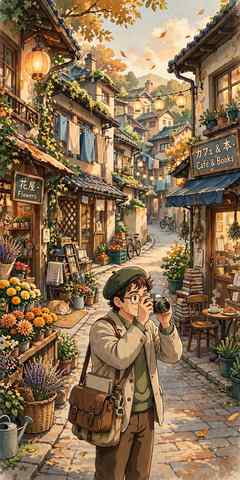
There is a particular street that lives in every Ghibli fan’s heart: the sloping, sun-warmed lanes of Koriko in Kiki’s Delivery Service, the hillside town of Whisper of the Heart, the seaside streets where every bakery and clock tower seems to glow from within. These streets feel like memories of places we have never been, and golden hour is when they shine brightest. This prompt places you on exactly such a street, vintage film camera in hand, cobblestones glowing beneath your feet and flower boxes spilling color from every windowsill.
The photographer portrait has become a favorite in the Ghibli AI photo trend among actual photographers and hopeless romantics alike, because it is deliciously meta: a portrait of someone who captures moments, captured in a moment. It celebrates the quiet art of noticing, of wandering a beautiful street at the perfect hour with a camera and no particular destination. In a feed of loud content, this image’s nostalgic warmth feels like a deep, satisfied sigh.
Your real face, half-lit by the low sun and half-lost in the pleasure of the street, anchors the scene in genuine human feeling. The vintage camera, the drifting leaves, and the glowing architecture all serve one story: yours, the observer who finally stepped into the frame. Below is the exact copy-paste prompt, why it bottles Ghibli’s street-level nostalgia so well, step-by-step instructions, pro tips, and answers to common questions.
The Prompt
Copy the exact prompt below and paste it into your AI image generator together with your photo:
Transform this photo into a Studio Ghibli-style anime illustration of a photographer on a charming old European-style street at golden hour, holding a vintage film camera, cobblestones and flower boxes glowing in the warm light as leaves drift through the air. Keep the person's face and identity exactly the same as the uploaded photo. Painterly hand-drawn Ghibli look with soft watercolor skies, nostalgic atmosphere, detailed architecture, and cinematic warmth; vertical portrait orientation, 3:4 aspect ratio.
Why This Prompt Works
The prompt works because Ghibli’s streets are emotional architecture. The studio’s towns are never just backgrounds; they are built from memory and longing, every awning, shutter, and flower box placed with affection. By specifying detailed architecture, cobblestones, and flower boxes, the prompt asks the AI to build a street with that same loving density, the kind of place viewers instantly want to wander, rather than a vague pretty backdrop.
It also captures the studio’s golden-hour alchemy. Ghibli’s most nostalgic sequences bathe ordinary streets in low, honeyed light that makes everything feel precious and slightly fleeting, like childhood summers. The golden hour setting plus drifting leaves recreates that exact transience: beauty you can feel slipping through your fingers, which is why these portraits stir such strong emotion. The cinematic warmth is not decoration; it is the story.
Finally, the vintage film camera is a perfect Ghibli prop: tactile, analog, and full of character, like the lovingly drawn objects that fill every Ghibli interior. It gives your figure a natural pose and a reason to be on the street, turning you from a posed subject into a person with a purpose. With your face preserved exactly and the nostalgic atmosphere dialed up, the portrait reads as a still from a film about someone falling in love with a town, one frame at a time.
How to Use This Prompt
Step 1: choose a warm, well-lit source photo. Pick a clear, front-facing photo with good light on your face. A soft smile or a look of quiet contentment matches the golden-hour nostalgia; the AI carries your expression into the painted street, so bring the mood you want to remember.
Step 2: upload to your AI image generator. Use any modern generator that accepts reference photos, such as ChatGPT image generation, Google Gemini, Midjourney, or Leonardo AI. Upload your photo first, then paste the full prompt text exactly as written in the prompt box above.
Step 3: set the vertical composition. The prompt asks for a 3:4 portrait, which frames you against the street’s vertical rhythm of buildings, sky, and drifting leaves. Choose a portrait or 3:4 aspect ratio in your tool’s settings.
Step 4: generate and refine. Create the image and look closely at the details: the camera, the cobblestones, the flower boxes, your likeness in the warm light. Regenerate for a fresh interpretation, or use follow-ups like more drifting leaves or a slightly lower sun to tune the nostalgia while keeping your face.
Pro Tips for Best Results
Personalize the camera. In a follow-up, name your dream camera: a classic Leica rangefinder, a twin-lens Rolleiflex, a brass-and-leather folding camera. A specific camera makes the portrait feel like your photography story, and vintage cameras are catnip for detail-loving AI models.
Try the rainy-street variant. Ask for the same street just after rain, with reflections shimmering on the cobblestones and a soft clearing sky. Ghibli rain is famously beautiful, and the reflective street doubles the golden light into something truly dreamlike.
Check the camera and hands closely. Vintage cameras have dials, lenses, and straps that challenge AI rendering, so zoom in at full resolution before posting or printing. If the lens looks melted, regenerate; camera details vary between runs and clean up nicely.
Use it as your photography brand image. For photographers, this is a profile picture that instantly communicates your aesthetic: warm, nostalgic, story-driven. It works beautifully as a watermark-style avatar, a portfolio about-page portrait, or a social banner element.
Share the prompt exactly as written. The specific combination of European street, golden hour, vintage camera, and face preservation is what produces the consistent Ghibli result. Send friends the verbatim text from this page so their street glows just as warmly as yours.
Frequently Asked Questions
I am a real photographer; will the camera look right?
The prompt specifies a vintage film camera, which AI models render with charming, if occasionally imperfect, detail. For the most accurate look, name a specific camera model in a follow-up and check the dials and lens at full resolution, regenerating if anything looks off.
Can I change the city or street style?
Yes. Try follow-ups like a Kyoto-style street with wooden machiya houses and lanterns, or a Mediterranean coastal lane with whitewashed walls. Describe the new setting specifically while keeping your figure, camera, and face consistent.
Will my face stay recognizable in the golden light?
Yes. The prompt instructs the model to preserve your face and identity exactly, and golden-hour light is warm, flattering illumination. A clear, front-facing, well-lit source photo gives the AI the best foundation for your likeness.
Which generator is best for architectural detail?
Any leading image model with reference-photo support works, including ChatGPT image generation, Google Gemini, Midjourney, and Leonardo AI. Detailed streetscapes benefit from the highest quality or detail settings, so enable those before generating.
In the end, every photographer knows the secret this portrait keeps: the best camera is the one that teaches you to see, and the most beautiful street is the one where, just for a golden hour, you finally let yourself be seen too.
Related Viral Prompts
Ghibli Style Street Musician AI Photo Prompt | Ghibli Style Dancer Stage AI Photo Prompt | Ghibli Style Soccer Player Field AI Photo Prompt
#GhibliAI #StudioGhibli #AIPhotoPrompt #GhibliStyle #GoldenHourStreet




Leave a Reply