
Introduction
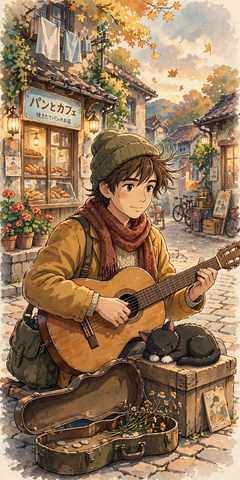
Music runs through Studio Ghibli’s veins like sunlight through leaves. From the soaring Joe Hisaishi scores that lift every flight scene to the young violin maker of Whisper of the Heart, the studio has always believed that a song can change a life, a town, or an entire evening. This prompt bottles that belief into a single portrait: you, a street musician with a guitar on a lively town corner at dusk, string lights glowing overhead, passersby slowing their steps, and visible music notes drifting up into the warm evening air.
The street musician portrait strikes a chord in the Ghibli AI photo trend because it is pure joy made visible. It is the portrait for musicians, buskers, and anyone who has ever been stopped in their tracks by a beautiful song on an ordinary street. The open guitar case with its few coins tells a whole story of courage and craft, and the Ghibli treatment turns that story into something luminous: not a gritty busking snapshot, but a celebration of the moment art meets community.
Your real face, mid-song and lit by string lights, is the heart of the image: the exact look of someone lost in the music while the town gathers around. Every storefront, every glowing bulb, every floating note exists to frame your performance. Below you will find the exact copy-paste prompt, why it captures Ghibli’s musical warmth so perfectly, step-by-step instructions, pro tips for the best result, and answers to common questions.
The Prompt
Copy the exact prompt below and paste it into your AI image generator together with your photo:
Turn this photo into a heartwarming Studio Ghibli-style anime scene of a street musician playing guitar on a lively town corner at dusk, open guitar case with a few coins inside, string lights glowing above as passersby pause to listen. Preserve the person's face and identity exactly from the uploaded photo. Hand-painted Ghibli aesthetic with warm evening light, charming storefronts, floating music notes in the air, and joyful storybook atmosphere; vertical portrait orientation, 3:4 aspect ratio.
Why This Prompt Works
The prompt works because Ghibli treats music as a visible force. In the studio’s films, songs do not just play; they lift characters into the sky, they gather crowds, they change weather. The floating music notes in this prompt honor that tradition literally, turning sound into something you can see drifting through the painted air. It is a small, whimsical touch that instantly signals Ghibli rather than generic street photography.
It also builds the community warmth the studio does best. Ghibli towns are full of kind strangers: the bakery owner who feeds Kiki, the neighbors who gather and help. The passersby pausing to listen, the string lights, the charming storefronts: these details paint not just a musician but a moment of connection, a whole corner of town briefly united by a song. That sense of shared joy is the emotional signature of the studio’s gentlest films.
Finally, the warm evening light ties the composition together. Dusk is Ghibli’s most sociable hour, when work ends, lanterns come on, and the day’s last light turns everything golden. The warm glow on your figure, the guitar, and the coins in the case creates an intimacy that makes viewers feel like they are standing in the small crowd, listening. With your face preserved exactly, the portrait becomes your song, visualized: personal, warm, and impossible not to smile at.
How to Use This Prompt
Step 1: choose a joyful source photo. Pick a clear, front-facing, well-lit photo of yourself. A genuine smile or an expression of happy concentration suits the mid-performance mood; the AI carries your expression into the scene, so the joy you bring is the joy the portrait sings.
Step 2: upload and paste the prompt. Open an AI image generator with reference-photo support, such as ChatGPT image generation, Google Gemini, Midjourney, or Leonardo AI. Upload your photo first, then paste the complete prompt text exactly as it appears in the prompt box above.
Step 3: confirm the portrait format. The prompt specifies a vertical 3:4 orientation, which frames you with the guitar against the glowing storefronts and string lights above. Select a portrait or 3:4 aspect ratio in your tool’s settings.
Step 4: generate and refine. Review the result for the details that matter: the guitar’s shape, your hands on the strings, the string lights, the coins, and your likeness in the warm light. Regenerate for a fresh take, or use follow-ups like more listeners gathering or brighter string lights to enrich the scene while keeping your face.
Pro Tips for Best Results
Make the instrument yours. In a follow-up, swap the guitar for your real instrument: a violin, an accordion, a ukulele, a saxophone. A specific instrument makes the portrait authentically yours, and describing it simply gives the AI the clearest target to render.
Try the rainy-evening encore. Ask for the same corner in gentle rain, with reflections on the pavement and listeners huddled under awnings. Ghibli rain plus warm string lights is an unbeatable combination, and the two versions make a beautiful diptych of the same song.
Check hands and strings at full size. Guitars and playing hands are among the trickiest details for AI models, so zoom in at maximum resolution before posting or printing. If fingers blur across the strings, regenerate; hand rendering improves dramatically between runs.
Use it to announce your music. For real musicians, this is a perfect single-cover concept, gig announcement image, or profile picture that instantly says what you do. The storybook warmth makes promotional posts feel inviting rather than salesy.
Share the prompt verbatim with fellow musicians. The exact blend of dusk light, string lights, floating notes, and face preservation is what creates the reliable Ghibli busker look. Pass along the exact text from this page so their serenade glows just as warmly as yours.
Frequently Asked Questions
I do not play guitar; can I still use this prompt?
Absolutely. The portrait is about the romance of street music, not a skill test. And if you play a different instrument, just mention it in a follow-up prompt to swap the guitar for your own, from violin to harmonica.
Will the floating music notes look cheesy?
In the Ghibli painterly style they read as whimsical rather than cheesy, like visible magic in the air. If you prefer realism, ask in a follow-up to remove the floating notes while keeping everything else, and the scene still works beautifully.
Can I add a friend or a duet partner?
Yes. After generating your solo portrait, ask for a version with a second musician beside you, describing them simply. For the best likeness of both people, check whether your generator supports uploading two reference photos.
Which tool renders the warm dusk light best?
Any major image generator with reference-photo support handles this well, including ChatGPT image generation, Google Gemini, Midjourney, and Leonardo AI. Warm, glowing scenes benefit from the highest quality or detail settings your tool offers.
Long after the last chord fades and the string lights blink out, what remains is the Ghibli truth this portrait sings: a single person, playing from the heart on an ordinary corner, can turn an entire evening into something worth remembering.
Related Viral Prompts
Ghibli Style Inventor Workshop AI Photo Prompt | Ghibli Style Photographer Street AI Photo Prompt | Ghibli Style Dancer Stage AI Photo Prompt
#GhibliAI #StudioGhibli #AIPhotoPrompt #GhibliStyle #StreetMusician




Leave a Reply