
Introduction
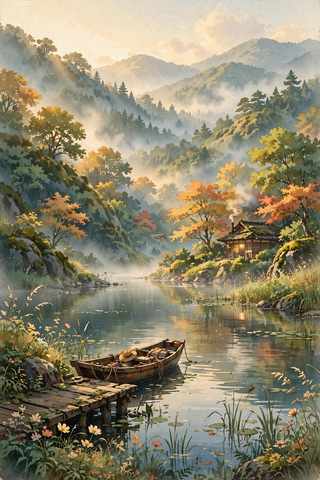
If you have scrolled through Instagram or TikTok lately, you have seen it: ordinary selfies reborn as breathtaking anime stills, glowing with the unmistakable warmth of Studio Ghibli. The Ghibli AI photo trend has turned millions of everyday photos into hand-painted storybook moments, and among all the styles people are trying, the morning mist lake scene might be the most dreamlike of them all.
There is something about a lake at dawn that Hayao Miyazaki understood better than almost any filmmaker alive. Think of the glassy river where Chihiro and Haku soar together in Spirited Away, or the hushed forest waters of Princess Mononoke, or those quiet My Neighbor Totoro mornings when the whole world is still half-asleep. A misty lake is where Ghibli magic feels most at home: calm, luminous, and full of unspoken stories.
This prompt wraps your own photo in that exact atmosphere. Your face, your likeness, standing at the water’s edge while golden light filters through drifting mist and the far hills dissolve into soft blue layers. It is the kind of image people save as a phone wallpaper, frame as a poster, or post as a profile picture that stops thumbs mid-scroll.
Part of the reason this style is exploding right now is how quietly emotional it is. Unlike loud, dramatic edits, the morning mist lake look is soft and cinematic. It works for solo portraits, couple photos, travel shots, and even pet pictures. Creators are pairing these images with lo-fi piano covers and Ghibli-inspired music, and the combination is pure internet gold. If you want one Ghibli style that feels like a deep breath, this is it.
The Prompt
Copy the prompt below exactly as it is written, then paste it into your favorite AI image generator along with your photo. Every word has been tuned to capture the painterly Ghibli lake atmosphere while keeping your face recognizable:
Transform this photo into a Studio Ghibli anime illustration, preserving the person's exact face identity and likeness. Place them standing at the edge of a serene mountain lake at dawn, with soft morning mist drifting across the glassy water and pine-covered hills fading into the distance. Portrait orientation (9:16), soft cel shading, warm hand-painted watercolor backgrounds, gentle golden sunrise light filtering through the mist.
Why This Prompt Works
The secret of a great Ghibli-style edit is not just the scenery, it is the balance between fantasy and familiarity. This prompt works because it tells the AI to preserve your exact face identity first, so the result feels like you stepped into an anime film rather than being replaced by a generic cartoon character. Your eyes, your smile, your features all carry over into the painted world.
The second reason is the mist itself. Morning mist is one of the hardest natural effects to describe, but it is also one of the most powerful mood-setters in Ghibli films. By asking for mist drifting across glassy water with hills fading into the distance, the prompt triggers the AI’s painterly rendering: soft gradients, layered depth, and that watercolor softness that defines the Ghibli background art style. The golden sunrise light ties everything together with warmth.
Finally, the portrait 9:16 orientation makes the result instantly usable. Phone wallpapers, Instagram Stories, Reels covers, and profile pictures all favor vertical images, so your Ghibli lake portrait is ready to share the moment it is generated.
- Face identity preservation keeps your likeness intact instead of generating a random anime face.
- Morning mist and layered hills recreate the iconic hand-painted Ghibli background style.
- Golden dawn lighting adds warmth and a cinematic glow that flatters every portrait.
- Glassy water reflections double the dreamlike quality of the scene.
- Portrait 9:16 format is perfect for wallpapers, Stories, and profile pictures.
- Soft cel shading gives clean anime lines without looking harsh or digital.
How to Use This Prompt
Using this prompt takes less than five minutes, even if you have never generated an AI image before. Follow these simple steps:
- Choose a clear photo of yourself with good lighting on your face. Front-facing selfies or half-body shots work best.
- Open your preferred AI image tool, such as ChatGPT, Midjourney, Gemini, or any anime photo editor app.
- Upload your photo and paste the full prompt from the box above into the text field.
- Press generate and wait for the AI to paint your misty lake scene. Try two or three variations to pick your favorite.
- Download the image in the highest resolution available and share it as your wallpaper or social post.
Pro Tips for Best Results
- Use a photo where your face is clearly visible and well-lit; the AI preserves likeness much better with sharp source images.
- If the mist looks too heavy and hides your face, regenerate with the same prompt and the AI will usually rebalance the scene.
- For a more dramatic version, add the words “sunrise breaking through clouds” to the end of the prompt.
- For a calmer, bluer mood, add “cool blue tones, early morning calm” instead of the golden light phrase.
- Generate at the highest resolution your tool allows so the hand-painted details stay crisp on large screens.
- Pair your final image with soft piano or lo-fi music when posting Reels for maximum viral potential.
Frequently Asked Questions
Will the AI keep my face looking like me?
Yes. The prompt explicitly instructs the AI to preserve your exact face identity and likeness, so your features, expression, and proportions carry over into the anime style. For the best match, start with a clear, front-facing photo rather than a blurry or heavily filtered one.
Which AI tools work best with this prompt?
This prompt works with any modern AI image generator that accepts a reference photo plus text, including ChatGPT’s image mode, Midjourney, Gemini, and popular anime filter apps. Tools with strong style transfer tend to give the most painterly, Ghibli-like backgrounds.
Can I use this prompt for a couple or group photo?
Absolutely. The scene composition works beautifully for two or more people standing together at the lake’s edge. Just make sure every face is clearly visible in the source photo so the AI can preserve each person’s likeness.
Is this prompt free to use?
Yes, the prompt itself is completely free to copy and use as many times as you like. You only need access to an AI image generator, and many of them offer free generations every day.
The morning mist lake is Ghibli at its most peaceful: no battles, no chase scenes, just you, still water, and light learning how to be morning. Generate your version today, and carry a little of that quiet magic with you wherever your phone goes.
Related Viral Prompts
Ghibli Style Moonlit Lake AI Photo Prompt
Ghibli Style Starry Night Sky AI Photo Prompt
Ghibli Style Waterfall Valley AI Photo Prompt
#GhibliAI #AIPhotoPrompt #StudioGhibliStyle #AnimePhotoTrend #GhibliLake




Leave a Reply