
Introduction
Look up on a truly dark night, far from city lights, and the sky does something no screen can replicate — it humbles you and thrills you at the same time. Studio Ghibli captured that feeling better than any studio in history: the star-drunk skies of Howl’s Moving Castle, the luminous night flight in Kiki’s Delivery Service, the quiet cosmos watching over Totoro’s forest. The Ghibli style starry night sky prompt puts that infinite sky above your own upturned face.
Night-sky portraits are having a massive moment because they turn inward. While sunset scenes celebrate warmth, starry scenes celebrate wonder — curiosity, dreams, and the delicious smallness of being human under something vast. These portraits are showing up as profile pictures for dreamers, poets, and night owls, and as deeply personal posts about hope during hard times.
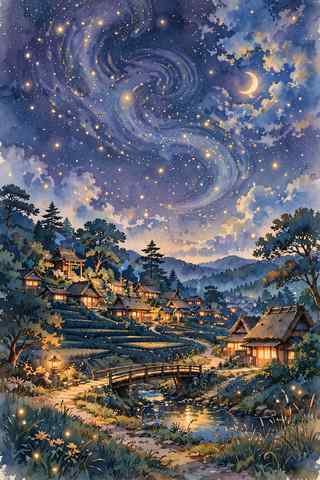
The visual power is undeniable. A swirling Milky Way in deep blues and purples, rendered in Ghibli’s painterly style, creates one of the most striking backdrops in the entire trend batch. Against that cosmic canvas, a single gazing figure becomes profoundly moving — it is the anime equivalent of standing at the edge of the universe and smiling.
Below is the exact copy-paste prompt, the reasons it produces such breathtaking nightscapes, step-by-step instructions, pro tips for stellar results, and answers to common questions.
The Prompt
Copy the full prompt from the box below, attach your photo in any AI image generator, and gaze up at your own Ghibli night sky.
Transform this photo into a Studio Ghibli anime-style illustration of a person gazing up at a breathtaking starry night sky, keeping the person's face and likeness exactly the same. The Milky Way arcs brilliantly overhead in swirling blues and purples, countless twinkling stars reflected in their wonder-filled eyes, with a quiet moonlit meadow and distant tree silhouettes below. Portrait orientation (9:16), soft cel shading, luminous hand-painted night details, and a dreamy contemplative mood like the night scenes in Howl's Moving Castle.
Why This Prompt Works
This prompt works because it gives the AI the most dramatic canvas possible: the night sky. ‘Milky Way arcs brilliantly overhead in swirling blues and purples’ is a rich, specific brief that pushes the model toward the luminous, textured star fields Ghibli is famous for — not a flat black background with white dots, but a living, swirling cosmos with depth and color variation.
The human element is carefully directed too. ‘Gazing up’ with ‘wonder-filled eyes’ reflecting the stars creates an emotional focal point that connects viewer to subject instantly. That upward gaze is a classic Ghibli storytelling device — characters looking at the sky are characters full of dreams — and it makes the portrait feel narrative rather than posed.
The moonlit meadow and tree silhouettes ground the composition. Without a foreground, a starry portrait can feel like floating in space; the quiet meadow below gives the scene earth and scale, while the Howl’s Moving Castle mood reference ensures the overall feeling stays dreamy and romantic rather than cold or scientific.
- Swirling Milky Way brief produces a luminous, painterly cosmos — not flat dots.
- Upward gaze with star-reflecting eyes creates instant emotional connection.
- Moonlit meadow foreground grounds the scene with earth and scale.
- Howl’s Moving Castle mood keeps the night dreamy, not cold.
- Face preservation keeps the wonder personal and recognizable.
- Portrait 9:16 framing stacks meadow, figure, and sky like a film poster.
How to Use This Prompt
Creating your starry nightscape is simple — follow these steps.
- Select a clear photo with your face well-lit and visible; upward-looking angles match the gazing pose beautifully.
- Upload it to an AI image tool supporting image-to-image, such as ChatGPT, Gemini, or Midjourney.
- Copy the prompt from the box above and paste it in, keeping your photo attached as the reference image.
- Generate and inspect — check that the stars look painterly (not noisy) and your likeness is preserved, then regenerate if needed.
- Download your nightscape and share it, or set it as a wallpaper for late-night inspiration.
Pro Tips for Best Results
Small tweaks will make your night sky truly stellar.
- Source photos with soft, even lighting on the face blend best into the gentle moonlight of the scene.
- Add ‘a shooting star streaking across the sky’ for a magical focal point that viewers love.
- If the sky looks too dark, add ‘the Milky Way glowing brightly enough to softly illuminate the meadow.’
- For a romantic variant, request ‘the person holding a small glowing lantern’ as a warm light source in the foreground.
- Avoid harsh flash photography as the source — it clashes with the soft nocturnal lighting.
- Try generating with ‘aurora ribbons faintly visible’ for an ultra-dreamy bonus version of the night sky.
Frequently Asked Questions
Will my face be too dark in a night scene?
The prompt is designed to keep your face softly lit — the moonlight and starlight illuminate the subject gently, Ghibli-style. If a generation comes out too shadowy, add ‘soft moonlight illuminating the person’s face clearly’ to guarantee visibility while keeping the dreamy mood.
Can I add the moon prominently to the scene?
Definitely. Add a phrase like ‘a large luminous full moon hanging low in the sky’ to the prompt. A big Ghibli moon — think of the iconic moonlit scenes in Whisper of the Heart — makes the composition even more striking and shareable.
Does this work with glasses in the photo?
Yes, and glasses can look fantastic — the AI often renders starlight reflections in the lenses, which is a gorgeous effect. Just make sure the source photo shows your eyes clearly through the lenses so likeness preservation stays strong.
What if the stars look like random noise instead of a Milky Way?
Strengthen the sky description with ‘a detailed, painterly Milky Way band with nebula-like color clouds stretching across the sky.’ Naming the structure (band, swirls, color clouds) guides the AI away from scattered-dot randomness toward the sweeping cosmic composition you want.
The stars have watched over dreamers for millennia — now they can watch over your portrait too. Copy this Ghibli prompt, look up, and let the night sky tell your story.
Related Viral Prompts
Ghibli Style Moonlit Lake AI Photo Prompt
Ghibli Style Aurora Night Sky AI Photo Prompt
Ghibli Style Firefly Night Forest AI Photo Prompt
#GhibliAI #AIPhotoPrompt #StudioGhibliStyle #StarryNight #MilkyWay #AnimeNightscape




Leave a Reply