
Introduction
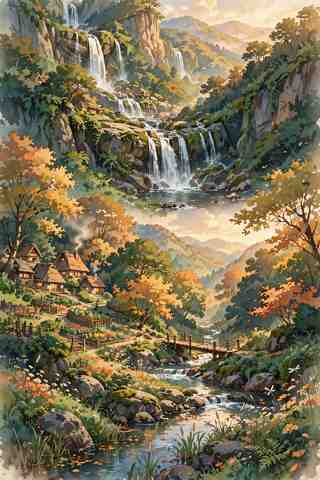
There is a moment in every great adventure story when the hero pushes through the trees and the world opens up — water thundering down cliffs, mist catching the light, a hidden paradise revealed. Studio Ghibli staged that moment to perfection in Castle in the Sky and Princess Mononoke, where waterfalls and secret valleys feel like the planet showing off. The Ghibli style waterfall valley prompt gives you that revelation as your own portrait backdrop.
Waterfall portraits are pure showstoppers. The combination of cascading water, rainbow mist, and lush green valley creates the most visually rich scene in this entire trend batch — there is simply more to look at, more color, more life. On crowded feeds, these images demand attention the way the real thing demands you stop and stare.
The emotional charge is renewal. Waterfalls symbolize cleansing, power, and the unstoppable force of nature — standing before one suggests courage and fresh beginnings. That is why waterfall portraits are trending for milestone posts: new jobs, recoveries, graduations, and every ‘new chapter’ moment that deserves a majestic backdrop.
Below is the exact copy-paste prompt, why it produces such spectacular results, step-by-step instructions, pro tips for the perfect cascade, and answers to frequently asked questions.
The Prompt
Copy the full prompt from the box below, attach your photo in any AI image tool, and stand before your own Ghibli waterfall.
Transform this photo into a Studio Ghibli anime-style illustration of a person standing before a majestic waterfall in a lush green valley, keeping the person's face and likeness exactly the same. Crystal water cascades down mossy cliffs into a sparkling turquoise pool, rainbow mist rising where the water lands, dense vibrant foliage and wildflowers framing the scene. Portrait orientation (9:16), soft cel shading, rich hand-painted background details, and a majestic refreshing mood like the hidden valleys in Castle in the Sky.
Why This Prompt Works
The prompt works because waterfalls give the AI everything it loves to render: motion, texture, and light interaction. ‘Crystal water cascades down mossy cliffs’ provides dynamic flow, ‘sparkling turquoise pool’ gives reflective surface detail, and ‘rainbow mist rising’ adds prismatic light effects. Together they create a scene with extraordinary visual richness that still reads clearly at phone-screen size.
The framing instruction — ‘dense vibrant foliage and wildflowers framing the scene’ — is doing crucial compositional work. Natural framing focuses attention on the central figure while filling every corner of the image with hand-painted detail, eliminating the empty or blurry edges that plague weaker AI landscapes. It is a technique straight out of Ghibli background art.
The Castle in the Sky mood reference ensures majesty without chaos. That film’s hidden valleys feel grand yet peaceful, and the ‘majestic refreshing mood’ keeps the waterfall awe-inspiring rather than threatening. Face preservation and 9:16 portrait orientation make the epic scene personal and perfectly sized for modern sharing.
- Cascading water, turquoise pool, and rainbow mist create unmatched visual richness.
- Natural foliage framing eliminates empty edges and focuses on the subject.
- Castle in the Sky mood delivers majesty balanced with peace.
- Face preservation keeps the epic scene personal and recognizable.
- Motion and light effects showcase AI rendering at its most impressive.
- Portrait 9:16 format stacks falls, figure, and valley like an adventure poster.
How to Use This Prompt
Your waterfall portrait is just a few steps away.
- Pick a clear photo with your face well-lit — confident expressions match the majestic mood perfectly.
- Upload it to an AI image tool with image-to-image support, such as ChatGPT, Gemini, or Midjourney.
- Copy the prompt from the box above and paste it in, keeping your photo attached as the reference.
- Generate and check the waterfall flow and your likeness — regenerate if the water looks smeared or the face drifts.
- Download your majestic portrait and share it as a milestone post or an epic new profile picture.
Pro Tips for Best Results
These pro tips will make your waterfall valley look like a hidden Ghibli paradise.
- Bright, high-contrast source photos hold up best against the vivid waterfall backdrop.
- Add ‘a wooden footbridge crossing the pool’ for a charming human touch in the composition.
- If the waterfall dominates too much, add ‘waterfall in the background, person clearly in the foreground’ to rebalance.
- For extra magic, request ‘sunlight creating a full rainbow arc in the waterfall mist.’
- Avoid very dark source photos — the bright valley scene needs a well-lit face to blend naturally.
- Try a ‘hidden cave behind the waterfall’ variation for an adventurous, secret-world feeling.
Frequently Asked Questions
Can the AI handle the waterfall water realistically?
Yes — flowing water is one of AI’s strengths when described well. Words like ‘cascading,’ ‘crystal,’ and ‘sparkling’ guide the model toward convincing flow and spray. If one generation looks smeared, regenerate; water texture varies between attempts and usually resolves beautifully within two tries.
Is this prompt suitable for a powerful, confident profile picture?
Absolutely — it is one of the best in the batch for that purpose. The majestic waterfall conveys strength and adventure, making it ideal for entrepreneurs, athletes, travelers, and anyone wanting a profile picture with commanding natural energy.
How do I make the scene feel more secluded and hidden?
Add phrases like ‘a secret hidden valley untouched by people’ and ‘soft light filtering through the canopy above.’ These cues push the AI toward an enclosed, discovered-paradise composition rather than an open tourist-viewpoint look.
Can I change the pool color or add swimming?
You can customize freely: ’emerald green pool’ or ‘the person standing ankle-deep at the pool’s edge’ both work well. Keep modifications to one or two details per generation so the core Ghibli composition stays intact.
Stand tall before the falling water and feel its power. This Ghibli waterfall prompt turns your photo into a portrait of renewal — copy it, generate, and let the valley roar.
Related Viral Prompts
Ghibli Style Riverside Town Dusk AI Photo Prompt
Ghibli Style Rice Terraces AI Photo Prompt
Ghibli Style Morning Mist Lake AI Photo Prompt
#GhibliAI #AIPhotoPrompt #StudioGhibliStyle #Waterfall #NatureParadise #AnimeAdventure




Leave a Reply