
Introduction
Long before the ghat fills with diyas, the real heart of Chhath Puja is beating in the kitchen. Thekua, the crisp, golden, jaggery-sweetened biscuit made only for Chhath, is shaped by hand, pressed with wooden moulds, and fried in small batches while the whole house smells of ghee and cardamom. It is a scene of laughter, flour-dusted hands, and grandmothers teaching the next generation a recipe that has not changed in decades.
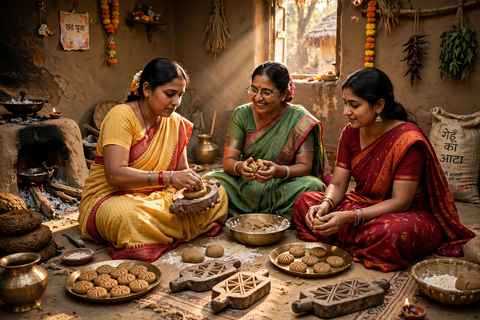
This prompt captures that warm, homely moment: women sitting together in a village kitchen, shaping thekua with love, sunlight falling across brass plates, and baskets of fresh thekua cooling nearby. It is the kind of image that makes everyone who sees it remember their own mother’s kitchen, which is why thekua-making photos are shared so widely during Chhath week.
That is why this prompt has been written with so much care. Every line of it has a job to do: the lighting sets the mood, the camera details make the image look professionally shot, the face-lock wording keeps the people looking natural, and the small, specific details, the colours, the props, the setting, tell the AI exactly which festival moment to create. You do not need any editing skills or any expensive camera. You only need this prompt, a free AI tool, and a few minutes, and you can create a Chhath Puja 2026 Thekua Making image that looks like it was captured by a professional photographer on the day itself.
The Prompt
Copy the full prompt below and paste it into Gemini or ChatGPT. If you are using your own photo, upload it first and add the face-lock line at the start, so the AI keeps your real face while it rebuilds the scene around you.
Ultra-photorealistic warm photograph of Chhath Puja thekua making in a rustic village kitchen, three women in colourful sarees sitting together on the floor shaping traditional thekua sweets by hand, one elderly woman pressing a thekua into a carved wooden mould, face locked and consistent, hands dusted with flour, a brass plate piled with golden-brown fried thekua beside them, small bowls of jaggery and flour, a clay stove with a kadhai in the background, warm morning sunlight streaming through a small window, steam rising softly, earthy tones, cosy and nostalgic mood, shot on a DSLR with a 35mm lens, vertical 4:5 composition, highly detailed, natural skin tones, no text, no watermark
Why This Prompt Works
A good AI photo prompt is not just a description, it is a set of instructions that guides the AI the way a photographer guides a shoot. This prompt works so well because it controls the four things that matter most in a festival photograph: the light, the composition, the people, and the details. Get those four right, and the image almost always looks beautiful on the first try.
- The kitchen setting is intimate and relatable, so the photo triggers nostalgia and memories, which is the strongest reason people share festival images.
- Specific props, the wooden mould, the brass plate, the clay stove, make the scene unmistakably about thekua and Chhath, not just any cooking photo.
- Warm window light is written into the prompt, giving the image a golden, homely glow that flat kitchen lighting can never match.
- Showing three generations together, an elderly woman teaching younger women, adds a story to the image, and stories are what make photos go viral.
Put together, these choices do something important: they remove the guesswork. Instead of asking the AI for a vague festival photo and hoping for the best, you are giving it a complete brief, like a professional photographer would receive. That is why this prompt consistently produces images that look real, warm, and ready to share, while short, vague prompts usually produce flat, generic results that nobody wants to forward.
How to Use This Prompt
Follow these simple steps, and you will have a beautiful, share-ready image in just a few minutes, even if you have never used an AI image tool before.
- Open Gemini or ChatGPT: open Gemini (with Nano Banana) or ChatGPT on your phone or computer, and tap the image upload button if you want to use your own photo as the base.
- Upload your photo (optional but recommended): if you want the image to look like you, upload a clear, front-facing photo with good light, then add ‘keep the exact same face and person from the uploaded photo’ at the start of the prompt.
- Copy the full prompt: copy the entire prompt from the box below, including the camera, lighting, and composition details, because every detail shapes the final image.
- Paste it and generate: paste the prompt into the chat box, send it, and wait for the first image. Do not shorten the prompt, because the details are what make the result look professional.
- Check the result closely: look at the faces, hands, and key objects in the image. If something looks wrong, note exactly what it is before you regenerate.
- Refine with one small change: change only one thing at a time, for example the saree colour or the number of people, and generate again. Small, clear changes work far better than rewriting the whole prompt.
- Generate two or three versions: always generate a few versions and pick the best one. The first image is rarely the best, and comparing versions helps you spot the most natural, shareable frame.
- Save, crop, and share: save the best image in high quality, crop it to 4:5 for the Instagram feed or 9:16 for WhatsApp status and Reels, and share it with a short, personal caption about the festival.
Pro Tips
These small tricks will take your image from good to great, and they work with almost every festival photo prompt on PromptBazar.
- Add ‘my grandmother’s kitchen’ style details from your own home, like a specific utensil or wall colour, to make the image feel personal.
- Ask for a close-up version, ‘close-up of hands pressing thekua into the mould’, for a second image that works beautifully as a WhatsApp status.
- If the thekua looks too dark, add ‘golden-brown, freshly fried, crisp texture’ to get the appetising colour right.
- Generate the image in the morning light setting for the warmest result, and avoid asking for night lighting in a kitchen scene.
- Pair the photo with a short caption about who taught you to make thekua, because that personal line is what people comment on.
One last tip that applies to every festival image: always look at your final image on your phone before you post it, because that is how most people will see it. Check that the faces are clear, the colours are warm, and nothing important is cut off at the edges. If it looks good on your phone screen, it will look good everywhere.
FAQ
What is thekua and why is it special for Chhath Puja?
Thekua is a traditional sweet made from wheat flour, jaggery, ghee and cardamom, shaped with wooden moulds and deep-fried until crisp. It is the main prasad of Chhath Puja, prepared with great care during the festival, and it is offered to the Sun God along with fruits in the bamboo soop.
Can I use this prompt with a photo of my own mother or grandmother?
Yes. Upload their photo, paste the prompt, and add ‘keep the same face and person from the uploaded photo’. The AI will place them in the village kitchen scene, shaping thekua, while keeping their real face, which makes a beautiful keepsake to share with the family.
Which tool gives the most realistic kitchen scene?
Gemini with Nano Banana is usually the most realistic for indoor, warm-light scenes like this, because it handles skin tones and window light very naturally. ChatGPT is a good second choice, especially if you want to adjust the number of people or the props in the scene.
How can I make the image look less like AI and more like a real photo?
Keep the prompt’s camera details, ‘shot on a DSLR with a 35mm lens’, and avoid asking for perfect or glamorous faces. Small imperfections, flour on hands, a slightly messy kitchen, steam, are what make a photo feel real, so let the prompt keep those details in.
Try this prompt today, share your Chhath Puja 2026 Thekua Making photo with the people you love, and let the festival shine a little brighter in every feed it reaches. Happy Chhath Puja 2026 Thekua Making!
Related Viral Prompts
Chhath Puja Sandhya Arghya AI Photo Prompt
Chhath Puja Usha Arghya AI Photo Prompt
Chhath Puja Soop Decoration AI Photo Prompt
#ChhathPuja2026 #AIPhotoPrompt #FestivePhotography #ViralPhoto #PromptBazar


Leave a Reply