
Introduction
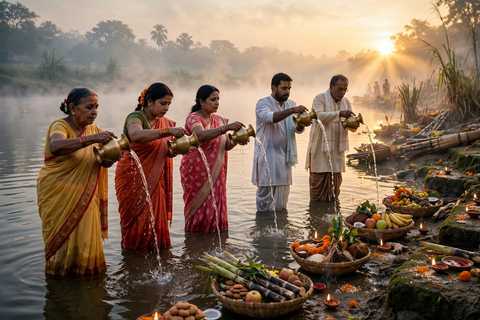
There is no morning in India quite like the morning of Usha Arghya. Before the sun has even cleared the horizon, the riverbank is already alive with quiet devotion: families standing waist-deep in cool water, brass lotas raised in both hands, and a thin veil of mist drifting over the river. It is the final, most emotional moment of Chhath Puja, when devotees who have fasted without water offer their prayers to the rising sun and break their fast with gratitude.
This is the scene everyone wants to capture and share, because it is both deeply personal and breathtakingly beautiful. A single photograph of Usha Arghya can carry the whole story of Chhath: discipline, faith, family, and the first golden light of a new day. With the right AI photo prompt, you can recreate that moment even if you were not at the ghat, or turn your own photo into a cinematic, festival-ready image that looks like it was shot by a professional photographer at dawn.
That is why this prompt has been written with so much care. Every line of it has a job to do: the lighting sets the mood, the camera details make the image look professionally shot, the face-lock wording keeps the people looking natural, and the small, specific details, the colours, the props, the setting, tell the AI exactly which festival moment to create. You do not need any editing skills or any expensive camera. You only need this prompt, a free AI tool, and a few minutes, and you can create a Chhath Puja 2026 Usha Arghya image that looks like it was captured by a professional photographer on the day itself.
The Prompt
Copy the full prompt below and paste it into Gemini or ChatGPT. If you are using your own photo, upload it first and add the face-lock line at the start, so the AI keeps your real face while it rebuilds the scene around you.
Ultra-photorealistic cinematic photograph of Chhath Puja Usha Arghya at dawn on a misty riverbank, devotees standing waist-deep in a calm river offering water from brass lotas to the rising sun, a woman in a bright orange and red saree in the foreground with folded hands and a serene expression, face locked and consistent, soft golden sunlight breaking through morning mist, a bamboo soop with fruits and glowing diyas floating nearby on the water, distant devotees silhouetted along the ghat, gentle ripples reflecting the orange sky, warm golden-hour lighting, atmospheric haze, shallow depth of field, shot on a DSLR with a 50mm lens, vertical 4:5 portrait composition, highly detailed, natural skin tones, no text, no watermark
Why This Prompt Works
A good AI photo prompt is not just a description, it is a set of instructions that guides the AI the way a photographer guides a shoot. This prompt works so well because it controls the four things that matter most in a festival photograph: the light, the composition, the people, and the details. Get those four right, and the image almost always looks beautiful on the first try.
- Golden-hour light does the heavy lifting: the prompt locks in a rising sun and morning mist, which gives the image its warm, glowing, emotional quality without any extra editing.
- The face-lock wording keeps the main devotee’s face consistent and natural, so the photo feels like a real person rather than a generic AI face.
- Specific ritual details, the brass lota, the bamboo soop, the floating diyas, tell the AI exactly which festival this is, so it does not drift into a generic sunrise photo.
- The 4:5 vertical composition is made for Instagram and WhatsApp status, so your image fills the screen instead of getting cropped.
Put together, these choices do something important: they remove the guesswork. Instead of asking the AI for a vague festival photo and hoping for the best, you are giving it a complete brief, like a professional photographer would receive. That is why this prompt consistently produces images that look real, warm, and ready to share, while short, vague prompts usually produce flat, generic results that nobody wants to forward.
How to Use This Prompt
Follow these simple steps, and you will have a beautiful, share-ready image in just a few minutes, even if you have never used an AI image tool before.
- Open Gemini or ChatGPT: open Gemini (with Nano Banana) or ChatGPT on your phone or computer, and tap the image upload button if you want to use your own photo as the base.
- Upload your photo (optional but recommended): if you want the image to look like you, upload a clear, front-facing photo with good light, then add ‘keep the exact same face and person from the uploaded photo’ at the start of the prompt.
- Copy the full prompt: copy the entire prompt from the box below, including the camera, lighting, and composition details, because every detail shapes the final image.
- Paste it and generate: paste the prompt into the chat box, send it, and wait for the first image. Do not shorten the prompt, because the details are what make the result look professional.
- Check the result closely: look at the faces, hands, and key objects in the image. If something looks wrong, note exactly what it is before you regenerate.
- Refine with one small change: change only one thing at a time, for example the saree colour or the number of people, and generate again. Small, clear changes work far better than rewriting the whole prompt.
- Generate two or three versions: always generate a few versions and pick the best one. The first image is rarely the best, and comparing versions helps you spot the most natural, shareable frame.
- Save, crop, and share: save the best image in high quality, crop it to 4:5 for the Instagram feed or 9:16 for WhatsApp status and Reels, and share it with a short, personal caption about the festival.
Pro Tips
These small tricks will take your image from good to great, and they work with almost every festival photo prompt on PromptBazar.
- Upload your own photo first and add ‘keep the same face, same person’ at the start of the prompt to turn a real memory into a cinematic portrait.
- Ask for a 9:16 version if the image is mainly for WhatsApp status or Reels covers, and a 4:5 version for the Instagram feed.
- If the mist looks too heavy, add ‘light mist, clear faces’ to keep the devotees sharp while keeping the dreamy morning mood.
- Generate two or three versions and pick the one where the sun sits exactly behind the raised lota, that alignment is what makes the shot go viral.
- Add a short caption about your own Chhath morning when you post it, because a personal story doubles the shares on festival posts.
One last tip that applies to every festival image: always look at your final image on your phone before you post it, because that is how most people will see it. Check that the faces are clear, the colours are warm, and nothing important is cut off at the edges. If it looks good on your phone screen, it will look good everywhere.
FAQ
Can I use my own photo with this Usha Arghya prompt?
Yes, that is the best way to use it. Upload your photo to Gemini or ChatGPT, paste the prompt, and add ‘keep the exact same face and person from the uploaded photo’. The AI will rebuild the scene around your real face, so the result looks like a professional photograph of you at the ghat rather than a stranger.
Which AI tool works best for this Chhath Puja photo prompt?
Gemini with Nano Banana gives the most photorealistic faces and the best golden-hour light, while ChatGPT is very good at following the full scene description. Try Gemini first for realism, and use ChatGPT if you want to change small details like the saree colour or the number of diyas.
Is this prompt free to use for WhatsApp status and Instagram?
Yes. The prompt is free to use for your personal posts, WhatsApp status, Instagram stories, and family groups. You can generate as many images as you like and share them wherever you celebrate Chhath Puja online.
How do I make the rising sun look more dramatic in the image?
Add the words ‘dramatic sunrise, sun rays breaking through clouds, glowing horizon’ to the prompt, and ask for ‘low angle, sun just above the waterline’. A lower camera angle makes the sun look bigger and the devotees more heroic, which is exactly the look that performs best on social media.
Try this prompt today, share your Chhath Puja 2026 Usha Arghya photo with the people you love, and let the festival shine a little brighter in every feed it reaches. Happy Chhath Puja 2026 Usha Arghya!
Related Viral Prompts
Chhath Puja Sandhya Arghya AI Photo Prompt
Chhath Puja Soop Decoration AI Photo Prompt
Chhath Puja Riverbank Diya AI Photo Prompt
#ChhathPuja2026 #AIPhotoPrompt #FestivePhotography #ViralPhoto #PromptBazar


Leave a Reply