
Introduction
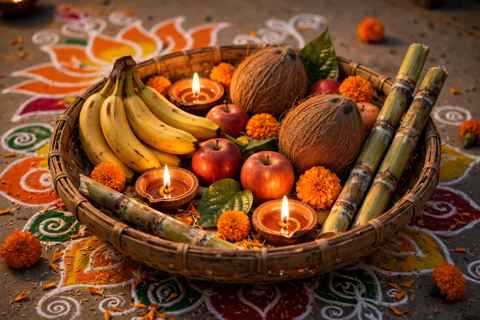
The soop is the soul of Chhath Puja. This humble bamboo basket carries everything the festival stands for: seasonal fruits, thekua, sugarcane, coconut, and rows of tiny clay diyas, all arranged with care and covered in marigold flowers. Long before the devotees reach the river, the soop is decorated at home, and that quiet moment of arranging it is one of the most photographed parts of the festival.
A beautifully arranged soop makes a perfect photo because it is colourful, detailed, and full of meaning all at once. This prompt creates a rich, top-down style image of a decorated soop that looks like it came from a festival magazine, ideal for greetings, WhatsApp status, and Instagram posts during Chhath week.
That is why this prompt has been written with so much care. Every line of it has a job to do: the lighting sets the mood, the camera details make the image look professionally shot, the face-lock wording keeps the people looking natural, and the small, specific details, the colours, the props, the setting, tell the AI exactly which festival moment to create. You do not need any editing skills or any expensive camera. You only need this prompt, a free AI tool, and a few minutes, and you can create a Chhath Puja 2026 Soop Decoration image that looks like it was captured by a professional photographer on the day itself.
The Prompt
Copy the full prompt below and paste it into Gemini or ChatGPT. If you are using your own photo, upload it first and add the face-lock line at the start, so the AI keeps your real face while it rebuilds the scene around you.
Ultra-photorealistic photograph of a beautifully decorated Chhath Puja bamboo soop, a large round woven bamboo basket filled with a neat arrangement of seasonal fruits, bananas, apples, oranges, coconut and sugarcane, golden thekua sweets stacked in a row, small clay diyas glowing warmly around the edges, fresh orange marigold flowers and green leaves tucked between the fruits, the soop resting on a red cloth on a clean floor with soft rangoli patterns beside it, warm golden evening light, rich colours, sharp detail on the bamboo weave and fruit textures, top-down three-quarter angle, shot on a DSLR with a 50mm lens, vertical 4:5 composition, highly detailed, no people, no text, no watermark
Why This Prompt Works
A good AI photo prompt is not just a description, it is a set of instructions that guides the AI the way a photographer guides a shoot. This prompt works so well because it controls the four things that matter most in a festival photograph: the light, the composition, the people, and the details. Get those four right, and the image almost always looks beautiful on the first try.
- A still-life subject like a soop is one of the easiest things for AI to render perfectly, so you get a clean, detailed, share-ready image almost every time.
- Listing every item, fruits, thekua, diyas, marigolds, stops the AI from forgetting a key element or adding something that does not belong in Chhath.
- The three-quarter top-down angle shows off the whole arrangement at once, which is exactly how festival flat-lay photos go viral.
- Warm evening light and a red cloth base give the image a festive, premium feel without needing any editing afterwards.
Put together, these choices do something important: they remove the guesswork. Instead of asking the AI for a vague festival photo and hoping for the best, you are giving it a complete brief, like a professional photographer would receive. That is why this prompt consistently produces images that look real, warm, and ready to share, while short, vague prompts usually produce flat, generic results that nobody wants to forward.
How to Use This Prompt
Follow these simple steps, and you will have a beautiful, share-ready image in just a few minutes, even if you have never used an AI image tool before.
- Open Gemini or ChatGPT: open Gemini (with Nano Banana) or ChatGPT on your phone or computer, and tap the image upload button if you want to use your own photo as the base.
- Upload your photo (optional but recommended): if you want the image to look like you, upload a clear, front-facing photo with good light, then add ‘keep the exact same face and person from the uploaded photo’ at the start of the prompt.
- Copy the full prompt: copy the entire prompt from the box below, including the camera, lighting, and composition details, because every detail shapes the final image.
- Paste it and generate: paste the prompt into the chat box, send it, and wait for the first image. Do not shorten the prompt, because the details are what make the result look professional.
- Check the result closely: look at the faces, hands, and key objects in the image. If something looks wrong, note exactly what it is before you regenerate.
- Refine with one small change: change only one thing at a time, for example the saree colour or the number of people, and generate again. Small, clear changes work far better than rewriting the whole prompt.
- Generate two or three versions: always generate a few versions and pick the best one. The first image is rarely the best, and comparing versions helps you spot the most natural, shareable frame.
- Save, crop, and share: save the best image in high quality, crop it to 4:5 for the Instagram feed or 9:16 for WhatsApp status and Reels, and share it with a short, personal caption about the festival.
Pro Tips
These small tricks will take your image from good to great, and they work with almost every festival photo prompt on PromptBazar.
- Ask for a version with ‘hands gently placing a diya on the soop’ if you want a human touch in the frame without a full portrait.
- Change the fruit list to match what your family actually puts in the soop, and the image will feel authentic to your home.
- Use this image as your Chhath greeting card background and add your greeting text on top with any photo editor.
- If the diyas look unlit, add ‘all diyas lit with warm flames’ to make the glow show up clearly in the image.
- Generate a square 1:1 version too, so the same soop photo works as a profile picture or a feed post without cropping.
One last tip that applies to every festival image: always look at your final image on your phone before you post it, because that is how most people will see it. Check that the faces are clear, the colours are warm, and nothing important is cut off at the edges. If it looks good on your phone screen, it will look good everywhere.
FAQ
What should go inside a Chhath Puja soop?
A traditional soop holds seasonal fruits like bananas, apples, oranges and coconut, sugarcane, thekua sweets, and small clay diyas, often decorated with marigold flowers and leaves. Everything in the soop is later offered to the Sun God during the arghya rituals at the river.
Can I make this soop photo with my own soop?
Yes. Photograph your own decorated soop in good light, upload it, and ask the AI to ‘enhance this photo, keep the same soop and arrangement, warm golden light, sharper detail’. The result keeps your real soop and makes it look professionally photographed.
Why is there no person in this prompt?
A soop still-life works best without people, because the basket itself is the hero of the image. If you want a person in the frame, add ‘a woman in a red saree arranging the soop, hands visible’ and the AI will include her naturally.
Which is better for this image, Gemini or ChatGPT?
Both work well for still-life images. Gemini usually gives richer colours and better texture on the bamboo and fruits, while ChatGPT follows the exact item list more strictly. Try Gemini first for beauty, and ChatGPT if an item keeps going missing from the basket.
Try this prompt today, share your Chhath Puja 2026 Soop Decoration photo with the people you love, and let the festival shine a little brighter in every feed it reaches. Happy Chhath Puja 2026 Soop Decoration!
Related Viral Prompts
Chhath Puja Sandhya Arghya AI Photo Prompt
Chhath Puja Usha Arghya AI Photo Prompt
Chhath Puja Riverbank Diya AI Photo Prompt
#ChhathPuja2026 #AIPhotoPrompt #FestivePhotography #ViralPhoto #PromptBazar


Leave a Reply